Try it on your own data
Every report in this article is in the free plan. One snippet for web and apps, up to 10 sites.
Start freeAudience segmentation tools define a group of people by a rule, keep the group current as behaviour changes and let you analyse or pass it on. Compare them on ten criteria: event rules with did and did-not, rolling windows, update mode, identity, size preview, reuse, export, privacy, limits and explainability. Below: a pass test for each, a weighted matrix, five segments built from events and a one-hour trial.
What you will learn
- Criteria 1 to 3 (event rules, time windows, update mode) decide whether behaviour-based segments are possible at all
- Score options with weights; the ranking can change when your priorities change
- Check segment size: 900 people at 11% gives 9.1% to 13.2%, while 4 of 40 gives 4.0% to 23.1%
What do audience segmentation tools actually do?
An audience segmentation tool does three jobs: it defines a group of people by a rule, it keeps the group current as people's behaviour changes, and it makes the group usable, either by analysing it or by passing it to another system. Tools differ mostly in how well they do each job when the rule is built from behaviour, such as "added to cart in the last 7 days and did not buy", rather than from a list of attributes such as country or plan.
The idea of dividing a market into groups with different needs goes back to Wendell Smith's 1956 paper on product differentiation and market segmentation. What changed since then is the data: with event tracking you can define a segment from what people did last week instead of who they are. That is behavioural segmentation, and it is the lens for this guide; for the definition and examples see behavioral segmentation, and for the method see how to segment your audience and audience segmentation.
This guide gives you ten criteria to check, a weighted matrix to compare options without naming products, five example segments built from events with sample numbers, a one-hour test, and the privacy checks that apply when segments are used for marketing.
Which ten criteria should you check?
| # | Criterion | Question to ask | Pass test |
|---|---|---|---|
| 1 | Event rules | Can a rule say "did" and "did not do" an event, with a count? | Build "did purchase 2+ times and did not refund" |
| 2 | Time windows | Is the window rolling (last 30 days) rather than fixed dates? | Same rule gives different members next week |
| 3 | Update mode | Daily refresh, real-time entry, static list: which are supported? | Do an event, time how long until membership changes |
| 4 | Identity | Does it handle anonymous visitors, known people and accounts? | See whether anonymous visitors are members |
| 5 | Preview and trend | Is member count shown before saving, and tracked over time? | Count matches a query you run separately |
| 6 | Reuse | Can the same segment filter funnels, retention and reports? | Apply it to a funnel in one click |
| 7 | Export and activation | Can membership go to another system (file, API, webhook)? | Receive a change notification |
| 8 | Privacy | Does it respect consent, retention and data-subject requests? | Delete a person, see them leave |
| 9 | Limits | Maximum members, number of segments, refresh frequency? | Read the plan limits before you build |
| 10 | Explainability | Can you see why a given person is in the segment? | Open one member and read the match |
Criteria 1 to 3 decide whether you can build behaviour-based segments at all. If a tool cannot say "did not do", you cannot build lapsed-buyer or abandoned-cart segments, which are the ones most often used.
How do you compare options with a weighted matrix?
Weight each criterion by how much it matters to you (3 = decisive, 2 = important, 1 = nice to have), score each option 0 to 2 and multiply. Sample data: three hypothetical tools, not products.
| # | Criterion | Weight | Tool A | Tool B | Tool C |
|---|---|---|---|---|---|
| 1 | Event rules | 3 | 2 | 2 | 1 |
| 2 | Time windows | 3 | 2 | 1 | 2 |
| 3 | Update mode | 2 | 2 | 1 | 0 |
| 4 | Identity | 2 | 1 | 2 | 2 |
| 5 | Preview and trend | 2 | 2 | 1 | 0 |
| 6 | Reuse | 2 | 2 | 2 | 1 |
| 7 | Export and activation | 1 | 1 | 2 | 2 |
| 8 | Privacy | 1 | 2 | 1 | 2 |
| 9 | Limits | 1 | 1 | 2 | 1 |
| 10 | Explainability | 1 | 2 | 1 | 1 |
| Weighted total (max 36) | 32 | 27 | 21 |
Tool A scores 32 of 36 (89%), B scores 27 (75%) and C scores 21 (58%). Tool B wins on export and limits but loses where the weights are highest. Change the weights to your situation and the order can change: if you mainly need to push audiences to an email system, give criterion 7 a weight of 3.
| Criterion | Pass test | Weight |
|---|---|---|
| Event rules with did and did-not | Build did purchase 2+ times and did not refund | 3 |
| Rolling time windows | Same rule gives different members next week | 3 |
| Update mode | Time membership change after a test event | 2 |
| Identity | See whether anonymous visitors are members | 2 |
| Size preview and trend | Count matches a separate query | 2 |
| Reuse in funnels and retention | Apply segment in one click | 2 |
Remaining four criteria (export, privacy, limits, explainability) carry weight 1 in the sample matrix.
What do segments built from events look like?
Sample data: a product with 20,000 identified users and these five rules.
| Segment | Rule (events) | Members | Share of base | 30-day conversion | 95% interval |
|---|---|---|---|---|---|
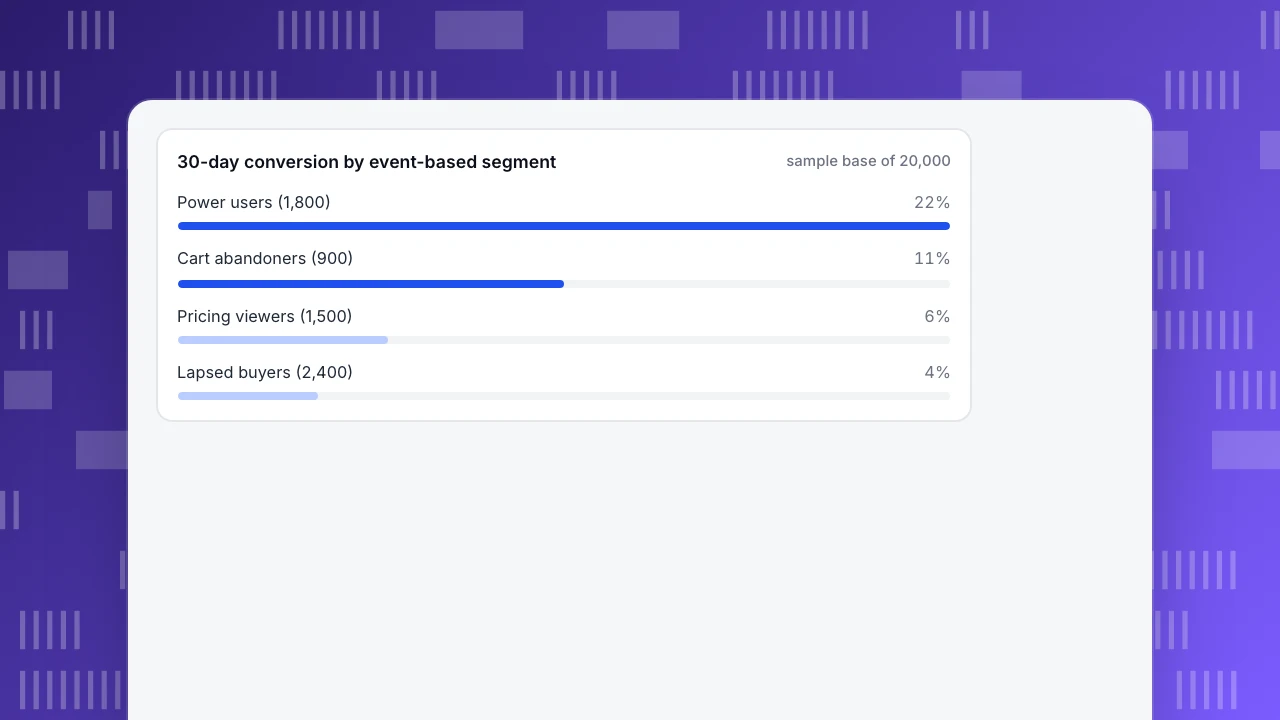
| Power users | Active on 8+ days in the last 30 | 1,800 | 9.0% | 22% (396) | 20.1% to 24.0% |
| Cart abandoners | Added to cart in 7 days, did not buy | 900 | 4.5% | 11% (99) | 9.1% to 13.2% |
| Pricing viewers | Viewed pricing in 14 days, did not start a trial | 1,500 | 7.5% | 6% (90) | 4.9% to 7.3% |
| Lapsed buyers | Bought in the last 180 days, not in the last 60 | 2,400 | 12.0% | 4% (96) | 3.3% to 4.9% |
| Everyone else | None of the above | 13,400 | 67.0% | not shown |
Three things to read from the table:
- Size before ambition. The smallest segment has 900 people. At 11% conversion its interval is 9.1% to 13.2%, narrow enough to act on. A segment of 40 people with 4 conversions (10%) would run from 4.0% to 23.1%, and you should not build a campaign on it.
- Rules are events plus a window plus a count. Every row has an event ("did" or "did not"), a window (7, 14, 30, 60, 180 days) and, for power users, a number (8+ days).
- Segments overlap. A power user can also be a pricing viewer. Check overlap before adding member counts together; the 33% of the base in the first four rows is an upper bound.
30-day conversion by event-based segment
sample base of 20,000How do you test a tool in one hour?
- Minutes 0 to 15: build three segments from your real events: one "did", one "did not", one with a count and a window.
- Minutes 15 to 25: reconcile. Compare each previewed count with a count from a separate query on the same data. A difference above 1% to 2% needs an explanation (test users, bots, identity mode).
- Minutes 25 to 40: change the data. Trigger an event as a test user and time how long until membership changes. Compare this with the refresh mode in the criteria table.
- Minutes 40 to 50: reuse it. Apply a segment to a funnel and a retention table.
- Minutes 50 to 60: check exit. Export membership or receive a change notification, then delete a test person and confirm they leave.
What privacy checks apply to segments?
Building a segment from someone's behaviour is a form of profiling. GDPR Article 4(4) defines profiling as automated processing of personal data to evaluate personal aspects, including preferences, behaviour and location. Article 21(2) gives people the right to object at any time to processing, including profiling, for direct marketing, and Article 21(3) says that once they object their data must no longer be processed for that purpose. So three checks belong in any evaluation:
- Can you honour an objection? A person who objects must leave every marketing segment.
- Does the segment need personal data at all? Anonymous or aggregate segments avoid most of the problem.
- Is the purpose written down? A segment built for product analysis should not quietly become a marketing list.
Common mistakes when choosing a segmentation tool
- Choosing by attribute count. Fifty demographic fields are less useful than three well-defined behavioural rules.
- Skipping "did not". Lapsed and abandoned segments need absence rules.
- Trusting the preview. Reconcile it with a separate count.
- Building tiny segments. Under a few hundred members the conversion rate is too noisy to act on.
- Ignoring identity. If anonymous visitors cannot be members, a segment of "visitors who viewed pricing" is empty for logged-out traffic.
- Counting overlapping segments as separate people.
- Forgetting the exit. Confirm you can remove a person from every downstream list when they object, delete their account or stop qualifying, not only add them when they qualify.
Building event-based segments in TapCub
Take the five sample segments. You want them without exporting data to another system first.
- Identify people. Anonymous visitors have no profile and are never segment members, so call
tapcub.loginwhen someone signs in; they then appear in All-platform analytics › Users › People with a timeline. - Build the segment. In All-platform analytics › Users › Segments & tags, create a rule segment from conditions such as did or did not do an event, a property, first seen, active, or being in another segment, preview the count, then save. Live segments add people at collection time (just did an event, visited a page, arrived from a channel); static segments are a pasted list of ids; RFM segments use ten buckets and record moves between them.
- Watch it. A rule segment refreshes daily or on demand, keeps a 30-day size trend and records who joined and who left.
- Reuse it. Analyze applies the segment as a cohort in analysis, so the same audience filters a funnel in All-platform analytics › Behavior › Behavior analysis.
- Know the boundary. If a webhook is configured, TapCub emits a membership change, but TapCub does not send email or buy ads. It defines and measures audiences; sending belongs to the system you connect.
FAQ
What are audience segmentation tools?
Software that defines groups of people by rules, keeps those groups current as behaviour changes, and lets you analyse them or pass them to another system. Behaviour-based ones build rules from events, such as did or did not do something in a time window.
What should you look for in an audience segmentation tool?
Check ten things: event rules with did and did-not, rolling windows, update mode, identity handling, size preview and trend, reuse in funnels and retention, export, privacy controls, limits and explainability. Weight them by your needs and score each option.
What is a behavioural segment?
A group defined by actions rather than attributes, such as users who added to cart in the last 7 days and did not buy. Each rule combines an event, a window and sometimes a count.
How big should a segment be?
Large enough that rates are stable. In the sample, 900 people at 11% gave an interval of 9.1% to 13.2%, which supports action; 40 people with 4 conversions gave 4.0% to 23.1%, which does not.
Does segmentation raise privacy issues?
Yes. Segments built from behaviour are profiling under GDPR Article 4(4), and for direct marketing people may object at any time (Article 21). Make sure objections remove people from segments and keep the purpose of each segment written down.
Sources
- Wendell R. Smith. Product Differentiation and Market Segmentation as Alternative Marketing Strategies. Journal of Marketing 21(1), 1956, 3–8. Origin of market segmentation. Checked 2026-11-15 (doi.org returns 403 to scripts).
- GDPR. Article 4: definitions. Profiling, 4(4). Checked 2026-11-21.
- GDPR. Article 21: right to object. 21(2) direct marketing and profiling, 21(3) effect of objection. Checked 2026-11-21.
Was this article helpful?
We use your answers to fix and expand this page.
Couldn’t send. Please try again in a minute.
Thanks for the feedback. We’ll use it to improve this page.You’ve already sent feedback on this page. Thanks.

Product Adoption Consultant
Explores customer onboarding, live conversations, and self-service, turning common usage questions into practical guidance and improvements.