Try it on your own data
Every report in this article is in the free plan. One snippet for web and apps, up to 10 sites.
Start freeA good automated message names who it is from, says what happens next with a time, asks for at most one thing and offers a way out, in under 45 words. Here are eleven copyable templates grouped by trigger: welcome, after-hours, order status, handoff, proactive and closing, with the rule behind each.
What you will learn
- Say who sent it, what happens next and when; avoid a bare "this is an automated message"
- Measure the promise: in the sample, 108 of 120 offline messages (90.0%) were answered by the day the template promised
- Marketing email and texts need opt-outs honored within 10 business days (FTC, FCC); keep support replies free of promotion
What makes an automated message good?
An automated message is a reply the system sends without a person typing it, because something triggered it: a visitor opened the chat, nobody is online, an order shipped. A good one does four things in under 40 words:
- Says who it is from. "Hi, this is the Acme support assistant" is better than an unsigned "An automated message".
- Says what happens next. An action and a time: "A teammate will reply by 9 am Monday (ET)."
- Asks for at most one thing. One question or one piece of information, not a form in a chat bubble.
- Has a way out. A person, or an unsubscribe, depending on the channel.
The examples below are grouped by trigger, because what you should say depends on the moment, not the channel. Replace the {braces}. Each one is under 45 words; the longer a message that nobody asked for, the fewer people read it.
What should a welcome message say?
Trigger: a visitor opens the chat window and at least one agent is online.
Template A, general:
Hi, I'm {Name} from {Brand}. What can I help you with today?
Template B, with context from the page (for example the pricing page):
Hi, I'm {Name} from {Brand}. Comparing plans? Tell me what you're building and I'll point you to the right one.
Rules: use a real first name or a clear role, ask one open question, and do not promise a response time you cannot keep when it is busy. Add the page context only if the message really fits that page, or it feels like a script.
What should an after-hours or offline message say?
Trigger: outside office hours, or no agent is online.
Template C:
Thanks for writing to {Brand}. We're away until {day, time, time zone}. Leave your email and your question and we'll reply by {day}.
Template D, when a knowledge base answers first:
We're offline right now, but this might help: {link or short answer}. If it doesn't, leave your email and question and a teammate will reply by {day}.
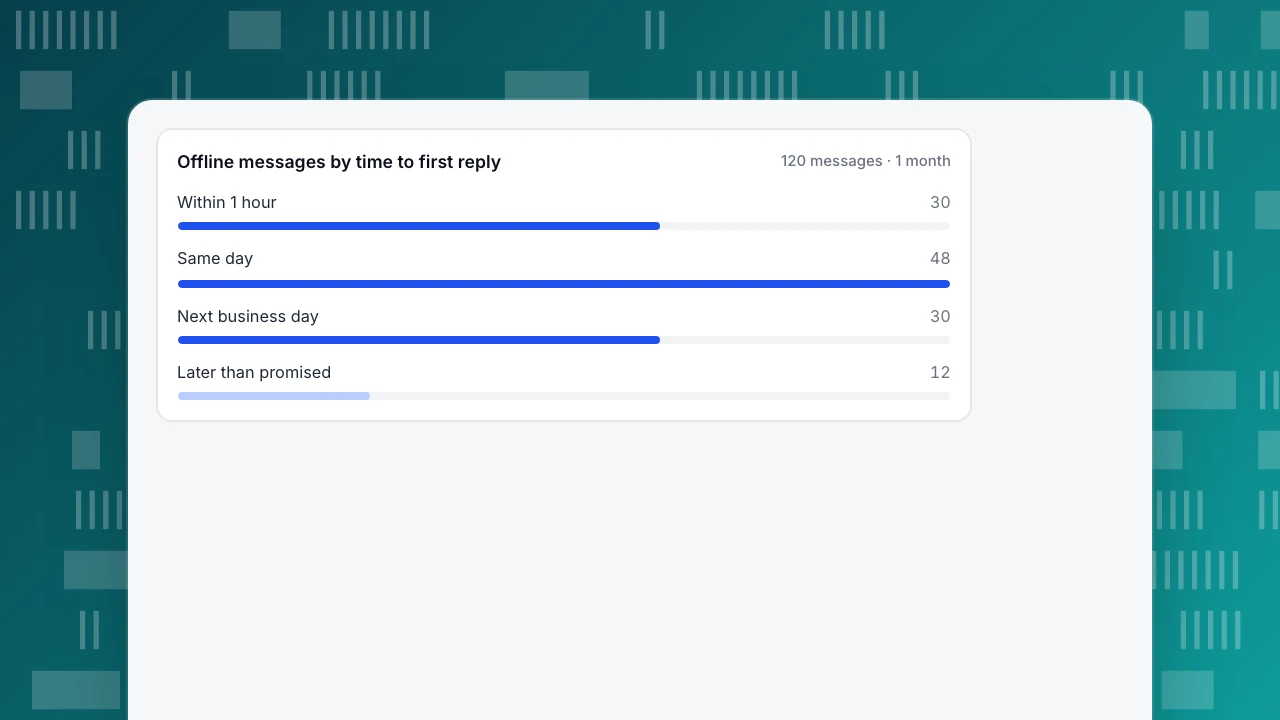
Rules: give a day and a time zone, never "soon"; ask for an email because a closed chat window cannot reach anyone later; and keep the promise. Measure it: in the sample data below, 108 of 120 offline messages (90.0%) were answered by the next business day that the template promised. If your own number is lower than the promise, change the promise, not just the template.
Offline messages by time to first reply
120 messages · 1 monthWhat should an order status message say?
Trigger: a visitor asks "where is my order?" or you pin an FAQ on the checkout confirmation page.
Template E, static answer:
Orders ship within {n} business days. Your tracking link is in the confirmation email sent to the address you used at checkout. If you can't find it, reply with your order number and email and I'll check.
Template F, from your own system (shipment event):
Your order {order number} left our warehouse on {date}. Tracking: {link}. Expected delivery: {date range}.
Template E works from a knowledge base because it needs no live data. Template F needs a system that knows the order, such as your store or shipping tool, and sends the message with the facts filled in. An automated chat reply that only drafts text cannot look up an order for you, so do not write "Let me check your order" in an automated message unless something really checks.
What should a handoff message say?
Trigger: automation cannot answer, or the visitor asks for a person.
Template G:
I'm bringing in a teammate who can look at your account. I've passed on what you told me, so you won't need to repeat it.
Template H, when nobody is available right now:
I've asked a teammate to take over, and they'll reply here or by email by {day, time}. Please add your email so we can reach you if you close this window.
Rules: say that a person is coming, say when, and keep the promise that the conversation history goes with the visitor. A bot that says "I don't understand" three times in a row is worse than a fast handoff.
What should a proactive or "still there?" message say?
Trigger: a visitor has been on a key page for a set number of seconds, such as 30 seconds on pricing.
Template I:
Comparing plans? Ask me anything and I'll answer in this chat.
Template J, when a chat has been quiet:
Are you still there? If you've solved it, no need to reply. If not, tell me where you got stuck and I'll pick it up.
Rules: one proactive message per visit, tied to a page where people typically get stuck, with a delay long enough that it is not the first thing they see. Do not use it on the checkout page when the visitor is typing card details.
What should a closing message say?
Trigger: an agent marks the conversation resolved.
Template K:
Glad that helped. I'll close this chat now. If you write again within 24 hours, the same conversation will reopen.
State the reopening rule if you have one; it saves visitors from starting again and repeating themselves.
How should you word "this is an automated message"?
Naming the sender and the purpose is better than a bare label. Compare:
| Weak | Better |
|---|---|
| This is an automated message. | This is an automated reply from {Brand} support. A teammate will follow up by {day, time}. |
| Do not reply to this message. | This address can't receive replies. To reach us, use the chat on {site} or email {address}. |
| Your request has been received. | We got your question about {topic}. You'll hear from us by {day}. |
The rule is simple: an automated message should be obviously automated, tell the reader who is responsible and give them the next step.
| Weak | Better |
|---|---|
| This is an automated message. | This is an automated reply from {Brand} support. A teammate will follow up by {day, time}. |
| Do not reply to this message. | This address can't receive replies. To reach us, use the chat on {site} or email {address}. |
| Your request has been received. | We got your question about {topic}. You'll hear from us by {day}. |
Rule: an automated message should be obviously automated, say who is responsible and give the next step.
How do you tell whether an automated message works?
Count what the message was meant to cause. For a welcome message, that is the share of people who open the chat and then write something.
Sample data: in month 1, Template A was shown to 2,000 openers and 620 wrote a first message (31.0%). In month 2, Template B ran on the pricing page for another 2,000 openers and 720 wrote (36.0%). The gap is 5.0 points. With samples of this size, random variation alone is about ±2.9 points at 95% confidence, so 5.0 points is probably a real difference, but two different months are not an experiment: seasonality or a campaign could account for part of it. Keep the change small, change one message at a time, and compare the same weeks before and after.
Two more numbers belong next to every automated message: the share of conversations that still needed a person (handoff rate) and the share of offline messages answered inside the promised window. If the first rises after you shorten a message, you cut something people needed.
What are the rules for automated email and text messages?
This is general information, not legal advice; check with a lawyer for your region.
For commercial email in the United States, the FTC's CAN-SPAM guide says you must honor an opt-out request within 10 business days and that any opt-out mechanism must keep working for at least 30 days after you send the message. For text messages sent under the Telephone Consumer Protection Act, the FCC's 2024 rule says requests to revoke consent, made in any reasonable manner, must be honored within a reasonable time not to exceed ten business days, and the clock starts when the request is received.
In practice: add "Reply STOP to unsubscribe" or an unsubscribe link to any marketing message, process opt-outs immediately rather than at the deadline, and keep order status and offline-message replies free of promotion.
How do you set these up in TapCub?
Map each template above to a place in the console. Menu names below are the ones in the product.
- Welcome and offline. Under Live chat › Chat settings › Greeting & translation, there are separate lines for Greeting (agents online) and Greeting (agents offline): use Templates A and C. Outside office hours the bubble uses the offline greeting even if an agent is online; set the hours at Live chat › Chat settings › Office hours.
- Offline messages. Visitors who leave an email and a question appear in Live chat › Chat settings › Offline messages with the status New, Replied or Closed. That is how you measure the promise in Template C. If the AI assistant is on, the knowledge base answers first and the form appears only when it cannot.
- Order status and common questions. In Live chat › Knowledge base, add a Q&A entry with Template E. A Q&A answer is sent as written and does not use an AI call; pinned entries appear in the visitor FAQ without opening a conversation.
- Proactive messages. Live chat › Chat settings › Proactive invites triggers on a page plus a number of seconds; use Template I.
- Handoff and closing. Save Templates G, H, J and K under Live chat › Canned replies and insert them with
/; edit before sending. The AI assistant only generates replies: it does not change orders or send emails, and it hands off to a person when it lacks material (Live chat › Chat settings › AI assistant). Resolved chats reopen if the visitor writes again within the reopen window, 24 hours by default.
Look at what works in Live chat › Reports: first response time, resolution rate and knowledge-base hit rate show whether the automated lines are doing their job. TapCub does not send marketing emails or texts and does not look up orders from your store, so Template F stays in your shipping or e-commerce tool.
FAQ
What is an example of an automated message?
"Thanks for writing to Acme. We're away until Monday 9 am ET. Leave your email and your question and we'll reply by Monday afternoon." It names the sender, gives a time and asks for one thing.
How do I write "this is an automated message" properly?
Say who sent it and what happens next: "This is an automated reply from Acme support. A teammate will follow up by Monday 9 am ET." Avoid bare labels with no next step.
What should an after-hours auto-reply include?
Your hours with a time zone, a promised reply day, a way to leave an email and, if you have one, a link to a self-service answer. Keep the promise you write.
How long should an automated chat message be?
Aim for under 45 words and one question. If the message needs more, link to an answer instead of pasting a wall of text into a chat bubble.
Do automated messages need an unsubscribe option?
Marketing email and text messages do. In the US, the FTC says opt-outs must be honored within 10 business days, and the FCC applies the same cap to revoking text consent. Order status and support replies that contain no promotion are different, but check your region's rules.
Sources
- Federal Trade Commission, CAN-SPAM Act: A Compliance Guide for Business: opt-out requests honored within 10 business days; opt-out mechanism must work for 30 days after sending. Checked 2026-11-21.
- Federal Communications Commission, Strengthening the Ability of Consumers To Stop Robocalls (Federal Register, 5 March 2024): revocation of consent honored within a reasonable time not exceeding ten business days. Checked 2026-11-21.
Was this article helpful?
We use your answers to fix and expand this page.
Couldn’t send. Please try again in a minute.
Thanks for the feedback. We’ll use it to improve this page.You’ve already sent feedback on this page. Thanks.

Product Experience Specialist
Writes about product experience, practical workflows, and growth, turning complex processes into clear steps for everyday decisions.