Try it on your own data
Every report in this article is in the free plan. One snippet for web and apps, up to 10 sites.
Start freeLead attribution credits the visits that came before a form fill, not just the last one. A lead source field stores one label; attribution looks at the whole touch path and can credit several channels. In the eight-lead sample, Social gets nothing under last touch but starts 25% of the leads under first touch.
What you will learn
- Lead source is one label; attribution splits credit across the touch path
- In the sample, last touch gives Social 0.0 leads and first touch gives 2.0; compare at least two models when leads need three or more visits
- Capture beats modelling: consistent UTM naming and an identified person fix more than switching from linear to position-based
What is lead attribution and how is it different from a lead source?
A lead source is one label on a lead record: "Organic Search", "Webinar", "Referral". It answers "where did this lead come from?" with a single word, usually chosen once.
Lead attribution looks at the visits that happened before the form was submitted and decides which of them deserve credit. It answers "which channels produced this lead?", and the answer can be one channel or several.
The difference matters when a lead visits more than once. Someone finds you through a social post, comes back from an email two weeks later and fills in the form after clicking a paid search ad. The lead source field will probably say "Paid Search", because that was the last visit. Lead attribution lets you see that social started the relationship, and email kept it going.
This article is about leads (form fills, demo requests, trial signups), not revenue. For the general models, see attribution models and multi-touch attribution; here the focus is on first touch and last touch for forms.
What does a touch path look like for a form lead?
A touch path is the ordered list of sessions a person had up to and including the one where they submitted the form. Each session is a touch, labelled with the channel it came from.
Sample data: eight leads in one month, oldest session on the left, the converting session on the right.
| Lead | Touch path |
|---|---|
| 1 | Organic |
| 2 | Paid → Organic |
| 3 | Social → Email → Paid |
| 4 | Organic → Email |
| 5 | Referral → Organic → Email → Paid |
| 6 | Paid |
| 7 | Social → Organic |
| 8 | Email → Email → Direct |
Two leads (1 and 6) have a single touch, so every model agrees on them. The other six are where the model changes the answer. Lead 5 has four touches across four channels; lead 8 has two email sessions in a row and finishes with a direct visit.
How do the models split the same eight leads?
Use four rules, which are the ones Google Analytics and most tools share in some form:
- First touch: the first session gets all the credit.
- Last touch: the last session before the form gets all the credit.
- Linear: each touch gets an equal share.
- Position-based: one touch gets everything; two touches get half each; with three or more, the first and last get 40% each and the middle touches share the remaining 20%.
Sample data: credited leads per channel for the eight paths above (each model adds up to 8.0).
| Channel | First touch | Last touch | Linear | Position |
|---|---|---|---|---|
| Organic | 2.0 | 3.0 | 2.75 | 2.60 |
| Paid | 2.0 | 3.0 | 2.08 | 2.30 |
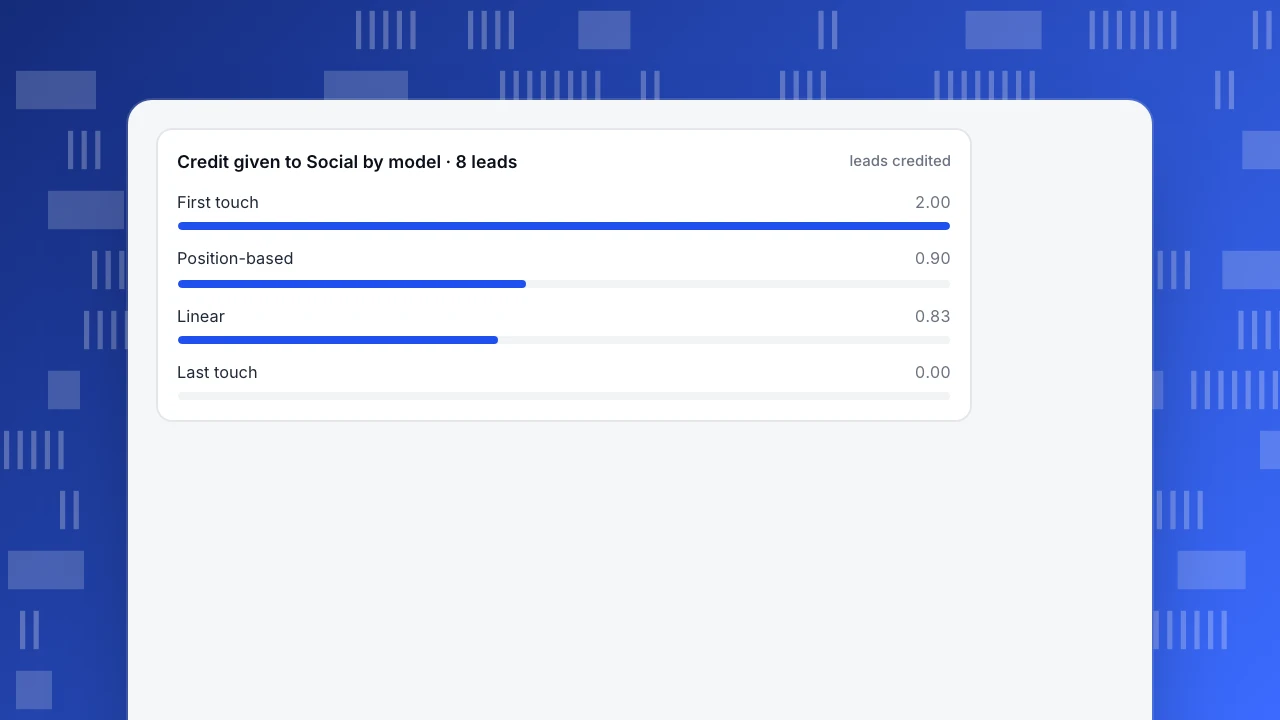
| Social | 2.0 | 0.0 | 0.83 | 0.90 |
| 1.0 | 1.0 | 1.75 | 1.40 | |
| Referral | 1.0 | 0.0 | 0.25 | 0.40 |
| Direct | 0.0 | 1.0 | 0.33 | 0.40 |
| Total | 8.0 | 8.0 | 8.0 | 8.0 |
Look at Social. Under last touch it produced nothing; under first touch it started two of the eight leads, 25% of the total. Email goes the other way: it is credited one lead by either single-touch model but 1.75 by linear, because it keeps showing up in the middle. Neither single number is wrong. They answer different questions, and a channel that is large in one column and small in the other is exactly the one worth looking at.
Credit given to Social by model · 8 leads
leads creditedShould you use first touch or last touch for lead forms?
Choose by the decision you need to make:
| Question | Use | Why |
|---|---|---|
| Where should we invest to start new relationships? | First touch | It rewards channels that introduce people to you |
| What triggers people to submit the form? | Last touch | It rewards the visit that closed the loop |
| Which channels work as a team? | Linear or position-based, side by side | Middle touches get credit instead of none |
| Is a channel assisting rather than closing? | Compare first, last and linear | A channel with first or linear credit but little last credit assists |
Rules of thumb:
- If the average number of touches before a lead is close to 1 (a short buying cycle, impulse-style forms), first and last touch will mostly agree and the choice matters little.
- If it is 3 or more, report at least two models. A single model will hide either the starter or the closer.
- Do not cut a channel because its last-touch credit is zero. Check its first-touch and linear credit first. In the sample, Social and Referral would be cut on last touch and yet start 3 of 8 leads.
| Question | Use | Why |
|---|---|---|
| Where do we start new relationships? | First touch | Rewards channels that introduce people |
| What triggers the form? | Last touch | Rewards the visit that closed the loop |
| Which channels work together? | Linear or position-based | Middle touches get credit |
| Is a channel only assisting? | Compare first, last and linear | Credit in first or linear but little in last |
Rule of thumb: when average touches per lead are 3 or more, report at least two models.
What goes wrong when you capture lead sources?
Most disagreement between lead sources and attribution reports comes from capture, not from the model.
- Inconsistent UTM values. Google Analytics states that its reports are case sensitive, so
utm_source=googleandutm_source=Googleare two sources. The three required UTM parameters areutm_source,utm_mediumandutm_campaign. Fix a naming list and use it for every link. - Self-reported source. A "How did you hear about us?" field records what people remember, which is often the last thing they saw. It is useful as a second opinion, but it does not replace tracked data. If self-reported "podcast" never appears in tracked sessions, that is information too.
- Direct visits. A direct visit often means a bookmark or a missing referrer, not a channel. In this sample, Direct is treated as a touch. Google Analytics assigns no credit to direct visits unless the entire path is direct, so check how your tool treats it before comparing numbers.
- Cross-device and cross-browser paths. The phone session and the laptop session are two people unless you identify the person at login or form submission. Without that, one lead looks like two paths with one touch each.
- Short lookback windows. If the average lead takes 21 days from first visit to form and your window is 7 days, first-touch credit goes to the wrong session. A 30-day window is a common starting point; widen it if your cycle is longer.
- One form, several pages. If the same form is embedded on many pages, record which page the submit came from, or you cannot tell which page converted.
A small fix to capture often beats a model change. A tidy naming list and an identified person do more than choosing position-based over linear.
How do you store the source on the lead itself?
If your leads end up in a CRM or spreadsheet, store the attribution result with the lead so sales sees it. A practical pattern:
- Save the first-touch channel, first landing page and first UTM campaign when the person first arrives (for example in a first-party cookie or local storage).
- Save the current visit's channel, UTM campaign and landing page at form time.
- Write both sets into hidden form fields, and add the page URL.
- Keep the self-reported answer in a separate field. Do not overwrite one with the other.
- Review a sample of 20 leads each month: compare the stored source with the full path in your analytics. Mismatches show broken tags or blocked scripts.
This gives you a first-touch and last-touch field on every lead. Fancier models are computed in analytics, not stored in the lead.
What can lead attribution not tell you?
Lead attribution measures credit for the form, not for revenue. A channel that brings many low-quality leads looks good here. If you can connect leads to closed deals in your CRM, attribute the deals too. Also remember it only counts sessions your analytics could see: blocked scripts, private browsing and offline conversations (a phone call after a visit) leave gaps. An unattributed lead is not a lead from nowhere; it is a lead you could not trace.
How do you attribute leads in TapCub?
Use the eight-lead sample as a template for your own form.
- Define the lead as a goal: an event or a page, such as the thank-you page after the form. For forms, the site script can record form submissions when you turn on
data-forms="true"; it keeps only the form id, name and action, never what people typed. - Open All-platform analytics › Behavior › Behavior analysis and choose attribution, then pick the goal. The touch defaults to channel (an empty channel falls back to the referrer channel); you can also choose referrer channel, UTM source, UTM campaign, referrer domain or landing page.
- Keep the 30-day lookback window (it can be 1 to 90 days and includes the converting session) or widen it. Select first touch, last touch, linear, position-based and time decay together so each model is a column, as in the sample table. A channel with credit in the first-touch column but not in last touch stands out immediately.
- Read the four headline numbers: conversions, attributed conversions, conversions with no touch and average touches on an attributed conversion. Each row is a touch value; touch rate is paths divided by touch sessions.
- Call
tapcub.loginwhen people log in or submit a form with an identity, so that sessions from different devices join under one person. Attribution uses the same identity for the sessions and the conversion.
TapCub uses sessions before the conversion; it is not an install postback and it does not write the result into your CRM. It does not score leads or manage CRM stages, so closing credit for revenue stays in your sales tool. It also scores at most 50,000 conversions per run.
FAQ
What is lead attribution?
Lead attribution assigns credit for a lead (a form fill, demo request or signup) to the marketing channels or visits that came before it. It can credit the first visit, the last visit or several visits, depending on the model.
What is the difference between lead source and lead attribution?
A lead source is a single label stored on the lead, often the last channel or a self-reported answer. Lead attribution looks at all tracked visits before the form and divides credit among them, so one lead can credit several channels.
Should I use first touch or last touch attribution for leads?
Use first touch to see which channels introduce people, and last touch to see which visit triggers the form. If leads usually need three or more visits, report both with a linear or position-based view, because either single model hides part of the story.
Why does my lead source say direct?
Direct usually means no referrer was recorded: a bookmark, a typed URL, a dark-social link or a blocked referrer. Tag every link with UTM parameters and keep consistent naming so more visits keep a real source.
Can lead attribution be 100% accurate?
No. It depends on the sessions your analytics can see, on consistent tagging and on identifying the same person across devices. Treat it as a way to compare channels, not as an exact count of what caused each lead.
Sources
- Google, Attribution models, Google Analytics Help: paid and organic last click gives 100% of credit to the last channel clicked, direct traffic is ignored unless the whole path is direct. Checked 2026-11-21.
- Google, URL builders: collect campaign data with custom URLs, Analytics Help: utm_source, utm_medium and utm_campaign are required, and values are case sensitive. Checked 2026-11-21.
Was this article helpful?
We use your answers to fix and expand this page.
Couldn’t send. Please try again in a minute.
Thanks for the feedback. We’ll use it to improve this page.You’ve already sent feedback on this page. Thanks.

Product Experience Specialist
Writes about product experience, practical workflows, and growth, turning complex processes into clear steps for everyday decisions.