Try it on your own data
Every report in this article is in the free plan. One snippet for web and apps, up to 10 sites.
Start freeTo qualify a lead, decide whether it is a genuine sales opportunity, using what it has done as well as what it says. Give points for signals such as viewing pricing, returning within a week and asking about price in chat, then check the points against past wins. Spend sales time on the leads that score, and nurture the rest.
What you will learn
- Behavior is visible before a lead fills anything in: pages, return visits and the questions asked in chat
- In the sample, 30 hot leads (15% of 200) won 40.0% of the time and cold leads 1.8%
- Validate the rule against outcomes: hot and warm held 21 of 23 wins with 45% of the leads
What it means to qualify a lead
Qualifying a lead means judging whether it is a genuine sales opportunity worth a salesperson's time. Microsoft's Dynamics 365 documentation describes the act in a CRM: qualifying validates that the lead is a genuine opportunity, associates an account and a contact, and creates an opportunity record to track the deal; a lead that does not meet your criteria is disqualified, with an audit trail kept. The tool only records your judgment. The judgment itself, the criteria, is what this article is about.
Most advice builds the criteria from what the lead says: budget, authority, need and timeline, asked on a form or a call. That works once someone has talked to the lead. It does nothing for the larger group who have not filled in a form but have already shown you what they want.
Stated signals and behavioral signals
| Type | Example | Strength | Limit |
|---|---|---|---|
| Stated | Job title, company size, budget range from a form | Directly answers "can they buy" | Self-reported; available only after the person opts in |
| Behavioral | Viewed pricing, came back, asked about price in chat | Shows interest as it happens | Needs interpretation; does not show authority or budget |
Use both. Behavior tells you who to talk to first; the conversation then fills in the stated half. A visitor who has read pricing and two docs pages and returned within a week is more likely to be shopping than one who read a single blog post, and it takes no form to know.
A points table from site and chat signals
Sample data: a starting rule that scores a lead from what is visible in analytics and chat.
| Signal | Where you see it | Points |
|---|---|---|
| Viewed the pricing page | Page views | +20 |
| Viewed 3 or more product or docs pages | Page views | +10 |
| Came back within 7 days | Sessions | +10 |
| Started a chat | Chat | +15 |
| Asked about price, timeline or setup in chat | Chat transcript | +20 |
| Used a free email domain | Lead record | −10 |
| Only read the blog | Page views | 0 |
Tiers: hot is 45 or more, warm is 25 to 44, cold is below 25. Three example leads:
- Lead A: viewed pricing (+20), read 4 docs pages (+10), came back in 3 days (+10), started a chat (+15) and asked about price (+20) = 75, hot.
- Lead B: viewed pricing (+20), read 3 pages (+10), started a chat (+15), free email (−10) = 35, warm.
- Lead C: read two blog posts and left = 0, cold.
Keep the table short. Five to eight signals are enough; more points only make the scores harder to explain and to check.
| Signal | Where you see it | Points |
|---|---|---|
| Viewed the pricing page | Page views | +20 |
| Viewed 3 or more product or docs pages | Page views | +10 |
| Came back within 7 days | Sessions | +10 |
| Started a chat | Chat | +15 |
| Asked about price, timeline or setup in chat | Chat transcript | +20 |
| Used a free email domain | Lead record | −10 |
| Only read the blog | Page views | 0 |
Sample data: a starting rule, not a benchmark. Hot is 45 or more, warm 25 to 44, cold below 25. Tune points after you check them against wins.
Check the rule against outcomes
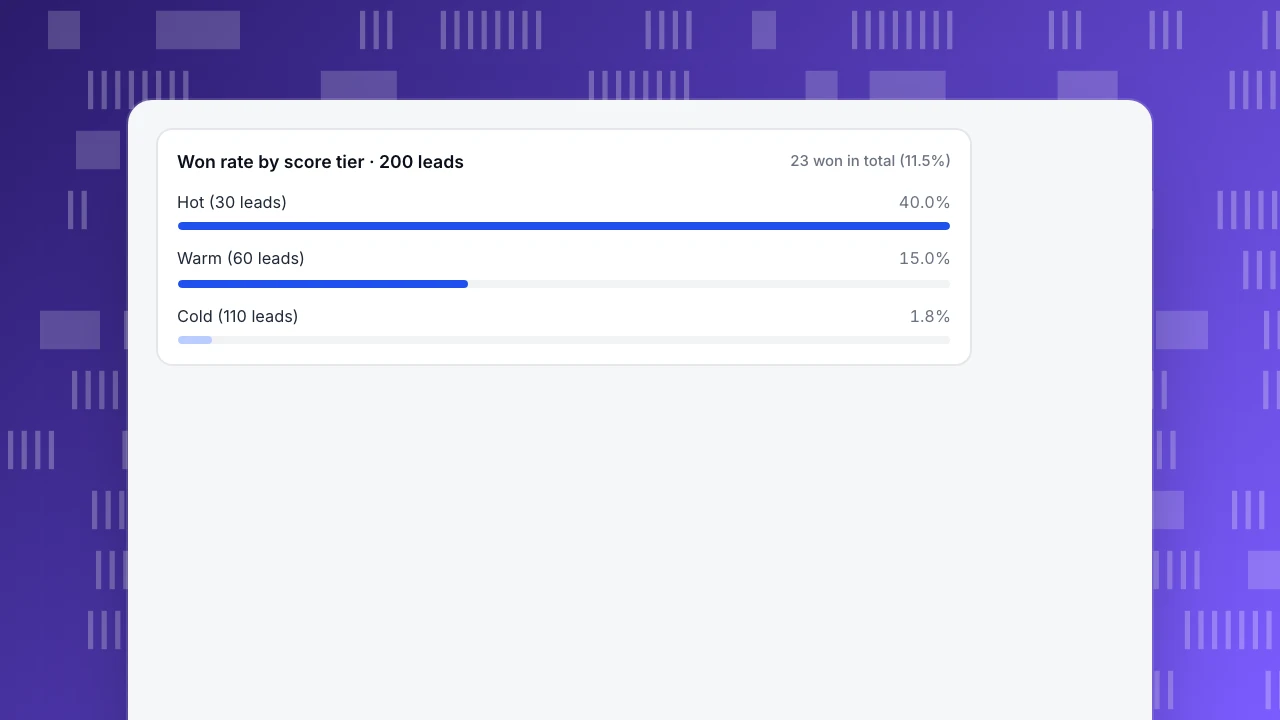
A score is a hypothesis. Test it on leads whose outcome you already know. Sample data: 200 past leads scored with the rule above, then compared with what happened.
| Tier | Leads | Won | Won rate |
|---|---|---|---|
| Hot | 30 | 12 | 40.0% |
| Warm | 60 | 9 | 15.0% |
| Cold | 110 | 2 | 1.8% |
| All | 200 | 23 | 11.5% |
Three readings:
- Separation. The won rate falls from 40.0% to 15.0% to 1.8% as the tier falls. A rule that did not separate tiers would be useless.
- Coverage. Hot and warm leads are 90 of 200 (45%) and hold 21 of 23 wins (91.3%). The two wins among cold leads show why cold leads go to nurture, not to the bin.
- Effort. If sales calls hot and warm first, 55% of the list can wait.
If the won rate of the warm tier is no better than the cold, a signal is wrong. Remove one signal at a time and recompute until the tiers separate. Re-check each quarter, because a new page or a new campaign changes which signals mean anything.
Won rate by score tier · 200 leads
23 won in total (11.5%)Speed matters as much as score
In "The Short Life of Online Sales Leads" (Harvard Business Review, March 2011), James Oldroyd, Kristina McElheran and David Elkington report from their research that most companies are not responding to online enquiries nearly fast enough. The abstract is the part we can quote with confidence; the article's specific timings are behind a paywall, so use it as direction, not as a number to copy.
Build speed into the rule: a hot lead gets a human reply the same business hour, a warm lead the same day, a cold lead goes into a nurture sequence. If the score is high but nobody sees it for two days, the score is worth nothing.
Decision rules
- Qualify on behavior first, then confirm by conversation. Use stated criteria (budget, authority, need, timeline) in the first call.
- Hot goes to a human within the hour. Warm the same day. Cold to nurture.
- Set points from your own data. Check them against 100 or more past leads with known outcomes.
- Penalise clear mismatches (a student address, a competitor, a country you do not serve) with negative points or a disqualify rule.
- Never score on one signal alone, like a single pricing view.
- Review the rule every quarter and when your site changes.
What the score saves: sales time
A score is worth having only if it changes what people do. Sample data: 200 leads a month, with the tiers from above.
| Approach | Leads contacted | Minutes per lead | Hours |
|---|---|---|---|
| Call everyone | 200 | 15 | 50.0 |
| Hot first (20 minutes each), warm second (10 minutes each) | 30 hot + 60 warm | 20 and 10 | 10.0 + 10.0 = 20.0 |
Calling every lead takes 200 × 15 ÷ 60 = 50.0 hours. Working hot and warm leads only takes 30 × 20 ÷ 60 + 60 × 10 ÷ 60 = 20.0 hours, a saving of 30.0 hours (60%), and it reaches 21 of the 23 wins. The cold 110 go to a nurture sequence, and anyone who then shows a new buying signal moves up a tier.
The time estimates are assumptions; the structure is what matters. If hot leads take longer because the call is a demo, the saving is smaller but the order of work stays the same.
Handoff: what to give the person who calls
A qualified lead is wasted if the caller starts from zero. Hand over a short note with:
- Why it scored: the three signals that gave the most points (for example pricing page, return visit, chat question).
- What they looked at: the pages and the source they came from.
- What they asked: the exact question from chat or the form.
- What to confirm: the stated criteria that the behavior cannot show, namely budget, who decides, the need and the timeline.
- Next step and deadline: for a hot lead, a reply within the hour.
Keep the first call about the visitor's question, not a form. Ask for the stated criteria in the conversation, one at a time, after you have answered what they asked.
When to disqualify, and when to nurture
Disqualifying is a decision with a reason, recorded so it can be reversed. Microsoft's documentation notes that a disqualified lead keeps an audit trail and can be reactivated if the person comes back, with attachments and notes intact.
| Situation | Action |
|---|---|
| Clear mismatch (student address, competitor, country you do not serve) | Disqualify with a reason |
| Interested but no budget or timing yet | Nurture; revisit when a signal appears |
| No reply after your sequence | Move to nurture, not to deleted |
| Duplicate of an existing contact | Merge into the existing record |
Review disqualified and nurture lists once a quarter. A lead that was cold in March can be hot in June, and your behavioral rule will show it first.
Common scoring mistakes
- Too many signals. Twenty rules with small points cannot be explained to sales or checked. Keep five to eight.
- Counting activity, not intent. Ten blog views are less meaningful than one pricing view. Weight pages by how close they sit to a decision.
- Never decaying points. A pricing view six months ago should not keep a lead hot. Count signals from the last 30 days, or halve points every 14 days.
- Skipping the check. A score that was never compared with outcomes is a guess. Use the 200-lead style table every quarter.
- Scoring on one tool's data. If chat questions live in one system and page views in another, the score will miss the strongest signal. Bring them together by visitor, or by person once they log in.
- Treating the score as a verdict. A hot score is a reason to call first, not a reason to promise a discount. A human still qualifies the stated criteria.
If sales stops trusting the score, ask them for ten leads they think were mis-scored, and use those to adjust one signal at a time.
How to see these signals in TapCub
TapCub does not score leads or act as a CRM; it supplies the signals. Take Lead A.
- When the chat starts, open the conversation in Live chat › Inbox. The side panel shows where the visitor came from, the page they are on and their browsing over the last 2 days, so the pricing and docs views are already in front of you.
- Chat has no pre-chat form, so ask for an email in the conversation, or use Live chat › Chat settings › Offline messages when nobody is online.
- If the visitor logs in, your site calls
tapcub.login. The person then appears under All-platform analytics › Users › People with an action timeline by day, and the chat knows who they are. - In All-platform analytics › Users › Segments & tags, create a rule segment such as "viewed the pricing page and started a chat in the last 7 days". It is your hot list, and the same segment can be used in funnels and retention.
- Compare chatters with non-chatters in Live chat › Reports › Conversion attribution, which shows goal conversion for visitors who chatted against those who did not; with fewer than 30 chatters it warns that the sample is too small.
Points, tiers and the follow-up live in your sheet or CRM. TapCub shows the signals and who the person is.
FAQ
How do you qualify a lead?
Decide whether the lead fits your customer profile and shows buying intent. Combine what they say (budget, authority, need, timeline) with what they do (pricing views, return visits, chat questions), score it, and check the score against past wins.
What are lead qualification criteria?
Common stated criteria are budget, authority, need and timeline. Behavioral criteria include pages viewed, return visits, content engagement and chat questions. Use whichever you can observe, and check them against outcomes.
What is the difference between a qualified lead and an unqualified lead?
A qualified lead is judged a genuine sales opportunity worth a sales conversation. An unqualified lead does not meet your criteria yet; it may belong in nurture. Disqualifying is not deleting: keep the record.
How fast should I respond to a qualified lead?
As fast as you can. Research published in Harvard Business Review found that most companies respond to online enquiries far too slowly. Set an internal target, for example one business hour for hot leads, and measure it.
Can I qualify leads without a form?
Yes. Page views, return visits and chat questions are signals you can observe. Use them to decide who to contact first, then collect the stated details in the conversation.
Sources
Was this article helpful?
We use your answers to fix and expand this page.
Couldn’t send. Please try again in a minute.
Thanks for the feedback. We’ll use it to improve this page.You’ve already sent feedback on this page. Thanks.

Product Adoption Consultant
Explores customer onboarding, live conversations, and self-service, turning common usage questions into practical guidance and improvements.