Try it on your own data
Every report in this article is in the free plan. One snippet for web and apps, up to 10 sites.
Start freeTo fix error 404, first decide whether the URL is worth fixing. Not every 404 needs it: rank missing URLs by real visitors, crawler hits and external links, 301 redirect only the valuable ones to a genuine replacement, and leave the rest as 404 or 410. Visitors who hit one can check the URL or search the site.
What you will learn
- 404s do not hurt rankings by themselves; they cost you where people and links still arrive
- Rank by human hits, crawler hits and referring domains, kept apart
- 301 only to a genuine replacement; leave the rest 404 or 410, never mass-redirect to the homepage
What a 404 error means
404 Not Found is the HTTP status code a server returns when it cannot find anything at the requested URL. MDN notes that it does not say whether the page is missing for now or for good. Its sibling 410 Gone says the resource was removed on purpose and will not come back.
A 404 is not a server failure. The server worked and answered correctly that there is nothing there. That separates it from 5xx errors, where the server itself broke; see HTTP 500 errors. It is also different from a soft 404: a page that shows "not found" or nearly empty content but returns 200 OK, which misleads search engines. Soft 404s are covered in the soft 404 glossary entry.
The usual causes are a page that was deleted or moved without a redirect, a URL changed during a redesign or CMS migration, a typo in an internal or external link, and bots guessing at URLs that never existed.
If you are a visitor seeing a 404
Most "how to fix error 404" searches come from people who just hit one. If the site is not yours, you cannot fix the page, but you can usually reach what you wanted:
- Check the address for typos, a missing letter or an extra character at the end.
- Reload the page; a link may have been fixed since your browser cached the error.
- Go up a level by deleting the last part of the path, or start from the homepage and use the site's search.
- Search for the page title in a search engine; the content may live at a new URL.
- Tell the site owner if a link on their own site led you there.
If every page on a site returns 404 for you but works for others, the cause is on your side (network filters, DNS, extensions). The rest of this guide is for site owners.
Do 404 errors hurt SEO?
Not by themselves. Google's Search Central blog put it plainly years ago: having 404 pages does not hurt you or count against you in search results. Google's current documentation adds that 4xx status codes, other than 429, have no effect on crawl rate, and that a 404 is a strong signal not to crawl that URL again. If the URL was indexed, it is removed from the index.
Where 404s do cost you:
- Lost visitors. People who click an old link and land on a dead end often leave.
- Lost link value. If other sites link to a URL that now returns 404, those links stop helping the content they were meant for.
- Broken internal links. They waste visitors' clicks and crawlers' fetches on your own site.
- Soft 404s. Google's crawl budget guide says soft 404 pages continue to be crawled and waste your budget, so a fake "not found" page with a 200 status is worse than an honest 404. See crawl budget for when that matters.
So the goal is not "zero 404s". It is: no 404s where real visitors, valuable links or your own navigation lead.
How to find your 404s
No single source sees every 404, so combine them:
| Source | What it shows | What it misses |
|---|---|---|
| Search Console › Page indexing ("Not found (404)") | URLs Google tried to crawl and got 404 | Visitors, and URLs Google never found |
| Analytics with 404 tracking | Which missing URLs real visitors open, and the page that sent them | Crawlers that do not run JavaScript |
| Server access logs | Every request with its status code, humans and bots | Context such as where the link was |
| Site crawler / link checker | Broken links inside your own pages | External links pointing in |
| Backlink tool or Search Console Links report | Which external sites link to which URLs | Whether anyone clicks those links |
The questions that decide the fix are: does a real person hit this URL, does a crawler, does any external site link to it, does a page of yours link to it, and is there a replacement page? Search Console reports for crawl problems in general are covered in crawl errors.
Decide which 404s are worth fixing
Apply these rules to each 404 URL, in order:
- Your own page links to it? Fix the link at the source, always. Then also redirect if rule 2 applies.
- A real replacement exists, and the URL has traffic or links? Use a 301 redirect to the replacement. In the example below, "traffic" means 10 or more human visits in 30 days, and "links" means at least one referring domain.
- Removed on purpose, with nothing equivalent? Return 410 Gone, or leave the 404. Either tells search engines to drop it.
- Everything else (typos, bot probes for
/wp-login.phpor/.env, URLs that never existed): leave it as a 404. That is the correct answer, not a problem to fix.
A replacement must be genuinely equivalent: the new version of the same guide, the renamed product, the moved documentation page. A loosely related category page or your homepage is not a replacement.
Worked example: 20 404 URLs, ranked
Sample data. Thirty days of 404s for a small SaaS site, combining visitor 404 tracking, crawler 404s from server logs and referring domains from a backlink report:
| URL | Human hits | Crawler hits | Referring domains | Replacement | Action |
|---|---|---|---|---|---|
| /blog/seo-checklist-2023 | 410 | 38 | 14 | /blog/seo-checklist | 301 |
| /pricing.html | 260 | 22 | 3 | /pricing | Fix footer link + 301 |
| /docs/v1/install | 190 | 15 | 6 | /docs/install | 301 |
| /products/blue-mug | 120 | 9 | 0 | /products/blue-mug-v2 | 301 |
| /careers/designer-2022 | 64 | 5 | 0 | none (role filled) | 410 |
| /free-trial | 55 | 7 | 1 | /signup | 301 |
| /webinar-spring | 41 | 3 | 2 | /webinars | 301 |
| /about-us/ | 35 | 4 | 1 | /about | 301 |
| /Contact | 22 | 1 | 0 | /contact | 301 |
| /promo/black-friday-2024 | 18 | 6 | 4 | /deals | 301 |
| /help/reset-pasword | 14 | 0 | 0 | /help/reset-password | Fix email link + 301 |
| /images/team-photo.jpg | 9 | 12 | 0 | none | Keep 404 |
| /blog/category/news/page/9 | 3 | 120 | 0 | none | Keep 404 |
| /blog/old-post-typo | 2 | 1 | 0 | none | Keep 404 |
| /blog/tag/misc | 1 | 30 | 0 | none (tag removed) | 410 |
| /wp-login.php | 0 | 310 | 0 | none | Keep 404 |
| /.env | 0 | 220 | 0 | none | Keep 404 |
| /xmlrpc.php | 0 | 150 | 0 | none | Keep 404 |
| /old-sitemap.xml | 0 | 64 | 0 | none | 410 |
| /api/v2/status | 0 | 45 | 0 | none | Keep 404 |
What the totals say:
- 1,244 human hits and 1,062 crawler hits across the 20 URLs.
- 10 URLs get a 301 (two of them also need a link fixed). They carry 1,165 human hits, 93.6% of all human 404 traffic, and all 31 referring domains.
- The top 5 URLs alone account for 1,044 human hits, 83.9%.
- 7 URLs stay 404. They draw 858 crawler hits, 80.8% of all crawler 404s, but only 14 human hits (1.1%). Most are bots probing for WordPress files on a site that does not run WordPress.
- 3 URLs get a 410: removed on purpose, with nothing equivalent to send people to.
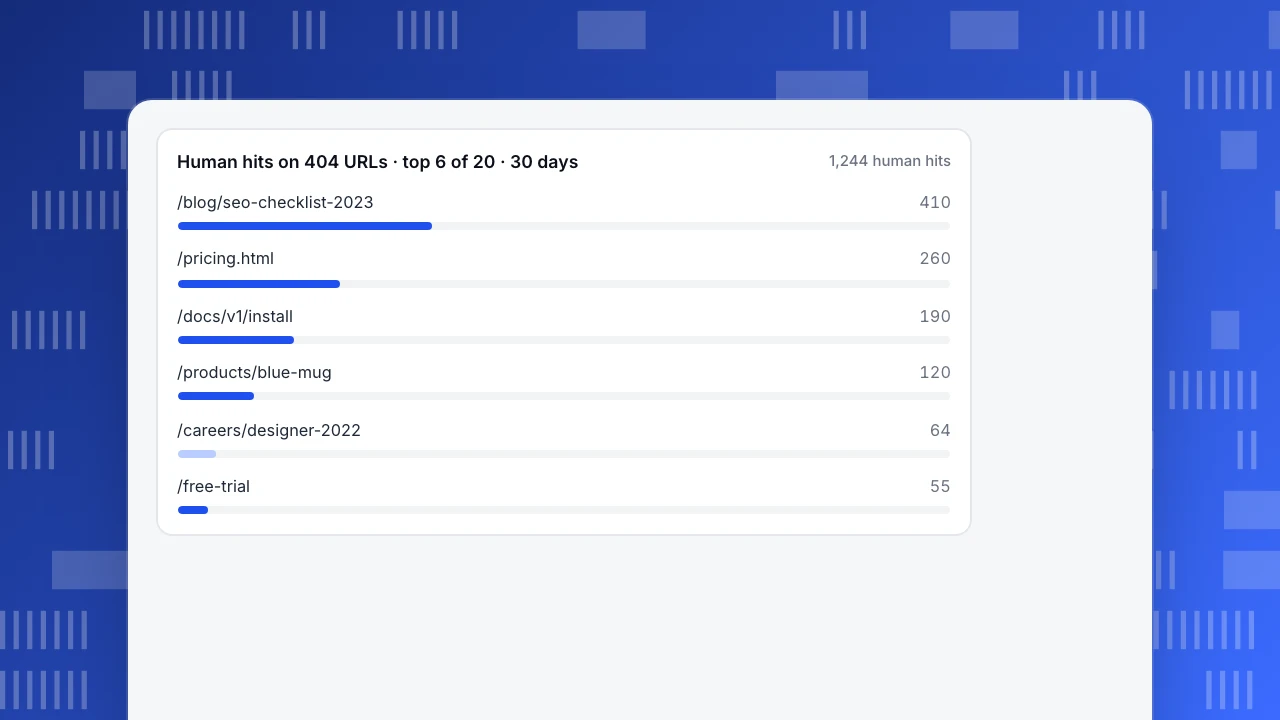
Ten redirects recover almost all the human traffic and every external link. Redirecting the other ten would add rules to maintain and save almost no one. If you sorted by total hits instead, /wp-login.php would rank second, which is exactly why the human and crawler columns must stay apart. The chart after this section shows how concentrated the human hits are.
Human hits on 404 URLs · top 6 of 20 · 30 days
1,244 human hits301, 410 or leave it as a 404
Once you know which URLs matter, choose the response. Google's documentation sets the guardrails:
- 301 (or 308) to an equivalent page. Google treats a permanent redirect as a strong signal that the target should be indexed instead. Map each old URL to its own closest match.
- Do not redirect everything to the homepage. Google's site-move guide warns that redirecting many old URLs to one irrelevant destination, such as the homepage, may be treated as a soft 404. Visitors also land somewhere they did not expect.
- Keep redirects for at least a year. Google advises keeping them as long as possible, generally at least one year, and from users' perspective, indefinitely, since old links never fully disappear.
- Avoid chains. Point each old URL straight at the final destination, and update internal links so they skip the redirect. See redirect chains.
- 410 for deliberate removals, 404 for the rest. Both drop the URL from the index; 410 states intent more clearly.
To write the rules for Nginx, Apache or other servers, the free redirect rule generator turns a list of old and new URLs into configuration. The table after this section summarises each response.
| Response | Use when | What Google does |
|---|---|---|
| 301 / 308 permanent redirect | A genuine replacement exists and the old URL has visits or links | Treats it as a strong signal to index the target instead |
| 410 Gone | You removed the content on purpose, with nothing equivalent | Drops the URL from the index, like 404 |
| 404 Not Found | Typos, bot probes, URLs that never existed, low-value removals | Drops the URL if indexed; 404 signals not to crawl it again |
| 302 / 307 temporary redirect | The move is genuinely temporary | Treats it as a weak signal to index the target |
| Redirect everything to the homepage | Avoid | May be treated as a soft 404 |
| 200 page saying 'not found' (soft 404) | Avoid | Keeps crawling it and reports a soft 404 |
Based on Google Search Central's documentation on HTTP status codes, site moves and crawl budget, checked 2026-11-15.
Fixing site-wide 404s
If every page, or a whole section, suddenly returns 404, the content usually has not disappeared. The routing has broken. Check these first:
- Rewrite rules. A missing or overwritten
.htaccess(Apache) ortry_files/locationblock (Nginx) breaks pretty URLs. On WordPress, re-saving the permalink settings regenerates the rules. - Recent deploys. A build that did not upload a folder, or a new base path, makes valid URLs miss. Compare with the previous release.
- Case and trailing slashes. Linux servers treat
/Contactand/contactas different files. Pick one form and redirect the other. - Single-page app routing. Deep links work in the app but 404 on reload when the server does not fall back to the app's entry file.
- CDN or proxy configuration. A changed origin path or cache rule can serve stale 404s; purge after fixing.
Fix these before triaging individual URLs, because one configuration error can produce thousands of 404s at once.
Build a useful custom 404 page
Some 404s will always exist, so make the page useful, and keep it honest:
- Return a real 404 status. Google's blog notes that you can return a 404 response code while serving whatever content you want. A friendly page with a 200 status is a soft 404.
- Say what happened in plain words, without blaming the visitor.
- Offer a way forward: a search box, links to the main sections, and the most visited pages.
- Do not auto-redirect to the homepage after a few seconds. It hides the problem from you and confuses visitors.
- Track it. Mark the template so analytics records which URLs people hit and which page sent them; that is the input to the triage above.
How to triage 404s in TapCub
The ranking in the example needs three inputs: human hits, crawler hits and referring domains. TapCub supplies the first two, kept apart.
- Mark the 404 template. Add
data-404="true"to the analytics script on your error page only. The script then sends a 404 event with the missing path and the referring page alongside the pageview. - Read the visitor 404s. In Web analytics › Pages, the 404 pages tab lists hits per missing URL and the previous page that sent visitors there. A previous page on your own site is a broken internal link to fix at the source, like the footer link to
/pricing.htmlin the example. - Read the crawler 404s. Monitoring › Crawl health shows fetches, success rate, distinct pages, 404s and 5xx per search engine, with a 404 list. It relies on server-side records: with script collection alone you do not see status codes, so import your server logs for an accurate crawler view. Web analytics › Bots also has a small search engine health table with each engine's 404 count.
- Fix the overlap first. Paths that appear in both the visitor and the crawler 404 lists are hurting people and search engines at once; start there, then work down by human hits.
TapCub does not count backlinks or referring domains; take those from Search Console's Links report or a backlink tool. It also does not set up redirects. It shows which URLs need one, and the redirect rule generator writes the configuration.
FAQ
How do I fix a 404 Not Found error?
As a visitor, check the URL for typos, reload, or search the site for the page. As the site owner, find out whether people or links still reach the URL. If a real replacement exists and the URL has traffic or backlinks, add a 301 redirect to it and fix any internal links. If the content is gone with nothing equivalent, leave the 404 or return 410.
Should I redirect all 404 pages to the homepage?
No. Google's site-move guide warns that redirecting many old URLs to one irrelevant page, such as the homepage, may be treated as a soft 404, so the redirect gains nothing for search. Visitors also land somewhere they did not expect. Redirect each URL to its closest genuine equivalent, and let URLs without one return 404 or 410.
Do 404 errors hurt my SEO?
Not on their own. Google says 404 pages do not count against your site, and 4xx codes other than 429 do not change crawl rate. They cost you when real visitors hit them, when external links point at them, or when they are disguised as soft 404s, which Google keeps crawling. Fix those cases and leave the rest.
What is the difference between 404 and 410?
404 means the server found nothing at the URL and says nothing about whether it will return. 410 Gone means it was removed deliberately and will not come back. Google treats both as signals to drop the URL from the index. Use 410 when you removed something on purpose and want to state that clearly; otherwise 404 is fine.
Why does Search Console show 404s for pages I never had?
Crawlers find URLs in many places: old sitemaps, links on other sites with typos, scraped copies, and generated URLs such as deep pagination. Bots also probe for common files like /wp-login.php. If no real visitor reaches the URL and no valuable site links to it, a 404 is the correct response and nothing needs fixing.
Sources
- 404 Not Found, MDN
- How HTTP status codes, and network and DNS errors affect Google Search, Google Search Central
- Site moves with URL changes, Google Search Central
- Large site owner's guide to managing your crawl budget, Google Search Central
- Do 404s hurt my site?, Google Search Central Blog
Was this article helpful?
We use your answers to fix and expand this page.
Couldn’t send. Please try again in a minute.
Thanks for the feedback. We’ll use it to improve this page.You’ve already sent feedback on this page. Thanks.

Solutions Engineer
Covers SDKs, API integrations, and data implementation, with an emphasis on validation, system interoperability, and troubleshooting.