Try it on your own data
Every report in this article is in the free plan. One snippet for web and apps, up to 10 sites.
Start freeEnterprise web analytics is chosen on four needs, scale, governance, privacy and access control, and each should be backed by written evidence, not a feature list. Size your volume first, treat must-haves as pass or fail gates, then score the remaining criteria and send the same nine questions to every vendor.
What you will learn
- Four needs, each with evidence to request: documented limits, roles and audit log, retention and data requests, single sign-on and scoped keys
- Size the volume before any demo: 50 million pageviews a month is 150 million events, about 58 a second and 720 GB over 12 months
- Gates first, scores second: in the sample one tool type fails two gates; two tie at 72 and are separated by total cost
What changes when analytics goes enterprise
Enterprise web analytics differs from a small-site setup in four ways: volume, governance, privacy exposure and access control. Features matter less than whether the tool can show, in writing, how it handles each one. Use the table to turn a vague wish ("must be enterprise-ready") into questions with checkable answers.
| Need | What it means in practice | Evidence to ask for |
|---|---|---|
| Scale | Millions of events a day, many sites, no silent limits | Written limits on events, properties and query size; whether reports are sampled |
| Governance | Many teams, many roles, a record of who changed what | Role list, field-level masking, an exportable audit log |
| Privacy | Legal exposure grows with turnover and data volume | Retention settings, data-subject request handling, regional consent rules |
| Access control | People leave and join; systems read data too | Single sign-on, two-step verification, scoped API keys |
The rest of the article takes each row, then scores tool types against the list, and ends with the questions to send in writing.
| Need | What it means in practice | Evidence to ask for |
|---|---|---|
| Scale | Millions of events a day, no silent limits | Written limits; whether reports are sampled |
| Governance | Many teams, roles and a record of changes | Role list, masking, exportable audit log |
| Privacy | Legal exposure grows with turnover and data | Retention settings, data requests, regional consent |
| Access control | People and systems both read data | Single sign-on, two-step verification, scoped keys |
Turn each row into a written question for every shortlisted vendor.
Scale: size your volume before you talk to vendors
Most "does it scale?" conversations fail because nobody brought numbers. Work them out first.
Sample data: a site network with 50 million pageviews a month, three tracked events per pageview on average, and 12 months of detail kept.
- Events a month = 50,000,000 × 3 = 150 million.
- Events a day = 150,000,000 ÷ 30 = 5 million.
- Average rate = 5,000,000 ÷ 86,400 seconds = 58 events per second.
- With a peak ten times the average (a campaign, a launch) = about 580 per second.
- Twelve months of detail = 150,000,000 × 12 = 1.8 billion events; at 400 bytes each that is 1.8 billion × 400 = 720 GB before indexes.
Give those five numbers to any shortlisted vendor and ask three questions. Is there a documented limit on events per property or per user, and what happens at the limit? Are reports computed on all events or on a sample, and can I see which? What is the longest range a query can cover? Limits exist in every product. As one public example, Google Analytics documents a maximum of 25 parameters per event, parameter names up to 40 characters and values up to 100 characters, and 500 distinctly named events per app user; the point is not that these are good or bad but that they were published and can be checked against a tracking plan.
Governance: roles, audit and masking
Governance answers the question an auditor or a new head of data will ask: who can see what, and how would we know if that changed?
- Roles. A short list with clear boundaries: an owner, administrators who change settings, analysts who read and build reports, viewers who only read, and a role for people who need only a support tool. Check that a role can be given per project, not only per account.
- Field-level control. Personal identifiers should be masked by default for the roles that do not need them, and a person's access should be limitable to certain sites, channels or properties.
- Audit log. A record of member changes, privacy setting changes, exports and logins that you can export. Ask for the retention of the log and the maximum export size.
- Naming and change control. A tracking plan with an owner and a status for each event stops "who added this event?" from being a recurring question. Ask whether the plan can be checked against live data.
Privacy: what the exposure really is
Privacy requirements enter the decision through law, not preference. Under the EU General Data Protection Regulation, Article 83 sets two tiers of administrative fines. The lower tier reaches €10 million or 2% of total worldwide annual turnover of the preceding financial year, whichever is higher; the upper tier, which covers breaches of the basic processing principles and data subject rights, reaches €20 million or 4%, whichever is higher.
Sample data: two companies.
| Company | Annual turnover | 4% of turnover | Upper-tier maximum (higher of the two) |
|---|---|---|---|
| Company A | €300 million | €12 million | €20 million (the fixed amount is higher) |
| Company B | €1.5 billion | €60 million | €60 million (the percentage is higher) |
That is a ceiling, not a prediction, and nothing in it says analytics is the likeliest source of a fine. It is a reason to ask concrete questions: Where is data stored by region? How long is detail kept, and can it be shortened per project? Can a request to export or delete one person's data be handled from the product? What is collected before consent, and can that be set per region? A vendor that answers with a link to a policy page and no setting has not answered.
Access control: people and systems
Check three things.
- Sign-in. Single sign-on is a hard requirement in many companies because it ties access to the directory, so leavers lose access in one step. If it is a must, make it a gate in the scorecard below, not a nice-to-have. Two-step verification is the fallback.
- Keys for systems. Server-side keys should carry scopes (read only, write only) and be revocable, and a key should be bindable to one project. Ask whether the full key is shown only once.
- Groups. A team of fifty should not be added person by person to forty projects. Ask whether members can be managed in groups across projects, and whether removing a group removes the access it granted.
Score the tool types, with gates first
A scorecard works only after gates. A gate is a must-have scored pass or fail; a tool that fails one is out, however high its total. Sample data: the gates are scale, governance, privacy and access control, and a tool type passes if it scores 3 or more of 5 on each. Remaining criteria are weighted. The scores are illustrative for four types of tool; replace them with your own after trials.
| Requirement | Weight | Free general-purpose hosted | Self-hosted open source | Enterprise suite | Privacy-first cloud |
|---|---|---|---|---|---|
| Scale, no silent limits (gate) | 20 | 3 | 3 | 5 | 4 |
| Governance: roles, audit, masking (gate) | 20 | 1 | 3 | 5 | 3 |
| Privacy and legal controls (gate) | 20 | 2 | 5 | 4 | 5 |
| Access control: SSO, scoped keys (gate) | 15 | 3 | 3 | 5 | 3 |
| Data ownership and export | 15 | 3 | 5 | 3 | 3 |
| Support and procurement | 10 | 1 | 2 | 5 | 3 |
Score = sum of (weight × score) ÷ 5, out of 100.
| Result | Free general-purpose hosted | Self-hosted open source | Enterprise suite | Privacy-first cloud |
|---|---|---|---|---|
| Passes all four gates? | No (governance 1, privacy 2) | Yes | Yes | Yes |
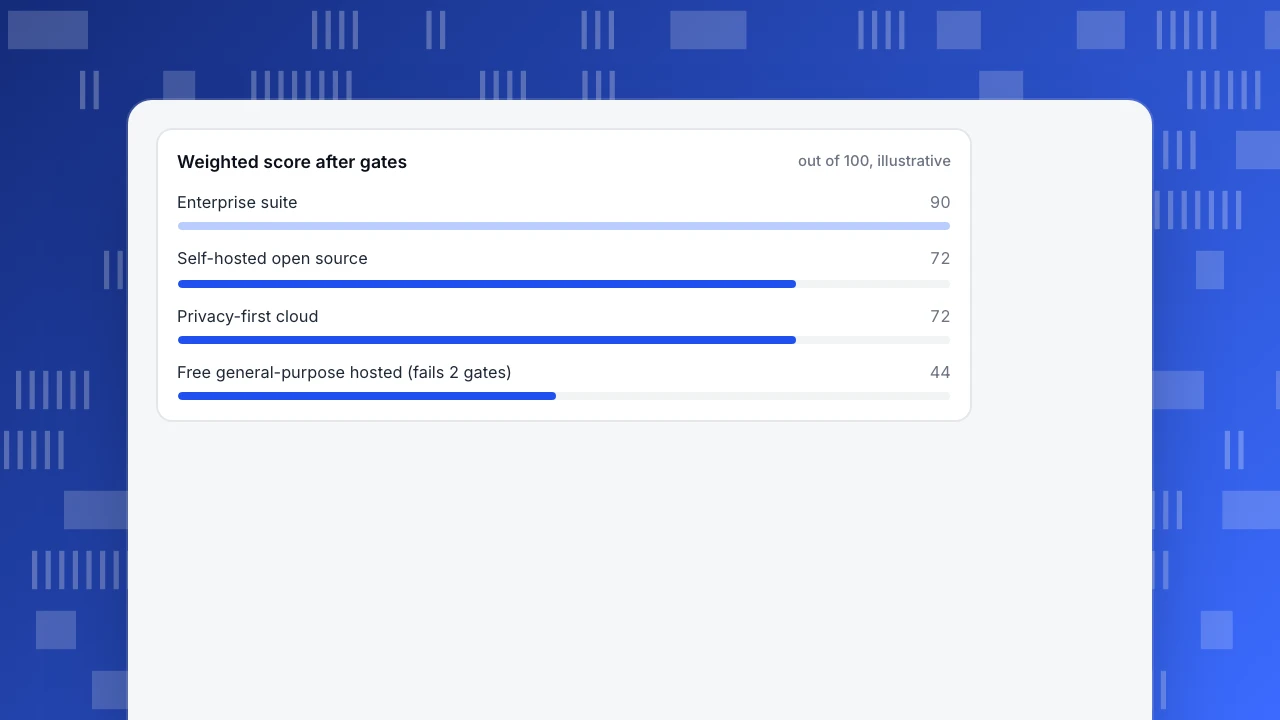
| Weighted score | 44 | 72 | 90 | 72 |
Two things to read from this. The first type is out on the gates, and its total is also the lowest, so the gates add little here; they matter when a high-scoring tool fails one. And two types tie at 72 with different strengths: the self-hosted option wins on ownership and the cloud one saves the team that would run servers. When a tie appears, compare total cost, including staff time, and not features. Do not treat the enterprise suite's lead as a verdict: it costs the most and may exceed what you need.
Weighted score after gates
out of 100, illustrativeQuestions to send in writing
Send these to every shortlisted vendor and keep the answers.
- What are the documented limits on events, properties and query ranges, and what happens at each limit?
- Are any reports sampled? If so, at what volume and can sampling be disabled?
- List the roles and what each can see. Can personal identifiers be masked by role?
- Is there an audit log? What does it record, how long is it kept and in which formats can it be exported?
- Where is data stored, for how long, and can retention differ per project?
- How is a request to export or delete one person's data handled?
- Is single sign-on supported, and which protocol? Is two-step verification available?
- What assurance reports does the vendor hold? SOC 2, for example, is an examination report by a CPA firm against the AICPA's criteria for security, availability, processing integrity, confidentiality and privacy. Ask for the report and its date, not just a badge.
- What is the exit path: can I export raw events, and in what format?
In TapCub: what is documented, and what is not claimed
TapCub's documentation covers several of the rows above. Compare each against your list rather than taking this section as a sales claim.
- Roles and members. Project roles are Owner, Admin, Analyst, Viewer and Agent only; Agent only members see just the chat inbox. Manage members in Configuration › Settings › Members, or across projects with user groups under Account › Members & user groups.
- Scoped access and masking. Reports can be narrowed to channels, platforms and hostnames, with properties hidden and a mask applied. Defaults mask direct identifiers fully for viewers and partially for analysts.
- Audit log. Configuration › Settings › Audit log records member changes, two-step verification changes, privacy configuration changes, exports and logins, and exports CSV, NDJSON or JSON, at most 50,000 rows at a time.
- Keys and sign-in. Configuration › Settings › API keys creates keys that start with a prefix, are shown once, carry scopes and can be bound to one project. Two-step verification is available. TapCub's documentation does not list SAML single sign-on, so if SSO is a gate, ask before shortlisting.
- Privacy. Configuration › Privacy center sets collection tiers, retention, address truncation and data-subject requests for export and delete; the default rule for the European Economic Area and the UK requires consent for analytics, and without it collection drops to the anonymous tier while pageviews and custom events are still recorded.
- Sharing and export. Configuration › Settings › Public sharing makes read-only links with an optional password, chosen modules and a day limit. Raw detail comes through an asynchronous export, and detail beyond the retention period is deleted.
- Scale limits. TapCub's documentation states specific limits, for example attribution calculates at most 50,000 conversions and funnel timing uses at most 20,000 completed samples. Check them against your own volume in the section above.
This article makes no claim that TapCub holds a SOC 2 report or any other certification. Ask for current compliance documents before you decide.
FAQ
What is enterprise web analytics?
Web analytics for organisations with high volume, many teams and legal exposure. It differs from small-site analytics in four ways: scale without silent limits, governance (roles, audit log, masking), privacy controls and access control such as single sign-on.
What features does an enterprise web analytics tool need?
Documented limits and unsampled reports, role-based access with masking, an exportable audit log, retention and data-request controls, single sign-on or two-step verification, scoped API keys and a way to export raw data. Turn each into a written question for the vendor.
How much can a GDPR fine be?
Under Article 83, up to €10 million or 2% of worldwide annual turnover for the lower tier, and up to €20 million or 4% for the upper tier, whichever is higher in each case. These are ceilings set in the regulation.
Is a SOC 2 report required for web analytics?
It is not a legal requirement; many buyers ask for it as evidence that a vendor's controls were examined by an independent firm. Ask for the report and its date and check that its scope covers the service you will use.
Should an enterprise self-host its analytics?
Self-hosting gives control of data and location but moves the work of scaling, patching and backups to your team. Compare the total cost, including staff time, against a hosted option that meets the same gates.
Sources
- Regulation (EU) 2016/679 (GDPR), EUR-Lex, Article 83: administrative fines up to €10 million or 2%, and up to €20 million or 4%, of total worldwide annual turnover, whichever is higher. Figures confirmed on the article text on EUR-Lex on 2026-11-21.
- Google Analytics Help, Property limits: 25 parameters per event, parameter name length 40, value length 100, 500 distinctly named events per app user. Checked 2026-11-21.
- AICPA, SOC 2 reporting: SOC 2 reports examine controls at a service organization relevant to security, availability, processing integrity, confidentiality or privacy. Checked 2026-11-21.
Was this article helpful?
We use your answers to fix and expand this page.
Couldn’t send. Please try again in a minute.
Thanks for the feedback. We’ll use it to improve this page.You’ve already sent feedback on this page. Thanks.

Data Analyst
Explores traffic sources, conversion funnels, and retention, using clear metric definitions and concrete examples to explain what the numbers mean.