Try it on your own data
Every report in this article is in the free plan. One snippet for web and apps, up to 10 sites.
Start freeEnterprise help desk software is a support system that holds up at scale: service levels you can measure, routing that fits your teams, roles that limit access, and an audit trail that proves what happened. Choose it with a requirements matrix where every row has a question to ask and evidence to request, not a feature checklist.
What you will learn
- Eight requirement areas, each with a question to ask and a document or demo that proves the answer
- An SLA has consequences; an SLO is an internal target; 99.9% availability still allows 43.2 minutes of downtime in a 30-day month
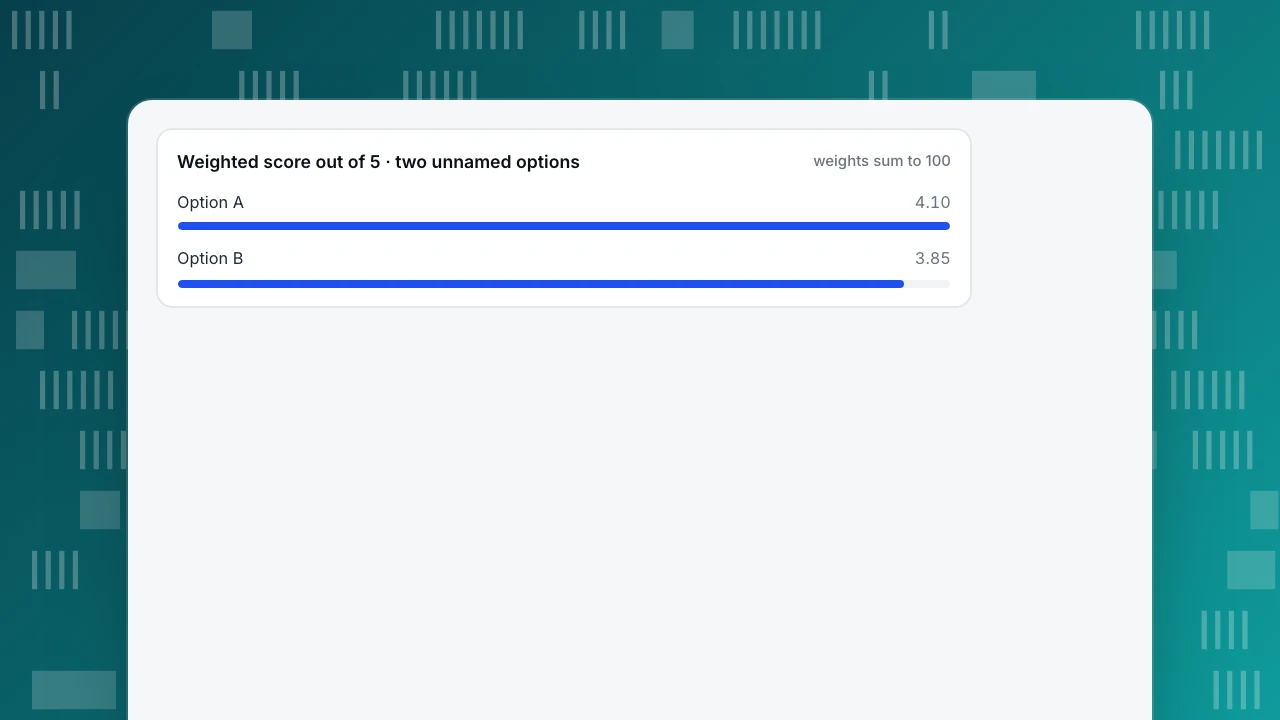
- Score weighted criteria, but make must-haves pass/fail: option A won 4.10 to 3.85 and still failed one gate
What makes a help desk enterprise-grade
"Enterprise" on a help desk page usually means one of three things, and it helps to separate them:
- Scale. More agents, queues, languages and conversations without the tool slowing or the admin work exploding.
- Control. Who can do what, who gets which conversation, and how rules change without breaking.
- Evidence. The ability to show a regulator, auditor or customer what happened, when and by whom.
Feature lists mix these up. A requirement is only useful in an RFP if you can ask a question and receive proof. The matrix below is built that way.
The requirements matrix
| Requirement | Question to ask | Evidence to request |
|---|---|---|
| SLAs and priorities | Can targets differ by priority and customer tier, and what happens on a breach? | A configured policy and a breach report from the trial |
| Routing and queues | How are conversations assigned, and what happens at capacity or when an agent goes offline? | Documentation of assignment rules; a test with 3 agents |
| Roles and permissions | Which actions can each role take, including export and delete? | A role-by-action table |
| Audit trail | Which events are logged, who can read the log, how long is it kept? | A sample log with transfers, exports, deletions |
| Security and identity | Single sign-on, provisioning, data location, certifications | Security documentation and a named contact |
| Data control | Export, deletion, retention per record and per customer | A test export and a test deletion |
| Reporting | First response, resolution, backlog, workload by agent and by queue | Reports with definitions and a CSV export |
| Integrations and API | What connects to your CRM, identity and ticketing systems? | API reference and a working connection |
Two of these deserve a note.
Audit trail. The NIST SP 800-53 control for event logging (AU-2) asks an organisation to identify the events a system can log, choose which to log with a frequency or trigger, justify that the choice supports investigating an incident after the fact, and review the list on a schedule. Turn that into a question: "show me the log entry for a conversation that was transferred, exported and deleted."
Roles. Ask for the exact permission table. The question that separates tools is rarely "does it have roles" but "can I stop one role from exporting or deleting data, and is the attempt logged?"
| Requirement | Question to ask | Evidence to request |
|---|---|---|
| SLAs and priorities | Can targets differ by priority and customer tier, and what happens on a breach? | A configured policy and a breach report from the trial |
| Routing and queues | How are conversations assigned, and what happens at capacity or when an agent goes offline? | Documentation of assignment rules; a test with 3 agents |
| Roles and permissions | Which actions can each role take, including export and delete? | A role-by-action table |
| Audit trail | Which events are logged, who can read the log, how long is it kept? | A sample log with transfers, exports, deletions |
| Security and identity | Single sign-on, provisioning, data location, certifications | Security documentation and a named contact |
| Data control | Export, deletion, retention per record and per customer | A test export and a test deletion |
| Reporting | First response, resolution, backlog, workload by agent and by queue | Reports with definitions and a CSV export |
| Integrations and API | What connects to your CRM, identity and ticketing systems? | API reference and a working connection |
Questions and evidence are a template for an RFP; add rows for your sector's rules.
SLA, SLO and what 99.9% means
People use SLA for everything. Google's SRE Book separates three terms. An SLI is a measured indicator of service quality (response time, error rate). An SLO is a target for it. An SLA is a contract that attaches consequences, such as rebates or penalties, to missing the targets it contains. In the book's words, if there is no explicit consequence, you are almost certainly looking at an SLO.
That distinction tells you what to ask a vendor, and what to set for your own team:
- Vendor availability SLA: what percentage, measured how, and what credit do you get?
- Your support SLO: for example, 95% of conversations get a first response within 15 minutes during opening hours.
Availability percentages hide a lot. In a 30-day month (43,200 minutes):
| Availability | Allowed downtime per 30 days |
|---|---|
| 99.9% | 43.2 minutes |
| 99.95% | 21.6 minutes |
| 99.99% | 4.3 minutes |
Ask whether planned maintenance is excluded, and whether the percentage is measured across the whole service or per region.
Score with weights, gate with must-haves
A weighted score makes the trade-offs visible. Sample data: seven criteria, each scored 0 to 5, with weights that add to 100.
| Criterion | Weight | Option A | Option B |
|---|---|---|---|
| SLAs and priorities | 20 | 5 | 3 |
| Routing and queues | 15 | 4 | 5 |
| Roles and permissions | 15 | 4 | 3 |
| Audit trail | 15 | 3 | 5 |
| Security and identity | 15 | 5 | 4 |
| Reporting | 10 | 3 | 4 |
| Integrations and API | 10 | 4 | 3 |
| Weighted score | 100 | 4.10 | 3.85 |
Option A: (20×5 + 15×4 + 15×4 + 15×3 + 15×5 + 10×3 + 10×4) ÷ 100 = 410 ÷ 100 = 4.10. Option B: 385 ÷ 100 = 3.85.
A wins on the total, but suppose your regulator requires an audit trail and you set the bar at 4. A scores 3 and fails the gate; B scores 5. A weighted score ranks options that passed the must-haves; it must not rescue one that failed them. Decide the gates before you see any scores.
Weighted score out of 5 · two unnamed options
weights sum to 100A trial test plan
A two-week trial with real data answers more than any demo. Run these:
- Assignment test. Create 3 agents and 30 test conversations. Take one agent offline, fill another to capacity, and see where the rest go.
- Permission test. Log in as the lowest-privilege role and try to export and delete.
- Audit test. Transfer, export and delete one conversation, then read the log as an admin.
- Reporting test. Check that first response and resolution match a hand count for 20 conversations.
- Failure test. Ask support to explain what the vendor's SLA credit would be for a one-hour outage.
Decision rules
- Write the must-haves before you talk to vendors, and make each one pass/fail.
- Request evidence, not claims: a policy file, a log, a report.
- Check SLA wording for consequences. No credit, no SLA.
- Weigh admin effort. A tool that needs a specialist for every routing change costs more than its licence.
- Check data exit. Test an export of all conversations before you sign.
- Do not buy features for next year's problem. Choose for the volume and teams you have, with a clear way to grow.
Plan the rollout and the cost of ownership
The licence is rarely the largest cost. Count people's time as well. Sample data for a team of 120 agents:
| Item | Calculation | Result |
|---|---|---|
| Training | 120 agents × 3 hours | 360 hours |
| Training cost at a loaded $30 an hour | 360 × $30 | $10,800 |
| Routing and rule changes | 2 hours × 24 changes a year | 48 hours |
| Report and audit requests | 2 hours × 12 requests a year | 24 hours |
The rates and counts are placeholders; replace them with yours. The point is the structure: a tool that needs a specialist for each routing change turns 48 hours a year into a queue with a backlog, while one that an admin can change in minutes does not.
Run the rollout in stages:
- Pilot with one team for two weeks, using the trial tests above, and compare first response and resolution with the old tool.
- Migrate history you need, not all of it. Decide the retention period first.
- Move teams in waves, keeping the old tool read-only for 30 days.
- Review after 90 days against the must-haves and the requirement matrix, and record what the vendor promised.
Questions to put in the contract
Whatever the tool, ask for these in writing:
- Availability and credits: the percentage, how it is measured, what is excluded and the credit you receive.
- Support response times from the vendor for each priority level.
- Data location and sub-processors, with notice of changes.
- Export on exit: the format and the time it takes to receive all conversations.
- Retention and deletion: what is deleted, when, and how you verify it.
- Change notice: how long before a feature or price changes.
A vendor that answers these clearly and quickly is showing you how it will behave during an incident.
Mistakes in evaluating help desk software
- Starting with demos. A demo shows the best path. Start with your must-haves and your trial tests, and use demos to answer open questions.
- Letting the loudest team write the criteria. Collect requirements from agents, team leads, security, legal and the people who run reports, then merge them into the matrix.
- Scoring features, not outcomes. "Has routing rules" is a feature. "A conversation reaches an available agent within 60 seconds in the trial" is an outcome you can test.
- Ignoring the exit. If you cannot export all conversations in a usable format before you sign, you are renting your own history.
- Comparing list prices. Seats, volume tiers, add-ons for AI or audit, and the admin effort in the rollout table change the real cost.
- Skipping reference checks. Ask a customer of similar size what broke in the first six months, and how fast the vendor responded.
A short evaluation with clear gates beats a long one with a spreadsheet nobody trusts. Keep the matrix to eight rows, the trial to two weeks and the decision to a meeting where the gates are read aloud first.
Where TapCub fits
TapCub is a live chat and messaging tool tied to website, app and mini-program analytics. It is not a ticketing suite or an IT service management platform, so it does not manage email tickets, service catalogs or change requests. Here is how it answers the matrix for chat support:
- Routing. In Live chat › Chat settings › Appearance, turn on auto-assign and choose least load or round robin, set a maximum of concurrent chats per agent, and set when a conversation returns to Waiting if its owner has been offline too long.
- Roles. In Live chat › Agents, Owner, Admin and Analyst can handle chats; a Viewer cannot use live chat; an Agent-only member sees only chat menus with tight defaults (assigned plus unassigned conversations, no export or delete). An Analyst cannot export or delete.
- Audit. A transfer is recorded on the conversation timeline and in the audit log; export of a conversation is audited and returns messages, timeline events and consent records; deletion leaves a deleted mark and the audit entry.
- Reporting. Live chat › Reports shows resolution rate, average and median first response, satisfaction and workload by agent. First response excludes AI replies.
- SLA breach policies, single sign-on and data location are not described in the chat documentation, so ask about them directly and verify the answers in a trial instead of assuming them.
FAQ
What is enterprise help desk software?
It is support software built for larger organisations: service level management, routing across teams, role-based access, audit logs, security controls and reporting at scale. It can serve customers, employees or both.
What features should an enterprise help desk have?
SLA policies by priority, rules-based routing and queues, granular roles, an audit log, single sign-on, data export and deletion, reporting with definitions, and an API. Ask for evidence of each.
What is the difference between an SLA and an SLO?
An SLO is a target for a measured indicator, like 95% of first responses within 15 minutes. An SLA is a contract with consequences if the target is missed. Without a consequence it is an SLO.
How long should a help desk trial be?
Two weeks with real conversations is enough to test assignment, permissions, audit and reporting. Use the five tests above and compare the results to your must-haves.
Help desk or live chat: which do I need?
A help desk handles tickets across channels with SLAs and workflows; live chat handles real-time conversations on your site. Many teams use both. Decide by which channel your customers use most.
Sources
Was this article helpful?
We use your answers to fix and expand this page.
Couldn’t send. Please try again in a minute.
Thanks for the feedback. We’ll use it to improve this page.You’ve already sent feedback on this page. Thanks.

Product Experience Specialist
Writes about product experience, practical workflows, and growth, turning complex processes into clear steps for everyday decisions.