Try it on your own data
Every report in this article is in the free plan. One snippet for web and apps, up to 10 sites.
Start freeEcommerce customer service software receives shopper questions, routes them, helps answer them and reports what people ask. What to require depends on store size: at 300 orders a month you need quick answers, at 30,000 you need routing, reports and safe automation. This guide converts orders into support workload (3,000 orders is about 0.67 of a full-time agent) and gives a checklist by size, with channel and automation rules.
What you will learn
- Convert orders into agent hours before comparing tools: 3,000 orders at 20% contact and 8 minutes each is 80 hours a month
- Put each answer where the question arises; the top abandonment reason is extra cost, cited by 40% of shoppers
- Automate answers from your own policies, keep money and complaints with people, and require a one-click handover
What should ecommerce customer service software actually do?
Ecommerce customer service software has four jobs: receive questions on the channels shoppers use, route them to the right person, answer them quickly with the right information, and report what shoppers keep asking so you can fix the cause. Everything else is a feature that serves one of the four. The right tool depends on your store's size, because the order of importance changes: a store with 300 orders a month needs a fast way to answer; one with 30,000 needs routing, reporting and automation that does not make mistakes.
This guide is a checklist by store size. It starts from the questions shoppers ask, converts order volume into support workload with an example you can recompute, and ends with what to require at each stage. For the specific case of chat on a store, see live chat for ecommerce; for a ticketing-centred set-up, see ecommerce help desk.
What do shoppers ask, and where should the answer live?
Many support questions are decided before the order. The Baymard Institute's review of 50 studies lists why US shoppers abandoned a cart, and several reasons are questions someone could answer (Baymard Institute):
| Reason shoppers gave | Share citing it | The question behind it | Best place for the answer |
|---|---|---|---|
| Extra costs too high | 40% | "What will shipping and tax be?" | Cart page, and a canned reply in chat |
| Delivery too slow | 20% | "When will it arrive?" | Product page and a knowledge-base entry |
| Did not trust the site with card details | 19% | "Is paying here safe?" | Checkout page, plus a human in chat |
| Couldn't see total cost up front | 12% | "What is the final price?" | Cart page |
| Unsatisfactory returns policy | 13% | "Can I send it back?" | Product page link, knowledge-base entry |
Shares are of US online shoppers who abandoned a cart, excluding those just browsing; they do not add to 100% because shoppers could give more than one reason. The practical point: put the answer where the question arises, and let chat or a knowledge base catch what the page did not answer. After the order, the questions shift to "where is my order", changes, returns and damage.
How much support does your order volume create?
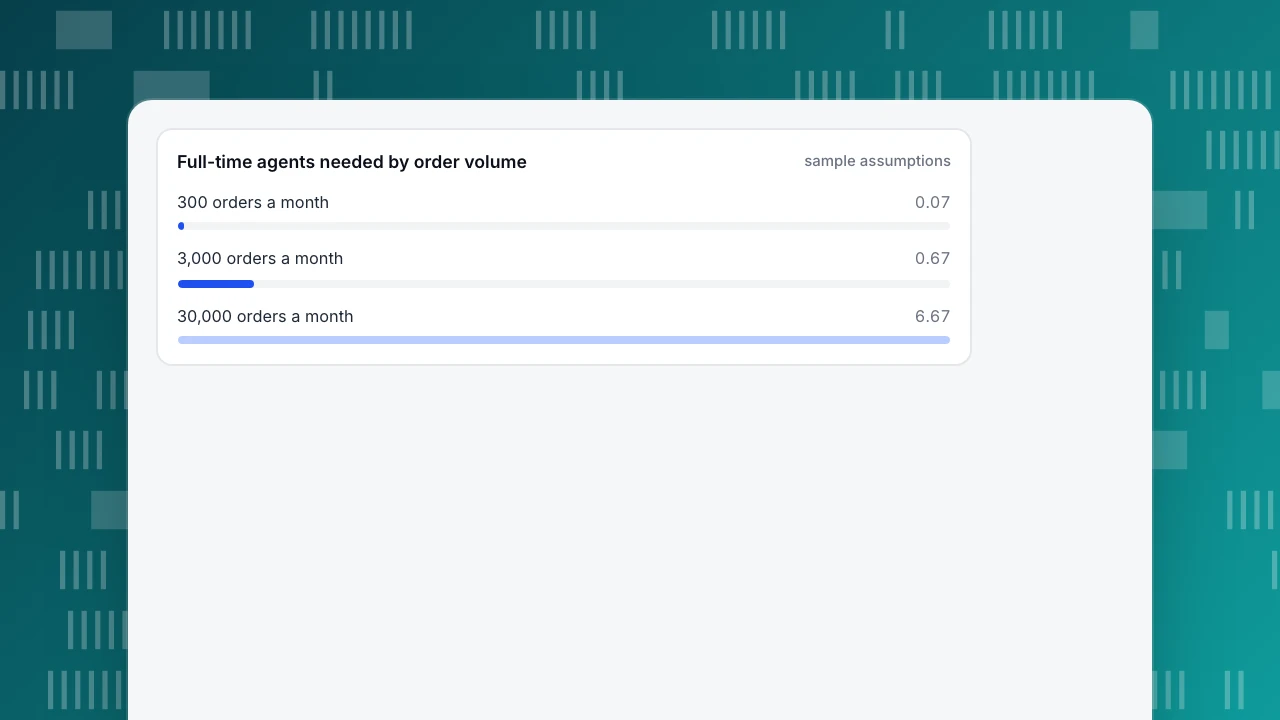
Convert orders into workload before comparing tools. Sample assumptions you should replace with your own: contacts per month equal 20% of orders (including pre-sale questions), 8 minutes of agent time per contact, and 120 productive agent hours a month per full-time person.
| Orders per month | Contacts (20%) | Agent hours (× 8 min) | Full-time agents (÷ 120 h) | With 30% handled by self-service |
|---|---|---|---|---|
| 300 | 60 | 8.0 | 0.07 | 0.05 |
| 3,000 | 600 | 80.0 | 0.67 | 0.47 |
| 30,000 | 6,000 | 800.0 | 6.67 | 4.67 |
Recompute one row: 3,000 × 20% = 600 contacts; 600 × 8 ÷ 60 = 80 hours; 80 ÷ 120 = 0.67 of a person; and with 30% answered by self-service, 0.67 × 0.7 = 0.47.
Staffing at a point in time depends on how contacts arrive. For the 30,000-order store with staffed hours of 8 hours × 22 days = 176 hours, 6,000 ÷ 176 = 34.1 contacts an hour, and 34.1 × 8 ÷ 60 = 4.55 agents' worth of work at once on average. If the busiest hours are twice the average, that is 9.1; with each agent handling two chats at a time, about 4.5 agents must be online at the peak. At 3,000 orders (600 contacts) the same 176 hours carry 600 ÷ 176 = 3.41 contacts an hour, or 0.45 agents' worth of work at once: one person with no queue most of the day. At 300 orders the work is a few hours a month, so the constraint is not people but answering quickly when it matters.
Full-time agents needed by order volume
sample assumptionsWhat should you require at each store size?
| Need | Under 500 orders a month | 500 to 5,000 | 5,000 to 50,000 |
|---|---|---|---|
| Where answers come from | One person, shared inbox or chat | Canned replies and a small knowledge base | Knowledge base maintained by an owner, reviewed monthly |
| Channels | Email plus chat on the store | Email, chat, offline messages when closed | Add social and phone only if volume proves a need |
| Routing | None | Round-robin or simple assignment | Rules by topic and language, transfers, roles |
| Automation | Canned replies | Knowledge-base answers for repeat questions | AI replies for the top questions, with a handover to a person |
| Order data in the tool | Open your store admin in another tab | Same, or a simple link | Order lookup connected, if you can afford the upkeep |
| Reporting | Count conversations by hand | Volume, first response, resolution rate | Per-agent workload, topic trends, knowledge-base hit rate |
| Hours and languages | Your hours, one language | Office hours with an offline form | Coverage plan; translation if you sell abroad |
| Proof to ask vendors | A free trial on your store | Reports on a real week of your traffic | A written rule for what automation may never do |
The one thing every column shares: the tool must hand a conversation to a human without making the shopper repeat themselves.
| Need | Under 500 orders | 5,000 to 50,000 orders |
|---|---|---|
| Answers | One person, shared inbox or chat | Knowledge base with an owner, reviewed monthly |
| Channels | Email plus chat on the store | Add social or phone only if volume proves it |
| Routing | None | Rules by topic and language, transfers, roles |
| Automation | Canned replies | AI replies for top questions, with handover |
| Reporting | Count by hand | Per-agent workload, topic trends, knowledge-base hit rate |
The 500 to 5,000 band sits between: canned replies, a small knowledge base, simple assignment and offline messages.
Which channels do you need?
Start from where your shoppers already contact you, not from a feature list. A store with most questions arriving on product pages needs chat first; one whose questions arrive after delivery needs a reliable email inbox first. Add a channel when you can show how many contacts it would carry, because every channel has to be staffed within its response expectation. Chat expects replies in minutes while the shopper is on the page; email can wait hours. Offline messages cover the gap when no one is online.
Where should automation stop?
Automate answers, not actions, unless the tool is connected to your order system and you have tested it. A short rule set:
- Let automation answer questions whose answer is in your own written policy: shipping times, return windows, sizing, payment methods.
- Keep a person on anything involving money (refunds, chargebacks), a damaged order, a complaint, or a question the knowledge base cannot answer. Automation that guesses is worse than a short wait.
- Make handover one click for the shopper ("talk to a person") and keep the transcript with them.
- Measure the miss rate. Review a sample of automated answers each week; remove or fix any that were wrong.
Which legal deadlines should your process respect?
In the US, the Federal Trade Commission's Mail, Internet or Telephone Order Merchandise Rule requires you to ship within the time you state, or within 30 days if you state none. If you cannot, you must tell the buyer and either get consent to the delay or cancel and refund; refunds are due within 7 working days for most payment methods (FTC business guidance). This is not legal advice, and other markets have their own rules, but the practical meaning is the same: delay notices and refunds are deadlines, not preferences, so support must be able to see which orders are late. Software that cannot show you those orders leaves the clock to memory.
Scale matters too. The US Census Bureau puts e-commerce at 17.9% of total retail sales in the third quarter of 2026, seasonally adjusted (Census Bureau), so online orders are a large part of retail, and each one can generate the contacts modelled above.
How does TapCub fit an ecommerce store's service stack?
TapCub covers the chat part of the stack, plus the analytics around it. It is not a multi-channel help desk, it does not connect to your order data, and its AI replies only generate text (they do not change orders or send email). In practice:
- Turn on chat. If the analytics script is already on the store, switch on chat in Live chat › Chat settings › Appearance; no site code change is needed. Set office hours in Chat settings › Office hours and offline messages in Chat settings › Offline messages, so a shopper outside hours can leave an email and a question.
- Prepare the answers from the table above. Put shipping, delivery and returns questions into Live chat › Knowledge base as questions and answers (matched answers are sent as written and do not use AI) and the longer policy pages as documents. Add Live chat › Canned replies for the cost, delivery and trust questions, inserted with
/. - Choose how AI is used. In Chat settings › AI assistant pick off, only when agents are all offline, or AI first. When the knowledge does not cover the question, the conversation goes to a person.
- Route. Use Live chat › Agents for online status, assignment and transfers, with role permissions.
- See the shopper. Each conversation shows the visitor's source, the pages from the last 2 days and past conversations, because chat and analytics use the same visitor ID.
- Measure. Live chat › Reports shows volume, resolution rate, first response and knowledge-base hit rate, and Conversion attribution compares goal conversion for visitors who chatted with those who did not (a raw comparison, not proof of cause).
Order status, refunds, email and social inboxes stay in your store platform or another tool.
FAQ
What is ecommerce customer service software?
It is software that receives shopper questions, routes them to staff, helps answer them quickly and reports what people ask. Depending on the product it covers chat, email, social messages, order lookup and automation.
What features should ecommerce customer service software have?
At minimum: a channel your shoppers use, canned replies or a knowledge base, a clean handover from automation to a person, and reporting on volume and first response. Add routing, roles and order lookup as volume grows.
How many support agents does an online store need?
Convert orders to workload. With the sample assumptions in this guide (20% of orders contact you, 8 minutes each, 120 productive hours a month), 3,000 orders a month is about 0.67 of a full-time agent and 30,000 is about 6.7.
Is live chat enough for an ecommerce store?
For a small store, often yes, with offline messages when you are closed. As volume and channels grow you will want email handling and order lookup in addition, which a chat tool alone does not give you.
Should I use AI for ecommerce customer service?
For answering repeat questions from your own policies, yes, with a clear handover to a person. Keep refunds, damage and complaints with people, and review a sample of automated answers every week.
Sources
- Baymard Institute: cart abandonment rate statistics, checked 2026-11-21
- FTC: Business guide to the Mail, Internet or Telephone Order Merchandise Rule, checked 2026-11-21
- U.S. Census Bureau: Quarterly Retail E-Commerce Sales, 3rd quarter 2026, checked 2026-11-21
Was this article helpful?
We use your answers to fix and expand this page.
Couldn’t send. Please try again in a minute.
Thanks for the feedback. We’ll use it to improve this page.You’ve already sent feedback on this page. Thanks.

Product Analyst
Focuses on event analysis, conversion funnels, and retention, using clear metric definitions and structured analysis to explain product performance.