Try it on your own data
Every report in this article is in the free plan. One snippet for web and apps, up to 10 sites.
Start freeDeferred deep linking is a link that takes a person to a specific app screen even when the app was not installed at the tap: the link goes to the store, and on first open the app reads the saved destination and routes there. On Android the carrier is the Play Install Referrer, available for 90 days. Below: the five-step flow, a sample funnel, why routing fails and how to measure it.
What you will learn
- The destination must survive four hops (click, store, install, first open); the first open is where most routes are lost
- Android's Play Install Referrer is available for 90 days and should be read once on first run; a click older than that cannot supply a destination
- Log the routing step as its own event, so the gap between first opens and routed first opens shows your failure rate
What is deferred deep linking?
Deferred deep linking is a link that still takes a person to a specific screen inside your app even though the app was not installed when they tapped it. The link first sends them to the app store; after they install and open the app for the first time, the app reads the destination that was saved with the click and routes them to it, instead of showing the generic home screen. The routing is "deferred" because it happens after the install, not at the click.
An ordinary deep link is the easy case. On Android, App Links are verified web URLs that open the matching content in your app, and for people who do not have the app, "users who don't have the app installed go to your website instead — no 404s, no errors" (Android Developers). That fallback sends them to the website, not the store, and it forgets the destination as soon as they leave. Deferred deep linking is what you add so the destination survives the install. Google's own definition for its app campaigns is the same idea: new users "land directly on a specific in-app page" after installing (Google Ads Help).
This guide explains the flow in four hops (click, install, first open, routed screen), what can break at each hop, and how to measure the result. If you need the basics first, start with deep link; for how installs are won in the first place, see mobile user acquisition.
What happens between the click and the routed screen?
Every deferred link passes through the same five moments. The table shows what happens, what commonly fails and who holds the data at that point.
| Step | What happens | What can fail | Who holds the data |
|---|---|---|---|
| 1. Click | A person taps a campaign link with a campaign id and a destination | Link opens in an in-app browser that hides the referrer; link expired | Your link service or the link itself |
| 2. Store | The app is not installed, so the link ends at the store listing | Person leaves the store; wrong store listing for the device | The store |
| 3. Install | The app downloads and installs | Install abandoned; install from a different store | The store |
| 4. First open | The app starts and asks for the saved context | Context missing, older than the retention window, or the app asks too late | Your app, the store or a matching service |
| 5. Route | The app maps the destination to a screen and opens it | Screen removed, login required, destination unknown | Your app |
The step that makes it "deferred" is step 4. On Android with Google Play, the carrier is the Play Install Referrer API. After the connection is made, it returns a referrer URL string, the time of the referrer click and the time the install began, and Google states that this information "is available for 90 days and doesn't change unless the app is reinstalled," so you should call it once, on the first run after install (Android Developers). On iOS there is no Play-style referrer, so carrying the destination across the install needs another mechanism, such as a matching service or your own server.
What should the link carry?
Keep the saved context small and free of personal data. Two values are enough: which campaign sent the person and which screen they were headed for. A referrer string for a promo might read:
utm_source=newsletter&utm_medium=email&utm_campaign=nov_promo&screen=promo_42
Three rules keep this safe and reliable:
- Use ids, not addresses. Never put an email address, name or phone number in a link.
- Use the same UTM names as the web. Google Analytics documents
utm_source,utm_mediumandutm_campaignas the standard campaign parameters, and notes that values are case sensitive and that missing parameters show as "(not set)" (Google Analytics Help). If the app and the website use identical names, one campaign reads as one row on both sides. - Map destinations to a short code.
screen=promo_42survives a redesign; a hard-coded screen path does not.
Worked example: one campaign from click to purchase
Sample data: 1,000 people click a campaign link on their phones. The app was not installed for any of them.
| Step | People | Step rate | Of all clicks |
|---|---|---|---|
| Link clicks | 1,000 | n/a | 100.0% |
| Store page opens | 930 | 93.0% | 93.0% |
| Install started | 410 | 44.1% | 41.0% |
| First opens | 330 | 80.5% | 33.0% |
| Routed to the promo screen | 285 | 86.4% | 28.5% |
| Purchases | 41 | 14.4% | 4.1% |
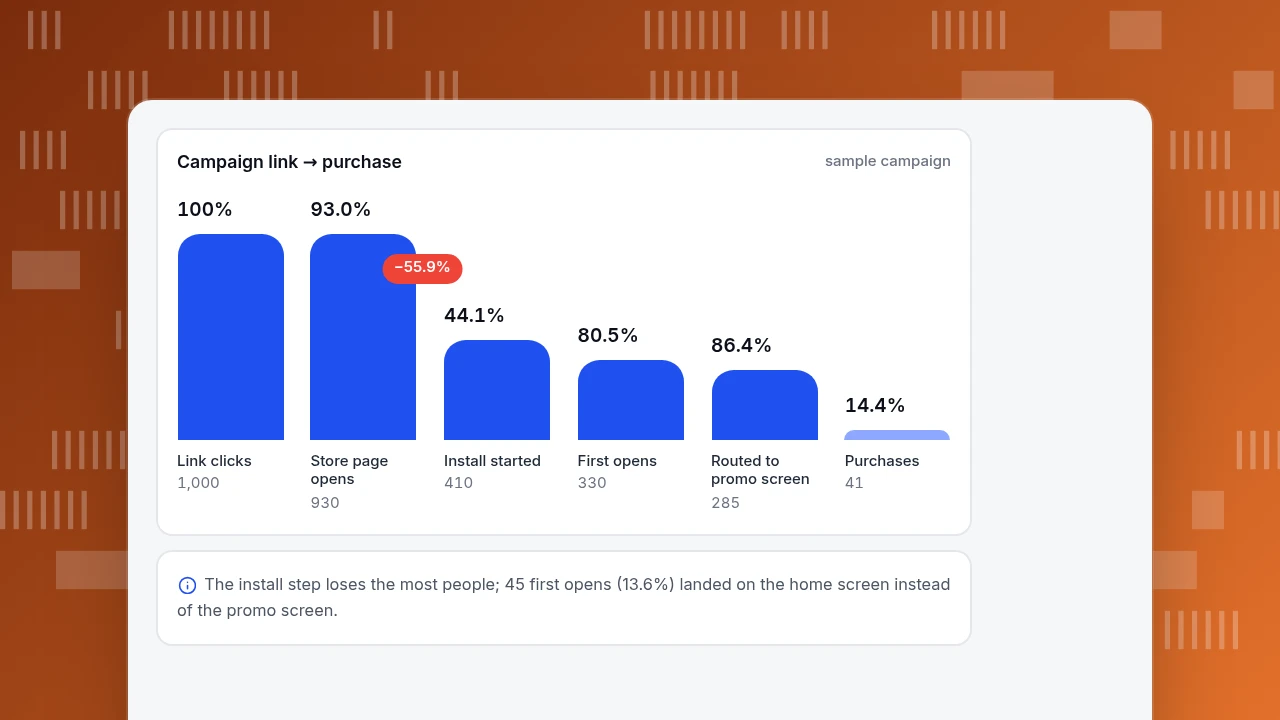
Check the arithmetic: 930 ÷ 1,000 = 93.0%; 410 ÷ 930 = 44.1%; 330 ÷ 410 = 80.5%; 285 ÷ 330 = 86.4%; 41 ÷ 285 = 14.4%. From 1,000 clicks only 330 reach a first open (33.0%), and 285 of those land on the promo screen.
Read two numbers from this table. First, the install step loses more people than any other (44.1% continue), and no deep link fixes that; it is a store listing and offer problem. Second, the routing step is the only one the link itself controls: 330 − 285 = 45 first opens (13.6%) landed on the generic home screen. Suppose 3 of those 45 bought. That is 6.7%, against 14.4% for the 285 who were routed. The two groups are not randomly assigned (people whose context was lost may differ in network or device), so do not claim the routing "doubles" conversion. Use the gap to decide whether fixing the 13.6% is worth an engineering week.
Timing is worth logging too. If the referrer click was at 09:12:00 and the install began at 09:31:45, the gap is 19.75 minutes. A click on 1 August followed by an install on 5 November is a 96-day gap, past the 90-day window, so the context would be gone and the person would land on the home screen whatever you built.
Campaign link → purchase
sample campaignLink clicks
1,000
Store page opens
930
Install started
410
First opens
330
Routed to promo screen
285
Purchases
41
Why does the routed screen sometimes not appear?
Check these in order. Each one removes people from the "routed" row.
- The context is missing at first open. The person installed from another source, reinstalled, or waited more than 90 days after the click.
- The app read it too late. Google recommends reading the Play Install Referrer once on the first run; if your code shows the home screen before it has read the referrer, the person never sees the destination.
- A login or consent screen comes first. Store the destination, finish the login or consent step, then route; do not drop it.
- The destination no longer exists. A campaign screen was retired. Send people to the closest live screen and log that you did.
- The link was opened somewhere you have not tested. Check that the in-app browser of each channel keeps the whole link.
- It is a reinstall. The referrer does not change unless the app is reinstalled, so a returning person's context may be an old campaign. Treat a returning device differently from a new install.
| Where it fails | Typical cause | First check |
|---|---|---|
| Context missing at first open | Different install source, reinstall or click older than 90 days | Log whether a referrer was found on first run |
| Routed to home instead of the screen | Referrer read after the home screen was shown | Read the referrer before the first screen renders |
| Login or consent first | Destination dropped during the login step | Store the destination and route after login |
| Screen not found | Campaign screen retired | Send to the nearest live screen and log it |
Based on Android's documented behaviour (90-day window, call once on first run); the checks are suggestions to adapt to your own routing code.
How do you test a deferred link before launch?
Test on a real device with a clean install, in this order:
- Uninstall the app and clear any saved state.
- Tap the campaign link from the channel it will really run in (email, SMS, social), not from a note.
- Install from the store listing, or from a test track if the app is not published.
- Open the app for the first time and confirm which screen appears.
- Repeat with the app installed, to confirm the ordinary deep link opens the same screen.
- Repeat with a login required, with airplane mode on at first open, and with a retired destination, and write down the screen each case reaches.
A link that works only when the app is already installed has passed one of the two tests.
How do you measure whether deferred linking works?
Measure five counts per campaign and compare each step with the one before it, as in the worked example: clicks, installs, first opens, routed first opens and the action you wanted (purchase, signup). Three habits make the numbers useful:
- Name the routing step as its own event, with the campaign and the screen as properties, so "first open" and "routed" can be told apart.
- Track the unrouted first opens too. The gap between first opens and routed first opens is the failure rate; it should be small and stable.
- Compare against your own baseline. There is no honest industry figure for the routed share, so watch for a fall of several points after an app release, which usually means a screen mapping broke.
How to measure deferred deep linking in TapCub
TapCub does not match clicks to installs and is not an attribution provider; it measures what people do after the app is open. For the example above:
- Count the install. The SDK sends
$app_installon first launch, and it is the event the attribution report reads (check the SDK overview for your platform to confirm it is sent automatically). - Send one event from your routing code. When the app routes a person to a screen, call the SDK's track function with an event such as
deferred_link_routedand properties for the campaign and screen. TapCub does not create this event for you. - Build the funnel. In All-platform analytics › Behavior › Behavior analysis, build a funnel from
$app_installtodeferred_link_routedto the purchase event, and read the step conversion and the median time between steps. - Compare routed and unrouted. Run the same funnel twice, once filtered to the campaign property and once for all installs, to see how many first opens never reached the routed step.
- Bring in installs by source if you use a matching provider. If you use a third-party attribution provider, forward its callback to the receive URL under App analytics › Configuration › Business settings, and App analytics › Quality & attribution › Attribution lists installs by media source and campaign.
TapCub does not store the link, route the person or match the click; your app and your matching service do that, and TapCub reports what followed.
FAQ
What is deferred deep linking?
It is a link that routes a person to a specific in-app screen even when the app was not installed at the tap. The destination is saved with the click, the person installs the app, and on first open the app reads it and opens that screen instead of the home screen.
What is the difference between a deep link and a deferred deep link?
A deep link opens specific app content when the app is already installed. A deferred deep link also works when it is not: the person goes through the store first, and the destination is applied after the first open. On Android, App Links send people without the app to your website, not to a saved screen.
Does deferred deep linking work on iOS?
It can, but the carrier is different. The Play Install Referrer is a Google Play feature, so on iOS the destination has to be carried by a matching service or your own server. Test the iOS path separately, because the failure points differ.
How long does the Android install referrer last?
Google states the information is available for 90 days and does not change unless the app is reinstalled, and recommends calling the API once on the first run after install. A click older than 90 days cannot supply a destination.
Can I track deferred deep links without an attribution tool?
You can count the steps that happen inside your app: install, first open, routed screen and the action you wanted. Without a matching service you cannot attribute an install to a specific click on someone else's platform, only to the destination your own app routed.
Sources
- Android Developers, "About Android App Links": verified web URLs open in the app; people without the app go to the website. https://developer.android.com/training/app-links/about (checked 2026-11-20)
- Android Developers, "Play Install Referrer Library": referrer URL, click and install-begin timestamps, available for 90 days, call once on first run. https://developer.android.com/google/play/installreferrer/library (checked 2026-11-20)
- Google Ads Help, "About deferred deep linking": new users land on a specific in-app page after install; App campaigns for installs only. https://support.google.com/google-ads/answer/16420273 (checked 2026-11-20)
- Google Analytics Help, "Collect campaign data with custom URLs": UTM parameters, case sensitivity, "(not set)". https://support.google.com/analytics/answer/10917952 (checked 2026-11-20)
Was this article helpful?
We use your answers to fix and expand this page.
Couldn’t send. Please try again in a minute.
Thanks for the feedback. We’ll use it to improve this page.You’ve already sent feedback on this page. Thanks.

Technical Engineer
Focuses on tracking code, SDKs, and API integrations, with practical guidance on implementation checks and troubleshooting.