Try it on your own data
Every report in this article is in the free plan. One snippet for web and apps, up to 10 sites.
Start freeCustomer engagement automation is a rule that watches for a customer action and sends a message or opens a conversation without a person pressing a button. Build each rule with a trigger, an audience, a message, a limit and a measure. In the sample, the pricing-page rule reaches 2,800 people a month; the trial and cart email rules reach dozens.
What you will learn
- Every rule needs a trigger, audience, message, limit and measure; most failed automations skip the last two
- Pick rules by audience size first: the sample pricing invite reaches 2,800 a month, the email rules 600 and 562
- A +10% lift on 2,800 monthly invites would take about 18 months to prove, so judge small rules on response and cost
What customer engagement automation is, and where it stops
Customer engagement automation is a rule that watches for a customer action and, when it fires, sends a message or opens a conversation without a person pressing a button. It reacts to behaviour: someone stays on the pricing page, a trial user goes quiet, a cart is left behind. That is the difference from a scheduled campaign, which goes to a list on a date.
A good rule has five parts: a trigger (what the person did), an audience (who is eligible), a message (what they get), a limit (how often, through which channel) and a measure (how you will know it worked). Most failed automations skip the last two. This article builds three rules with all five parts, using sample numbers you can replace with your own.
What automation does not do is judge. A rule fires on a pattern, so it will fire for the person who was only looking for the office address. Keep the message cheap to ignore. How the on-site version works in depth is in proactive chat invites, and how rules across channels fit together is in omnichannel engagement.
The three rules side by side
Sample data for one month. Rates marked "benchmark" come from public sources named in the Sources section; everything else is an assumption to replace.
| Rule 1: pricing page | Rule 2: trial day 3 | Rule 3: abandoned cart | |
|---|---|---|---|
| Trigger | 20 seconds on a pricing path | Signed up 3 days ago, key action not done | Items in cart, no order after a set time |
| Audience (month) | 8,000 pricing visitors, 35% reach 20 s = 2,800 | 1,000 trials, 60% not activated = 600 | 2,000 carts, 70.22% abandoned = 1,404 |
| Channel | On-site chat invite | Email, only if the address is known (40% = 562) | |
| Response rate | Assumed 12% open, 40% of those reply | 2.62% click (Mailchimp, all users) | 1.74% click (Mailchimp, ecommerce) |
| Reached outcome | 336 open, 134 chats | 15.7 clicks | 9.8 clicks |
| Expected extra outcomes | +16.8 sign-ups (+10% on a 6% base) | +4.7 activations (30% of clicks) | +2.0 orders (20% of clicks) |
The cart abandonment rate of 70.22% is Baymard Institute's average across 50 studies. The Mailchimp click rates describe email campaigns in general, not triggered messages specifically, so treat them as a cautious floor. Triggered messages usually do better, but that is exactly why you measure your own.
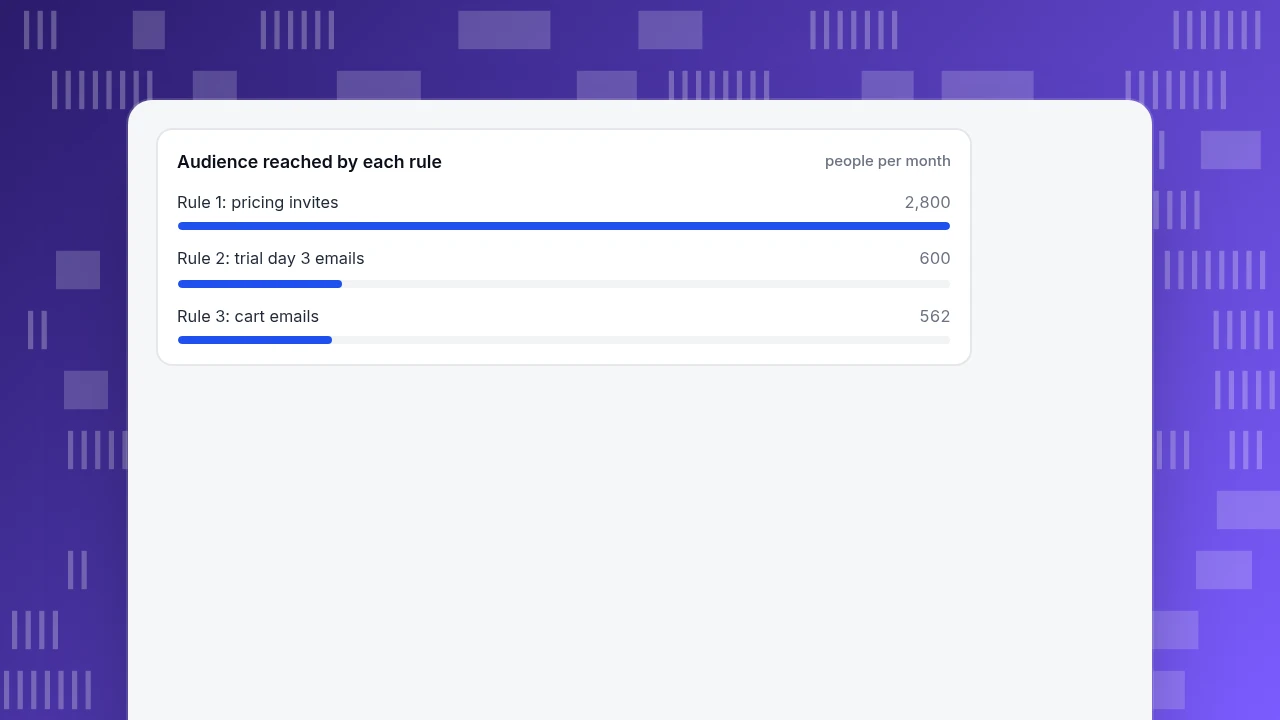
The table shows something else: the second and third rules touch dozens of people a month at these volumes, the first touches thousands. Pick rules by audience size first.
Audience reached by each rule
people per month| Rule | Pricing page | Trial day 3 | Abandoned cart |
|---|---|---|---|
| Trigger | 20 seconds on pricing path | 3 days after sign-up, key action not done | Cart with no order after a set time |
| Audience per month | 2,800 | 600 | 562 with a known email |
| Channel | On-site chat invite | ||
| Expected extra outcomes | +16.8 sign-ups | +4.7 activations | +2.0 orders |
Sample data. Email response uses Mailchimp click rates (2.62% and 1.74%) as a cautious floor; cart abandonment 70.22% is Baymard's average.
Rule 1: a chat invite when someone stays on the pricing page
Trigger: the visitor stays on any path that contains /pricing for 20 seconds. Audience: everyone, once. Message: one line from a named agent that offers a specific help, such as "Comparing plans? Tell me your team size and I can point you to the right one." Limit: once per visitor, one rule per page.
Sample arithmetic: 8,000 pricing visitors × 35% staying 20 seconds = 2,800 invites. At an assumed 12% open rate that is 336 opens, and at 40% replying, 134 conversations. If visitors who see the invite convert at 6.0% and the invite adds a relative 10%, they convert at 6.6%: 2,800 × 0.06 × 0.10 = 16.8 extra sign-ups a month.
Can you prove it? A test of 6.0% against 6.6% at 5% significance and 80% power needs 25,740 visitors per version, 51,480 in total. At 2,800 exposed visitors a month, that is about 18 months. A +10% lift on a few thousand visitors is not provable in a quarter. Accept that and judge the rule on the things you can measure: whether people open the invite, whether they reply, and whether the conversations are about buying.
Rule 2: a message on trial day 3
Trigger: three days after sign-up, the user has not done the one action that predicts retention (the "activation" event). Audience: only the users who have not done it. Message: one email that offers the next step for that action, not a feature tour. Limit: one message, then stop; a second message is a separate rule with its own measure.
Sample arithmetic: 1,000 trials × 60% not activated = 600 people. At the 2.62% Mailchimp all-users click rate that is 15.7 clicks, and if 30% of clickers then activate, 4.7 extra activations. The honest takeaway is that an email rule at this size helps a handful of people a month. If your real triggered click rate is 10% rather than 2.62%, the same rule returns about 18 activations; measure before you scale.
Before you send anything commercial, check the rules. The US CAN-SPAM Act requires that opt-out requests are honoured within 10 business days, that the opt-out mechanism works for at least 30 days after sending, and that each violating email can cost up to $53,088 under the FTC's current figure. Whether a trial-onboarding email counts as commercial is a legal question for your counsel; the point here is to build the unsubscribe path first.
Rule 3: an abandoned cart message
Trigger: the cart has items and no order after a set time, for a shopper whose email you already hold. Audience: people who gave an email, not everyone who abandoned. Message: the cart contents and the delivery date, without a discount first. Limit: one message, sent once.
Sample arithmetic: 2,000 carts × 70.22% abandoned = 1,404. If 40% gave an email, that is 562 people; at a 1.74% click rate, 9.8 clicks; if 20% of clickers buy, 2.0 extra orders. At $60 an order that is about $120 a month. Compare that with the effort of building the sequence. If checkout loses people for reasons an email cannot fix, such as surprise costs, fix the checkout first; see how to reduce checkout abandonment.
How to track expected lift without fooling yourself
Write the expected result down before launch, then check three layers in order:
- Reach. Did the rule fire for the audience you sized? If 2,800 invites were expected and 400 appeared, the trigger is wrong.
- Response. Opens, replies or clicks per message. This is where you have enough data to judge within weeks.
- Outcome. Sign-ups, activations or orders among people who got the message, compared with a fair baseline.
For the outcome, the fair baseline is the hard part. In order of strength: a holdout (a random share of eligible people who are not messaged, which your sending tool must support), a parallel comparison (two similar pages, only one with the rule), and a before and after with a launch marker, which is the weakest because anything else that changed in the same weeks is mixed in. Whichever you use, put the expected number beside the actual one every month, and set a stop rule: "if response is under X% after Y weeks, switch it off."
Limits worth setting from day one
- Frequency: one automated message per person per rule, and one automated message per person per week across rules.
- Priority: when two rules match, only one should fire. TapCub's invite rules do this by priority.
- Quiet exits: stop the sequence when the person converts, replies or asks for a human.
- Human reach: every automated message should make it easy to reach a person, and a conversation that starts from an invite must land with someone who can answer.
- Unsubscribe first: build the opt-out before the message.
Running the pricing-page rule in TapCub
Use rule 1 as the scenario: 8,000 pricing visitors a month, you want to know whether the invite is worth keeping.
- Size the audience. Open Web analytics › Pages, find your pricing page and read the visitors for the last 30 days. That is the 8,000.
- Create the invite. In Live chat › Chat settings › Proactive invites, add a rule that matches paths containing
/pricing, with 20 seconds of dwell time (the allowed range is 3 to 600 seconds) and a message of at most 300 characters. If more than one rule matches a page, only the highest priority fires, and by default each visitor is invited once. The number of rules depends on your plan (Free 1, Pro 10; the account page shows the limit in force). - Know what the invite is. It does not create a conversation until the visitor replies. Only then does it appear in Live chat › Inbox, with the visitor's source, current page and recent browsing next to it.
- Read response. The rule list records impressions, open rate and reply rate, so you can retire lines nobody answers.
- Read outcome, with care. Live chat › Reports › Conversion attribution compares visitors who chatted with those who did not, and shows the relative lift as chatted rate ÷ no-chat rate − 1. People who choose to chat are self-selected, so treat the lift as a signal, not proof. With fewer than 30 chatters, it warns that the sample is too small.
- Mark the launch. Add a note in Configuration › Annotations so charts show when the rule went live.
Rules 2 and 3 live outside TapCub. TapCub does not send email or in-app messages and does not run a holdout for you. It can size the audience (rule-based segments in All-platform analytics › Users › Segments & tags for people who did or did not do an action) and measure what the people who got your message did next.
FAQ
What is customer engagement automation?
It is a rule that reacts to what a customer did, such as staying on a page, going quiet after sign-up or leaving a cart, and sends a message or opens a conversation automatically. Each rule needs a trigger, an audience, a message, a frequency limit and a measure.
What are examples of customer engagement automation?
A chat invite after 20 seconds on a pricing page, a day-3 email to trial users who have not done the key action, and a cart reminder to shoppers whose email you already hold. The article sizes all three with sample numbers.
How do I measure whether an automated message worked?
Check reach, then response, then outcome. For outcome, use a holdout if your tool supports one, otherwise a parallel comparison, and a before and after with a launch marker only as the weakest option. Write the expected result before launch.
How much lift should I expect?
Do not assume a number from someone else's case study. In the sample, a +10% relative lift on a 6% base on 2,800 monthly invites would take about 18 months to prove, so judge small rules on response and cost.
Does TapCub send automated emails?
No. TapCub sends on-site chat invites and shows what visitors do afterwards. For email rules, size the audience with segments and send from your email tool.
Sources
- Baymard Institute: cart abandonment rate statistics, 70.22% average of 50 studies, checked 2026-11-20
- Mailchimp: email marketing benchmarks, click rates 2.62% and 1.74%, data last updated December 2023, checked 2026-11-20
- FTC: CAN-SPAM Act compliance guide for business, 10 business days, 30 days, $53,088 per email, checked 2026-11-20
Was this article helpful?
We use your answers to fix and expand this page.
Couldn’t send. Please try again in a minute.
Thanks for the feedback. We’ll use it to improve this page.You’ve already sent feedback on this page. Thanks.

Product Analyst
Focuses on event analysis, conversion funnels, and retention, using clear metric definitions and structured analysis to explain product performance.