Try it on your own data
Every report in this article is in the free plan. One snippet for web and apps, up to 10 sites.
Start freeA CDN cache keeps copies of your files on servers near visitors, so a request answered from the copy (a hit) never reaches your origin and the first byte arrives sooner. Check it with the cache status header, such as cf-cache-status, and the Age header, and calculate your hit ratio as hits divided by requests. Look at P75, not the average.
What you will learn
- HIT, MISS, EXPIRED, BYPASS and DYNAMIC have different fixes; read cf-cache-status and Age before you change anything
- Hit ratio = HIT ÷ requests (72.0% in the sample), or 82.8% over cacheable requests only; HTML and JSON are not cached by default
- The mean TTFB fell 63% at 72% hits, but P75 stayed 620 ms until the hit ratio passed 75%, then it dropped to 90 ms
What a CDN cache does
A CDN cache is a copy of your files kept on servers close to your visitors. When a visitor asks for a file, the nearest CDN server checks whether it already holds a fresh copy. If it does (a cache hit), it answers itself and your origin server is never contacted. If it does not (a miss), it fetches the file from your origin, passes it on, and keeps a copy for the next visitor.
The benefit is time to first byte. A hit is answered from a nearby machine instead of crossing the world to your origin, so the wait for the first byte of the response drops. For the full set of timings, see our guide to website performance metrics. A CDN cache also takes load off the origin, because every hit is a request your server did not have to serve.
Whether a file is cached is decided by the CDN's defaults and by the headers your origin sends. This article uses Cloudflare's documentation because it publishes exact status values, but the idea is the same everywhere: other CDNs use their own header names, so read your provider's documentation for the matching ones.
What gets cached by default
Cloudflare's documentation states that it caches by file extension, not by content type, and that it does not cache HTML or JSON by default. The extensions it caches include images (JPG, PNG, GIF, WEBP, SVG), static assets (CSS, JS, WOFF2), documents (PDF), media (MP4, MP3) and archives. The most common surprise follows directly: your page's HTML is not cached unless you add a rule for it.
Cloudflare also lists what stops a cacheable file being cached:
- The origin sends
Cache-Controlofprivate,no-store,no-cacheormax-age=0. - The origin response sets a cookie (
Set-Cookie). - The request method is not GET.
A file is cached when the origin sends public with a max-age greater than 0, or an Expires date in the future. When the origin sends no Cache-Control and no Expires, the default edge lifetime is 120 minutes for 200, 206 and 301 responses, 20 minutes for 302 and 303, and 3 minutes for 404 and 410.
How to read the cache status header
Every response from a Cloudflare edge includes a cf-cache-status header that says what happened to this request. Its documentation defines these values.
| Status | Meaning | Is the origin involved? |
|---|---|---|
| HIT | The file was found in cache | No |
| MISS | It could be cached but was not in cache, so it came from the origin | Yes |
| EXPIRED | A cached copy existed but had expired, so the origin served the response | Yes |
| STALE | An expired copy was served because the origin could not be reached | Tried, but unreachable |
| BYPASS | The request was eligible for caching, but the origin response was not cacheable | Yes |
| REVALIDATED | The origin confirmed through a conditional request that the cached copy was unchanged; the request waited for the origin | Yes (short) |
| UPDATING | An expired copy was served while the origin refreshed it in the background | No for this request |
| DYNAMIC | The request was not eligible for caching, so it went to the origin without a cache lookup | Yes |
The Age header answers a different question: how old is the cached copy? Cloudflare returns Age when it serves from cache (HIT, STALE or UPDATING), giving the seconds since the asset was admitted or last revalidated. It does not set Age on MISS, EXPIRED, REVALIDATED, DYNAMIC or BYPASS. The standard definition of Age in RFC 9111 is the sender's estimate of the time since the response was generated or successfully validated at the origin server.
| cf-cache-status | Meaning | Origin involved? |
|---|---|---|
| HIT | Found in the CDN cache | No |
| MISS | Cacheable but not in cache; fetched from the origin | Yes |
| EXPIRED | Cached copy had expired; origin responded | Yes |
| BYPASS | Eligible, but the origin response was not cacheable | Yes |
| REVALIDATED | Origin confirmed the copy was unchanged | Yes (short) |
| DYNAMIC | Not eligible for caching; sent straight to the origin | Yes |
From Cloudflare's cache response documentation (STALE and UPDATING are described in the article). Other CDNs use different header names.
A header walkthrough you can repeat
Run curl -sI https://example.com/assets/app.js twice, a few seconds apart, and read the cache lines. Sample output:
First request:
HTTP/2 200
cache-control: public, max-age=3600
cf-cache-status: MISS
Second request, 14 seconds later:
HTTP/2 200
cache-control: public, max-age=3600
cf-cache-status: HIT
age: 14
The first request is a MISS with no Age: the CDN had no copy and went to the origin. The second is a HIT with Age: 14, the copy being 14 seconds old. With max-age=3600 the copy stays fresh for 3,600 seconds, so a request at an Age of 3,601 would show EXPIRED or REVALIDATED instead.
Now two failures:
/assets/app.js when the origin also sets a cookie:
cache-control: public, max-age=3600
set-cookie: session=...
cf-cache-status: BYPASS
/pricing (an HTML page):
cache-control: public, max-age=3600
cf-cache-status: DYNAMIC
The script is BYPASS: the extension is eligible for caching, but the origin response sets a cookie, so it is not cached. The HTML page is DYNAMIC: HTML is not cached by default, so the request never looked in the cache at all. Different statuses have different fixes, which is why you read the status before you change anything.
How to calculate your hit ratio
The cache hit ratio is the share of requests the CDN answered without going to your origin.
Hit ratio = HIT ÷ total requests
Sample data: a day of 10,000 requests shows HIT 7,200, MISS 600, EXPIRED 300, REVALIDATED 150, UPDATING 50, BYPASS 400 and DYNAMIC 1,300.
- Hit ratio over all requests = 7,200 ÷ 10,000 = 72.0%.
- DYNAMIC requests were never eligible, so a second figure removes them: 7,200 ÷ (10,000 − 1,300) = 82.8%. This shows how well the cacheable part of the site is cached.
- UPDATING is also served from the edge, so the share of requests that did not wait for the origin is (7,200 + 50) ÷ 10,000 = 72.5%.
Both numbers are useful, because they point at different problems. The 72.0% shows how much of all your traffic is cached; the 82.8% shows how well the cacheable files are cached. A low second number means the headers or TTLs are wrong. A low first number with a good second number means most of your traffic is HTML or API responses that were never meant to be cached.
Before and after: what a better hit ratio does to load time
Sample data: assume a response from the CDN takes 90 ms to the first byte, one from the origin takes 620 ms, and a REVALIDATED response takes 380 ms because it waits for a short conditional request. The same 10,000 requests give three setups.
| Setup | Hit ratio | Mean TTFB | P75 TTFB |
|---|---|---|---|
| No CDN (every request goes to the origin) | 0% | 620 ms | 620 ms |
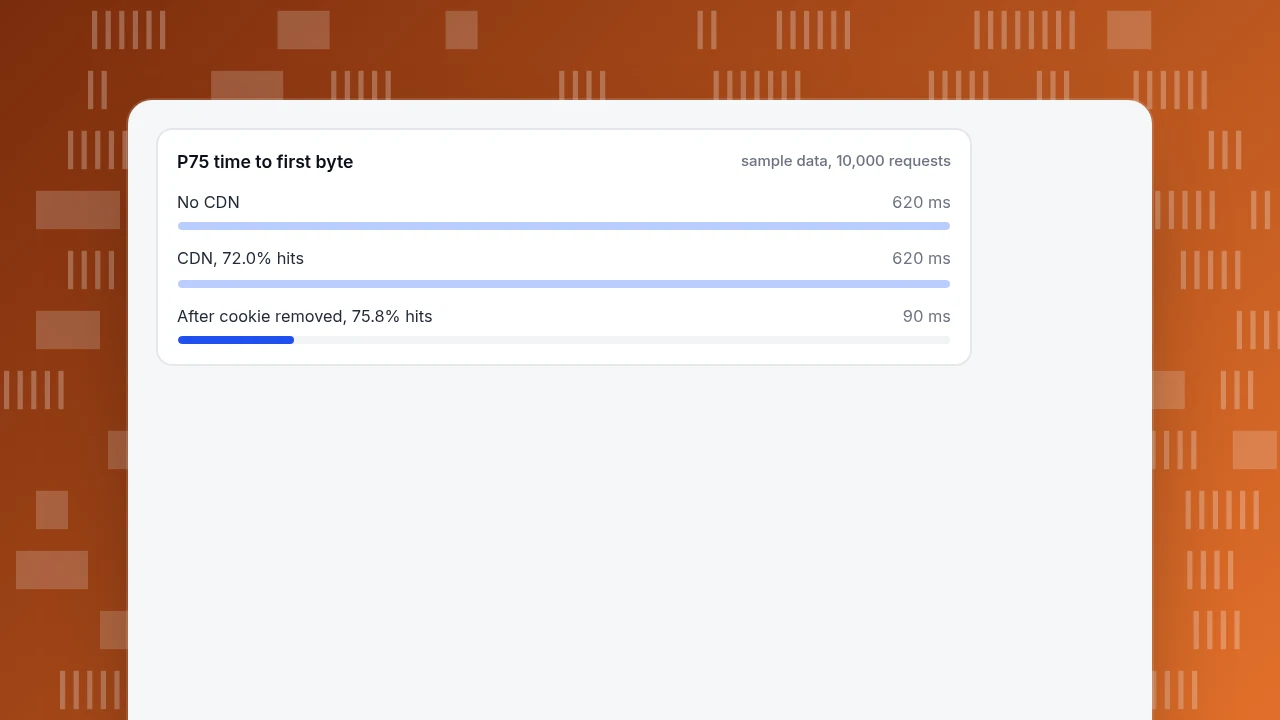
| CDN with the statuses above | 72.0% | 232 ms | 620 ms |
| After the cookie that caused 400 BYPASS requests is removed from static files | 75.8% | 212 ms | 90 ms |
The mean falls from 620 to 232 ms, a 63% drop, but the 75th percentile does not move until 75% of requests are fast. With 72.5% of requests answered from the edge, the slowest quarter still reflects the origin, so P75 stays at 620 ms. When the cookie is removed from 400 static-file responses, 380 of them become hits and 20 are misses (the first request for each file). Now 76.3% of requests are fast (7,580 hits plus 50 updating, over 10,000), P75 drops to 90 ms, and the mean barely changes (232 to 212 ms, 9%).
Two lessons. First, look at P75, not just the average: the slowest quarter of visits only improves once the hit ratio is high enough to cover them. Second, web.dev rates a time to first byte of 800 ms or less as good, so 620 ms is already in the good range; the gain shows up in the visitor's wait and the metrics that follow it, not in a changed rating.
P75 time to first byte
sample data, 10,000 requestsWhy requests miss, and what to change
| Status you see | Likely cause | What to change |
|---|---|---|
| DYNAMIC on HTML | HTML is not cached by default | Add a rule to cache pages that are the same for everyone, or accept it |
| BYPASS on a static file | The origin sends private, no-store, no-cache, max-age=0 or a cookie | Remove the header or cookie from static files |
| MISS repeatedly on one file | The lifetime is shorter than the gap between visits, or the file was purged | Lengthen the max-age |
| EXPIRED often | The file's lifetime is short | Use a longer max-age; add stale-while-revalidate |
| REVALIDATED often | Fresh lifetime ended, so each request waits for the origin | Longer lifetime or immutable on versioned files |
Large images are the other common cause of slow loads even when caching works; see how to optimize images for the web. Do not cache pages that differ per visitor. A cached account page served to someone else is worse than a slow page, so personal pages should send private or no-store.
How to see the effect in TapCub
The CDN headers tell you what the cache did. TapCub tells you what visitors experienced, which is what you are trying to improve. TapCub does not read your CDN's headers or show a hit ratio; it measures real-visitor load times.

- Take the baseline. In Monitoring › Performance, set the cards to P75 and note time to first byte and largest contentful paint for the two weeks before the change. TapCub rates TTFB good at 800 ms or less and poor above 1.8 seconds, and LCP good at 2.5 seconds or less and poor above 4 seconds.
- Mark the change. Add the date of the CDN rule change in Configuration › Annotations, so the date shows on the charts.
- Break the load down. The loading breakdown splits one load into backend (time to first byte), network transfer and frontend render. A cache hit shrinks the backend part; if the frontend part is large, the CDN is not your bottleneck.
- Find who gains. Break down by country or device. Visitors far from your origin usually gain most from a CDN, so a distant country that improves much more than the others is a sign the cache is working.
- Compare equal periods. The page has no previous-period comparison, so note the two-week values before and after. If P75 TTFB moves as it does in the example (620 to 90 ms), the hit ratio crossed the 75% line.
FAQ
What is a CDN cache?
A CDN cache is a copy of your files stored on servers near your visitors. A request answered from that copy (a hit) never reaches your origin, so the first byte arrives sooner and your server does less work. A request the CDN cannot answer (a miss) goes to the origin and the response is stored for next time.
How do I check whether a file is served from the CDN cache?
Run curl -sI on the file's URL and read the cache status header; on Cloudflare it is cf-cache-status. HIT means it came from cache. MISS means it was fetched from the origin and stored. Repeat the request: the second should be a HIT, with an Age header showing how many seconds the copy has been cached.
What is a good CDN cache hit ratio?
It depends on how much of your traffic is cacheable, so compare with your own baseline. Measure two figures: HIT over all requests, and HIT over requests that were eligible for caching. If the second is high and the first low, most of your traffic is HTML or API responses that are not meant to be cached.
Why does Cloudflare show DYNAMIC or BYPASS?
DYNAMIC means the request was not eligible for caching, which is the default for HTML and JSON, so it went straight to the origin. BYPASS means the file type was eligible but the origin's response was not cacheable, for example because it sent private, no-store or a cookie. Fix the origin headers for BYPASS; add a cache rule for DYNAMIC.
Does a CDN cache speed up a site by itself?
Only for requests that hit. Static files usually hit once the headers are right, and that shortens the wait for the first byte. The slowest quarter of visitors improves only when the hit ratio is high enough that those requests are answered from the edge too, so check P75, not just the average.
Sources
- Cloudflare, Cache responses (cf-cache-status and Age). Status definitions; when
Ageis set. Checked 2026-11-20. - Cloudflare, Default cache behavior. Caching by extension; HTML and JSON not cached; origin headers that stop caching; default edge TTLs (120 minutes for 200). Checked 2026-11-20.
- web.dev, Time to First Byte (TTFB). TTFB thresholds: good at 800 ms or less, poor above 1,800 ms. Checked 2026-11-20.
- IETF, RFC 9111: HTTP Caching, June 2022, section 5.1. Definition of
Age. Checked 2026-11-20.
Was this article helpful?
We use your answers to fix and expand this page.
Couldn’t send. Please try again in a minute.
Thanks for the feedback. We’ll use it to improve this page.You’ve already sent feedback on this page. Thanks.

Technical Engineer
Focuses on tracking code, SDKs, and API integrations, with practical guidance on implementation checks and troubleshooting.