Try it on your own data
Every report in this article is in the free plan. One snippet for web and apps, up to 10 sites.
Start freeAgent analytics means measuring AI agents separately from people. Sort requests into four classes (training crawlers, search crawlers, user-triggered fetchers and browser-driving agents), match published user-agent tokens, verify them against the operator's IP list or DNS, and flag the rest by behaviour. In the sample day below, agents were 29.4% of sessions and made the human conversion rate look 29% lower.
What you will learn
- Four kinds of agent traffic need four treatments: training and search crawlers honour robots.txt, user-triggered fetchers generally do not, and browser agents have no standard
- A user-agent name is a claim: verify against published IP lists or reverse DNS and record verified, suspected or unknown
- Counting agents as visitors turned a 3.00% human conversion rate into 2.12% in our sample day
What counts as AI agent traffic?
"AI agent traffic" is four different things that need four different treatments. Lumping them together is the most common reason agent analytics is confusing.
| Class | What it does | Example tokens | Does robots.txt apply? | Is it a human visit? |
|---|---|---|---|---|
| Training crawler | Collects pages that may be used to train models | GPTBot, ClaudeBot | Yes, vendors say they honour it | No |
| Search or answer crawler | Builds the index an AI search feature answers from | OAI-SearchBot, PerplexityBot, Claude-SearchBot | Yes | No |
| User-triggered fetcher | Opens one page because a person asked an assistant a question | ChatGPT-User, Claude-User, Perplexity-User | Generally no, because a user started it | No, but a person is behind it |
| Browser-driving agent | Operates a full browser to click through a site for a person or a script | Often a normal Chrome user agent | No standard | Looks like one, is not |
The first three usually announce themselves in the user agent. The fourth does not, which is why you also need behaviour signals. This guide covers how to separate all four from human sessions, what that does to your conversion numbers, and how to measure what the agents do.
Which user agents declare themselves, and what do the vendors say?
The operators of the large AI assistants publish their crawler names. The facts below were read from the vendors' own documentation on 2026-11-20; version numbers in the strings change, so match on the token, not the full string.
| Token | Operator's stated purpose | robots.txt |
|---|---|---|
| GPTBot | Crawls content that may be used to train generative AI foundation models | Applies |
| OAI-SearchBot | Surfaces sites in ChatGPT's search features; not used for training | Applies; changes can take about 24 hours |
| ChatGPT-User | Visits a page when a user asks, or for a Custom GPT action | "robots.txt rules may not apply" because a user initiated it |
| ClaudeBot | Collects web content that could contribute to model training | Honoured; supports a Crawl-delay directive |
| Claude-User | Retrieves pages when a Claude user's question needs them | Honoured per vendor |
| Claude-SearchBot | Crawls to improve the relevance of search responses | Honoured per vendor |
| PerplexityBot | Surfaces and links sites in search results; "not used to crawl content for AI foundation models" | Recommended to allow |
| Perplexity-User | Fetches a page when a user's question needs it | "generally ignores robots.txt rules" |
Sources: OpenAI, Anthropic, Perplexity.
Two consequences follow. First, a robots.txt rule that blocks the training crawler does not stop the user-triggered fetcher from the same operator, because the vendors say those requests are not governed by it. Second, blocking the search crawler can remove you from that assistant's answers, since the vendors describe it as the index builder. Decide per class, not per brand. For the underlying field, see user agent and AI crawler.
| Token | Stated purpose | robots.txt |
|---|---|---|
| GPTBot | Training data collection | Applies |
| OAI-SearchBot | Search features, not training | Applies |
| ChatGPT-User | Fetch when a user asks | May not apply |
| ClaudeBot | Training data collection | Honoured |
| Claude-User | Fetch when a user asks | Honoured per vendor |
| PerplexityBot | Search results, not training | Allow recommended |
| Perplexity-User | Fetch when a user asks | Generally ignored |
Read from each operator's documentation on 2026-11-20. Match the token, not the version in the string.
How do you tell a real declared agent from a fake one?
A user-agent string is just text the client chooses to send. Anyone can type "GPTBot" into a script, so a declared name is a claim, not proof. The robots.txt standard says plainly that its rules are "not a form of access authorization" and that crawlers are only "requested to honor" them (RFC 9309).
Verify before you count or block, using what the operator publishes:
- Check the published IP list. Perplexity publishes the ranges for both of its agents in JSON files and tells site owners to match each bot's user agent with its own ranges. Anthropic says requests from addresses on its published list at claude.com/crawling/bots.json come from Anthropic. If a request claims the token but comes from outside the list, treat it as unverified.
- Use reverse and forward DNS when the operator documents it. Google's procedure for Googlebot is: reverse-DNS the IP, check that the domain is googlebot.com, google.com or googleusercontent.com, forward-DNS that name, and confirm it returns the original IP (Google).
- Record the result as a status, not a yes or no. Use three: verified, suspected, unknown. "Unknown" is not the same as "fake": most operators do not publish a reverse-DNS pattern.
Do not block on IP alone without reading the operator's advice. Anthropic, for example, says blocking IPs may not give a persistent opt-out because it stops the bot from reading robots.txt.
How do you catch agents that look like browsers?
Some agents drive a real browser and send an ordinary browser user agent. You cannot find them by name. You can find many of them by what a session does, because human sessions and scripted sessions leave different shapes in a log.
| Signal | Typical human session | Typical scripted session |
|---|---|---|
| Static assets (CSS, JS, images) per page | Many | Few or none when pages are fetched as text |
| Pages per minute | 1–3, with pauses | Dozens, evenly spaced |
| Fetches robots.txt first | Never | Sometimes, for declared crawlers |
| Runs page JavaScript | Yes | Often no |
| Referrer | Search, social, direct or an assistant | None |
| Path pattern | Wanders and returns to earlier pages | Sweeps sitemap order or a numeric sequence |
A rule that is easy to apply and easy to explain: flag a session as suspected agent if it requests at least 30 pages in 2 minutes with zero static-asset requests. Review the matches before acting. Legitimate exceptions exist: link-prefetch, a screen reader that loads text only, an uptime check you set up yourself, or a corporate proxy that hides many people behind one address.
Sample sessions (sample data) show how the rule behaves:
| Session | Pages in 2 min | Static assets | Declared token | Class |
|---|---|---|---|---|
| S1 | 3 | 41 | none | Human |
| S2 | 52 | 0 | GPTBot | Declared training crawler |
| S3 | 1 | 0 | ChatGPT-User | Declared user-triggered fetch |
| S4 | 44 | 0 | none (Chrome string) | Suspected agent |
| S5 | 5 | 0 | none | Human (prefetch or screen reader; below the 30-page threshold) |
S5 shows why the threshold matters: a few text-only requests are not enough to call something an agent.
What do agents do to your numbers? A worked example
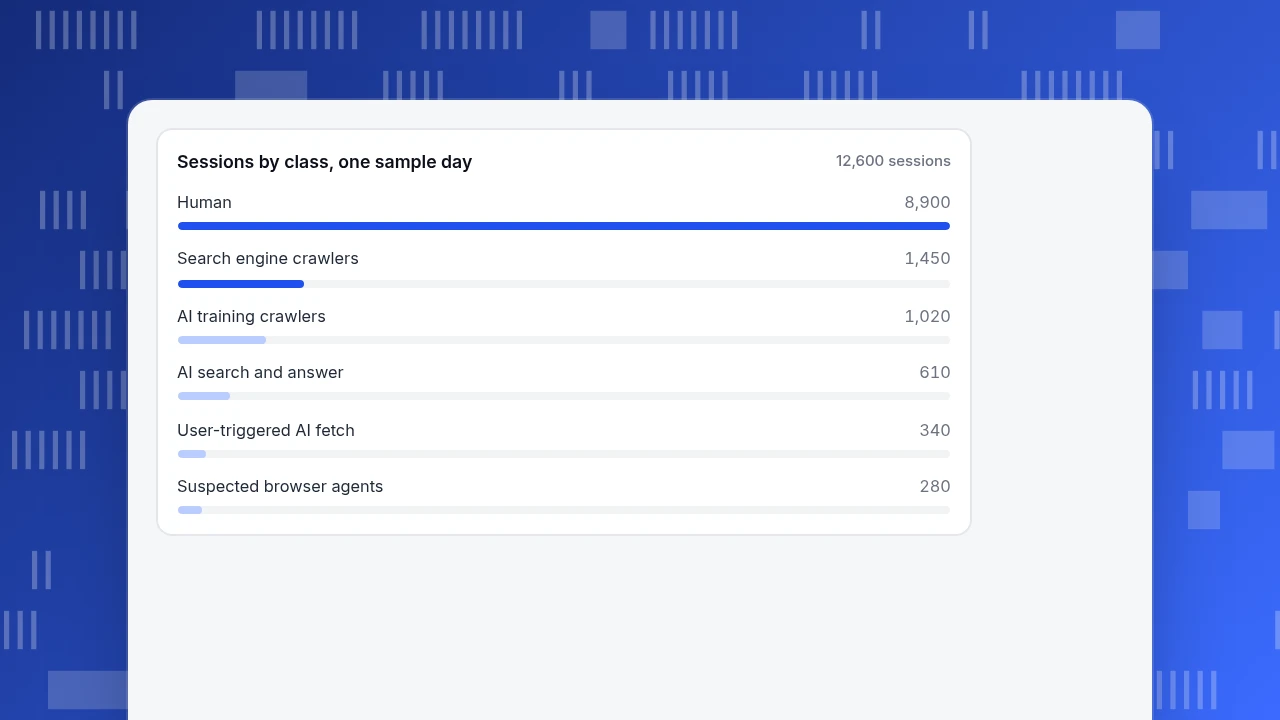
Suppose a site's analytics counted one day of traffic with no bot filtering and got 12,600 sessions. Classifying them by the methods above (sample data, counts recomputed in Python):
| Class | Sessions | Share of all sessions |
|---|---|---|
| Human | 8,900 | 70.6% |
| Search engine crawlers | 1,450 | 11.5% |
| Declared AI training crawlers | 1,020 | 8.1% |
| Declared AI search and answer crawlers | 610 | 4.8% |
| Declared user-triggered AI fetchers | 340 | 2.7% |
| Suspected browser-style agents | 280 | 2.2% |
| Total | 12,600 | all sessions |
On the same day the site recorded 267 sign-ups. Only people sign up, so:
- Conversion rate on human sessions: 267 ÷ 8,900 = 3.00%.
- Conversion rate on all sessions: 267 ÷ 12,600 = 2.12%.
Counting the agents as visitors understated the human conversion rate by 29% (1 − 2.12 ÷ 3.00). Nothing about the site changed; the denominator was polluted. If you then ran a test on the page, the noise would have lowered the baseline and made real lifts harder to detect.
The same table shows that 3,700 of the 12,600 sessions (29.4%) were not human. That share is specific to this sample; yours depends on your site, and you will only know it by measuring it.
Sessions by class, one sample day
12,600 sessionsWhat are agents actually doing: reading, or sending people back?
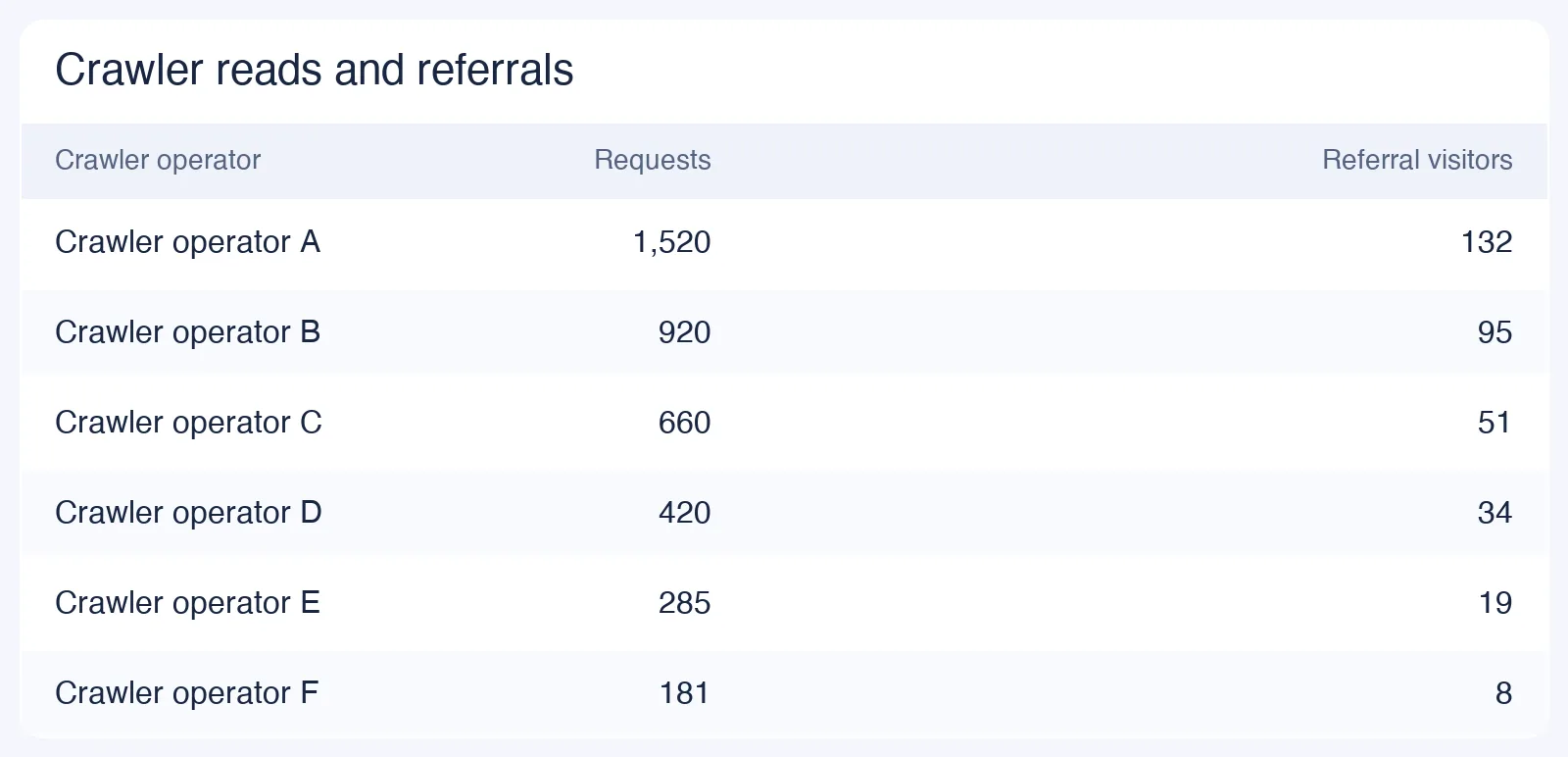
Once humans are separated out, the useful question about agent traffic is an exchange rate. Of the 3,700 non-human sessions, 1,970 were declared AI reads (1,020 + 610 + 340). In the same day, 61 human visitors arrived from an AI assistant's link. That gives:
1,970 reads ÷ 61 visitors sent back = 32.3 reads per human visitor.
Interpret that number with care. It is a description of one day on one site, not a verdict on any operator. A training crawler reading a page is not expected to send anyone back; an answer engine is. So split the ratio by class: 1,020 training reads with no expected return, and 950 answer and fetch reads (610 + 340) against 61 visits is 15.6 reads per visitor. Watch how that moves after you change content or robots.txt rules, rather than comparing the absolute number to other sites.
Three questions give the agent data a purpose:
- Which pages do agents read most? If the pages are your pricing and docs, those are the pages assistants will quote, so keep them accurate.
- Do they get clean answers? Check the most common status code per crawler. A crawler that mostly receives 404 or 5xx is reading errors.
- Do the rules you wrote match the traffic? If the user-triggered fetcher keeps arriving after you blocked training crawlers in robots.txt, that is expected from the vendors' documentation, not a bug. Use a firewall rule if you need to stop it.
What about an agent that reads your analytics?
"Analytics agent" also means the reverse direction: your own AI agent querying your analytics. The safe pattern is read-only access with a scoped key, so the agent can answer questions about last week's traffic but cannot edit settings or delete data. Treat every number it returns the way you would treat a number from a colleague: ask for the query behind it, and check one figure by hand. TapCub's documentation on connecting AI agents with MCP describes this read-only route.
How do you measure agent traffic in TapCub?
Using the example above, here is the same separation done in TapCub.
- Confirm bots are reported separately. New projects default to detecting bots and reporting them separately, so recognised bots go only to the bot reports and do not inflate human visitors, sessions or conversion rates. Only the Do not detect setting mixes them in, and the documentation does not recommend it.
- Open Web analytics › Bots. On the AI & agents tab, the cards show AI requests, AI agents, AI crawlers and visits sent back. The AI content ledger lists, per operator, reads (training crawlers and answer engines in separate columns), human visitors sent back and a return ratio, which is reads divided by visitors. In the example that ratio would be 32.3 : 1 overall.
- Check one crawler on All bots. The table lists name, operator, purpose, requests, pages visited, most common status code, last seen, trust level and the detection layers matched. Trust is verified, suspected or unknown; unknown does not by itself mean spoofed. If a row is wrong, report a false positive.
- Know the limit. With only the page script, TapCub sees bots that run JavaScript. Crawlers that do not run it, plus status codes and response times, need server-side collection: send those requests from your server through the server events endpoint, which keeps only requests classified as bots. See bots and AI crawlers and read the AI crawler ledger.
- Compare with people. On AI visibility and Sources › AI sources, the visits sent back are human sessions, so you can set reads against people in one place. For a fuller walk through the ledger, see the AI crawler ledger.
TapCub does not block or throttle any crawler; it measures them. Blocking happens in robots.txt or at your firewall.
FAQ
What is agent analytics?
Measuring what AI agents do on your site or product: which agents visit, what they read, whether they are verified, and how much human traffic they send back, kept separate from human sessions.
How do you identify AI agent traffic?
Match user-agent tokens published by operators, verify them against published IP ranges or reverse DNS, then flag undeclared sessions by behaviour such as many pages with no static assets.
Do AI agents follow robots.txt?
Training and search crawlers are documented as honouring it. User-triggered fetchers such as ChatGPT-User and Perplexity-User are documented as not being bound by it, because a person started the request.
Should you block AI agents?
Decide by class. Blocking a training crawler opts out of training; blocking a search crawler can remove you from that assistant's answers. Check the ledger's reads against visits sent back before choosing.
Why do some AI crawlers not appear in a script-based report?
A page script only runs when the client executes JavaScript. Crawlers that do not run it appear in server logs, not in a script-based report, which is why TapCub documents server-side collection for them.
Sources
- OpenAI. Overview of OpenAI crawlers. Read 2026-11-20.
- Anthropic. Does Anthropic crawl data from the web, and how can site owners block the crawler?. Read 2026-11-20.
- Perplexity. Perplexity crawlers. Read 2026-11-20.
- Google Search Central. Verifying Googlebot and other Google crawlers. Read 2026-11-20.
- Koster, M., Illyes, G., Zeller, H., Sassman, L. (2022). RFC 9309: Robots Exclusion Protocol. IETF.
Was this article helpful?
We use your answers to fix and expand this page.
Couldn’t send. Please try again in a minute.
Thanks for the feedback. We’ll use it to improve this page.You’ve already sent feedback on this page. Thanks.

Customer Experience Consultant
Writes about live chat, visitor conversations, and self-service, sharing practical ways to make customer communication clearer and more effective.