Try it on your own data
Every report in this article is in the free plan. One snippet for web and apps, up to 10 sites.
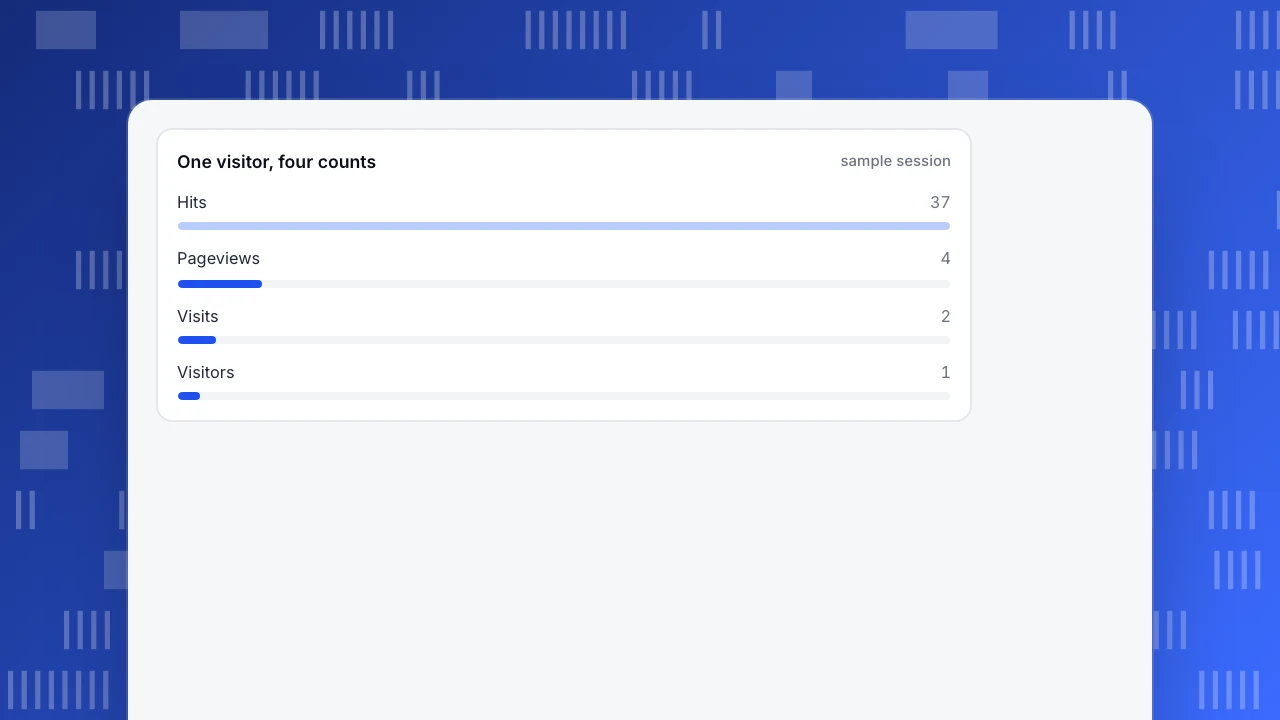
Start freeSite views can mean four different counts: hits are server requests, pageviews are pages loaded, visits are bursts of activity and visitors are distinct identifiers. One visitor who loads three pages and returns later makes 37 hits, 4 pageviews, 2 visits and 1 visitor, so always say which count you mean.
What you will learn
- Hits count every file the server sends, so they rise with page weight and bots; use them for load, not audience
- Pageviews count pages and route changes, visits split activity by an idle timeout, visitors count identifiers
- In the sample, one visitor is 37 hits, 4 pageviews, 2 visits and 1 visitor: label every number you report
Four counts, four different things
"Site views" can mean any of four numbers, and they differ by an order of magnitude on the same traffic. Here is what each one counts.
| Count | What it counts | Where it is recorded | Goes up when |
|---|---|---|---|
| Hits | Requests the web server answered, one per file | Server access log | A page loads an extra image, script or style |
| Pageviews | Pages loaded or routes entered | Analytics script | Someone opens or reloads a page, or a single-page app changes route |
| Visits (sessions) | A burst of activity by one visitor | Analytics script | A visitor starts again after an idle gap |
| Visitors | Distinct identifiers (browsers or people) | Analytics script | A new identifier appears |
They nest like boxes: many hits make a pageview, many pageviews make a visit, many visits make a visitor. The rest of this article puts one visitor through a site and counts every box, so you can see where each number comes from.
| Count | What it counts | Where it is recorded | Goes up when |
|---|---|---|---|
| Hits | Requests the server answered, one per file | Server access log | A page loads an extra image or script |
| Pageviews | Pages loaded or routes entered | Analytics script | A page is opened or reloaded, or an app changes route |
| Visits (sessions) | A burst of one visitor's activity | Analytics script | A visitor starts again after an idle gap |
| Visitors | Distinct identifiers | Analytics script | A new identifier appears |
They nest: many hits make a pageview, many pageviews a visit, many visits a visitor.
One visitor, counted four ways
Sample data: a visitor opens the home page, goes to the pricing page, then to the signup page. Forty-five minutes later they come back and reload the pricing page. Each page loads files the server must send.
| Step | Page | Requests (hits) | Pageview | Visit |
|---|---|---|---|---|
| 1 | Home | 13 (1 HTML, 2 CSS, 1 JavaScript, 8 images, 1 font) | 1 | Visit 1 starts |
| 2 | Pricing | 9 | 1 | Visit 1 |
| 3 | Signup | 6 | 1 | Visit 1 |
| 4 | Pricing again, 45 minutes later | 9 | 1 | Visit 2 starts |
| Total | 37 | 4 | 2 |
One visitor produced 37 hits, 4 pageviews and 2 visits. Dividing gives two ratios worth knowing: hits per pageview = 37 ÷ 4 = 9.25, and pages per visit = 4 ÷ 2 = 2.0.
Add one detail. On the pricing page a script fetches two prices with background requests and no new page loads. That adds two more hits to the log and no pageview. Hits grow with the page's weight and its scripts; pageviews do not.
The headline: if someone says "we had 37 views", ask which kind. The same traffic is 37, 4, 2 or 1, depending on the box.
One visitor, four counts
sample sessionWhat a hit is, and why it misleads
A hit is one request to the server. The Apache HTTP Server documentation describes its access log as recording all requests the server processes, one line per request, in the Common Log Format. A sample line from the documentation looks like this:
127.0.0.1 - frank [10/Oct/2000:13:55:36 -0700] "GET /apache_pb.gif HTTP/1.0" 200 2326
That one line is a request for one image, with the client address, the time, the request, the status code (200) and the size in bytes (2,326). Nothing in it says a person looked at a page.
This is why hits are the weakest measure of attention.
- They scale with page design. Adding five images to a page raises hits by five with no change in audience.
- They include everything that is not a person. Bots and crawlers make requests too, and a crawler that fetches 200 files makes 200 hits.
- They include failures. A 404 or a 500 is still a request and still a hit.
- They are still useful for servers. Hits tell you load, bandwidth and error rates, which is why they live in the access log.
Use hits for capacity and troubleshooting. Do not report them as audience.
What counts as a pageview
A pageview is recorded when a page is loaded or, in a single-page app, when the route changes to a new URL. Three rules decide the edge cases.
- Reloads count. Pressing refresh loads the page again. Some tools discard a repeat within a second or two; most keep it after that.
- Route changes count in single-page apps. The server sends one HTML file and the app changes the URL with the browser's history interface. A tool that listens to those changes records a pageview for each; one that does not records only the first.
- The same URL twice in a row is often ignored. A page that updates its state without changing its address is not a new view.
Pages per visit, the average number of pageviews in a visit, is a useful quality measure; in the sample it is 2.0. It is also easy to distort: a site that splits an article over five pages raises it without helping a reader.
What counts as a visit
A visit, or session, groups one visitor's activity into a burst. Tools cut it with rules, and the rules differ, so the same traffic can yield different visit counts in different tools.
- Idle timeout. Google Analytics ends a session after 30 minutes of inactivity by default and sets no maximum length, and the timeout can be changed. Forty-five minutes of silence in the sample therefore starts visit 2.
- A maximum length. Some tools also close a visit after a fixed number of hours, so someone who leaves a tab open all day is not one endless visit.
- Source changes. Some tools start a new visit when the visitor arrives from a different external source mid-visit; others do not.
- Midnight. Some tools split a visit at midnight; others count it once, on the day it started.
A visit is not a person. One person with a morning and an evening visit is two visits and one visitor. For how a visitor is identified, see unique monthly visitors and our guide to page view vs visit.
Which number should you report?
Match the number to the question.
- "How busy is the server?" Use hits, from the access log.
- "How much content was consumed?" Use pageviews.
- "How many times did people come to us?" Use visits.
- "How many people (or browsers) did we reach?" Use unique visitors, and say over what period.
- "Is the site getting more engaging?" Use pages per visit and engaged visits, not raw pageviews. In Google Analytics a session is engaged if it lasts longer than 10 seconds, includes a key event, or has at least two page or screen views; other tools set their own thresholds. Pageviews rise when pages get slower to read.
When a report mixes them, label every number. "12,400 views" is not a statement until it says whether it is hits, pageviews or something else.
Why your numbers will not match another report's
If your server log shows far more "views" than your analytics, the first suspect is hits: logs count every request, analytics counts pages. After that, check these in order.
- Bots. Logs include bots; many analytics scripts do not run for them, or classify and separate them. See are bots counted in visitors.
- Blockers and consent. An analytics script can be blocked or held back by a browser setting or a consent choice; the server log still sees the request.
- Visit rules. A different idle timeout or a midnight split changes visit counts.
- Duplicates. A page that includes the script twice, or a reload in quick succession, can double a pageview unless the tool removes it.
- Time zones. A report cut at UTC midnight and one cut at local midnight put the same traffic on different days.
In TapCub: pageviews, visits and visitors, and how each is counted
TapCub reports three of the four counts. Pageviews, visitors and sessions come from its script; hits are in your own server log, and TapCub's web metric definitions do not include them. If you need hit counts or have no script on some pages, you can import Nginx or Apache logs through the data import page, up to 100,000 lines per file, and the log import skips crawlers.
Using the sample visitor:
- Pageviews. The script records a pageview at first load, on each history-interface route change, and on back and forward. The same URL twice in a row is ignored, the
#and everything after it is dropped by default, and the collector keeps one pageview when the same visitor repeats one within 2 seconds. So the reload in step 4 counts, but a double-fire does not. In the sample, TapCub shows 4 pageviews. - Visits. A session is cut after 30 minutes idle, with a 24-hour maximum by default. Midnight and changes of advertising parameters do not split it unless you turn that on. The 45-minute gap in the sample starts visit 2, so TapCub shows 2 sessions.
- Visitors. The visitor is deduplicated on the visitor ID, so the sample shows 1 visitor. The visitor total on Web analytics › Overview adds each day's visitors, so a person who came on two days counts twice there; for 93 days or less the data report also shows a range-wide deduplicated figure.
- Bots. Automated traffic is classified and counted separately in Web analytics › Bots, so it does not enter pageviews, visits or visitors in the main reports.
Check any total in Web analytics › Sessions: it lists real visits with entry, exit, pages and duration, so you can sample a few against the definitions above.
FAQ
What is the difference between site visits, pageviews and hits?
A hit is one request to the server for one file. A pageview is one page loaded or route entered. A visit is a burst of one visitor's activity, ended by an idle gap. In the sample, one visitor produced 37 hits, 4 pageviews and 2 visits.
Are page views and site views the same thing?
Usually yes: "site views" and "page views" both mean the number of times pages were loaded, and a reload counts. Some people use "views" loosely for visits or hits, so state which when you report it.
Why is my hit count so much higher than my pageviews?
Because every file a page needs is a separate request. A page with an HTML file, images, style sheets and scripts can make dozens of hits for one pageview. In the sample, hits per pageview are 9.25, and bots add more.
Is a visit the same as a session?
Yes. Visit and session mean the same thing: one visitor's activity grouped by an idle timeout. Check your tool's timeout, which is 30 minutes in Google Analytics by default.
Which is better to track, hits or pageviews?
Pageviews, for audience questions, because they follow pages people actually opened. Hits are for server load and errors. Report them separately and never compare one with the other.
Sources
- Apache HTTP Server Project, Log Files: the access log records all requests; one line per request in Common Log Format, with an example line. Checked 2026-11-21.
- Google Analytics Help, Sessions: a session ends after 30 minutes of inactivity by default and has no maximum length. Checked 2026-11-21.
- Google Analytics Help, Engagement rate and bounce rate: an engaged session lasts longer than 10 seconds, has a key event, or has at least two page or screen views. Checked 2026-11-21.
Was this article helpful?
We use your answers to fix and expand this page.
Couldn’t send. Please try again in a minute.
Thanks for the feedback. We’ll use it to improve this page.You’ve already sent feedback on this page. Thanks.

Data Analyst
Explores traffic sources, conversion funnels, and retention, using clear metric definitions and concrete examples to explain what the numbers mean.