Try it on your own data
Every report in this article is in the free plan. One snippet for web and apps, up to 10 sites.
Start freeTo choose a website chat tool, decide the job first (shared inbox, help desk, bot or messaging), set must-pass gates for language, privacy, offline hours, page speed and access, then score the rest with weights you can recompute. Weighted scores hide dealbreakers and can flip when weights change, so show the weights and finish with a two-week trial on real questions.
What you will learn
- Write must-pass gates first; a high weighted score can still hide a requirement you cannot waive
- Show your weights: in the example, changing two of them flipped the order from C, B, A to C, A, B
- Test, do not trust feature pages: measure widget KB, p75 LCP and INP, keyboard access and the bot handoff
What counts as a website chat tool?
A website chat tool puts a conversation window on your pages so visitors can ask a question and get an answer without leaving. Under that one label sit four different kinds of product, and choosing the wrong kind is the most common mistake:
- Live chat inbox. A widget plus an agent workspace where people answer. The core job is routing, speed and context.
- Help desk with a chat channel. Chat is one of several channels feeding a ticket queue. Best when email and phone volume dwarf chat.
- Chatbot first. A bot answers from your content and hands off when it cannot. The core job is deflection and accuracy.
- Messaging aggregator. Brings messaging apps into one inbox. Useful when your customers already live there.
Decide which job you are hiring for before you compare features. If three people will answer chats during office hours, you need an inbox. If you get the same 20 questions all day, you need a bot with a knowledge base and a clean handoff. This guide helps you pick without ranking brands: it gives you must-pass gates, a feature-by-need checklist, a scoring method you can recompute, and a trial plan. The longer overview of software categories is in live chat support software.
Five must-pass gates before you score anything
Weighted scores hide dealbreakers: a tool can score 80 out of 100 and still fail a requirement you cannot waive. Write down gates first and drop any tool that fails one.
- Language. Can visitors and agents each use their own language? If you serve three languages and have one agent team, translation is a gate, not a bonus.
- Data and privacy. Can you get a written processing agreement and a list of sub-processors? Where are transcripts stored, and can you delete a person's conversations on request?
- Hours and offline. What does a visitor see at 3 a.m.? If the answer is "nothing happens", you will lose the leads that arrive outside office hours.
- Page impact. Does it load without hurting your Core Web Vitals? You can test this, see below.
- Access. Can your agents use it on the devices they have, and can a keyboard-only or screen-reader visitor open and use the window?
Everything else can be traded off with weights.
Feature-by-need checklist
Use this table as a questionnaire for any vendor, including the one you already use. Each row says what to ask and how to test it yourself in an hour, because feature pages describe intentions and a test describes reality.
| Need | Question to ask | How to test it |
|---|---|---|
| Shared inbox | Can two agents see who owns a chat, and can you transfer it? | Open two agent accounts, start a chat, and transfer it |
| Context | Does the agent see the visitor's page, source and past conversations? | Start a chat from a campaign link and see what the agent sees |
| Routing | Is assignment automatic, and what happens when everyone is offline? | Set all agents offline and send a message |
| Bots and AI | What does the bot answer from, and when does it hand off? | Ask five questions your content answers and five it does not |
| Translation | Is it two-way, and does the agent see the original text? | Write in a language no agent speaks |
| Saved replies | Can agents insert a reply and edit it before sending? | Type the shortcut and edit the text |
| Offline messages | Does an offline visitor get a form, and where does it land? | Submit one outside hours |
| Proactive invites | Can you trigger by page and time on page without spamming? | Set a 20-second rule on one page |
| Reports | Can you see first response time, resolution and busy hours? | Check the report after your test chats |
| Privacy | Is there a processing agreement, retention setting and deletion path? | Read the contract and find the delete control |
| Performance | How many KB does the widget load, and when? | Run the page test in the next section |
| Accessibility | Can the launcher be reached by keyboard and is it big enough to tap? | Tab through the page; measure the button |
Two points are easy to miss. First, a pre-chat form that demands an email before the first message lowers the number of conversations; if you need an email, ask in the conversation or use an offline form. Second, a bot that cannot hand off cleanly turns a missed answer into an angry visitor, so test the handoff more than the answers.
| Need | Question to ask | How to test it |
|---|---|---|
| Shared inbox | Can agents see ownership and transfer a chat? | Two agent accounts, start and transfer a chat |
| Bots and AI | What does it answer from and when does it hand off? | Five answerable and five unanswerable questions |
| Translation | Is it two-way and is the original visible? | Write in a language no agent speaks |
| Offline messages | What does an offline visitor see? | Submit one outside hours |
| Privacy | Processing agreement, retention, deletion? | Read the contract and find the delete control |
| Performance | How many KB and when does it load? | Compare p75 LCP and INP with and without it |
Full twelve-row checklist in the article. Privacy terms follow Article 28(3) as summarised by the Irish DPC; checked 2026-11-20.
A scoring method you can recompute: worked example
Sample data: a small store compares three tools, called A, B and C, after the gates. Weights add up to 100 and reflect the store's own needs: shared inbox 25, bots 15, translation 15, privacy 20, performance 15, accessibility 10. Each tool is scored 0 to 5 on each row after the hour-long tests above.
| Criterion | Weight | Tool A | Tool B | Tool C |
|---|---|---|---|---|
| Shared inbox | 25 | 5 | 3 | 4 |
| Bots | 15 | 2 | 4 | 3 |
| Translation | 15 | 1 | 5 | 3 |
| Privacy | 20 | 4 | 3 | 5 |
| Performance | 15 | 3 | 4 | 2 |
| Accessibility | 10 | 4 | 3 | 5 |
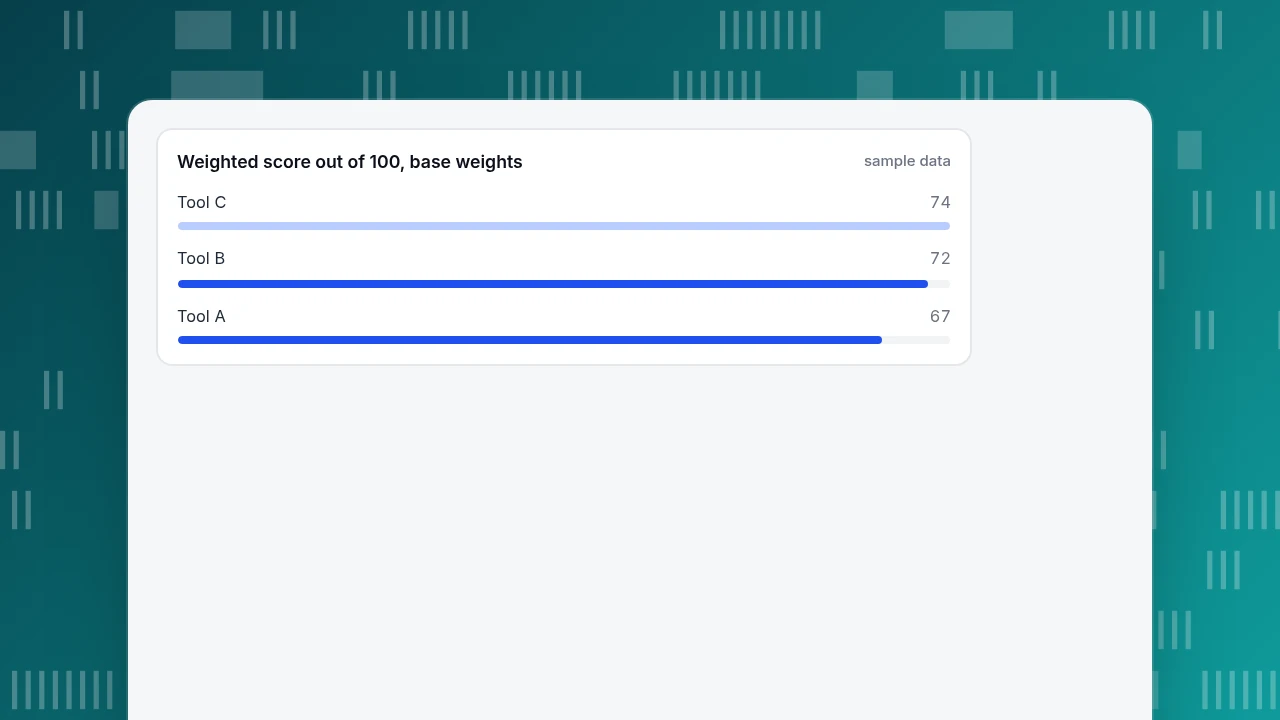
| Weighted score (out of 100) | 67 | 72 | 74 |
The score is the sum of weight × points, divided by 5 times the total weight (5 × 100 = 500): for Tool A, (25×5 + 15×2 + 15×1 + 20×4 + 15×3 + 10×4) ÷ 500 = 335 ÷ 500 = 67%. Tool B is 360 ÷ 500 = 72% and Tool C is 370 ÷ 500 = 74%.
Now test how fragile the ranking is. Suppose the store learns that its agents are bilingual, so translation matters less (weight 15 down to 5), and that its legal team insists on privacy (weight 20 up to 30); the other weights stay the same and still total 100. Tool A rises to 73 (365 ÷ 500), Tool B drops to 68 (340 ÷ 500) and Tool C rises to 78 (390 ÷ 500). The order changes from C, B, A to C, A, B. The lesson: do not publish a single ranking. Show the weights, and show which assumptions would change the winner. If two tools stay within five points of each other under reasonable weights, decide on the trial, not the spreadsheet.
Weighted score out of 100, base weights
sample dataWhat to ask about privacy and data processing
A chat window collects free text, which often contains names, emails and order numbers. If you are in scope of the GDPR, the person or company that decides why the data is processed (you, the controller) must have a binding contract with the tool provider (the processor). The Irish Data Protection Commission's guidance on processing agreements lists the minimum content of that contract, including the subject matter, duration, nature and purpose of the processing, the type of personal data, the categories of data subjects, and the controller's obligations and rights. Article 28(3) sets those terms.
Turn that into five questions for any vendor:
- Will you sign a processing agreement that covers these points?
- Which sub-processors handle chat data, and how are we told about changes?
- In which region are transcripts stored?
- How long are conversations kept, and can we change it?
- How do we delete or export one person's conversations on request?
If a vendor cannot answer in writing, treat that as a failed gate. The questions apply to AI features too: ask whether the content sent to a model is used to train it.
How to test page impact and accessibility
Chat widgets are third-party code, and they load on every page. Test them instead of trusting a feature page.
- Measure transfer size. Open DevTools, go to Network, reload with the widget and note the total KB it adds. As context, the median mobile page in the Web Almanac 2024 ships 558 KB of JavaScript. A widget adding 180 KB (sample number) would be 32% on top of that median (180 ÷ 558).
- Check when it loads. Lighthouse's guidance on third-party facades describes loading a lightweight placeholder first and the real widget on interaction or when the browser is idle. Its trade-off is that the placeholder lacks features such as the unread-message badge.
- Compare Core Web Vitals. Run the same page with and without the widget and compare LCP and INP at p75. Google's thresholds are 2.5 seconds and 200 milliseconds.
- Check the launcher size. WCAG 2.2 success criterion 2.5.8 (Level AA) asks for pointer targets of at least 24 by 24 CSS pixels, with exceptions. A chat bubble is usually larger; check the close button and send button inside the window.
- Check text contrast and keyboard. WCAG 1.4.3 requires 4.5:1 for normal text and 3:1 for large text. Press Tab until you reach the launcher, open it with the keyboard, and see whether focus moves into the window and back out.
A two-week trial plan that produces a decision
- Collect 50 real questions from your inbox and search logs, grouped by topic. This is the test set for bots and knowledge base.
- Run each candidate on one real page for a week, or on a staging copy, with the same agents and hours.
- Record four numbers: time to first response, share of chats resolved, number of chats handed from bot to human, and the page-load difference from the section above.
- Review ten transcripts per tool and mark every answer as correct, partly correct or wrong. Wrong answers weigh more than slow ones.
- Decide with the gates and the scores. If the scores are within five points, pick the tool that failed least in transcripts, and write down the reason.
Applying the checklist to TapCub
Here is how TapCub maps to the table, stated plainly so you can score it like any other tool.
- Turn it on. On a site that already has the TapCub script, switch on Enable live chat under Live chat › Chat settings › Appearance; the bubble appears without a change to your site code. Sites without the script get the code from Live chat › Chat settings › Install. There is also a standalone chat page link.
- Check the agent view. In Live chat › Inbox, chats come in as Waiting, Mine, All and Resolved lists. The side panel shows the visitor's source, the last two days of page views and past conversations, and opens the visitor's analytics profile, because chat and analytics share one visitor ID.
- Test bots and handoff. Under Live chat › Chat settings › AI assistant there are three modes: off, only when all agents are offline, and AI first. In Live chat › Knowledge base, a question-and-answer entry is sent as written without an AI call, and document entries are searched and drafted by a model. When the material is not enough, the chat goes to a person. TapCub's AI only writes replies; it does not change orders or send email.
- Test translation and hours. Live chat › Chat settings › Greeting & translation gives two-way translation (each side reads its own language, the original is shown to the agent); Office hours and Offline messages cover the 3 a.m. case, and Proactive invites fire on page plus seconds.
- Read the reports. Live chat › Reports shows conversations, resolution rate, first response time, satisfaction, agent workload and knowledge base hit rate; Conversion attribution compares goal conversion for visitors who chatted with those who did not.
Two boundaries for your scorecard: the TapCub chat widget has no pre-chat form, so ask for an email inside the conversation or through offline messages, and TapCub is not a CRM or an email marketing tool.
FAQ
How do I choose a chat tool for my website?
Decide the job first (inbox, help desk, bot or messaging), write must-pass gates for language, privacy, offline hours, page speed and access, then score the remaining features with weights that reflect your needs. Finish with a two-week trial on real questions.
What features should website chat have?
At minimum: a shared inbox with transfer, visitor context, offline messages, saved replies and reports. Add translation if you serve several languages, and a bot with a knowledge base if you answer the same questions repeatedly.
Does a chat widget slow down my website?
It can. A widget is third-party JavaScript, so measure the KB it adds, when it loads and the effect on p75 LCP and INP. Lazy-loading it behind a placeholder reduces the cost, with the trade-off that the placeholder lacks some features.
Is website chat GDPR compliant?
That depends on how you use it. Chat collects free text that may include personal data, so you need a processing agreement with the provider that covers the Article 28(3) points, a list of sub-processors and a way to delete a person's conversations.
Should I use a chatbot or live agents?
If volume is low and questions vary, start with people. If the same questions repeat, add a bot with a knowledge base and a clean handoff. Test the handoff more than the answers.
Sources
- Data Protection Commission (Ireland), A practical guide to controller-processor contracts, checked 2026-11-20.
- W3C, WCAG 2.2: Understanding SC 2.5.8 Target Size (Minimum) and SC 1.4.3 Contrast (Minimum), checked 2026-11-20.
- HTTP Archive, Web Almanac 2024: Page Weight, checked 2026-11-20.
- Chrome for Developers, Lazy load third-party resources with facades, checked 2026-11-20.
Was this article helpful?
We use your answers to fix and expand this page.
Couldn’t send. Please try again in a minute.
Thanks for the feedback. We’ll use it to improve this page.You’ve already sent feedback on this page. Thanks.

Product Experience Specialist
Writes about product experience, practical workflows, and growth, turning complex processes into clear steps for everyday decisions.