Try it on your own data
Every report in this article is in the free plan. One snippet for web and apps, up to 10 sites.
Start freeYou can track visitors to a website four ways: server logs (every request, no browser data), a JavaScript tag (page views and behaviour, missed by blockers), cookieless counting (no stored ID, weaker returning-visitor counts) and a tag manager (a way to load the tag, not a new measurement). Most sites use a tag for people and logs for crawlers. Below is what each can miss, a recomputed example of why a log and a tag disagree by 14.5%, and which method fits which question.
What you will learn
- Decide whether you need requests, page views, sessions or visitors first; tools disagree mostly because they count different units
- Explain a log-versus-tag gap by category; in the sample, 1,200 of 8,300 page views split into blockers, disguised bots and prefetches
- Under a 7-day cookie cap, 1,000 people visiting on days 0, 10 and 20 look like 3,000 visitors; compare tools on sessions and page views
What are the ways to track visitors to a website?
There are four, and they differ in where the visit is recorded: at the server (log files), in the browser (a JavaScript tag), in a browser-independent identity layer (cookieless counting), or through a container that loads the tag for you (a tag manager). The comparison table above lays them side by side. The rest of this guide explains what each one can and cannot see, with one sample day reconciled between two of them.
Before you pick, decide what "visitor" means for your decision, because the methods count different things:
- A request is one file fetched by anything, human or not.
- A page view is a page loaded in a browser.
- A session is a group of page views by the same visitor with no long gap.
- A visitor is a person or device recognised across sessions, which is the number that depends most on cookies.
Server logs give you requests. A tag gives you page views, sessions and, depending on storage, visitors. When two tools disagree, the first thing to check is whether they are counting the same unit.
| Method | What it records | Misses | Best for |
|---|---|---|---|
| Server logs | Every request: IP, time, URL, status, referrer, user-agent | Cookies, scrolls, clicks, cached pages; includes bots | Crawlers, errors, audits, no-script sites |
| JavaScript tag | Page views, sessions, events, device, behaviour in the browser | Visitors with blockers or JavaScript off; bots that skip scripts | Counting people and what they do |
| Cookieless counting | Page views and sessions without a stored ID | Reliable returning-visitor counts across days | Privacy-first setups |
| Tag manager | Nothing itself; loads the tag by rules | Adds a request and a failure point | Teams that change tags often |
Most sites combine a tag for people with logs for crawlers and audits.
How do server logs track visitors, and what do they miss?
Your web server already writes one line per request. In the Apache combined log format that line records the client IP address, the time, the request line (method, path and protocol), the status code, the response size, the Referer header and the User-Agent header. That is all it records. There is no cookie, no screen size, no scroll depth, and the Apache documentation notes the IP is the proxy's address if the request came through one.
What logs do well:
- They see every request that reaches the server, including visitors who block scripts or have JavaScript off.
- They record status codes, so 404s and 500s are visible.
- They need no change to the page.
What they miss, or get wrong:
- Bots are in there. Imperva's 2025 report puts automated traffic at 51% of web traffic. A raw log has no opinion about which requests were people, so you must filter by user-agent and, for crawlers that claim a famous name, by DNS check. See bot for the definition.
- Visitors are hard to count. Without cookies you can only approximate a person with IP plus user-agent, which merges people behind one office network and splits people who switch between Wi-Fi and mobile.
- Pages served from a cache or CDN edge may never reach the origin server, so the origin log undercounts them.
- Fragments and in-page behaviour (anchors, clicks, scrolls) are not sent to the server, so logs cannot see them.
- Header values are written unescaped. The Apache documentation warns that clients can insert control characters, so treat raw logs as untrusted input when you parse them.
Logs are the right tool when you need an audit trail, when you want to see crawlers, or when you cannot run scripts. They are a poor tool for "how many people read this page, and what did they do next".
How does a JavaScript tag track visitors, and what does it miss?
A tag is a small script on each page. When the page loads, it sends a message (the page, the referrer, the time, and optionally a visitor ID) to the analytics service. Because the code runs in the browser, it can measure things a server cannot: screen size, language, scroll depth, clicks, time on page, and the single-page-app route changes that never trigger a new server request.
What a tag misses:
- Visitors who block it. Ad blockers and privacy tools can stop analytics scripts from loading, and visitors with JavaScript off send nothing.
- Bots that do not run scripts. That is often an advantage for human counts, but it means crawlers are invisible to a tag-only setup.
- Pages where the tag failed to fire. A template that forgot the snippet, a consent banner that held it back, or a slow page the visitor left before the script ran.
A tag stores a visitor ID somewhere, usually a cookie. That is where browser rules start to matter. WebKit's tracking prevention caps cookies written by JavaScript (client-side cookies) at seven days of lifetime, a limit it introduced in ITP 2.1 in February 2019, and it deletes other script-writable storage after seven days of Safari use without interaction with the site. A visitor who comes back on day 8 can therefore look like a new one.
What changes when you track without cookies?
Cookieless counting stops relying on a stored ID. The tool still receives each page view, but it recognises returning people with less certainty, or only within a short window. The trade is plain:
| With a long-lived cookie | Without a persistent ID | |
|---|---|---|
| Returning visitor after 10 days | Recognised (if the cookie survives) | Usually counted as a new visitor |
| Consent banner needed | Often, depending on law and configuration | Depends on configuration and local law |
| Page views, sessions, sources | Accurate | Accurate |
| Cross-session journeys | Possible | Limited |
Do not read the table as "cookieless is worse". Page views, sources and conversions per session are unaffected; what you lose is the long-term returning-visitor number, which is already weak under the seven-day cap above. Here is how much it matters in numbers:
Sample data. 1,000 people each visit your site on day 0, day 10 and day 20. With a cookie that expires after 7 days, every visit looks like a new visitor: 1,000 × 3 = 3,000 "unique visitors" over 30 days, when the true figure is 1,000. The inflation factor is 3.0×. If those visits were counted per session instead, all three methods would agree on 3,000 sessions. The lesson: quote sessions and page views when you compare tools, and treat "unique visitors over a long period" as an estimate.
Where does a tag manager fit?
A tag manager is not a fourth way of measuring; it is a way of delivering the tag. You put one container snippet on the site, and the manager loads the analytics tag (and other tags) according to rules you set in its interface. It earns its place when marketers need to add or change tags without a code release.
It also adds things to check:
- An extra request. The container loads first, then the tag, so the first page view fires slightly later than with a direct snippet.
- A new failure point. A wrong trigger rule can fire a tag twice or never. Test in the manager's preview mode and compare the page-view count with the direct count for a day.
- Another thing blockers target. Blockers may target the container script as well, so you can lose the same visitors you would lose with a direct tag.
Use a tag manager when several people change tags often; use a direct snippet when one team owns the site and wants the simplest setup.
Worked example: why do a log and a tag disagree?
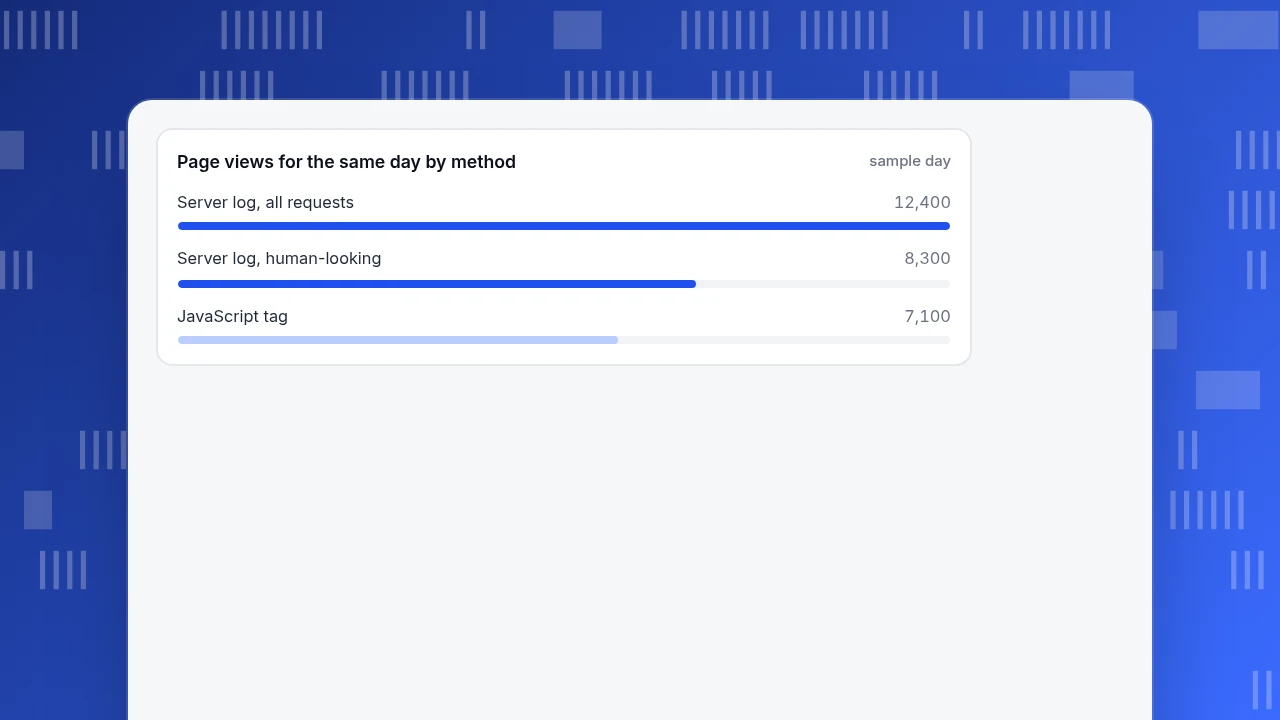
Sample data, one day on one site. The server log has 12,400 page requests. Classification by user-agent and DNS check marks 4,100 as bots, leaving 8,300 human-looking requests. The JavaScript tag recorded 7,100 page views for the same day.
The gap is 8,300 − 7,100 = 1,200 page views, which is 14.5% of the log figure. Do not average the two numbers; explain the gap by category:
| Reason | Page views (sample split) |
|---|---|
| Visitors with a script blocker or JavaScript off | 498 |
| Bots the log counted as human because they copy a browser user-agent | 450 |
| Prefetch and duplicate requests, such as a browser fetching a page it never shows | 252 |
| Total explained | 1,200 |
The first line, 498, is 6% of the 8,300 human-looking requests, an assumed blocker rate for this site. The split is an illustration of the method, not a benchmark: measure your own blocker rate by comparing a test page that logs both ways. The rule that follows: if you cannot explain more than about 10% of the gap, you have a tagging fault (missing pages, double firing) rather than a method difference. Fix that first.
Page views for the same day by method
sample dayWhich method should you use?
If you only want a quick traffic number first, start with how to check website traffic. To pick a method, match your question:
- "How many people visit and what do they do?" A JavaScript tag, plus a short check against logs when you set it up.
- "Are crawlers hitting my pages, and what status codes do they get?" Server logs (or a server-side feed to your analytics tool).
- "We cannot run scripts on this site." Logs only; accept the limits above.
- "Marketing changes tags every week." A tag manager on top of a tag.
- "We want no persistent ID." Cookieless counting; report sessions and page views, and treat returning-visitor rates as estimates.
Most sites end up with a tag for people and logs for crawlers and audits. The two answers differ by design, so keep a record of the date you last reconciled them.
How do you track visitors in TapCub?
For the one-day gap above, TapCub gives you both halves in one project. The page script counts people; the bot report holds the crawlers; and a one-minute check proves the setup works.

- Install the script. Copy the snippet from Web analytics › Configuration › SDK code and put it on every page template. TapCub counts without cookies by default; whether you need a consent banner depends on your configuration and local law.
- Confirm it works. Open your own site, then Web analytics › Realtime (see view realtime visitors). Your page view should appear within a few seconds. "Online now" is distinct visitors with an event in the last five minutes, and the feed is split into people and bots.
- Read where visitors came from. Web analytics › Sources groups visitors by channel, referrer, search engine and UTM. Each session is credited to the source it arrived from.
- Separate bots. New projects run in Detect and report separately mode, so recognised bots appear in Web analytics › Bots and not in your human visitors, sessions or page views.
- Cover what a tag cannot see. Crawlers that do not run JavaScript appear only if you send server access records with an API key from Configuration › Settings › API keys. For logged-in people, call
tapcub.loginso the visitor appears under All-platform analytics › Users › People with a day-by-day timeline.
TapCub's log file import (All-platform analytics › Data › Data import) is for getting a first look at page views from Nginx or Apache logs before the script is installed; it skips static assets, crawlers, requests without a user-agent and 4xx or 5xx responses (a 404 is kept as an event, not a page view), and visitors from logs are not merged with script visitors.
FAQ
What is the simplest way to track visitors to my website?
Add a JavaScript analytics tag to every page and check it works in a real-time report within a minute. It gives you page views, sources, sessions and conversions. Keep your server logs for crawler and error checks.
Can I track visitors without cookies?
Yes. Page views, sources and sessions do not need cookies. What you lose is reliable recognition of the same person across many days, so treat long-period unique-visitor counts as estimates.
Why do server logs show more traffic than my analytics tool?
Logs count every request, including bots, prefetches and visitors who block scripts. A tag counts only page views where the script ran. Filter bots from the log and reconcile the remaining gap by category, as in the worked example.
Do ad blockers stop website tracking?
They can stop a JavaScript tag from loading, which means those visits are missing from tag-based reports. Server logs still record the request. Measure your own gap by comparing the two for a day.
How long does a visitor cookie last in Safari?
WebKit caps cookies written by JavaScript at seven days (since ITP 2.1 in 2019), and clears other script-writable storage after seven days of Safari use without interaction with the site. A returning visitor after day 7 can appear as new.
Sources
- Apache HTTP Server, Log Files: combined log format fields and caveats about proxies and unescaped values.
- WebKit, Full Third-Party Cookie Blocking and More: seven-day limits on script-writable storage and the February 2019 cookie cap.
- Imperva, Bad Bot Report 2025: 51% automated traffic and 37% bad bots (page checked 2026-11-20).
Was this article helpful?
We use your answers to fix and expand this page.
Couldn’t send. Please try again in a minute.
Thanks for the feedback. We’ll use it to improve this page.You’ve already sent feedback on this page. Thanks.

Product Experience Specialist
Writes about product experience, practical workflows, and growth, turning complex processes into clear steps for everyday decisions.