Try it on your own data
Every report in this article is in the free plan. One snippet for web and apps, up to 10 sites.
Start freeA thank-you for your order email should confirm the order first (number, items, total, delivery date, how to change it) and thank the customer in one specific line. Send one email by default; add a separate thank-you only when it carries something useful, such as a setup guide a day after delivery, and keep any upsell small and below the order summary.
What you will learn
- Default: one email, transactional content first, a thanks line above the summary
- Under the FTC's CAN-SPAM guide, keep the subject about the order and promotion brief and below the transactional content
- Judge order emails by clicks and orders per 1,000 emails, not opens: Apple Mail downloads remote content on receipt
Thank-you email or order confirmation: what is the difference?
Every online order triggers one: the US Census Bureau reported e-commerce at 17.9% of total US retail sales in the third quarter of 2026 (seasonally adjusted), so order emails reach a large share of buyers. An order confirmation is a transactional message: it proves the order was received and states what happens next. A thank-you email is a relationship message: it expresses appreciation and, ideally, helps the customer get value from what they bought. They overlap, and that is the first decision to make.
| Order confirmation | Thank-you email | |
|---|---|---|
| Purpose | Confirm the transaction | Build the relationship |
| Sent | Within minutes of the order | Same time, or after delivery |
| Must contain | Order number, items, total, delivery address, delivery estimate, how to change or cancel, support contact | A genuine thanks, one useful next step |
| Can contain | One short thanks line, one related product | Care or setup guide, review request, a replenishment reminder |
| Cost of getting it wrong | Customer writes to support or disputes the charge | Missed second order |
Default rule: send one email. Make the confirmation do both jobs, with a thanks line above the order summary and the transactional content first. Send a separate thank-you only when it carries something the confirmation cannot: a setup guide that is useful when the product arrives, a care guide, or a welcome for a first-time buyer. A separate message that only says "thanks" is a missed chance and an extra email.
The legal frame: transactional content first
In the United States, the FTC's CAN-SPAM guide treats an email as transactional or relationship content when its primary purpose is to facilitate, complete or confirm a commercial transaction the recipient already agreed to. Such messages are exempt from most of the Act, though they may not carry false or misleading routing information. The guide also warns that the categories are read narrowly: a message that mixes in commercial content can be treated as commercial, especially if the subject line promotes something or the transactional part does not come first. The FTC states that each separate email in violation can be subject to penalties of up to $53,088.
What this means for the order email:
- Put the order summary and delivery information first, above anything promotional.
- Keep the subject line about the order, not the offer. "Order #4821 confirmed" is safe; "Thanks! Here is 20% off" is a promotion.
- Keep promotional content brief and below the transactional content. One product row is easier to defend than a banner.
- If the email is mostly marketing, treat it as marketing: include the unsubscribe link and the rest of what the rules require.
This is a summary of the FTC's published guidance, not legal advice, and other countries have their own rules; check yours before you send promotional content inside an order email.
What goes in the email: seven parts in order
- Subject line that names the order (below).
- Preheader: 40 to 90 characters that finish the thought, such as "Arrives Nov 28. Track it any time."
- A thanks line: one sentence, specific. "Thanks for your order, Maya" works; two paragraphs of gratitude do not.
- Order summary: number, items with quantity and price, shipping cost, tax, total, payment method (last four digits only).
- Delivery: address, carrier, the promised date or window, and a tracking link when there is one.
- What you can change: until when the order can be edited or cancelled, and how.
- Help: one contact route and a link to the help section. This is the part that cuts "where is my order" contacts.
The optional eighth part, after all of these, is one related product or one care tip. Not three.
Subject lines
| Type | Example subject | Characters | Use when |
|---|---|---|---|
| Confirmation with date | Order #4821 confirmed: arrives Nov 28 | 37 | Default |
| Confirmation with name | Thanks, Maya. Your order #4821 is confirmed | 43 | When the name is reliable |
| First order | Your first order is confirmed (#4821) | 37 | New customers |
| Shipped | Your order #4821 has shipped | 28 | Shipping notice |
| Plain thanks | Thank you for your order | 24 | Only if the order number is in the preheader |
| Promotion (avoid in this email) | Thank you for your order! Here is 20% off your next one | 55 | A separate marketing email, not the confirmation |
Keep the subject under about 45 characters so it is not cut off on a phone, and put the order number in it: customers search their inbox for it.
Five templates
Replace the bracketed fields.
1. Confirmation with a thanks line (default)
Subject: Order #[number] confirmed: arrives [date] Thanks for your order, [name]. We are getting it ready now. Your order: [items, quantities, prices] · Shipping [amount] · Tax [amount] · Total [amount] Delivery to: [address] · Estimated [date or window] · [Track your order] You can change or cancel until [time] from [link]. Questions about this order? Reply to this email or visit [help link].
2. First-time buyer
Subject: Your first order is confirmed ([number]) Welcome, [name], and thanks for choosing [brand]. Your order is confirmed. [Order summary and delivery as above.] What to expect: [one sentence on the packaging, the returns window or the setup]. Our returns policy is here: [link].
3. Separate thank-you after delivery
Subject: How to get the most from your [product] Your order [number] should have arrived by now. Thanks again, [name]. Here are the three things most customers ask in the first week: [link 1], [link 2], [link 3]. If anything is not right, reply to this email.
4. Repeat customer
Subject: Order #[number] confirmed: arrives [date] Thanks for coming back, [name]. This is order number [N] with us. [Order summary and delivery.] Your usual address is on file; change it until [time] if it is different this time.
5. Digital product
Subject: Your [product] is ready ([number]) Thanks for your purchase, [name]. Your receipt is below and your download is here: [link]. The link works until [date]. If anything does not open, reply and we will fix it the same day.
| Situation | Subject example | Upsell | |
|---|---|---|---|
| Any order | Confirmation with thanks line | Order #4821 confirmed: arrives Nov 28 | At most one related product, below the summary |
| First order | Confirmation with a welcome | Your first order is confirmed (#4821) | None; link the returns policy instead |
| Item delivered | Separate thank-you and how-to | How to get the most from your boots | One related product or care tip |
| Digital product | Receipt with download link | Your guide is ready (#4821) | None |
| Product used up in about 30 days | Replenishment reminder, day 25 | Time to restock? | The reorder link |
Subject lines under about 45 characters with the order number.
When to put an upsell in, and when not to
An upsell is a promotion, so by the legal rule above it must sit below the transactional content and stay small. There is a better question: when is the customer most likely to want something else? There is no universal answer. A common hypothesis is that attention for more is lowest right after payment and higher once the item arrives, and the test below is how you check it for your own store.
A typical timeline for a physical product:
| Day | Contains | |
|---|---|---|
| 0 | Order confirmation | Transactional content, thanks line, nothing else |
| 1 | Shipped | Tracking link |
| 4 | Delivered (estimated) | Optional |
| 5 | Thank-you and how-to | Care or setup guide, one related product |
| 12 | Review request | One question |
| 25 | Replenishment reminder | Only for products used up in about 30 days |
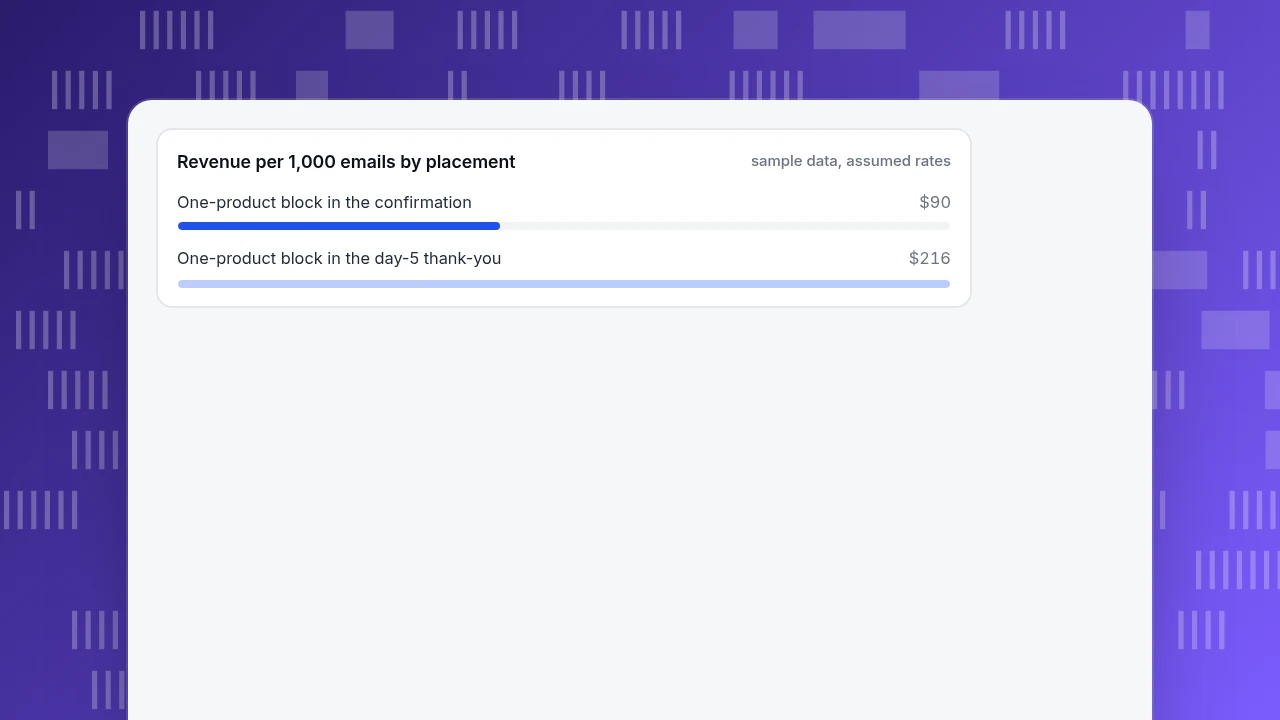
Sample data with assumed rates, to show the comparison method (replace the rates with your own): a store sends 1,000 emails of each type; average order value is $45.
| Placement of the one-product block | Emails | Clicks | Orders | Revenue |
|---|---|---|---|---|
| In the confirmation (assumed 2.0% click, 10% buy) | 1,000 | 20 | 2.0 | $90 |
| In the day-5 thank-you (assumed 4.0% click, 12% buy) | 1,000 | 40 | 4.8 | $216 |
The point is the method, not these rates: put the block in one placement, measure clicks and orders per 1,000 emails for a few weeks, then move it and compare. Revenue per 1,000 emails = emails × click rate × purchase rate per click × order value.
Revenue per 1,000 emails by placement
sample data, assumed ratesHow to measure an order email
Do not use open rate. Apple's Mail Privacy Protection downloads remote content privately in the background when a message is received, instead of when it is viewed, so a tracking pixel records an open whether or not a person read it. Opens from Apple Mail users are therefore inflated and cannot show when someone actually read the message. A bad subject line cannot be spotted by opens, and a good one cannot be proven.
Use these instead:
- Unique clicks per 1,000 delivered, on each link separately (tracking, help, product).
- Orders from the email: tag the product link with UTM parameters (source, medium
email, campaign name such asorder_confirmation) and count purchases from that campaign in a window such as 7 days. - Contacts per 100 orders: if the "where is my order" contact rate falls after you add the tracking link and the delivery date, the email is working.
- Repeat purchase within 90 days, for customers who got the new version against those who got the old one.
For setting up the tags and reading the campaign report, see email campaign tracking; for the wider channel, see email promotion.
Mistakes
- Confirmation with no order number in the subject. The customer cannot find it later.
- A large banner above the order summary. It buries the content the customer came for and weakens the transactional claim.
- A coupon in the confirmation. The customer already paid; a discount code they cannot use on this order feels like a missed saving and invites a price-adjustment request.
- Sending from a no-reply address. The customer's most natural reply, "I need to change my address", goes nowhere.
- A tracking link that returns an error. Test the link on a real order before launch.
Measuring order emails in TapCub
TapCub does not send email and does not run email campaigns; it measures what happens after the click.
- Tag the links in your order emails with UTM parameters (source, medium
email, campaign). TapCub reads them under Web analytics › Sources, where you can see visitors by channel, source and UTM parameters. - Create a goal in Web analytics › Goals for the order-confirmation page (an exact path) or for your purchase event; the conversion rate is conversions over unique visitors, and you can break it down by source.
- Send
purchaseevents withrevenue,currencyandorder_id; All-platform analytics › Business › Commerce & revenue reads them as the order ledger, so you can see revenue and the move from first to repeat purchasers. - To cut "where is my order" contacts, add the question to Live chat › Knowledge base and pin it; opening a pinned answer does not create a conversation. The knowledge base hit rate in Live chat › Reports shows how often it answers directly.
FAQ
What should a thank-you for your order email include?
A specific thanks line, the order number, items, total, delivery address and estimate, how to change or cancel, and a support contact. Put these first. One related product or care tip may follow, below the transactional content.
Is an order confirmation the same as a thank-you email?
No. A confirmation is transactional: it proves the order and says what happens next. A thank-you is a relationship message. Most stores combine them: a confirmation with a thanks line, and a separate thank-you only after delivery when it has something useful to add.
Can I include a coupon or upsell in an order confirmation?
You can include brief promotional content, but under the FTC's CAN-SPAM guidance the transactional content should come first, and a subject line that promotes something may make the message commercial. Keep the subject about the order and the promotion small and below the summary.
When should I send a thank-you email after a purchase?
Send the confirmation immediately. A separate thank-you works best a day after the item is expected to arrive, when the customer can use a care or setup guide. Test the timing by comparing clicks and orders per 1,000 emails.
Why not judge order emails by open rate?
Apple's Mail Privacy Protection downloads remote content in the background on receipt, so opens are recorded whether or not the message is read. Use unique clicks, orders from the campaign link, and the drop in "where is my order" contacts instead.
Sources
- US Federal Trade Commission, CAN-SPAM Act: A compliance guide for business (transactional or relationship messages; mixed content; penalties of up to $53,088 per email), checked 22 November 2026
- US Census Bureau, Quarterly retail e-commerce sales (17.9% of total retail sales, seasonally adjusted, third quarter 2026), checked 22 November 2026
- Apple Support, Use Mail Privacy Protection on Mac (remote content privately downloaded in the background when a message is received), checked 22 November 2026
Was this article helpful?
We use your answers to fix and expand this page.
Couldn’t send. Please try again in a minute.
Thanks for the feedback. We’ll use it to improve this page.You’ve already sent feedback on this page. Thanks.

Product Experience Specialist
Explores usability, user journeys, and feature adoption through practical examples of onboarding and everyday product use.