Try it on your own data
Every report in this article is in the free plan. One snippet for web and apps, up to 10 sites.
Start freeA push notification is a message your server sends to a user's device through a platform service such as APNs or FCM, shown even when the app is closed, and only after the user has opted in. Treat it as a funnel: opted in, valid token, delivered, opened. In the sample below, 100,000 installs become 3,402 opens, and a holdout shows only 71% of those opens were extra returns.
What you will learn
- Push is a funnel: opt-in, valid token, delivery and open each lose people, and opt-in is the loss you can design for
- State the open-rate denominator every time: 7% of delivered is 3.4% of installs
- Hold out a share of users to measure what the push added; opens overstate the effect
What is a push notification?
A push notification is a message that your server sends to a user's device through the platform's notification service, so it can appear on the lock screen or notification shade even when the app or browser is closed. The server starts the delivery; the app does not ask for it. Apple describes notifications as interactions that happen when your app isn't running or is in the background, and says you must obtain permission to use them because a person might find them disruptive.
That last point is the whole game. A push notification is a message you may send only after the user has opted in, delivered through a pipe you do not control, to a device that may be offline. Every step in that chain loses people, so the useful way to think about push is as a funnel, not as a channel: audience, opted in, reachable, delivered, opened, acted.
How does a push get from your server to the screen?
The path has four hops, and each one has a limit you can look up.
- The app registers with the operating system's push service and gets a device token (mobile) or a subscription (web).
- Your server stores the token and sends a request to the platform's service: APNs on Apple devices, Firebase Cloud Messaging (FCM) on Android and the web.
- The service routes it to the device, and stores it if the device is offline.
- The device shows it, or drops it if the user has turned notifications off.
Facts that shape your design:
- Payload size. For APNs, the payload is limited to 4 KB (4,096 bytes), and 5 KB for VoIP notifications. Send an identifier and fetch the content when the app opens if you need more.
- Lifetime. FCM stores messages for offline devices. Without a time-to-live, a message lasts up to four weeks; the maximum is 2,419,200 seconds (28 days). A TTL of 0 means undeliverable messages are discarded at once. A flash-sale push that arrives three days late is worse than none, so set a short TTL for anything time-sensitive.
- Replacing old messages. With a collapse key, a new message replaces a waiting one for the same device, so a user who was offline does not get ten score updates at once.
- Uninstalls. If the app is uninstalled, FCM discards the message and invalidates the token; later sends return a
NotRegisterederror. That error is your signal to remove the token from your list.
What types of push notification are there?
Three kinds matter, and they differ in who starts them and what they need.
| Type | Triggered by | Needs | Example |
|---|---|---|---|
| Remote (mobile app) push | Your server, via APNs or FCM | App installed, permission, valid token | Order shipped; new message |
| Local notification | The app itself, on a schedule or event | Installed app and permission (no server) | Reminder at 9 a.m. |
| Web push | Your server, via the browser's push service | Service worker, permission, a subscription | Back-in-stock alert on a site |
For web push, Google's guide describes the flow: the page asks for permission from a user gesture, subscribes the browser using a VAPID key, your server sends an encrypted request to the browser's push service, and a service worker shows the notification. Browsers do not allow silent web push, meaning a message without a visible notification.
| Type | Triggered by | Needs |
|---|---|---|
| Remote (mobile) push | Your server, via APNs or FCM | Installed app, permission, valid token |
| Local notification | The app itself | Installed app and permission, no server |
| Web push | Your server, via the browser push service | Service worker, permission, subscription |
Delivery limits to remember: 4 KB APNs payload; FCM messages last up to four weeks unless a TTL is set.
What decides whether people opt in?
Opt-in is the biggest loss in the funnel, and the platforms set the rules.
- iOS. The first authorization request shows the system prompt; subsequent requests do not prompt again. Apple advises asking in a context where people understand why, for example after someone schedules a first task, rather than on first launch. Provisional authorization delivers quietly to the notification center on a trial basis, and the person can keep or turn it off.
- Android 13 and later. For a new install, notifications are off by default until the app requests the POST_NOTIFICATIONS permission and the user grants it. Apps that were already installed get the permission pre-granted when the device upgrades. A user who swipes the dialog away leaves the state unchanged. Android's advice is to wait until the user has familiarised themselves with the app, with triggers such as tapping an alert bell, following an account or submitting an order.
- Web. The request should come from a user gesture such as clicking a button.
Rule: ask when the user has just done something that the notification would help with. A first-launch prompt asks for permission before the user has seen a reason; an order-confirmation prompt offers delivery updates at the moment they matter.
What does an opt-in-to-open funnel look like?
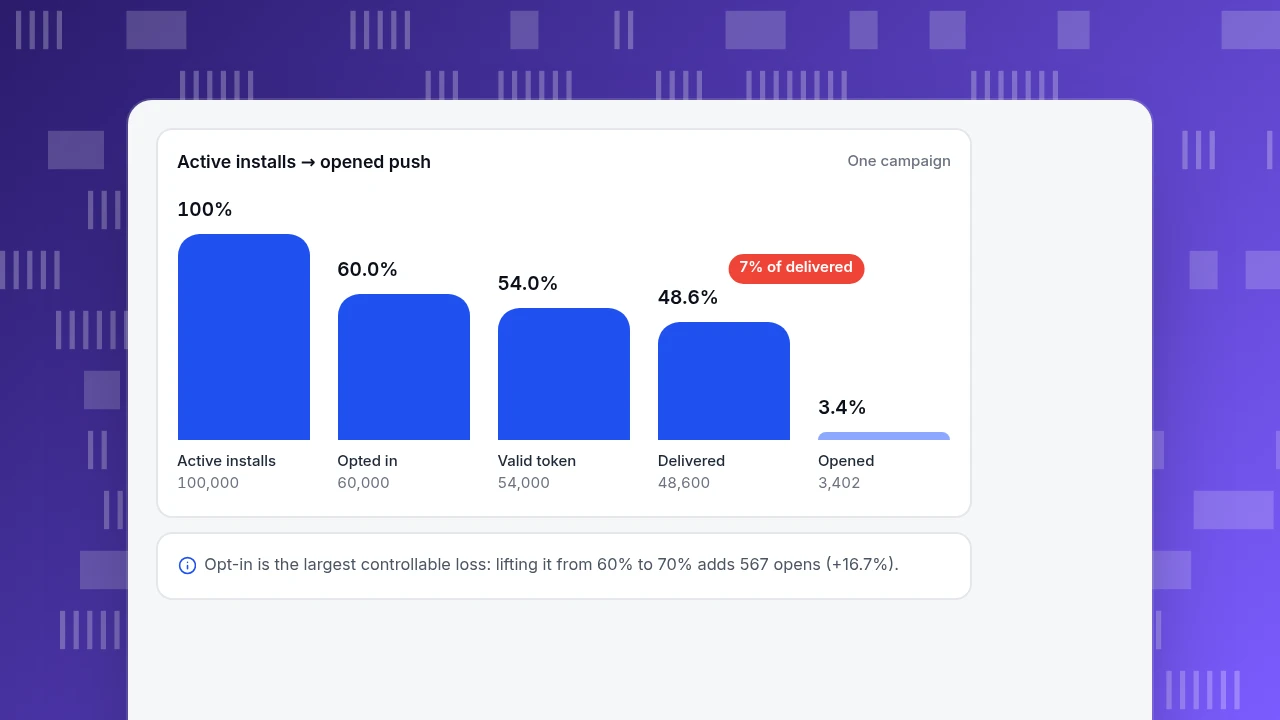
Sample data: an app with 100,000 active installs.
| Step | Rate | Users | Cumulative share of installs |
|---|---|---|---|
| Active installs | 100,000 | 100% | |
| Opted in | 60% | 60,000 | 60.0% |
| Valid token | 90% of opted in | 54,000 | 54.0% |
| Delivered | 90% of valid | 48,600 | 48.6% |
| Opened | 7% of delivered | 3,402 | 3.4% |
Recompute: 100,000 × 0.60 = 60,000; × 0.90 = 54,000; × 0.90 = 48,600; × 0.07 = 3,402, so 34 opens per 1,000 installs. The open rate (7%) is measured against delivered messages, and against installs the number is 3.4%. State which denominator you use every time, because 7% and 3.4% describe the same campaign.
Now see which lever moves the funnel. Raising opt-in from 60% to 70% with a better prompt moment gives 70,000 × 0.90 × 0.90 × 0.07 = 3,969 opens, 567 more (+16.7%). For comparison, one full point of open rate (7% to 8%) on the original 48,600 delivered adds 486 opens, so the 10-point opt-in gain is worth about a 1.2-point open-rate gain. Opt-in and valid-token rates are the ones you control through product design and list hygiene, so start there.
Active installs → opened push
One campaignActive installs
100,000
Opted in
60,000
Valid token
54,000
Delivered
48,600
Opened
3,402
What practices raise results without annoying people?
Each practice below has a metric that tells you whether it worked.
| Practice | Why | Metric to watch |
|---|---|---|
| Ask for permission in context | The user sees the reason (Apple and Android both say so) | Opt-in rate by prompt location |
| Set a TTL that matches the message's life | A late message is stale | Delivered-within-window share |
| Use a collapse key for updating content | Offline users do not get a pile-up | Notifications per user per day |
Clean tokens on NotRegistered | Dead tokens inflate the audience and deflate the open rate | Valid-token share |
| Segment by behaviour | Relevant messages get opened | Open rate and opt-out rate by segment |
| Hold out a share of users | Measures what the push added | Incremental return rate |
The holdout is the practice that changes decisions. Sample data: a campaign goes to 36,000 opted-in users, with 4,000 held back. In 24 hours, 31.0% of the treated group returned (11,160 users) against 28.5% of the holdout. If nobody had been messaged, you would expect 36,000 × 0.285 = 10,260 returns, so the campaign added 900. Opens were 1,260; 900 ÷ 1,260 = 71% of the people who opened were incremental, and the other 29% would have come back anyway. Reporting 1,260 as "returns caused by push" overstates the effect by 40% (1,260 vs 900).
Watch the opt-out rate beside the open rate. A push that wins opens but drives people to turn notifications off is borrowing from future reach, and on Android users can see how many notifications an app sends each day and revoke permission at any time.
How do you measure push in TapCub?
TapCub does not send push notifications; it measures what happens after the tap and whether the people who came back stay. Take the 36,000-user campaign above and measure it as follows.
- Record the tap. The app event list includes a preset event,
$push_click(push tap), in the Open group. Your SDK may report it automatically or may need you to send it, so check the SDK overview for your platform; if it does not, send it yourself with the campaign name as a property. - Build the funnel. In All-platform analytics › Behavior › Behavior analysis, make a funnel from the push tap to the action you wanted (view item, purchase, reply) and read where people drop.
- Compare returners. In All-platform analytics › Users › Segments & tags, create a segment of users who did
$push_clickin the period and compare it with users who did not, using retention in App analytics › Users › Retention. Remember the holdout lesson: that comparison is not causal. - Split by version and channel. The app users report in App analytics › Users › Users can be split by app version and channel, so you can see whether a push SDK upgrade changed the numbers.
- Know the boundary. TapCub does not split traffic for a randomised holdout and does not send, schedule or optimise notifications. Hold out users in your sending tool, tag them, and use TapCub to compare outcomes.
FAQ
What are push notifications?
They are messages your server sends to a user's device through a platform service such as APNs or FCM, shown even when the app is closed. They require the user's permission, and delivery depends on a valid token and an online device or an unexpired message.
What is the difference between a push notification and an in-app message?
A push notification reaches the user outside the app, so it needs permission and a delivery service. An in-app message is shown while the app is open and needs neither. Use in-app messages for people already inside the product.
What is a good push notification open rate?
There is no reliable universal number, and the denominator changes the answer: in the sample, 7% of delivered messages is 3.4% of installs. Track your own rate by segment and campaign, and judge a campaign by incremental returns against a holdout, not by opens alone.
How often should you send push notifications?
Set the cadence by opt-out rate, not by a fixed number. If the opt-out rate after a send rises above your normal level, you sent too much or sent something irrelevant. Android also shows users how many notifications an app sends per day.
Why do users not receive a push notification?
The usual causes are in the chain: permission denied or turned off, an invalid or removed token (after an uninstall FCM returns NotRegistered), an offline device with an expired message (the default FCM lifetime is four weeks), or a payload over the size limit.
Sources
- Apple. Asking permission to use notifications — permission prompt shown once, ask in context, provisional authorization. Verified 2026-11-20.
- Apple. Sending notification requests to APNs — 4 KB payload limit (5 KB for VoIP). Verified 2026-11-20.
- Android Developers. Notification runtime permission — off by default on Android 13 and later, pre-grant for existing apps. Verified 2026-11-20.
- Firebase. Setting the lifespan of a message — four-week default and maximum, TTL 0, collapse key,
NotRegistered. Verified 2026-11-20. - Google. Push notifications overview — web push flow and permission. Verified 2026-11-20.
Was this article helpful?
We use your answers to fix and expand this page.
Couldn’t send. Please try again in a minute.
Thanks for the feedback. We’ll use it to improve this page.You’ve already sent feedback on this page. Thanks.

Product Experience Specialist
Explores usability, user journeys, and feature adoption through practical examples of onboarding and everyday product use.