Try it on your own data
Every report in this article is in the free plan. One snippet for web and apps, up to 10 sites.
Start freeA live chat app is software for answering website visitors in real time, and it has two parts: the widget visitors see and the agent app your team replies from. To answer from a phone, the agent app must alert a locked screen, allow quick canned replies, and hand a chat over with a note.
What you will learn
- Judge the agent app, not the widget: notifications, presence, offline path, canned replies, handoff, visitor context, roles and touch use
- In the sample, phone answers until 21:00 lift live coverage from 66.7% to 86.7% of 60 daily chats
- iPhone web push needs iOS or iPadOS 16.4 and the web app on the Home Screen; test a lock-screen alert before you rely on it
What does "live chat app" mean?
The phrase covers two different things, and mixing them up is the most common way to buy the wrong product. The first is the chat widget your visitors see on your website. The second is the agent app: the screen your team uses to answer, which may be a native phone app, a browser tab or an installed web app. This guide is about the second, and about what it needs to do if some of your answers will be sent from a phone.
The widget is judged by how it looks and where it appears. The agent app is judged by one thing: how fast a visitor's message turns into a good reply, wherever the agent happens to be. Every item in the checklist below is a step in that path.
How many more chats can a phone answer?
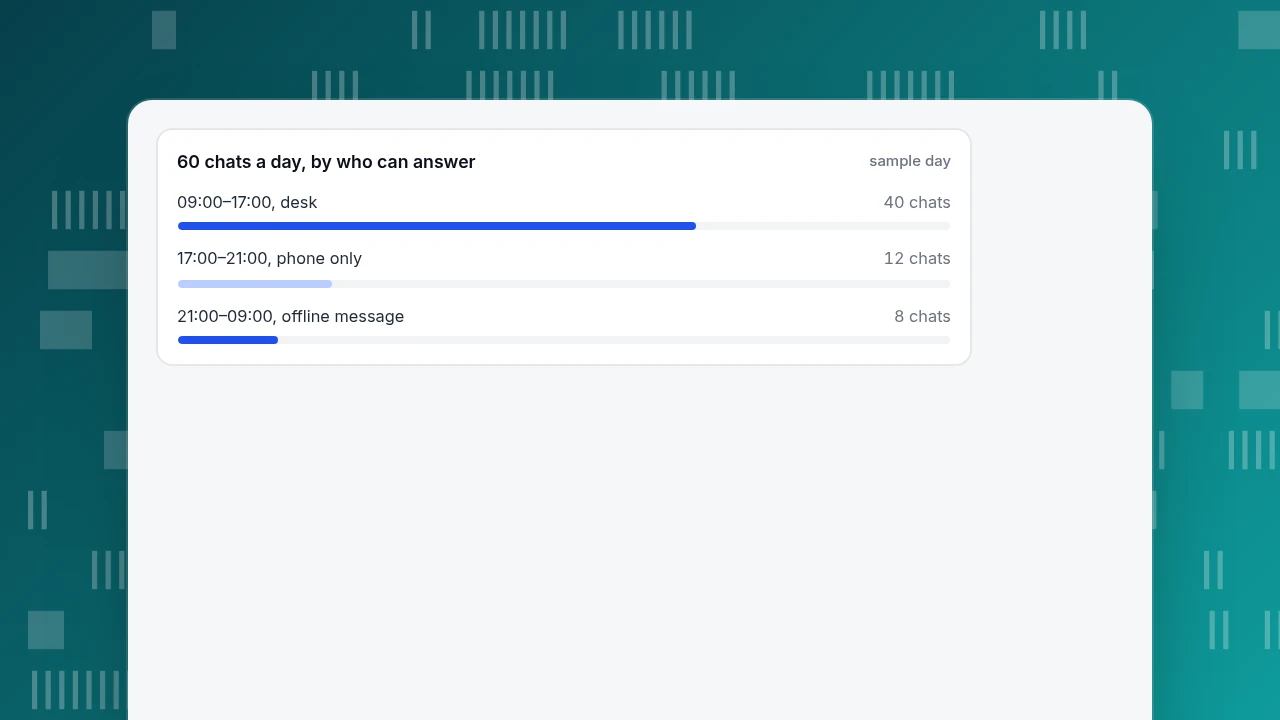
Before comparing features, count the chats you currently miss. Sample data: a shop gets 60 chats a day. The team sits at desks from 09:00 to 17:00 and receives 40 of them. Another 12 arrive between 17:00 and 21:00, and 8 arrive overnight.
- Desk-only coverage: 40 ÷ 60 = 66.7% of chats answered live.
- With agents answering from a phone until 21:00: (40 + 12) ÷ 60 = 86.7%.
- The remaining 8 ÷ 60 = 13.3% become offline messages, which need a form and a next-morning reply.
So the evening phone shift is worth 12 more live chats a day, 20 points of coverage, and it only works if three things hold: the notification actually reaches the person, the person can reply in a few taps, and the conversation does not get stuck with an agent who has stopped looking. That is what the checklist tests. Replace the sample counts with your own hourly chat counts before you decide.
60 chats a day, by who can answer
sample dayWhat must an agent app do? A scorable checklist
Score each row 0 (fails), 1 (partly) or 2 (passes) in a 15-minute trial on a real phone, not from the feature page. A tool that scores 0 on rows 1, 3 or 5 will lose chats however good the rest is.
The table below gives the question and the pass rule for each row. Rows 1–3 are about being reached, rows 4–6 about answering well, and rows 7–8 about control and touch use.
| # | Check | Test | Pass rule |
|---|---|---|---|
| 1 | Notification reaches the agent | Send a chat from a second device with the phone locked | Alert within 10 seconds with the app or tab closed |
| 2 | Presence | Set yourself away and start a chat | An away agent gets no auto-assignment |
| 3 | Offline path | Start a chat when nobody is online | Visitor can leave an email and a question |
| 4 | Canned replies | Insert one by shortcut, edit a word, send | Fills the box without sending; whole step under 30 seconds |
| 5 | Handoff | Transfer with a note, then let an owner go offline | Note visible to agents only; unread chat returns to the queue |
| 6 | Visitor context | Open the visitor panel | Source, pages viewed and past chats visible without leaving the chat |
| 7 | Roles and masking | Log in as a restricted agent | Sees only own and unassigned chats by default; sensitive numbers masked |
| 8 | Touch use | Reply one-handed on a small phone | Send button and reply rows at least 24 × 24 CSS pixels |
Score each row 0, 1 or 2 in a trial on the phone agents will really use. A 0 on rows 1, 3 or 5 loses chats.
Why are notifications the make-or-break feature?
A reply cannot be fast if nobody knows a chat arrived. There are two kinds of notification, and they behave differently:
- Native app push works with the app closed, on the phone's own notification system.
- Browser notification works through the browser's permission prompt, which a site can only trigger in response to a click. MDN's documentation says the request should be made in response to user interaction, and the permission ends in one of three states: granted, denied, or default, which acts as denied.
Three facts shape your test. First, on iPhone and iPad, Apple's WebKit team announced on 16 February 2023 that web push arrives in iOS and iPadOS 16.4, and that the web app must first be added to the Home Screen; it asks for permission only after a tap. So a browser tab on an iPhone will not push. Second, Google's web.dev guidance is that if a user blocks the request the site cannot ask again, so a wrong first prompt is permanent until the user digs into settings. Third, a muted tab or a browser without permission produces a badge and no sound.
Test it: switch the phone to lock screen, send a message from a second device, and time how long until the phone alerts. Pass if it alerts within 10 seconds on the lock screen with the app or tab closed. Repeat on Wi-Fi and mobile data.
Which canned replies work when you type with one thumb?
On a phone, a canned reply is the difference between answering in 10 seconds and in two minutes. Check four things:
- Shortcut length. A shortcut of 10 characters or fewer is quick to type; check that the tool matches on the title as well as the shortcut.
- Edit before sending. Choosing a reply should fill the box, not send it, so you can change a name or a date.
- Length. Keep a phone-ready reply under about 300 characters and one question long. Long replies are better as a link to a help article.
- Personal and shared. Shared replies stay consistent; personal ones let each agent keep their own shortcuts without cluttering the team's list.
Tap targets matter too. WCAG 2.2 success criterion 2.5.8 (Level AA) asks for pointer targets of at least 24 by 24 CSS pixels; a send button or a reply row smaller than that will cause mistakes on a small screen.
How should a handoff work between two agents?
A handoff is where a chat is most likely to stall. Use three rules in your test:
- There is always one owner. The list shows who owns the chat; a waiting chat shows how long it has waited.
- A transfer carries a note. The next agent should see why it was transferred, without the visitor repeating it. The note should be visible to agents only.
- An absent owner does not strand the chat. If the owner goes offline with the visitor still unread, the chat returns to the waiting queue after a time you set.
Example: an agent on a phone gets a refund question outside her permissions. She transfers it with the note "order 4821, refund over limit, customer already sent photos". The colleague on a desk sees the note and the earlier messages and answers the same minute. Without the note, the visitor repeats the story, and the first-response clock restarts in the visitor's mind.
Native app or browser: how do you decide?
| If… | Then… |
|---|---|
| Agents answer from a phone for hours a day | Prefer a native app: reliable lock-screen push and background delivery |
| Phone answers are occasional (evening cover, on call) | A browser or installed web app is enough if the notification test passes |
| Agents use iPhone | Check the Home Screen requirement for web push (iOS and iPadOS 16.4 or later) before relying on the browser |
| The team already has a laptop in front of it all day | The agent app on a phone is a backup, so score notifications and handoff first |
| Chats may contain card or ID numbers | Check masking in the inbox and who can see every conversation before putting the inbox on personal phones |
What does a 15-minute trial look like?
- Install it on the phone agents will actually use, and log in as an agent, not as an admin.
- Open your site in a private window on a laptop and start a chat with a one-line question.
- Time how long the phone takes to alert with the screen locked (pass: 10 seconds or less).
- Take the chat, insert a canned reply with its shortcut, edit one word, send. Time the whole step (pass: under 30 seconds).
- Transfer the chat to a colleague with a note, and confirm the colleague sees the note and not the visitor.
- Set yourself away, start a second chat, and confirm it does not auto-assign to you.
- Close the chat and start a third while no one is online, and check that the visitor gets a form to leave an email.
- Open the visitor panel: confirm you can see where the visitor came from and what pages they viewed.
How does this work in TapCub?
TapCub does not have a native iPhone or Android agent app. Its docs describe the inbox as a web workbench with browser notifications and a sound toggle, and say the notification prompt is "a browser notification, not a separate push app to install". So the honest score for TapCub on row 1 is: browser notifications only. Here is what the same checklist finds in the Live chat › Inbox workbench:
- Reached. Agents mark themselves online, away or offline; away and offline agents receive no auto-assignments. If no agent is online or it is outside Live chat › Chat settings › Office hours, visitors can leave an email and a question under Offline messages. If the inbox sound toggle is off, or the tab is muted, you get a badge and no sound, so test it.
- Answered. Type
/in the composer to insert a canned reply; you can edit it, and nothing is sent until you send it. Canned replies are site-level or personal. Internal note switches the composer so only agents see it. - Handed off. Conversations sit in Waiting, Mine, All or Resolved. After 120 seconds the wait time turns red. A transfer can carry a handoff note only agents see, and with Reclaim when owner offline set to a number of minutes, an unread conversation goes back to Waiting.
- Informed. The visitor drawer shows the visitor's source, their last two days of pages and past conversations, and opens the analytics profile, because chat and analytics share one visitor ID. See live chat support software for the wider picture.
- Controlled. An Agent only member sees by default only conversations assigned to them plus unassigned ones, with no export or delete. Roles and seats are in team and roles. The visitor widget has a separate Hide bubble on mobile switch, which is about visitors on phones, not agents.
FAQ
What is a live chat app?
It is software for answering website visitors in real time. Two parts are often confused: the chat widget that visitors see, and the agent app the team uses to reply. The agent app can be a native phone app or a browser-based screen.
Can I answer live chat from my phone?
Yes, if the agent app supports it, either as a native app or through a browser with notifications allowed. On an iPhone, browser push needs iOS or iPadOS 16.4 and the web app added to the Home Screen. Test a lock-screen alert before relying on it.
How do I get live chat notifications on my phone?
Allow notifications when the app or site asks, keep the sound switch on, and make sure the phone is not muted. In a browser, the permission request must come from a click; if you block it, you must re-enable it in the browser settings.
Do I need a separate app for live chat?
Not always. A native app gives reliable push for people who answer all day. If phone use is occasional and the browser notification test passes, a web inbox is enough. TapCub uses a web inbox with browser notifications and has no separate app.
What should I check before choosing a live chat app?
Eight things: notifications, presence, the offline path, canned replies, handoff, visitor context, roles and masking, and touch usability. Run the 15-minute trial on a real phone and score each row 0 to 2.
Sources
- WebKit, Web Push for Web Apps on iOS and iPadOS (16 February 2023): iOS and iPadOS 16.4, Home Screen requirement, permission prompt only after user interaction. Checked 2026-11-20.
- MDN Web Docs, Notification.requestPermission(): secure context, request in response to user interaction, granted / denied / default. Checked 2026-11-20.
- web.dev, Permission UX for push notifications: blocking prevents asking again; do not ask on page load. Checked 2026-11-20.
- W3C, Understanding SC 2.5.8: Target Size (Minimum): 24 by 24 CSS pixels, Level AA. Checked 2026-11-20.
Was this article helpful?
We use your answers to fix and expand this page.
Couldn’t send. Please try again in a minute.
Thanks for the feedback. We’ll use it to improve this page.You’ve already sent feedback on this page. Thanks.

Product Analyst
Focuses on event analysis, conversion funnels, and retention, using clear metric definitions and structured analysis to explain product performance.