Try it on your own data
Every report in this article is in the free plan. One snippet for web and apps, up to 10 sites.
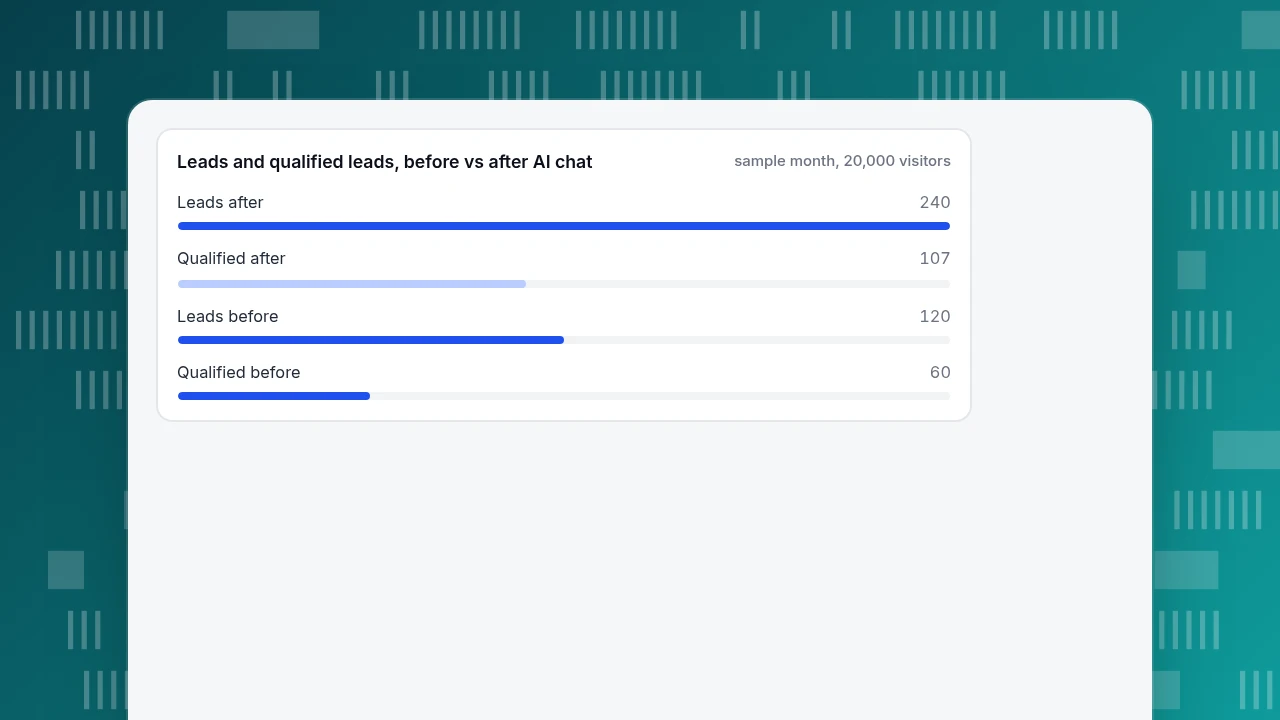
Start freeTo use AI for sales, work along the funnel: let an assistant answer pre-sales questions from your own content, ask two or three qualifying questions and capture contact details, then use it to prioritise leads and draft follow-ups that a person reviews. Judge it on qualified leads, not all leads. In the sample below leads doubled but the qualified rate fell from 50.0% to 44.6%.
What you will learn
- Start with pre-sales answers and lead capture: low effort, easy to measure, narrow risk
- Count qualified leads and rep time per qualified lead; total leads can double while quality falls
- Keep a person in any step that commits price, terms or an automated outcome that changes what someone is offered
Where does AI help in sales?
AI helps most where sales work is repetitive, text-heavy and time-sensitive: answering the same pre-sales questions, collecting the details a rep needs, sorting leads, drafting follow-ups and writing up calls. It helps least where the work is judgment under uncertainty, such as negotiating a custom deal. A practical way to find the use cases is to walk the funnel from a visitor on your site to a signed customer and ask, at each step, what is slow, repetitive or dropped.
Two numbers frame how much to expect and how fast adoption is moving. A study of 5,179 customer support agents found that giving them a generative AI assistant raised issues resolved per hour by 14% on average, and by 34% for novice and low-skilled workers, with minimal effect on the most experienced (NBER Working Paper 31161, Brynjolfsson, Li and Raymond). That is a support setting, not sales, so treat it as evidence that assistance helps newer people most, not as a sales forecast. And Salesforce's State of Sales page says nine in 10 sales teams use agents or expect to within two years (Salesforce, State of Sales, retrieved 2026-11-22), a vendor survey that tells you how common the question is, not how well it works.
The table below lists the use cases in funnel order with a rough judgment of effort and impact. The ratings are ours, based on how much setup and review each needs, not measured results.
| Funnel step | AI use case | Effort | Impact | Metric to track |
|---|---|---|---|---|
| Visitor on your site | Answer pre-sales questions from your own content | Low | High | Share of questions answered without a human; handoff rate |
| Visitor to lead | Ask a few qualifying questions and capture contact details | Low to medium | High | Leads captured per 100 chats; qualified rate |
| Lead to rep | Prioritise and route leads | Medium | Medium | Time from lead to first human contact |
| Rep and prospect | Draft follow-ups, summarise calls, update notes | Low | Medium | Rep time per qualified lead |
| Pipeline | Flag stalled deals, forecast | High | Uncertain | Forecast error before and after |
The rest of this guide takes them in order. Wider questions about AI agents in business are in AI agents for business, and the chat side is expanded in AI live chat.
| Funnel step | AI use case | Effort | Metric |
|---|---|---|---|
| Visitor on site | Answer pre-sales questions from your content | Low | Handoff rate |
| Visitor to lead | Ask a few questions and capture contact details | Low to medium | Qualified rate |
| Lead to rep | Prioritise and route | Medium | Time to first human contact |
| Rep and prospect | Draft follow-ups and call notes | Low | Rep time per qualified lead |
Effort ratings are our judgment, not measurements.
Use case 1: answer pre-sales questions instantly
Most prospects do not fill in a form; they leave. A common reason is a simple question that nobody answered in time: does it integrate with X, what does the plan include, how long is onboarding. An AI assistant that answers from your own pricing page, documentation and policies removes the wait for those questions.
The safe design is narrow. Give it a reviewed set of sources, tell it to say "I'm not sure, let me get someone" when the sources do not answer, and let it hand off to a person for anything about custom terms, discounts or legal commitments. A wrong answer about price or contract terms costs more than a slow answer.
What to measure: the share of conversations the assistant ended without a handoff (and without the visitor coming back about the same question), and the share handed to a person with the reason recorded. Review a sample each week; the failures cluster in a handful of questions you can fix by adding or correcting an answer.
Use case 2: qualify and capture leads
A chat that answers questions but never asks anything leaves value on the table. A qualifying conversation asks two or three things a rep would ask anyway: what are you trying to do, how big is the team, when do you need it, and where can we send details. Ask them in the conversation, one at a time, after the visitor has received something useful.
Keep qualification light. Three questions is a conversation; eight is a form, and forms are what visitors avoided. Decide in advance what counts as qualified (for instance team of 10 or more and a decision within 90 days) and what happens to the rest: a self-serve path or a nurture email, not silence.
Use case 3: prioritise and route leads
Once leads come from several places, someone has to decide who gets called first. AI can help by summarising what each lead did and said, and by suggesting a priority. Start with a rule you can explain, such as "asked about pricing and visited the pricing page twice", before using a model's score that nobody can explain.
One compliance point: the GDPR gives people the right not to be subject to a decision based solely on automated processing that has legal or similarly significant effects (Article 22, EUR-Lex). Sorting a sales queue is usually not that kind of decision, but declining a service or setting a price automatically may be. Keep a person in any step where an automated outcome changes what someone is offered.
Use case 4: drafts, notes and follow-ups
This is where the NBER result is most relevant by analogy. Drafting a follow-up email from a call summary, turning a call into notes in the CRM and writing the first reply to an inbound question are text tasks where an assistant gives a starting point that a person reviews. The support study found the gain concentrated in newer workers, which suggests onboarding a new rep with suggested replies is a good place to start.
Rules: the rep reads and edits before anything is sent; the assistant gets no authority to promise discounts, delivery dates or product changes; and anything it drafts from a prospect's words stays inside your own systems.
A worked example: count qualified leads, not leads
Sample data: a software company compares one month before and one month after adding an AI chat to its pricing page, with the same 20,000 visitors in each month.
| Source | Leads | Qualification rate | Qualified leads |
|---|---|---|---|
| Before: contact form only | 120 | 50% | 60 |
| After: contact form | 110 | 50% | 55 |
| After: AI chat | 130 | 40% | 52 |
| After: total | 240 | 44.6% | 107 |
Leads doubled (120 to 240), but the qualification rate fell from 50.0% to 44.6% (107 ÷ 240), because chat leads qualify at 40%. Judge by qualified leads: 107 against 60 is 47 more, up 78.3%. That is the real gain.
The cost side is rep time. If a rep spends 10 minutes triaging each unqualified lead, before the month cost 60 × 10 = 600 minutes, 10.0 hours. After, 240 − 107 = 133 unqualified leads cost 133 × 10 = 1,330 minutes, 22.2 hours, an extra 12.2 hours. Per qualified lead, triage time went from 10.0 minutes to 1,330 ÷ 107 = 12.4 minutes. So volume rose a lot, triage per good lead rose a little, and the next improvement is a sharper question in the chat that sends unqualified people to a self-serve path.
Two cautions. The comparison is before and after, not a controlled test, so seasonality, campaigns and the chat itself are mixed together. And some of the 130 chat leads would have filled the form anyway; the form fell from 120 to 110, so the net new leads are 240 − 120 = 120 rather than 130.
Leads and qualified leads, before vs after AI chat
sample month, 20,000 visitorsWhat AI should not do in a sales conversation
- Quote prices or terms not on a published page. It should link the page, not improvise.
- Make commitments. Delivery dates, discounts and custom features are for a person.
- Hide that it is automated. People accept a bot that is honest about being one.
- Collect more than you need. Ask for the minimum a rep needs to follow up.
- Replace the first human touch for high-value leads. Route those to a person immediately.
Metrics that show whether it works
- Lead response time: minutes from first message or form to first human contact for qualified leads. Report the median and the 90th percentile.
- Qualified leads per month and qualification rate, both, as in the example.
- Handoff rate and the reasons.
- Rep time per qualified lead.
- Conversion of chatted vs not-chatted visitors to your goal, read with care because people who chat were already more interested.
Research on lead response, published in the Harvard Business Review, concluded that most companies are not responding nearly fast enough (Oldroyd, McElheran and Elkington, 2011). Measure your own response time before assuming you are an exception.
A 30-day rollout
- Week 1: list the 20 questions prospects ask most from your inbox and chat history; write or fix the answers on your site.
- Week 2: switch the assistant on for pre-sales pages only, with human handoff and a visible way to reach a person.
- Week 3: review every handoff and a sample of answered conversations; fix the answers that failed.
- Week 4: add one qualifying question, set the qualified definition and compare qualified leads with the month before.
How to set this up in TapCub
Take the sample company above. TapCub covers the chat, the visitor context and the measurement; it does not score leads, sync to a CRM or send follow-up emails.
- Turn on Live chat › Chat settings › Appearance (the enable switch) for a site that already has the TapCub script; no code change is needed. Then add your pricing and onboarding answers in Live chat › Knowledge base: Q&A entries are sent as written without an AI call, document entries are searched and used to draft a reply.
- In Live chat › Chat settings › AI assistant pick a mode: off, only when all agents are offline, or AI first. The assistant only drafts replies; it does not change orders, send email or call other systems, and it hands over to an agent when the knowledge base is not enough or the visitor asks for a person.
- The chat has no pre-chat form. Ask for an email inside the conversation, or use Live chat › Chat settings › Offline messages outside office hours. When an agent opens the conversation, the sidebar shows where the visitor came from, the current page and the last two days of browsing, with one click to the analytics profile.
- If your product has logins, call
tapcub.loginso the visitor appears in All-platform analytics › Users › People with a timeline, and the agent knows who they are. - Read Live chat › Reports › Conversion attribution to compare the goal conversion of visitors who chatted with those who did not, with the start pages. It warns when fewer than 30 people chatted.
FAQ
How can AI be used in sales?
Along the funnel: answering pre-sales questions on your site, asking qualifying questions and capturing contact details, prioritising leads, drafting follow-ups and writing call notes. Start with the first two because they need little setup and are easy to measure.
Will AI replace salespeople?
The evidence here is about assistance, not replacement: in a study of 5,179 support agents, an AI assistant raised issues resolved per hour by 14% on average and by 34% for novices. Judgment-heavy work like negotiating custom deals still needs a person.
What should I automate first?
Pre-sales questions with a reviewed set of answers, with handoff to a person. It removes waiting, has a clear success measure and a narrow risk surface.
How do I measure whether AI is helping sales?
Track qualified leads per month, qualification rate, response time to qualified leads, handoff rate and rep time per qualified lead, compared with a month before. Count qualified leads, not all leads.
Is it legal to use AI to score leads?
Rules vary by country. In the EU, GDPR Article 22 restricts decisions based solely on automated processing with legal or similarly significant effects. Keep a person in any step that changes what someone is offered, and get legal advice for your case.
Sources
Was this article helpful?
We use your answers to fix and expand this page.
Couldn’t send. Please try again in a minute.
Thanks for the feedback. We’ll use it to improve this page.You’ve already sent feedback on this page. Thanks.

Product Experience Specialist
Writes about product experience, practical workflows, and growth, turning complex processes into clear steps for everyday decisions.