Try it on your own data
Every report in this article is in the free plan. One snippet for web and apps, up to 10 sites.
Start freeTo create a chatbot for your website, count your most repeated questions, write answers for them, choose how the bot answers (stored answers plus document search), set a turn limit and a handoff to a person, test it with 30 questions, install the widget and measure net deflection: (bot-resolved − repeat contacts) ÷ conversations. In the sample here that was 51.7%. Below: each step, the numbers and what TapCub does at each one.
What you will learn
- Start with the questions: in the sample six types covered 78% of 600 questions
- Version one explains and hands off; it does not change orders or accounts
- Measure net deflection, not chats answered: (1,400 − 160) ÷ 2,400 = 51.7%
What should the chatbot be for?
Start with the questions, not the tool. A website chatbot is worth building when a few repeated questions take up most of the human conversations, and the answers do not need anyone to change an order or check an account. Open the last 30 days of conversations and count them by type.
Sample data: 600 questions from one online shop.
| Question type | Count | Share |
|---|---|---|
| Order status | 150 | 25.0% |
| Returns and exchanges | 96 | 16.0% |
| Shipping costs and times | 84 | 14.0% |
| Sizing and fit | 54 | 9.0% |
| Product details | 48 | 8.0% |
| Payment and discount codes | 36 | 6.0% |
| Account and login | 30 | 5.0% |
| Other | 102 | 17.0% |
The top four types are 384 of 600 questions (64%), and the top six are 468 (78%). Those six are the scope for version one. "Order status" is an example of a trap: the bot can explain how to find an order, but it cannot look one up unless it is connected to your order system. Write the scope as "explains, does not act", and keep order-specific questions for a person.
For the wider picture of bot types and templates, see customer service chatbot and chatbot templates.
Which kind of chatbot should you build?
| Approach | How it answers | Effort | Risk |
|---|---|---|---|
| Fixed buttons and flows | Visitor picks from a menu | Low for 5 to 10 paths, grows quickly | Dead ends when the question is not on the menu |
| Question-and-answer matching | A stored answer is sent when the question matches | Write each answer once | Misses rephrased questions |
| AI drafting from your documents | Finds relevant passages, a model writes the reply | Writing and reviewing the source documents | A confident wrong answer if the documents are stale |
A sensible first build combines the second and third: exact answers for the repeated questions, and a document-based fallback for the rest, with a handoff to a person when the material does not cover the question. Do not build integrations with orders, accounts or payments in version one; each one multiplies the ways a mistake can reach a customer.
| Approach | How it answers | Risk |
|---|---|---|
| Fixed buttons and flows | Visitor picks from a menu | Dead ends when the question is not on the menu |
| Question-and-answer matching | A stored answer is sent on a match | Misses rephrased questions |
| AI drafting from documents | Finds passages, a model writes the reply | Confident wrong answers if documents are stale |
A sensible first build combines matching for repeated questions with a document fallback and a handoff.
How do you write the knowledge the bot answers from?
Write for each of the six scoped question types, then add the next ones.
- One question, one answer. The question is phrased the way visitors write it ("where is my parcel"), with two or three variants.
- Answer in 80 words or fewer, leading with the answer, then the condition, then a link to the full page.
- Put numbers and dates in. "Returns are accepted within 30 days of delivery" beats "within our return window".
- Name an owner and a review date for every entry. A stale answer is worse than none.
- State what the bot cannot do in the entries where people expect action: "To cancel an order, a team member will take it from here".
A sample entry:
Question: How long does delivery take? Answer: Standard delivery takes 3 to 5 working days; express takes 1 to 2. Orders placed before 2 pm ship the same day. See the full shipping page for countries and costs. Owner: Operations. Review: every quarter.
Longer material, such as a returns policy, is better as a document that the bot searches than as a single Q&A, because it holds many conditions.
How do you set limits and handoff?
The bot needs three rules written before launch.
- When it stops. Cap the number of AI turns in one conversation, and hand off when the visitor asks for a person or the material does not cover the question.
- What the visitor sees on handoff. A short message that says what happens next, and, outside office hours, a form to leave an email and question.
- That it says it is a bot. The EU AI Act's Article 50(1) requires providers to design AI systems that interact directly with people so that those people are told they are dealing with an AI system, unless it is obvious. The Act sets 2 August 2026 as the date Article 50 applies. Tell visitors up front whatever your location.
Wrong answers also carry liability. In Moffatt v. Air Canada (2024), a British Columbia tribunal held the airline responsible for incorrect information its website chatbot gave a customer and ordered it to pay C$812.02. The practical consequence: review what the bot says, especially anything about money, deadlines or legal terms, and keep those answers short, sourced and owned.
How do you test it before it goes live?
Write 30 test questions: 20 real ones from your conversation log, 5 rephrasings of known entries and 5 questions outside the scope. Run them all and grade each answer correct, partial or wrong.
Sample data: 24 correct, 4 partial and 2 wrong out of 30. That is 80% correct and 6.7% wrong. The two wrong answers matter more than the percentage: read them, fix the entries, rerun. A reasonable launch rule is no wrong answer on anything about money, deadlines or legal terms, and wrong answers on the rest below about 5%. These numbers are our working rule, not a standard, so set your own and write them down.
The out-of-scope questions test the handoff: the right result is a polite handoff, not an invented answer.
How do you measure whether it works?
Define the numbers before launch so you cannot pick them afterwards.
| Metric | Definition | Sample |
|---|---|---|
| Conversations | Chats started in the period | 2,400 |
| Bot-resolved | Ended without a human reply | 1,400 (58.3%) |
| Repeat contact | Bot-resolved, same visitor back about the same issue within 7 days | 160 |
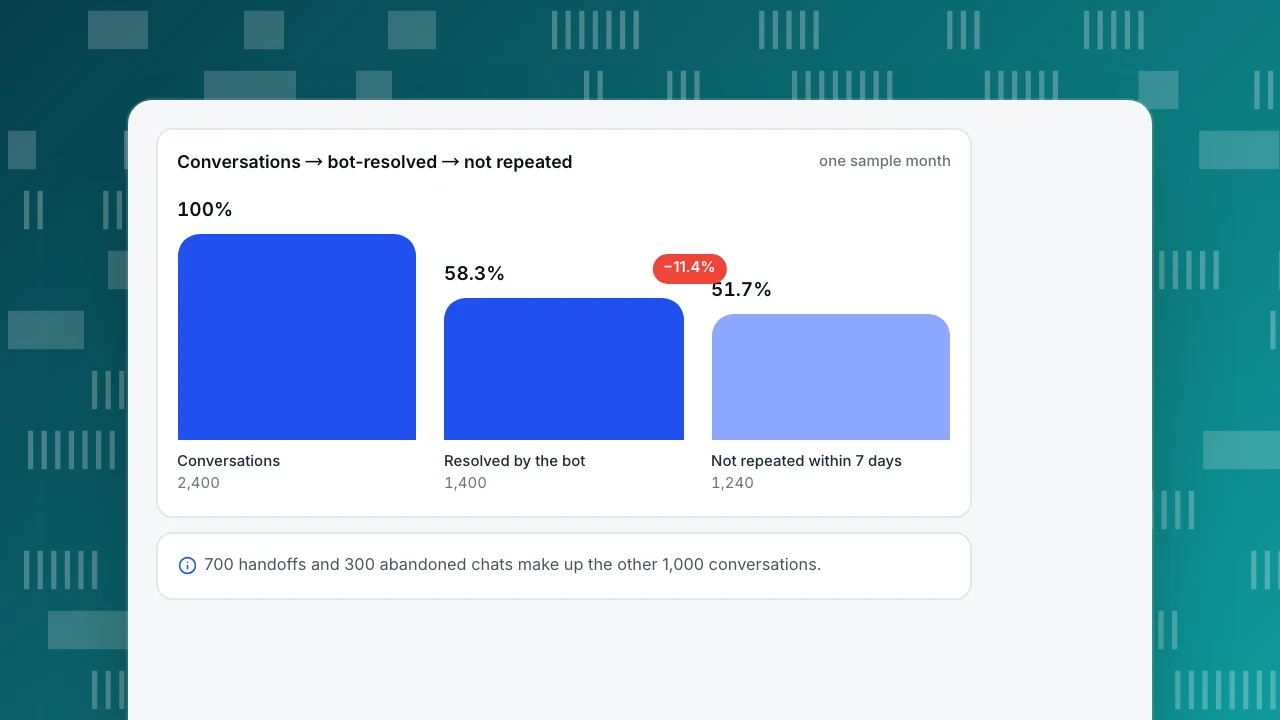
| Net deflection rate | (bot-resolved − repeat contacts) ÷ conversations | 1,240 ÷ 2,400 = 51.7% |
| Handoff rate | Conversations passed to a person | 700 (29.2%) |
| Abandoned | Visitor left without an answer | 300 (12.5%) |
| Knowledge hit rate | Questions answered by a stored answer or a retrieved passage | Track weekly |
| Satisfaction | Score after resolution | Track weekly |
The deflection rate is net because a conversation the bot "resolved" but the visitor repeated two days later was not resolved. A conversation that ends with the visitor abandoning is not resolved either, so abandonment is a separate line to watch rather than a hidden success.
At $4.00 per human-handled conversation (sample), 1,240 net deflections are worth $4,960 a month; against $850 of costs that is $4,110 net. For the full method, including the conversion half and the bias in it, see chatbot ROI and ticket deflection.
Conversations → bot-resolved → not repeated
one sample monthConversations
2,400
Resolved by the bot
1,400
Not repeated within 7 days
1,240
How do you improve it every week?
- Read the handoffs. Group handed-off conversations by reason: no matching knowledge, the model could not answer, the visitor asked for a person, the turn limit.
- Fix the top gap. If "no matching knowledge" holds 40% of handoffs, add the three most common missing questions as new entries.
- Fix wrong answers at the source so the correction is reused.
- Re-run the 30 test questions after each batch of changes.
- Watch the weekly numbers (deflection, handoff, repeat contact, satisfaction) and stop when two weeks in a row are flat: the next gain probably needs new content or a connected system, not more tuning.
Common mistakes
- Starting with the tool. Count the questions first.
- Letting the bot act. Version one explains; it does not change anything.
- Counting handoffs as failures. A clean handoff on a question the bot should not answer is correct behaviour.
- Measuring chats, not outcomes. Conversations answered is not deflection.
- No owner for the content. Entries go stale within a quarter.
- Hiding that it is a bot.
Building the bot in TapCub
Take the six scoped question types. You want a working bot, with the numbers above, without writing code.
- Turn chat on. If the TapCub analytics script is on your site, open Live chat › Chat settings › Appearance, switch on Enable live chat and save; no second script is needed.
- Write the knowledge. In Live chat › Knowledge base, add Q&A entries (sent as written, no AI call when the question or its keywords match) and documents (split into passages of about 600 characters; full-text search finds passages and the model drafts the answer). Test in Playground, which uses no quota and creates no conversation. Pin common questions so visitors can read the answer in the FAQ without opening a conversation.
- Choose the mode. In Live chat › Chat settings › AI assistant, pick off, only when all agents are offline, or AI answers first. Set the maximum AI turns (1 to 20, default 6) and a handoff message. The visitor is told they are talking to an AI before the first reply, and that notice cannot be turned off.
- Run the handoff. The inbox in Live chat › Inbox labels the reason for each handoff. Use Fix & save on a wrong answer to store a corrected Q&A entry, and Generate from conversations in the draft inbox to draft entries from resolved chats.
- Read the numbers. Live chat › Reports gives conversations, resolution rate, first response, satisfaction and knowledge base hit rate; Conversion attribution compares goal conversion of visitors who chatted with those who did not.
Know the boundary: the TapCub assistant only drafts replies from your knowledge base. It cannot change an order, send an email or call another system, and the chat widget has no pre-chat form.
FAQ
How do I create a chatbot for my website?
Count your top questions, write answers for the repeated ones, choose how it answers (stored answers plus document search), set a turn limit and a handoff, test 30 questions, install the widget and measure the net deflection rate each week.
How long does it take to build a website chatbot?
The setup can take an afternoon; the quality takes weeks. Writing and reviewing answers and testing take most of the time, and the first month of handoff reasons will show which entries to add.
What is a chatbot deflection rate?
The share of conversations the bot resolved without a human, net of repeat contacts: (bot-resolved − repeat contacts) ÷ conversations. In the sample, (1,400 − 160) ÷ 2,400 = 51.7%.
Do I need to tell visitors it is a bot?
Yes, as good practice everywhere. Under the EU AI Act, Article 50(1) requires AI systems that interact directly with people to be designed so people are told they are dealing with AI, unless obvious; the Act sets 2 August 2026 for Article 50.
Can the chatbot take actions like cancelling an order?
Not in a first version. Keep the bot to explaining and hand off anything that changes an order or an account to a person; each integration multiplies the ways a wrong action can reach a customer.
Sources
- European Union. Artificial Intelligence Act, Article 50: transparency obligations. 50(1) on informing people they interact with an AI system; applies from 2 August 2026 (Article 113). Checked 2026-11-21.
- Civil Resolution Tribunal of British Columbia. Moffatt v. Air Canada, 2024 BCCRT 149. Responsibility for chatbot information; C$812.02 ordered. Verified 2026-11-15 (the site returns 403 to scripts on 2026-11-21).
Was this article helpful?
We use your answers to fix and expand this page.
Couldn’t send. Please try again in a minute.
Thanks for the feedback. We’ll use it to improve this page.You’ve already sent feedback on this page. Thanks.

Product Analyst
Focuses on event analysis, conversion funnels, and retention, using clear metric definitions and structured analysis to explain product performance.