Try it on your own data
Every report in this article is in the free plan. One snippet for web and apps, up to 10 sites.
Start freeData integrity testing for tracking data means running repeatable checks that find missing fields, duplicate events, invalid values, wrong timestamps and gaps against your orders. Five SQL checks cover it, and each should return zero rows or a rate above a floor you set in advance.
What you will learn
- Five checks: completeness, uniqueness, validity, timeliness and reconciliation; each returns zero bad rows or a rate above a fixed floor
- In the 10-row sample, completeness is 70%, one order is counted twice and reconciliation coverage is 6 of 7 orders (85.7%)
- Duplicates mostly come from two trackers, client plus server reporting, or a blank key; test the dedupe key before trusting it
What data integrity testing means for tracking data
NIST defines data integrity as the property that data has not been changed, destroyed or lost in an unauthorized or accidental manner. For analytics, the accidental part is the whole problem: a tag fires twice, a required property is dropped by a release, a timestamp comes from a clock that is wrong. Data integrity testing is a set of repeatable checks that catch those cases before anyone makes a decision from the numbers.
IBM's overview of data integrity testing describes four stages: data validation (format, range, type and referential checks), consistency checks across systems or tables, anomaly detection such as duplicates and outliers, and ongoing monitoring. This article turns those four stages into five checks you can write as SQL against an event table, and shows the results on a table small enough to verify by hand.
If you are auditing a whole setup rather than one table, start with the web analytics audit; the broader idea of trustworthy data is in data quality.
The sample table
Sample data: ten rows from a purchase_events table on one day, plus a backend orders table with seven orders for the same day. The problems are planted on purpose so each check has something to find.
| event_id | order_id | user_id | revenue | currency | event_time |
|---|---|---|---|---|---|
| 1 | o1001 | u1 | 49.00 | USD | 2026-11-01 09:00:00 |
| 2 | o1002 | u2 | 19.00 | USD | 2026-11-01 09:05:00 |
| 3 | o1002 | u2 | 19.00 | USD | 2026-11-01 09:05:01 |
| 4 | o1003 | (null) | 35.00 | USD | 2026-11-01 10:10:00 |
| 5 | o1004 | u4 | (null) | USD | 2026-11-01 11:00:00 |
| 6 | o1005 | u5 | -20.00 | USD | 2026-11-01 12:30:00 |
| 7 | o1006 | u6 | 29.00 | usd | 2026-11-01 13:00:00 |
| 8 | (null) | u7 | 15.00 | USD | 2026-11-01 14:00:00 |
| 9 | o1007 | u8 | 99.00 | USD | 2026-11-09 08:00:00 |
| 10 | o1008 | u9 | 24.00 | USD | 2026-11-01 16:20:00 |
The backend orders table holds o1001, o1002, o1003, o1004, o1006, o1008 and o1009. Every query below was run against this data in SQLite and the results are as shown.
| Check | SQL pattern | Result on the sample |
|---|---|---|
| Completeness | COUNT rows where a required column IS NULL | 3 of 10 rows incomplete (70% complete) |
| Uniqueness | GROUP BY order_id HAVING COUNT(*) > 1 | o1002 twice, one second apart |
| Validity | WHERE revenue <= 0 or currency NOT IN (list) | 1 negative revenue, 1 lowercase currency |
| Timeliness | WHERE event_time is later than load time | 1 row dated 7 days ahead |
| Reconciliation | LEFT JOIN to the orders table both ways | 1 order missing, 2 events without an order |
Sample data: 10 purchase events and 7 backend orders for one day, built with known problems and run in SQLite.
Check 1: completeness, are the required fields present?
Decide which properties each event must carry, then count the rows that miss them. For a purchase, that is order_id, user_id and revenue.
SELECT COUNT(*) AS rows_total,
       SUM(order_id IS NULL) AS no_order_id,
       SUM(user_id  IS NULL) AS no_user,
       SUM(revenue  IS NULL) AS no_revenue
FROM purchase_events;
Result: 10 rows, 1 without an order_id, 1 without a user_id, 1 without revenue. Those are three different rows (events 8, 4 and 5), so 3 of 10 rows are incomplete and the completeness rate is 7 ÷ 10 = 70%.
A rule you can adopt: set a floor per event, for example 98% of purchases must carry all three fields, and alert below it. The floor is a judgment call; pick one and keep it fixed so a drop means something.
Check 2: uniqueness, is any fact counted twice?
Group by the business key, not by the event ID. Retries and double tags produce rows with different event IDs and the same order.
SELECT order_id, COUNT(*) AS n
FROM purchase_events
WHERE order_id IS NOT NULL
GROUP BY order_id
HAVING COUNT(*) > 1;
Result: o1002 appears twice (events 2 and 3, one second apart). Nine of the ten rows carry an order ID, and those nine rows hold only 8 distinct orders, because o1002 is one order seen twice; event 8 has no ID to count. Summing raw rows would report 38.00 of revenue for o1002 instead of 19.00.
Rule: any key with n above 1 is a defect to investigate, not to average away. Repeated rows one second apart almost always mean a retry or a duplicate tag.
Check 3: validity, are the values allowed?
Validation compares values to a list or a range.
SELECT event_id, revenue FROM purchase_events WHERE revenue <= 0;
SELECT event_id, currency FROM purchase_events
WHERE currency NOT IN ('USD','EUR','GBP');
Result: event 6 has revenue -20.00, which is probably a refund sent as a purchase. Event 7 has currency usd, which would split into a separate group in any report that groups by currency. Neither row is missing data; both are wrong data, which a completeness check cannot see.
Rule: write allowed values down next to the event definition. A currency list, a revenue greater than zero, a user ID in an expected format.
Check 4: timeliness, did it arrive when it should?
Timestamps from the future and gaps in a daily series both point to clock or pipeline problems.
SELECT event_id, event_time FROM purchase_events
WHERE event_time > '2026-11-02 00:00:00';
Result: event 9 is stamped 2026-11-09 while the data was loaded on 2026-11-02, so it is a week in the future. It will vanish from a day report for November 1 and show up on a day that has not happened yet. In production, replace the literal with the load time and also test the opposite direction: for a daily table, check that yesterday's row count is within a band of the last seven days, for example 70% to 130% of the median.
Check 5: reconciliation, does it match another system?
The strongest test compares your analytics with a source of truth such as the orders database.
-- orders with no purchase event
SELECT o.order_id FROM orders o
LEFT JOIN purchase_events p ON p.order_id = o.order_id
WHERE p.order_id IS NULL;

-- purchase events with no order
SELECT DISTINCT p.order_id FROM purchase_events p
LEFT JOIN orders o ON o.order_id = p.order_id
WHERE o.order_id IS NULL AND p.order_id IS NOT NULL;
Result: order o1009 exists in the backend but has no event, a lost purchase. Events for o1005 and o1007 have no backend order: o1005 is the negative-revenue row and o1007 is the future-dated one, so both are suspect. Of seven real orders, six were tracked, a coverage of 6 ÷ 7 = 85.7%.
Reconciliation will not match to the cent, because of refunds, currencies and time zones, so decide the tolerance first. What matters is the trend of the gap and the lists of orders that fall on either side.
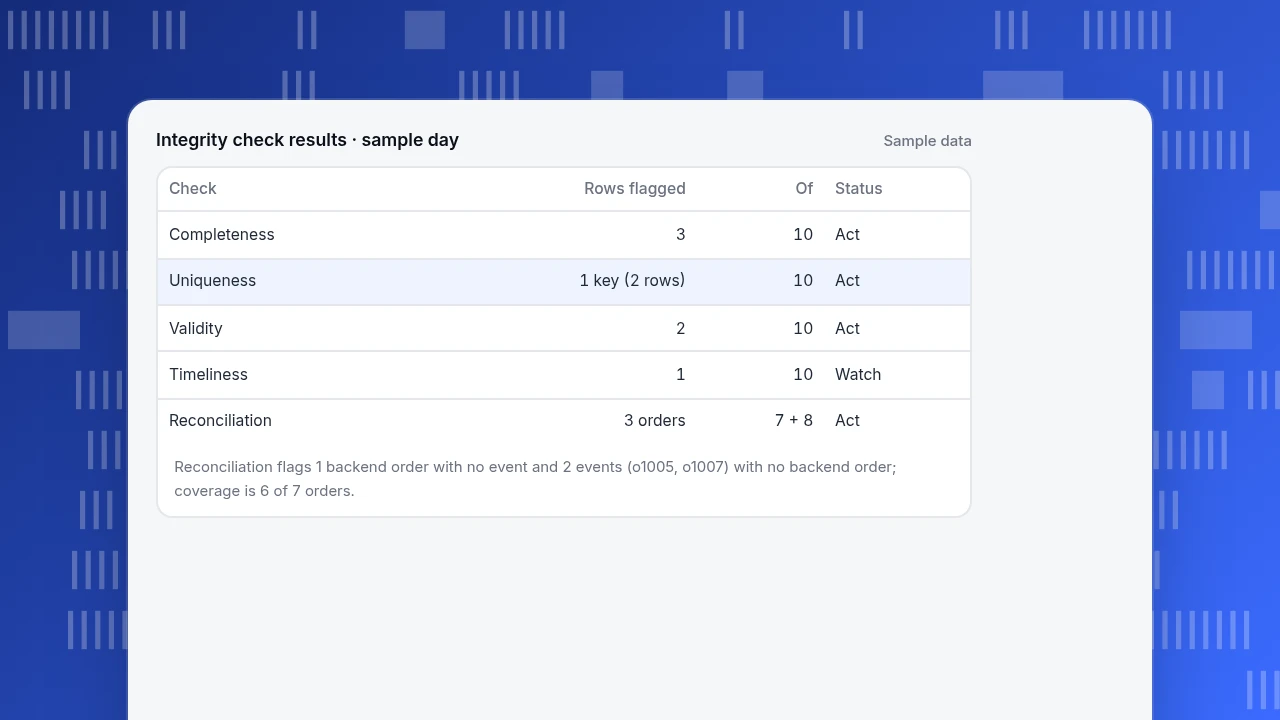
Integrity check results · sample day
Sample data| Check | Rows flagged | Of | Status |
|---|---|---|---|
| Completeness | 3 | 10 | Act |
| Uniqueness | 1 key (2 rows) | 10 | Act |
| Validity | 2 | 10 | Act |
| Timeliness | 1 | 10 | Watch |
| Reconciliation | 3 orders | 7 + 8 | Act |
Reconciliation flags 1 backend order with no event and 2 events (o1005, o1007) with no backend order; coverage is 6 of 7 orders.
Where duplicates come from
Three sources account for most duplicates in tracking data:
- Two copies of the tracker on one page, often a hard-coded snippet plus a tag manager. Google's ecommerce validation guide says to use the Google tag (gtag.js) or Google Tag Manager, but not both, because using both double counts certain events.
- Client and server both reporting the same fact. A purchase sent from the browser and again from the server is two rows unless they share a key.
- A weak or blank key. Google Analytics' ecommerce help says the transaction ID must be unique for each order, and warns that purchase events with an empty transaction ID are all deduplicated together into one.
The third cuts both ways: deduplication keyed on an ID protects you from retries and destroys real orders if the ID is blank or constant. Test the key before you trust the dedupe.
How often to run the checks
Run completeness, duplicates and validity daily on the previous day's data, since they are cheap. Run reconciliation weekly, and also after every release that touches checkout or the tracking code. After a change, run all five on the first day of data, not the first week.
Keep a short log of each run: the date, which check failed, how many rows, and what you did. The log is how you know whether a failure is new.
| Check | What it finds | Example pass rule |
|---|---|---|
| Completeness | Missing required properties | 98% or more of rows carry every required field |
| Uniqueness | The same fact counted twice | No business key with n above 1 |
| Validity | Values outside the allowed set | No negative revenue; currencies in the list |
| Timeliness | Future or missing days | No future timestamps; yesterday within 70% to 130% of the weekly median |
| Reconciliation | Gaps against the source of truth | Coverage within the tolerance you set, for example 98% |
How to run these checks with TapCub
The five checks above run in your warehouse. TapCub covers parts of the same ground inside the product, and it helps to know which part.
- Write down what should arrive. In All-platform analytics › Data › Tracking plan, record each event with its properties, whether each is required, the owner and a status from Proposed to Live. This is the list the completeness check measures against.
- Turn on live verification. The Live verification (24 h) switch adds hits in the last 24 hours and the completeness of required properties for each event. Low completeness is a warning; it does not block intake on its own.
- Look at where data was lost. All-platform analytics › Data › Data quality lists collector rejects by reason and day (domain mismatch, exclusion rule, monthly quota, rate limit, invalid payload, bots), ingestion warnings and stale detection. This helps with timeliness-type problems, such as a rule that stopped matching.
- Make duplicates impossible from the server. For orders, send the purchase from your server with an
insert_idsuch as the order number (at most 36 characters). Duplicates in a batch are dropped, and a key already stored with an event time within one day of the new one is not inserted again. The browser script keeps one pageview when the same visitor repeats a view within 2 seconds, and a second copy of the snippet on a page exits instead of double-counting. - Reconcile outside. TapCub does not run SQL checks against your orders database for you. Use the data export in All-platform analytics › Data › Data export or the query tool in All-platform analytics › Behavior › Metrics & SQL to pull the event side, and compare with your order list.
TapCub shows where an event stopped arriving; it does not tell you whether a business number is right. That comparison stays with you.
FAQ
What is data integrity testing?
Data integrity testing is a set of repeatable checks that confirm data is accurate, consistent and complete as it is stored and moved. IBM describes validation, consistency checks, anomaly detection such as duplicates and outliers, and continuous monitoring. For tracking data, that means checking required fields, duplicate events, allowed values, timing and a match against orders.
How do you test data integrity in a database?
Write queries that return rows violating a rule, and expect zero. Count nulls in required columns, group by the business key to find duplicates, filter for values outside the allowed set, check timestamps, and join to a source of truth. Run them on a schedule and keep a log of failures.
What is the difference between data integrity and data quality?
Data integrity is mainly about whether data stays unaltered and complete as it moves, which is the NIST sense. Data quality is wider: it includes whether the data is fit for the question, such as being fresh enough or defined consistently. Integrity checks are the testable part of data quality.
How do you find duplicate events?
Group by the business key, such as order ID, and keep groups with a count above 1. Do not group by event ID, because retries create new IDs. Look at the time gaps: rows one or two seconds apart usually mean a retry or two trackers. Then fix the cause rather than deleting the rows.
How often should you run data integrity tests?
Run cheap checks daily on the previous day's data, reconciliation weekly, and all checks on the first day after any release that changes tracking. The schedule matters less than keeping the thresholds fixed and logging each run.
Sources
- NIST, Computer Security Resource Center glossary: data integrity (definitions from SP 800-175B, SP 1800-25B and others). Checked 2026-11-22.
- IBM, Data integrity testing: goals, process and best practices (four process stages). Checked 2026-11-22.
- Google Analytics Help, Measure ecommerce (unique transaction ID; empty IDs are deduplicated together). Checked 2026-11-22.
- Google for Developers, Validate your ecommerce setup (gtag.js) (use gtag.js or Tag Manager, not both). Checked 2026-11-22.
Was this article helpful?
We use your answers to fix and expand this page.
Couldn’t send. Please try again in a minute.
Thanks for the feedback. We’ll use it to improve this page.You’ve already sent feedback on this page. Thanks.

Product Experience Specialist
Writes about product experience, practical workflows, and growth, turning complex processes into clear steps for everyday decisions.