Try it on your own data
Every report in this article is in the free plan. One snippet for web and apps, up to 10 sites.
Start freeData enrichment examples are easiest to judge as before and after records. A sign-up with only an email gains a company domain, an industry, an employee band and a country, and a messy campaign tag becomes a clean channel. Below: eight examples grouped as cleaning, deriving and appending, and how to measure them: in the sample, a 64.0% match at 88.0% accuracy is only 56.3% usable.
What you will learn
- Three kinds: cleaning (fix what is there), deriving (compute from what you hold) and appending (look up elsewhere)
- Report usable rate, match rate times accuracy: 64.0% matched at 88.0% accurate is 56.3% usable
- Keep the original value, store the source and date, and treat appended personal data under GDPR Article 14
One record, before and after enrichment
Data enrichment means adding fields to a record from another source, so the record answers questions it could not answer alone. The definition is covered in data enrichment; this article is about what it looks like in practice, record by record.
Here is one lead from a sign-up form (all names are made up). The only thing the form captured was an email address and a page.
| Field | Before | After | Where the new value came from |
|---|---|---|---|
email | Dana@Northwind.Example | dana@northwind.example | Cleaned: trimmed, domain lower-cased |
company_domain | (empty) | northwind.example | Derived from the email domain |
industry | (empty) | Retail | Looked up from your own account list |
employee_band | (empty) | 51-200 | Looked up from your own account list |
country | (empty) | Germany | Derived from the visit by the analytics collector |
channel | utm_source=FB | paid-social | Normalised with a channel rule |
enriched_at | (empty) | 2026-11-22 | Added by you, so the age is visible |
The "After" column shows three kinds of enrichment that are easy to mix up: cleaning (fixing what is there), deriving (computing a new field from fields you already hold) and appending (looking up a value in another list). The risk, the cost and the legal obligations differ for each, which is why the examples below are grouped that way.
| Kind | What it does | Risk and cost |
|---|---|---|
| Cleaning | Fixes values already in the record | Low; no new data enters |
| Deriving | Computes a field from fields you hold | Low to medium; check the rule |
| Appending | Looks up a value in another list or vendor | Highest; cost per record, accuracy, legal duties |
Start with cleaning and deriving; append only fields that change a decision.
Eight data enrichment examples
| # | Example | Before | After | Kind |
|---|---|---|---|---|
| 1 | Normalise a campaign tag | utm_source = FB, Facebook, fb | facebook | Cleaning |
| 2 | Standardise an email | Dana@Northwind.Example | dana@northwind.example | Cleaning |
| 3 | Standardise an address | 12 main st apt 4 | 12 Main St, Apt 4 | Cleaning |
| 4 | Convert a timestamp | 2026-11-03 23:30 (local, no zone) | 2026-11-03T22:30:00Z plus local day | Deriving |
| 5 | Group job titles | Sr. Mktg Mgr | function Marketing, level Manager | Deriving |
| 6 | Add a product category | sku = TS-BL-M | category = T-shirts, margin = 42% | Appending (your own table) |
| 7 | Add company attributes | northwind.example | industry Retail, band 51-200 | Appending (your list or a vendor) |
| 8 | Add location | Visit from an IP address | country Germany | Deriving (collector) |
Notes on a few of them:
- Example 2. The domain part of an email address is case-insensitive, but the local part (before the
@) is, by the mail standard, case-sensitive in principle (RFC 5321, section 2.4). In practice almost all providers treat it as case-insensitive, so lower-case a copy for matching and keep the original value you were given. - Example 4. A timestamp without a zone is ambiguous:
23:30on 3 November is a different day in UTC for anyone east of the zone. Store UTC and keep the local date as a second field. - Example 5. Title mapping is rule-based and will misfile unusual titles; keep an
Unknownvalue rather than guessing, and review the unknowns monthly. - Example 8. Location from an IP address is coarse below country level and unreliable for people on VPNs or mobile networks; decide on country and treat city as a hint.
- Example 6. This is the cheapest and most reliable enrichment: a lookup table you already own, such as SKU to category and margin. It has no vendor, no cost per record and no privacy question.
- Example 7. This is where a vendor or a public list is usually involved, and where the match rate and the accuracy matter most.
Measure the enrichment: fill rate, match rate, accuracy
Enrichment is only valuable if the added values are present and right. Three numbers tell you, and they are easy to compute.
Sample data: 1,000 records sent for company enrichment.
| Measure | How to compute | Result |
|---|---|---|
| Match rate | Records with a value returned ÷ records sent | 640 ÷ 1,000 = 64.0% |
| Accuracy | Correct values in a checked sample ÷ sample size | 44 ÷ 50 = 88.0% |
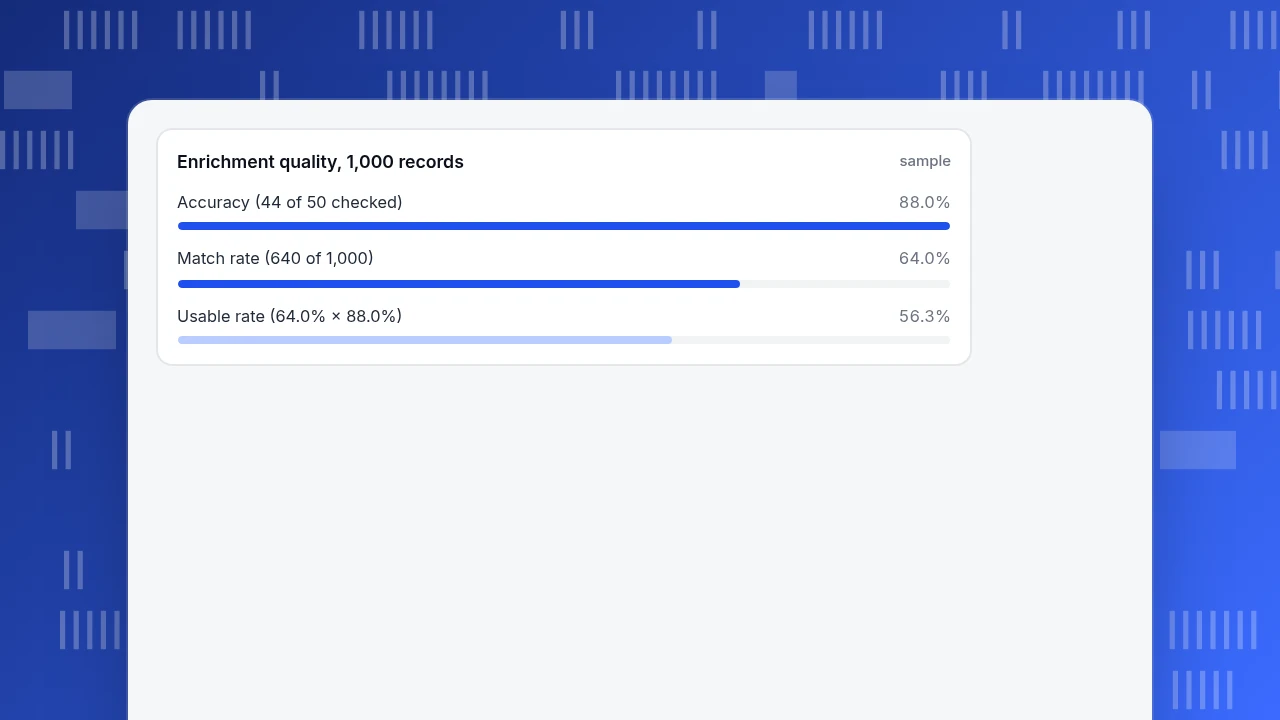
| Usable rate | Match rate × accuracy | 640 × 0.88 = 563, so 56.3% of all records |
The accuracy figure comes from a sample of only 50, so give it a range: the 95% interval is 88.0% ± 9.0 points (1.96 × √(0.88 × 0.12 ÷ 50) = 0.090), about 79% to 97%. If the range matters for a decision, check 200 records instead; the interval narrows to about ± 4.5 points.
Two rules follow. Check a sample by hand before trusting a field. And compare usable rate, not match rate: a vendor that matches 90% of records at 70% accuracy gives 90% × 70% = 63.0% usable, more than the 56.3% above, but only if the 70% holds on your own records, so test each vendor on the same 50-record sample.
Enrichment quality, 1,000 records
sampleWhen to enrich and when not to
Ask four questions before adding a field.
- Will a decision or a message change because of this field? If the answer is no, do not append it. Each extra field is a record you must keep correct.
- Can you derive it from what you already hold? Deriving (country from the visit, channel from the referrer) is cheaper and more defensible than buying.
- Is the field personal data? Appending information about an identifiable person from another source brings obligations. Under the GDPR (Article 14), when you obtain personal data from a source other than the person, you must inform them, in general within a reasonable period and at the latest within one month. The data-minimisation principle (Article 5(1)(c)) says data must be adequate, relevant and limited to what is necessary, and Article 5(1)(d) requires it to be accurate and kept up to date.
- How fast does the field go stale? A country rarely changes; a job title often does. Re-check fast-decaying fields on a schedule and store the date you enriched them.
Rules for storing enriched data safely
- Keep the original. Write enriched values to new fields (
industry_enriched) or keep both; never overwrite what the person told you. - Record the source and date.
enriched_atandenriched_sourcelet you answer "where did this come from?" and "how old is it?". - Mark confidence. If the source gives a confidence score, store it and use a threshold.
- Do not enrich what you cannot protect. Sensitive fields (health, beliefs) need a separate legal basis, or should not be appended at all.
- Plan removal. If a person asks you to delete their data, enriched fields must go with the record.
Mistakes that make enriched data worse than none
- Overwriting a correct value with a wrong one. Always keep the original.
- Trusting match rate. A 90% match with poor accuracy pollutes segments.
- Enriching everything "just in case". It raises cost and legal exposure with no decision to justify it.
- Mixing time zones. A day boundary in the wrong zone moves orders between days.
- Joining on messy keys. If
skuisTS-BL-Min one place andts-bl-min another, the lookup fails silently; clean keys first. - Never checking again. Enriched values decay; schedule a re-check.
Enrich analytics data in TapCub
TapCub does not sell or append third-party company or person data. It enriches in the three ways it can, and imports what you enrich elsewhere. Take the lead above.
- Collector-derived fields. Country or region, device type, browser, operating system and referral channel are derived from the visit and available as filters and breakdowns; the IP address is not stored. Channel rules in Web analytics › Configuration › Web settings turn messy referrers and UTM tags into clean channels, matching example 1.
- Identify the person. After login,
tapcub.loginlinks the visits to a profile in All-platform analytics › Users › People, where properties you send (plan, role) sit with the behaviour timeline. - Import appended values. Do the company lookup in your CRM or warehouse, then import a CSV user properties file in All-platform analytics › Data › Data import: map
distinct_id, email or phone (email and phone are hashed before they are bound as identities) and the custom property columns. A file holds at most 100,000 rows, and importing the same file twice gives two copies, so import once. - Join by a lookup table. For example 6, create a table in All-platform analytics › Data › Dimension tables with key property
skuand columns category and margin band, upload the CSV, then read Coverage (matched ÷ sampled over the last 7 days of events). A low value means missing rows orskuwritten differently, the same match-rate check as above. At the time of writing, the documentation says the analysis screens do not yet list dimension-table columns in the split menu, so use a virtual property for simple mappings. - Use the new field. Build a segment from the imported property, for example
employee_band = 51-200, and compare its conversion with the rest.
TapCub measures and joins; the choice of data vendor, and the legal notice to the people concerned, stay with you.
FAQ
What is an example of data enrichment?
A sign-up with only an email address gets a company domain, an industry and an employee band appended, plus a country derived from the visit. Cleaning a messy campaign tag such as FB to facebook and adding a product category from your own SKU table are also enrichment.
What is the difference between data cleaning and data enrichment?
Cleaning fixes what is already in the record, such as trimming an email or standardising an address. Enrichment adds something that was not there, either by deriving it from existing fields or by looking it up elsewhere. Clean first: enrichment lookups fail on messy keys.
How do I measure whether enrichment worked?
Compute match rate (records that got a value), accuracy from a hand-checked sample, and usable rate (match rate times accuracy). In the sample, 64.0% matched and 88.0% were correct, so 56.3% of records were usable. Report the interval when the sample is small.
Is data enrichment legal under GDPR?
It can be, but appending personal data from another source brings duties. Article 14 requires telling the person, generally within a reasonable period and at the latest within one month, and Article 5 limits you to adequate, relevant, necessary and accurate data. Take legal advice for your case.
Can I enrich analytics events without code changes?
Partly. Channel rules and collector-derived fields work without changing the page. Lookup tables join an ID such as SKU to category from a CSV, and CSV user-property import adds CRM fields to profiles. Anything that needs a new event still needs tracking code.
Sources
- European Union. Regulation (EU) 2016/679 (GDPR) — Article 5(1)(c) and (d) on minimisation and accuracy; Article 14 on information to be provided where data were not obtained from the person, within one month at the latest.
- Klensin, J. RFC 5321: Simple Mail Transfer Protocol, section 2.4 — local-part of a mailbox treated as case-sensitive.
- TapCub documentation: Data sources and import, Dimension tables, Users. Checked 2026-11-22.
Was this article helpful?
We use your answers to fix and expand this page.
Couldn’t send. Please try again in a minute.
Thanks for the feedback. We’ll use it to improve this page.You’ve already sent feedback on this page. Thanks.

Customer Experience Consultant
Writes about live chat, visitor conversations, and self-service, sharing practical ways to make customer communication clearer and more effective.