Try it on your own data
Every report in this article is in the free plan. One snippet for web and apps, up to 10 sites.
Start freeCross-platform analytics measures the same people across your website, app and mini program in one project, with one set of event names and one rule for recognising a person. Without it, separate reports count shared people twice; with it, one funnel can follow a visitor from a web landing page to a purchase in the app.
What you will learn
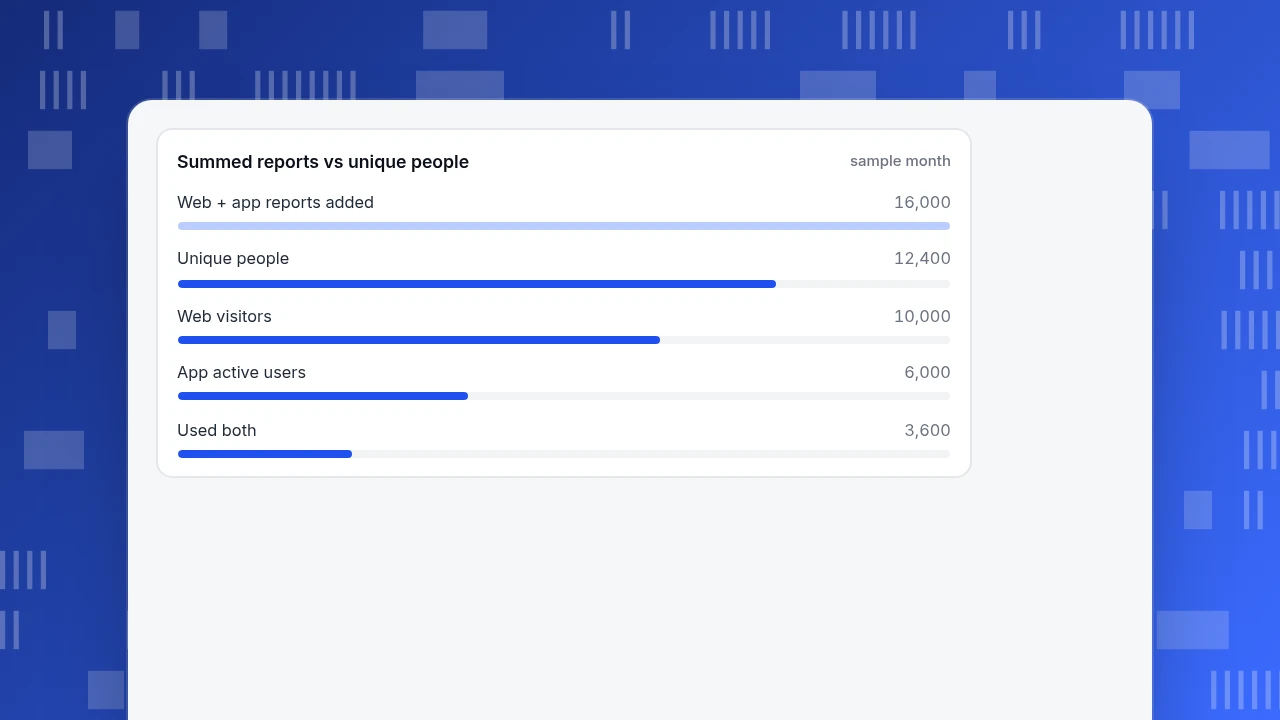
- Summed platform reports overcount people: 10,000 web + 6,000 app visitors with 3,600 in common is 12,400 people, not 16,000
- One name per action and a platform property; putting the platform in the event name splits every funnel
- Identity joins at sign-in with your own user id; people who never sign in stay platform-level
What cross-platform analytics actually measures
Cross-platform analytics means measuring the same people across your website, your app and your mini program, in one project, with one set of event names and one way of recognising a person. It does not mean installing three tools and reading three dashboards. The goal is a single answer to questions such as "how many people signed up last week, and how many of them later bought in the app?"
Three ingredients make that possible, and the rest of this article walks through each one:
- One event model. The same action has the same name and the same properties wherever it happens.
- One identity rule. A person who browses on a laptop and buys on a phone is counted once, as soon as they sign in.
- One place to read it. Funnels, retention and segments run over all platforms together, with a platform property to split them when you need to.
If you only need to understand how one person moves between devices, the glossary page on cross-device tracking covers that mechanism. For the wider question of joining online and offline touchpoints, see omnichannel analytics. This page is about the practical work of aligning events and identity across web, app and mini program.
Why separate dashboards overcount people
The first cost of separate tools is arithmetic. Each platform report counts its own people, so adding them up counts shared people twice.
Sample data: in one month the website reports 10,000 visitors and the app reports 6,000 active users. Matching on sign-in shows that 3,600 people used both.
- Sum of the two reports: 10,000 + 6,000 = 16,000
- Unique people: 10,000 + 6,000 − 3,600 = 12,400
- Overcount: 16,000 ÷ 12,400 − 1 = 29.0%
The overlap is not a rounding error. Pew Research Center's mobile fact sheet reports that 91% of US adults own a smartphone, so a large share of your web visitors also carry a phone that can hold your app. The more your product encourages people to move between a browser and an app, the larger the overlap.
Overcounting also distorts every rate built on that count. A conversion rate computed as orders ÷ visitors on the web side and orders ÷ users on the app side will each look worse than the combined rate, because the same buyer appears in two denominators. Decide which "person" you are counting before you compare channels.
Summed reports vs unique people
sample monthMap each platform to one event model
The platforms do not produce identical raw material. A website has pages and a browser; an app has screens, installs and versions; a mini program runs inside a host app with its own login. The trick is to map each platform's native signal to a shared event name, and keep the platform as a property instead of baking it into the name.
| Concept | Website | Mobile app | Mini program | Shared design |
|---|---|---|---|---|
| A view of content | Page view | Screen view | Page view | One view event, with a path or screen name property |
| An action | Click, form submit, custom call | Tap, custom call | Tap, custom call | Same snake_case name for the same action |
| First sight of a person | First visit in a browser | First open after install | First open inside the host app | A "first seen" flag per platform, not a different event per platform |
| Anonymous identifier | Browser-derived visitor id | Device id | Host-app user id | Keep one anonymous id per platform; join them at sign-in |
| Known identifier | Your login id | Your login id | Your login id plus the host-app id | One login id from your own system |
| Where to record money | Server | Server | Server | Server-side event with the order id |
| Platform label | A property on every event | A property on every event | A property on every event | One property, a few fixed values |
Three rules come out of the table.
Use the same name for the same action. If a person can sign up on the web and in the app, both should send signup_completed. The platform property tells you which one it was.
Keep amounts and statuses on the server. A purchase confirmed by your backend is more reliable than a "thank you" screen that a browser might never load. Send the server event with the same name for every platform.
Do not put platform into the event name. signup_completed_ios, signup_completed_web and signup_completed_android look tidy at first, then turn every funnel into a three-way union that someone has to maintain.
Naming rules checklist
A short written convention does more than any tool setting. Use this list when you review a tracking plan, and write your own values next to it.
- [ ] snake_case, verb after noun or past tense, consistently. Choose
signup_completedandcheckout_started, not a mix ofSignUp,sign-upandcompletedSignup. - [ ] Short. Keep names under 40 characters; one stable name per action.
- [ ] No reserved prefixes. Do not start custom names with
$,_ortc_; double underscore is for autocapture and$is for app presets. - [ ] A fixed list of platform values. For example
web,ios,android,mini_program. Do not allowiOS,iosandiphoneto coexist. - [ ] Properties only if you will break down by them. Twenty properties per event is a limit, not a goal.
- [ ] Never raw input text. Do not put what people type into properties.
- [ ] One timestamp format. If you send events from your server, use RFC 3339, for example
1996-12-19T16:39:57-08:00, so that time zones are explicit. - [ ] A rename policy. Once a name is in your event catalog, do not rename it; change the display name instead and document the change.
The cost of skipping the list is easy to calculate. Sample data: the web sends signup for 400 signups; the app sends sign_up for 150. A report on signup shows 400. The true total is 550, so the report undercounts signups by 150 ÷ 550 = 27.3%, and every funnel that starts at signup is missing the app-side signers.
| Item | Do | Avoid |
|---|---|---|
| Event name | signup_completed | signup_completed_ios, SignUp |
| Platform value | web, ios, android, mini_program | iOS, iphone |
| Timestamp from a server | 1996-12-19T16:39:57-08:00 | 12/19/96 4:39 PM |
| Login id | Internal user id (primary key) | Email address typed by the user |
| Revenue | Server event with the order id | A thank-you page view |
Naming rules for events sent from every platform; the timestamp example is the RFC 3339 format.
Identity: how a person becomes one person
Naming makes the events line up. Identity makes the people line up. Both are needed, and identity is where cross-platform projects most often stall.
Before sign-in, each platform sees a different anonymous identifier. A web visitor is recognised from browser and request data, or from a stored id; an app user is a device. These do not match, and they are not supposed to. There is also a clock on the web side: WebKit's tracking prevention deletes all of a site's script-writable storage after seven days of Safari use without interaction on that site, so a stored web identifier can disappear before a person returns. An anonymous web visit and a later app session can only be joined if the person tells you who they are in between.
That moment is the login. The rule is simple:
- When someone signs in, on any platform, call the same login function with your own stable user id (not an email address in plain text).
- The platform links that device's earlier anonymous events to the user.
- When the same person signs in on a second platform with the same id, both devices belong to one person.
Choose the id carefully. It should be the primary key in your own database, not something a user can edit. If a person can log in with an email on the web and a phone number in the app, make your backend resolve both to one internal id before it reaches analytics, otherwise the two sign-ins create two people.
Be clear about what you lose. People who never sign in cannot be joined across platforms; they stay in aggregate counts as separate visitors. If only 30% of your visitors ever sign in, cross-platform person-level analysis covers that 30%, and the rest remains platform-level. Say so in any report you share.
A worked example: one funnel across web and app
Sample data: a product has a web landing page, a signup form on the web, and a mobile app where purchases happen.
| Step | Platform | People | Rate from previous step |
|---|---|---|---|
| Visited the landing page | Web | 5,000 | — |
Signed up (signup_completed) | Web | 400 | 8.0% |
Signed in to the app (login) | App | 220 | 55.0% |
First purchase (purchase_completed) | App, from the server | 90 | 40.9% |
End to end, 90 ÷ 5,000 = 1.8% of landing-page visitors bought. Neither a web-only report nor an app-only report can say that. The web report ends at 400 signups; the app report starts with 220 logins and has no idea where they came from.
The funnel also changes decisions. The biggest loss, 180 of the 400 who signed up never opened the app (45.0%), is a handoff problem, not a landing page problem. A better landing page would not fix it; a stronger prompt to install after signup, or a simpler sign-in on the app, might.
Common failure modes
Four patterns appear again and again when teams combine platforms.
| Symptom | Likely cause | How to check |
|---|---|---|
| Signups on web and app do not add up to the total in your database | Two event names for one action | List event names that contain the same words |
| The same person appears twice in a funnel | Different login ids on each platform | Compare the login id on both platforms for a known user |
| App events arrive hours late | Offline batching on the device | Compare event time with receive time |
| Revenue differs between analytics and billing | Amounts sent from the client | Move purchase events to the server and compare with order ids |
Events that arrive late are normal for apps: a phone with no signal queues events. Always analyse by event time rather than receive time, and expect the most recent day to be incomplete.
How to do it in TapCub
TapCub keeps a website, an app and a mini program in one project, with one identity model and one event table. Here is how the example above would run.
- Register the sources. Add the website domain and the app identifier under All-platform analytics › Data › Data sources. Both feed the same event table. A platform your plan does not include has its events dropped, and the page says so.
- Name events once. Write the names in All-platform analytics › Data › Tracking plan, then send them with
tapcub.trackon the web and from the SDK in the app. The same name on all platforms is what lets them join; names in the catalog must be snake_case, start with a letter and run to at most 40 characters. - Bind logins. Call
tapcub.loginwith your own user id when someone signs in, andlogoutwhen they leave. Identified mode needs a plan that includes it and is switched on through support. Bound people appear in All-platform analytics › Users › People, and the identity map logs each bind. - Build the funnel. In All-platform analytics › Behavior › Behavior analysis, add the four steps from the example and read the drop between each pair.
- Send revenue from the server. Use the server HTTP interface with an API key from Configuration › Settings › API keys.
TapCub does not stitch together people who never sign in, and it cannot merge two different login ids; your own system has to decide that those are one person.
FAQ
What is cross-platform analytics?
Cross-platform analytics measures the same people across a website, a mobile app and other surfaces such as a mini program, in one project with shared event names and a shared identity rule. It lets you build funnels and retention across platforms and count each person once, instead of reading separate dashboards.
How do you track users across web and app?
Send the same event names from every platform, add a platform property to each event, and call the same login function with your own stable user id on each platform. Before sign-in, the two identifiers are separate; after sign-in, both devices link to one person.
Why do my web and app user counts not add up?
Each report counts its own people, so someone who uses both is counted twice when you add the reports. In the sample above, 10,000 web visitors plus 6,000 app users overcount the 12,400 unique people by 29.0%. Match on a shared login id to remove the overlap.
Should event names include the platform?
No. Use one name per action, such as signup_completed, and a platform property with a fixed list of values. Putting the platform in the name multiplies the events you must maintain and turns each cross-platform funnel into a union of several names.
Can you track people who never log in across platforms?
Not as a single person. Anonymous identifiers differ by platform and stored web identifiers can expire, so anonymous visits stay as separate visitors. You still get platform-level totals; only the people who sign in can be joined into one profile.
Sources
- Pew Research Center, Mobile Fact Sheet (91% of US adults own a smartphone; survey fielded January 30 to June 18, 2026). Checked 2026-11-23.
- WebKit, Full Third-Party Cookie Blocking and More (script-writable storage deleted after seven days of Safari use without interaction). Checked 2026-11-23.
- IETF, RFC 3339: Date and Time on the Internet: Timestamps (section 5.6 date-time format; example timestamp). Checked 2026-11-23.
Was this article helpful?
We use your answers to fix and expand this page.
Couldn’t send. Please try again in a minute.
Thanks for the feedback. We’ll use it to improve this page.You’ve already sent feedback on this page. Thanks.

Customer Experience Consultant
Writes about live chat, visitor conversations, and self-service, sharing practical ways to make customer communication clearer and more effective.