Try it on your own data
Every report in this article is in the free plan. One snippet for web and apps, up to 10 sites.
Start freeCross-domain tracking passes a visitor's identity from one domain to another so that one visit stays one visit. Without it, each domain starts fresh: in the sample below users are counted 30% too high, your own site becomes the source of every checkout session, and a campaign that returns $30 per order shows no conversions.
What you will learn
- Needed when a journey crosses different root domains; subdomains of one root usually share a cookie
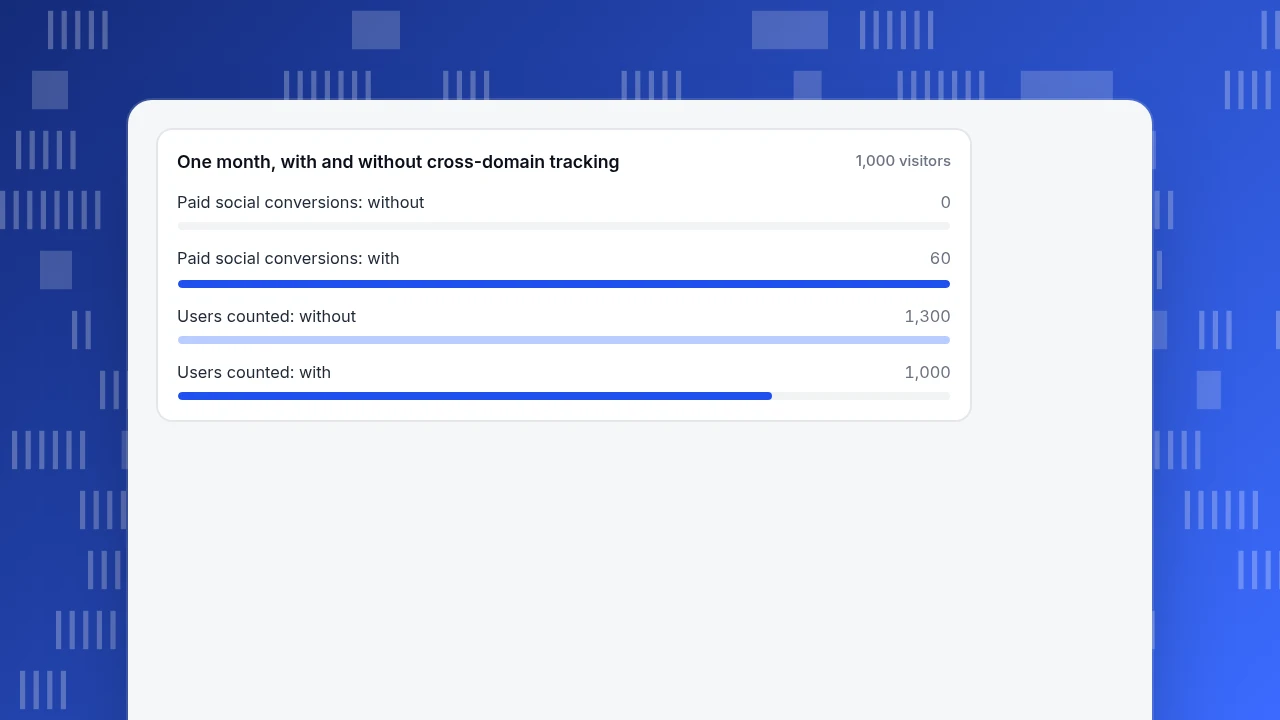
- In the sample, skipping it inflates users from 1,000 to 1,300 and hides 60 paid social orders
- Verify by clicking through, checking for the _gl parameter, then comparing sources and users after a day and a week
What cross-domain tracking is, and when you need it
Cross-domain tracking passes a visitor's identity from one domain to another, so the visit stays one visit. Without it, each domain starts from scratch. Google's documentation says it plainly: when cross-domain measurement is off, each domain gets new cookies, so one person visiting two root domains is counted as two users and two sessions.
You need it when one journey crosses different root domains, for example:
- a marketing site on
example.comand a checkout or booking engine onpay-example.net; - a store and a separate help or account portal;
- a brand with several country domains where people move between them.
You mostly do not need it for subdomains of one root domain (www.example.com and shop.example.com), because a cookie set for the root domain can usually be read by both. Google still recommends the setup for subdomains in some configurations, because navigation between them can create self-referrals when cookie domains differ. The checklist later in this article covers that case.
What breaks without it: a before and after split
Take a sample month (sample data). The marketing site gets 1,000 visitors: 600 from paid social, which cost $1,800, and 400 from organic search. Of them, 300 follow the "Buy" button to the checkout domain (200 paid, 100 organic), and 30% of those buy: 60 paid orders and 30 organic orders, 90 in all.
| What you read | Without cross-domain | With cross-domain |
|---|---|---|
| Users across both domains | 1,000 + 300 = 1,300 | 1,000 |
| Checkout domain sessions by source | 300 from "marketing site / referral" | 200 paid social, 100 organic |
| Paid social conversions | 0 | 60 |
| Paid social conversion rate | 0.0% | 60 ÷ 600 = 10.0% |
| Paid social cost per order | not defined ($1,800 ÷ 0) | $1,800 ÷ 60 = $30.00 |
| Organic conversion rate | 0.0% | 30 ÷ 400 = 7.5% |
| Checkout conversion rate | 90 ÷ 300 = 30.0% | 90 ÷ 300 = 30.0% |
Three things go wrong at once. The user count is inflated by 300, which is 30% above the true 1,000. Your own marketing site becomes the "source" of every checkout session, a self-referral. And the campaign that produced the orders gets none of the credit, so a channel that returns $30 per order looks like pure waste. The checkout conversion rate is the same in both columns, which is why the problem hides: nothing on the checkout dashboard looks broken. This is one of the usual reasons unique visitors never match between two tools.
One month, with and without cross-domain tracking
1,000 visitorsHow the handoff works
In Google Analytics 4, the source domain adds a _gl parameter to links and forms that point to another configured domain. It carries the client and session identifiers. Google's example URL looks like https://www.example.com/?_gl=1*abcde5***. The destination page reads the parameter, rebuilds the same identifiers in its own first-party cookie, and the two halves join.
Two details matter in practice:
- It happens on click or submit. The linker relies on a click listener on the document and on form submits. If the navigation is triggered by JavaScript (
window.location = ...) or a script stops the click event before it reaches the document, nothing is added to the link. - The parameter must survive. If the destination redirects (for example from
/payto/pay/or to a language path) and drops the query string,_glis lost and a new ID is created.
Browser rules add a second limit. WebKit's published Intelligent Tracking Prevention notes cap client-side cookies at seven days, and later extended that cap to LocalStorage and IndexedDB for sites without user interaction. A visitor who clicks over to a second domain a week later on Safari may therefore look new even when the linker works.
How to set it up, step by step
These steps follow Google's help page for GA4 and are the common pattern for other tools; check your tool's own page for its names.
- Use one tag ID everywhere. Every domain must send data with the same measurement ID from the same web data stream. Different IDs cannot be joined.
- Open the domain list. In GA4, go to Admin, then Data streams, choose the web stream, then Configure tag settings and Configure your domains.
- Add each domain as a condition. Accept the domains offered under Recommendations, or add a condition with a match type and the domain. Conditions use OR logic, and the limit is 100 conditions. You need the Editor role or above.
- Match the domain you link to. If your links point to
pay.example.net, a condition forexample.nethas to match it. A mismatch is the most common reason_glis missing. - Keep cookie domains consistent across subdomains and add them to the referral exclusion (unwanted referrals) list so internal hops do not become sources.
- For custom builds, read the client and session IDs on the source domain and add them to destination links as parameters, then read them from the URL and pass them to the tag on the destination.
If you manage the tag through a tag manager, set the same domain list in the tag's configuration, not in two places.
What breaks it: redirects, forms, iframes and payment pages
Most failures are one of these:
| Symptom | Likely cause | Fix |
|---|---|---|
_gl missing on the destination URL | Link domain does not match a configured condition | Add or correct the domain condition |
_gl present, but a new user appears | A redirect dropped the query string | Preserve the parameter in redirects |
| Works on links, not on one button | Navigation done in JavaScript, or a script stops the click event | Use a real link, or decorate the URL in code |
| Works for the buy button, not for the return from the payment provider | The provider sends the person back without the parameter | Pass the identifiers to the provider as metadata, or accept a session break there |
| All checkout sessions say "referral" | Self-referral from the missing handoff | Fix the handoff first, then exclude the domain |
| Works in Chrome, breaks on iPhones | Browser storage limits | Test Safari separately; expect some loss |
The payment-provider return is the hardest one. If the provider hosts the payment page on its own domain, you cannot add your tag there. The two stable options are to let the provider send the person back to a page on your own domain that carries the order number, or to join orders to sessions on the server using that order number.
| Symptom | Likely cause | Fix |
|---|---|---|
| _gl missing on the destination URL | Link domain does not match a configured condition | Add or correct the domain condition |
| _gl present but a new user appears | A redirect dropped the query string | Preserve the parameter in redirects |
| Works on links but not one button | Navigation in JavaScript, or a script stops the click event | Use a real link or decorate the URL in code |
| Fails when returning from the payment provider | Provider returns without the parameter | Return to your own domain with the order number and join on the server |
| Every checkout session says referral | Self-referral from the missing handoff | Fix the handoff, then exclude the domain |
| Works in Chrome but not on iPhones | Browser storage limits | Test Safari separately |
Causes for _gl failures come from Google Analytics Help (redirects, click listener, domain match); the rest are common patterns to test.
The verification checklist
Google's help page gives five steps; the extra rows are what separates "set up" from "working".
- [ ] Open a page that links to the other domain, click the link, and confirm the destination page loads.
- [ ] Confirm the destination URL contains
_gl. - [ ] Start a file download from a page with the linker, if you offer downloads, and confirm it succeeds.
- [ ] Submit any form that points to the other domain and confirm
_glis on the form's target URL. - [ ] In real-time reports, follow your own test visit across the two domains and confirm it appears as one user.
- [ ] After a day, compare sources on the destination domain: your own domain should not be the top referrer.
- [ ] After a week, compare users across domains with the before and after table above: the 30% inflation should disappear.
- [ ] If sources show as "(not set)" after the change, see what "(not set)" means in Google Analytics.
- [ ] Repeat the first three on iPhone and Android, not just a desktop browser.
When a single domain is simpler
Cross-domain tracking is maintenance: a domain list, a redirect rule, and a test after every checkout change. Ask whether the second domain is necessary. A checkout moved to a subdomain of your main domain (pay.example.com) removes the handoff problem completely, because the cookie can be shared. If a provider forces its own domain, use the server-side order-number join described above rather than relying on the linker alone.
Cross-domain tracking in TapCub
Return to the sample: the marketing site and the checkout live on different domains, and you want the $1,800 paid social spend matched to the 60 orders.
- Register both hostnames as data sources of one project. Open Web analytics › Configuration › SDK code and add each hostname without a scheme or path. Subdomains of a registered hostname are allowed. If a hostname is not registered, the collector drops its events silently and still returns a success code, so a checkout domain with no data usually means it was never added.
- Install the same script on both sites.
- Understand what is different. TapCub's website script does not write a cookie by default. The collector builds the visitor ID from a site salt plus the address and browser data. There is no per-domain cookie to hand across, and TapCub's docs describe no link-decoration step.
- Test it. Click from the marketing site to checkout and watch Web analytics › Realtime and Web analytics › Sessions. If the two pageviews appear as one visitor, the journey is joined. Switching network between the pages (mobile data to Wi-Fi) changes the address and can produce a new visitor, and the strict privacy preset rotates the salt each project day.
- For logged-in users, call
tapcub.loginon both domains with the same login ID. This is available in identified mode on plans that include it. The person then appears once in All-platform analytics › Users › People, regardless of device or domain. - Check the result in Web analytics › Goals: select the "order confirmed" goal and read its source breakdown. It should show your paid social source, not your own marketing domain.
TapCub does not rewrite links with a _gl-style parameter, and a payment page hosted by a provider on its own domain cannot carry your script. For that last hop, join on the order number.
FAQ
What is cross-domain tracking?
It is the practice of keeping one visitor's identity when they move between separate root domains, so sessions are not split and the original source is not replaced by your own domain. In GA4 it works by adding a _gl parameter to links and forms.
Do subdomains need cross-domain tracking?
Usually not, because a cookie set for the root domain can be read by every subdomain. Google still lists subdomains as a case where the setup prevents self-referrals if cookie domains differ. Check that all subdomains use the same cookie domain.
How many domains can I configure in GA4?
Google's help page states a limit of 100 conditions. Conditions use OR logic, and you need the Editor role or above on the account to set them.
Why do I see my own domain as a referral?
Because a visitor arrived through a link that did not carry the identifiers, so the destination started a new session with your first domain as the referrer. Fix the handoff first, and use the referral exclusion list only as a second layer.
Does cross-domain tracking work on Safari?
Partly. WebKit caps client-side cookies at seven days, and the same limit applies to LocalStorage and IndexedDB, so long gaps between domain visits can still show as new visitors. Test on iPhone separately.
Sources
- Google Analytics Help: Set up cross-domain measurement, checked 2026-11-20
- WebKit: Full Third-Party Cookie Blocking and More, 24 March 2020
- WebKit: Intelligent Tracking Prevention 2.3, 23 September 2019
Was this article helpful?
We use your answers to fix and expand this page.
Couldn’t send. Please try again in a minute.
Thanks for the feedback. We’ll use it to improve this page.You’ve already sent feedback on this page. Thanks.

Product Experience Specialist
Writes about product experience, practical workflows, and growth, turning complex processes into clear steps for everyday decisions.