Try it on your own data
Every report in this article is in the free plan. One snippet for web and apps, up to 10 sites.
Start freeTo check URL status codes, request each address and record the three-digit HTTP code and where redirects end; curl does it in one line and a loop covers a whole list. The real work is deciding which failures matter: a 500 on a visited page first, then 404s ranked by visits, then wrong redirects. Below: a code table with Google's treatment, a worked 1,200-URL run and the traffic-ranked fix order.
What you will learn
- Use GET with redirects followed and a hop limit; re-run every non-200 once before acting
- Fix 5xx on visited pages first, then 404s by visits: in the sample one URL held 86% of 404 visits
- Use 301 for permanent moves, 404 or 410 for removed pages, and never a 200 that shows an error
How do you check URL status codes?
A URL status checker requests each address and records the three-digit HTTP status code the server answers with, plus where a redirect ends up. For one page, your browser's developer tools (Network tab) or a single command is enough. For a site, you run the same request over a list of URLs and sort the results by status.
The one-line command, using curl:
curl -s -o /dev/null -L --max-redirs 10 \
  -w "%{http_code} %{num_redirects} %{url_effective}\n" \
  https://example.com/old-page
-L follows redirects, --max-redirs 10 stops loops, and the output reads status hops final-url. For many URLs, put them in a file and loop:
while read -r u; do
  printf "%s " "$u"
  curl -s -o /dev/null -L --max-redirs 10 \
    -w "%{http_code} %{num_redirects} %{url_effective}\n" "$u"
done < urls.txt > results.txt
Two cautions before you trust the output: some servers answer a HEAD request differently from a GET (use GET, as above, for anything you will act on), and a checker only sees what the server says at that moment, from your network. It cannot tell you which of the bad URLs anyone actually visits. That second step, ranking by traffic, is where most guides stop and where this guide spends most of its time. The cleanup itself is in fix 404 errors; what search-engine crawlers report is in crawl errors.
What does each status code mean, and what should you do?
Status codes are grouped by their first digit: 2xx success, 3xx redirection, 4xx client error, 5xx server error. The definitions are in RFC 9110; how Google treats them is documented on its HTTP status code page.
| Code | Meaning | How Google treats it | What to do |
|---|---|---|---|
| 200 | OK, content returned | Considered for indexing; not a guarantee | Nothing, unless the content is an error message (soft 404) |
| 301 / 308 | Moved permanently | Strong signal the target should be processed | Right choice for a permanent move |
| 302 / 303 / 307 | Temporary redirect | Weak signal for the target | Change to 301 if the move is permanent |
| 304 | Not modified | Content unchanged since last crawl | Normal; fine |
| 401 / 403 | Needs login / forbidden | Treated as a 4xx: content ignored | Fine for private pages; wrong for public ones |
| 404 | Not found | Content treated as nonexistent; indexed URL is removed over time | Redirect to the closest page if one exists, otherwise leave as 404 |
| 410 | Gone | Same group as 404 | Use when you removed it on purpose and it will not return |
| 429 | Too many requests | Treated as a server-overload signal | Slow your checker; check rate limits |
| 500 / 502 / 503 / 504 | Server error / gateway problem | Crawling slows; URLs that keep failing are removed from the index | Fix first; these affect real visitors |
Two details worth knowing from the sources. First, RFC 9110 says 404 makes no claim about permanence while 410 says the removal is intentional, and that 410 is preferred when the server knows the condition is permanent. Second, Google follows up to 10 redirect hops, and treats 307 like 302 and 308 like 301. Google's page gives no number of days for how fast a URL leaves the index after a 404 or 410, so do not promise one.
| Code | Meaning | What to do |
|---|---|---|
| 200 | OK | Nothing, unless the content is an error message |
| 301 / 308 | Moved permanently | Right choice for a permanent move |
| 302 / 307 | Temporary redirect | Change to 301 if the move is permanent |
| 404 | Not found | Redirect to the closest page or leave as 404 |
| 410 | Gone | Intentional, permanent removal |
| 429 | Too many requests | Slow your checker |
| 5xx | Server error | Fix first: real visitors are affected |
Google treats 301 and 308 as strong signals and 302, 303 and 307 as weak ones.
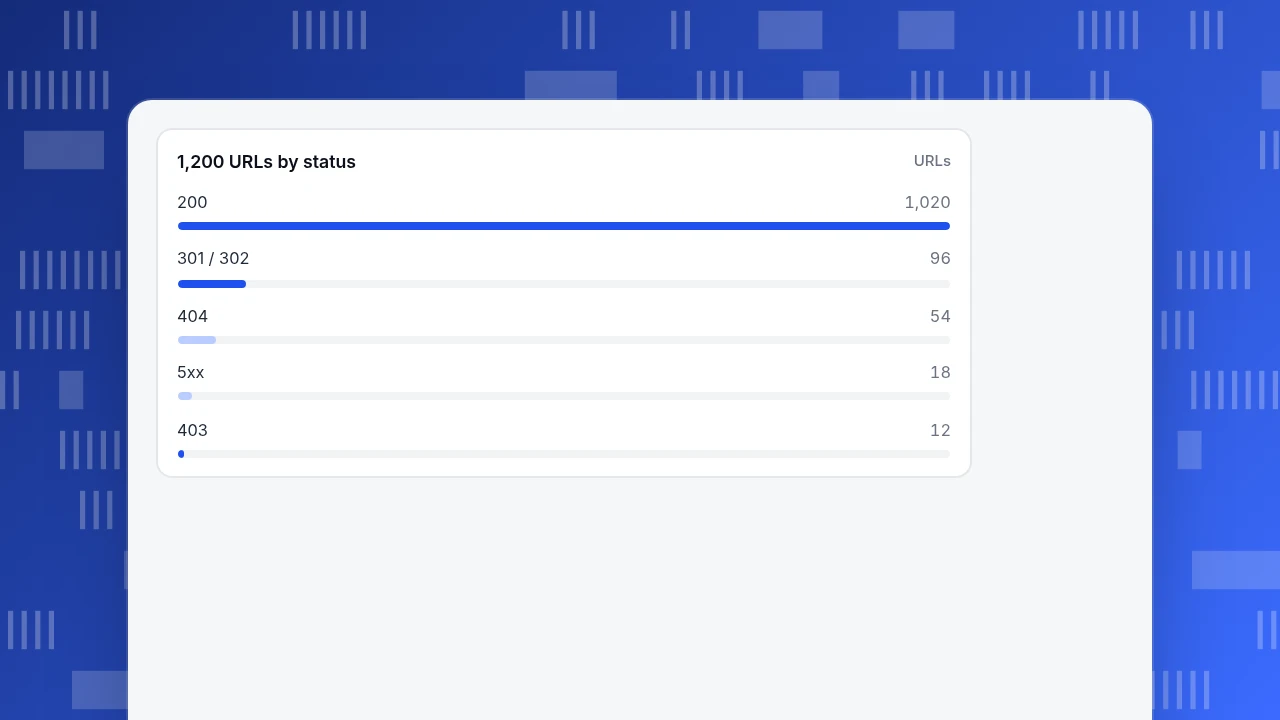
Worked example: 1,200 URLs through a checker
Sample data: a site exports 1,200 URLs from its sitemap and old internal links and runs the loop above. The results:
| Result | URLs | Share |
|---|---|---|
| 200 | 1,020 | 85.0% |
| 301 or 302 | 96 | 8.0% |
| 404 | 54 | 4.5% |
| 5xx | 18 | 1.5% |
| 403 | 12 | 1.0% |
| Total | 1,200 | 100.0% |
That is 180 URLs that are not a clean 200. Fixing them in alphabetical order, as the output arrives, is the usual mistake. Joining the list to traffic changes the order completely.
1,200 URLs by status
URLsWhich bad URLs matter? Rank them by traffic
Export the same period's pageviews per URL from your analytics (last 30 days is a good default) and join it onto the checker output. Sample data for the worst offenders:
| URL | Status | Visits, 30 days | Action |
|---|---|---|---|
| /signup | 500 | 640 | Fix now: real visitors are hitting a server error |
| /pricing-2023 | 404 | 1,840 | 301 to /pricing |
| /docs/start | 302 to /docs/getting-started | 3,100 | Change to 301 |
| /old-a to /old-b to /old-c to /guide | 3 redirect hops | 450 | Point /old-a straight at /guide |
| /blog/old-guide | 404 | 210 | 301 to the closest current guide |
| /thanks-old | 200 with "page not found" text | 12 | Return a real 404 or 410 |
| /tag/misc | 404 | 4 | Leave it, or 410 |
Rules that produced this order:
- 5xx on a URL with traffic comes first, because it is a failure for current visitors, not just for search.
- Then 404s, by visits. All 54 of the 404 URLs together received 2,140 visits in the 30 days: the three in the table (1,840 + 210 + 4 = 2,054) plus 86 spread across the other 51.
/pricing-2023alone is 1,840 ÷ 2,140 = 86.0%. One redirect fixes most of the damage. - Then permanent redirects that are temporary. A 302 on a heavily visited URL is cheap to fix and affects how the target is treated.
- Then redirect chains, which add latency and risk the 10-hop limit.
- Then soft 404s, pages that return 200 but show an error. Google reports these in Search Console when the page looks empty or like an error; the fix is a real 404 or 410, or a 301 if the content moved. See the soft 404 definition.
Notice what the traffic join also tells you: of 54 404s, most can be ignored. A checker finds problems; traffic tells you which problems are worth an afternoon.
Where do you get the list of URLs to check?
A checker is only as good as its list. Four sources, in the order they usually pay off:
- Your sitemap. It lists what you want indexed; every URL that is not a 200 there is a direct contradiction and should be fixed first.
- Top landing pages from analytics. The pages people actually enter on are the ones where an error costs the most.
- Old URLs you changed. After a migration, keep the old list and check that each one redirects once to the right new address.
- Pages that other sites link to. If external links point to a URL that now returns 404, you lose the visitors and the link's value.
No command line? Your browser's developer tools show the status of one page at a time (Network tab, reload, read the first row), and a spreadsheet of results from any bulk checker can be sorted and joined to traffic in the same way as below.
Why does the checker disagree with a browser or with search results?
Five common reasons:
- Different user agent. Some servers or firewalls answer a command-line client differently from a browser or a search crawler. Set a browser-like user agent if the results look wrong.
- Rate limiting. A 429 or a burst of 403s halfway through a big list usually means the checker is being throttled, not that the pages broke.
- Redirect by script. A page that returns 200 and then redirects in the browser with JavaScript looks fine to a checker.
- Location. A CDN or geo rule can answer differently from different places.
- Time. A 503 during a deploy is not a permanent state; re-check failures before acting.
Re-run every non-200 URL once, a few minutes later, before putting it on the fix list.
How often should you check?
After any change to URLs (a migration, a redesign, a CMS change), check immediately. Otherwise, a monthly check of the sitemap and your top 500 landing pages is usually enough; automated alerts are better than any schedule for the 5xx case. The cost is small: assuming an average of 0.3 seconds a request, 1,200 URLs take about 1,200 × 0.3 = 360 seconds, six minutes; a sleep between requests keeps it polite.
How to use traffic data in TapCub
TapCub does not crawl your site or check URLs for you; it reports the status codes that visitors and crawlers actually met. That is the traffic half of the job above:
- Visitor 404s. In Web analytics › Pages, the 404 tab lists missing pages that visitors opened, with the hit count and the previous page that sent them. Sort by hits and start with the top row; the previous page tells you which internal or external link to fix.
- Crawler errors. In Monitoring › Crawl health, see the search-engine and AI-crawler fetches with 404s and 5xx counted separately, a success rate where success means a status below 400, and the 404 list. Paths that appear in both the visitor 404 list and the crawler list should be fixed first.
- Bot status codes. In Web analytics › Bots, the All bots table shows each crawler's most common status code.
- Confirm the fix. After you add a redirect, pick a date range that starts after the change; hits for that path in the 404 tab should stop.
Crawl health only covers search engines and AI crawlers, not SEO tool crawlers, and crawler 404s and visitor 404s are separate lists, so they can disagree.
FAQ
How do I check the status code of a URL?
Open your browser's developer tools, go to the Network tab and reload the page; the status appears next to the first request. From a terminal, curl -s -o /dev/null -w "%{http_code}" URL prints the code. For many URLs, loop over a file as shown above.
What does a 301 versus a 302 redirect mean?
A 301 says the page has moved permanently, which Google treats as a strong signal that the new address should be processed. A 302 says the move is temporary, which is a weak signal. Use 301 for permanent moves.
Should I use 404 or 410 for a removed page?
Both are treated the same way by Google, as content that does not exist. RFC 9110 says 410 signals an intentional, permanent removal and is preferred when the server knows that; use 404 when you are not sure.
Why does a page return 200 but Google calls it a soft 404?
Because the page shows an error message or is nearly empty while the server says success. Return a real 404 or 410 for pages that are gone, or redirect with a 301 if the content moved.
How many redirects in a row are too many?
Googlebot follows up to 10 hops, but each hop adds latency and a chance of failure. Aim for one: point every old URL straight at its final destination.
Sources
- IETF, RFC 9110: HTTP Semantics, section 15, June 2022: definitions of 301, 308, 404, 410 and the 5xx codes (checked 2026-11-23).
- Google Search Central, HTTP status codes, network and DNS errors: how Google handles 2xx, 3xx, 4xx, 5xx and soft 404s, and the 10-hop redirect limit (checked 2026-11-23).
Was this article helpful?
We use your answers to fix and expand this page.
Couldn’t send. Please try again in a minute.
Thanks for the feedback. We’ll use it to improve this page.You’ve already sent feedback on this page. Thanks.

Product Experience Specialist
Writes about product experience, practical workflows, and growth, turning complex processes into clear steps for everyday decisions.