Try it on your own data
Every report in this article is in the free plan. One snippet for web and apps, up to 10 sites.
Start freeA CDP (customer data platform) builds and keeps one profile per customer that other tools can use; BI (business intelligence) turns data into reports and dashboards people read. Decide by the question: if you ask who the customer is, you need CDP-style identity; if you ask what happened, BI is enough.
What you will learn
- A CDP's product is a profile other tools use; BI's product is a chart people read
- In the sample, adding three systems gives 21,500 customers but only 17,000 are unique, a 26.5% overstatement no chart can fix
- Small web or app teams often get both jobs from product analytics that identifies logged-in users
What is a CDP and what is BI?
A customer data platform (CDP) is, in the definition kept by the CDP Institute, software that creates and maintains a persistent, unified customer record that is accessible to other systems. It takes in data from many places (website events, orders, support tickets, email), works out which records belong to the same person, and keeps one profile per person that other tools can read.
Business intelligence (BI) is the practice and tooling for turning data into reports and dashboards. Vendor documentation describes a BI tool as something that connects to many data sources, lets you model and combine them, and builds interactive visuals and dashboards to share with a team. BI does not decide who a customer is. It reads whatever tables you point it at and shows the result.
That is the whole difference in one line: a CDP is a system of record about people; BI is a way to look at numbers. They are not competitors, and neither replaces the other.
How do a CDP and BI compare?
| CDP | BI | |
|---|---|---|
| Main purpose | Build and maintain one profile per customer | Report, explore and monitor business numbers |
| Typical question | "Who is this customer and what have they done?" | "What happened and how much?" |
| Data in | Events, orders, CRM and support records, with identifiers | Tables from a warehouse, files or applications |
| Identity | Core job: links records into one person | Not its job; uses whatever keys the tables have |
| Who uses it | Marketing, product and support teams who act on customers | Analysts, finance and managers who read reports |
| Output | Profiles, audiences and segments sent to other tools | Charts, dashboards and scheduled reports |
| Update rhythm | Continuous or near real time | Scheduled refresh or on demand |
| Where it fails | Messy identifiers produce wrong merges | Poor tables produce confident wrong charts |
Pay attention to the "Output" row. A CDP's product is something other tools use (an audience, a profile). BI's product is something humans read (a chart). If your problem ends with a person looking at a number, you need BI. If it ends with a system acting on a person, you need what a CDP does.
| CDP | BI | |
|---|---|---|
| Main purpose | One profile per customer | Reports and dashboards |
| Typical question | Who is this customer? | What happened? |
| Identity | Core job | Not its job |
| Users | Teams who act on customers | Analysts and managers |
| Output | Profiles and audiences for other tools | Charts and scheduled reports |
| Update rhythm | Continuous or near real time | Scheduled or on demand |
Based on the CDP Institute definition and vendor BI documentation, both checked 2026-11-23.
How do you decide by question type?
The shortest rule: ask who the customer is → CDP; ask what happened → BI. The table classifies eight sample questions.
| # | Question | Answers about | Tool category |
|---|---|---|---|
| 1 | What was revenue by region last quarter? | What happened | BI |
| 2 | Which customers viewed pricing three times in 14 days and have no open ticket? | Who | CDP-style profile and segment |
| 3 | How did refund rate move over 12 months? | What happened | BI |
| 4 | Show me everything this one customer did across web, app and support | Who | CDP-style profile |
| 5 | Which channel had the lowest cost per order? | What happened | BI (or analytics) |
| 6 | Send a different message to people who abandoned checkout yesterday | Who, then act | CDP-style audience, sent by another tool |
| 7 | How many unique customers do we have? | Who (identity) | CDP-style identity resolution |
| 8 | Is support response time getting worse? | What happened | BI |
Notice that questions 2, 4, 6 and 7 all need the same thing: an agreed definition of "this person" across systems. Questions 1, 3, 5 and 8 need clean numbers and a good chart, and do not care who the customer is. If most of your questions look like the second group, BI is the tool. If many look like the first, you have an identity problem, and a dashboard will not solve it.
Why does identity make "customers" mean different things?
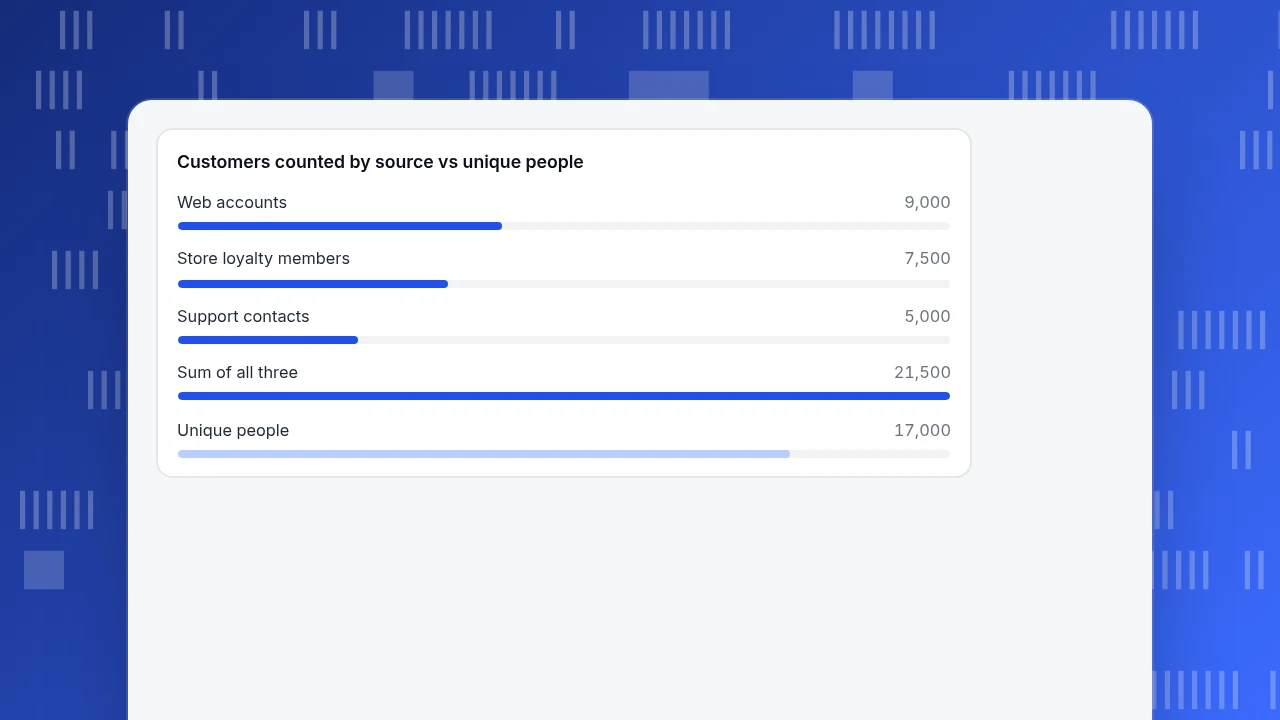
Sample data: a retailer has three systems that each count "customers".
- Web accounts: 9,000
- In-store loyalty members: 7,500
- Support contacts: 5,000
A BI report that adds these up shows 21,500 customers. But many people are in more than one system. Suppose 2,200 are in both web and loyalty, 1,800 in both web and support, 1,000 in both loyalty and support, and 500 in all three. The unique count follows inclusion–exclusion:
21,500 − (2,200 + 1,800 + 1,000) + 500 = 17,000 unique people.
The summed figure overstates by 21,500 ÷ 17,000 − 1 = 26.5%. No chart can fix that, because the chart reads the numbers it is given. Resolving that the "j.smith@…" in web and the loyalty card 4471 are one person is the CDP's job. Once it is done, BI can count customers correctly by reading the unified table.
The converse also holds. A CDP will not tell you whether last quarter's margin fell; the margin sits in finance tables that a CDP usually does not hold. Use each for the question it was built for.
Customers counted by source vs unique people
How do the two work together?
In most companies that use both, data flows in one direction:
- Sources (site, app, store, support) send events and records.
- A CDP (or the identity step in your warehouse) resolves identity and builds profiles.
- A warehouse holds both raw and unified tables.
- BI reads the unified tables and builds reports for managers.
- The CDP also pushes audiences to the tools that send messages.
Two practical consequences:
- Do not build the same report twice. If the CDP has a customer count and BI has another, they will disagree. Pick the unified table as the source for both.
- Define a customer once. Write down what counts as one person (email? account id? both?), because every downstream number depends on it.
What does a small team actually need?
Use these rules:
- If you have one website and under a few thousand customers, you probably need neither. A product analytics tool that identifies logged-in users covers both "who did this" and "what happened".
- If your questions are mostly totals and trends across finance, sales and operations, start with BI on a warehouse.
- If you need to act on people across several tools (different messages by behavior, on several channels), look at a CDP, and first check how many sources you actually need to unify.
- If you cannot say what counts as one customer, fix that before buying either. Neither tool defines it for you.
- If your data is mainly web and app behavior, a product analytics tool with segments often removes the need for both at your size.
For the broader BI question, see BI vs data analytics, and for the platform category, customer data platform.
What mistakes do teams make when choosing?
- Buying a CDP to get dashboards. A CDP's reports are usually thin. If what you want is charts of revenue and costs, the profile layer adds expense without answering your question.
- Using BI to merge people by hand. A spreadsheet match on email works for a one-off, and breaks when people use two addresses, change address or share one. If identity matters every week, put it in a repeatable process.
- Treating a warehouse as a CDP. A warehouse stores tables. It does not decide who is the same person unless someone writes that logic and keeps it running.
- Skipping the definition of a customer. The unified count in the example (17,000) depends on the rule used to match people. Change the rule and the count changes.
- Ignoring who will maintain it. Both need an owner. A CDP needs someone to review merge rules and data sources when they change; a BI report needs someone to fix it when a table changes. If nobody has the time, a smaller setup that one person can understand beats a larger one that decays.
- Starting with the tool. Write down five questions you need answered, classify each as who or what happened, and only then look at tools.
Where does product analytics sit, and what does TapCub do?
Product analytics is neither a CDP nor BI, but it covers a lot of what small teams actually want from either. Here is how the examples above map to TapCub.
- "Who did this?" for logged-in users. Call
tapcub.loginafter sign-in; the person then appears in All-platform analytics › Users › People, with a time-ordered behavior timeline. Anonymous visitors have no profile. - "Which customers did X and not Y?" In All-platform analytics › Users › Segments & tags, build a rule segment (did, did not, in a time window). Rule segments refresh daily or on demand, and a segment can be used as the group in other analyses.
- "What happened?" Charts, funnels and retention sit under All-platform analytics › Behavior › Behavior analysis, and you can define your own metric or query the event data with SQL under All-platform analytics › Behavior › Metrics & SQL.
- Move data out. Raw detail leaves through an asynchronous export in All-platform analytics › Data › Data export, so a warehouse and BI tool can read it.
- Know the limits. TapCub is not a CDP: it does not unify records from your CRM, store or support systems into one profile, and it does not send audiences to messaging tools or run campaigns. It is not a BI tool for finance data either; it measures behavior on your web, app and mini-program properties.
FAQ
What is the difference between a CDP and BI?
A CDP builds and maintains a unified profile of each customer and makes it available to other systems. BI turns data into reports and dashboards for people to read. A CDP answers "who is this customer", while BI answers "what happened and how much".
Do I need a CDP if I already have BI?
Not necessarily. If your questions are about totals and trends, BI is enough. You need CDP-style capabilities when you must recognize the same person across systems and act on them, for example by sending different messages to different audiences. Without that, a CDP adds cost without answering new questions.
Can BI replace a CDP?
Only partly. A BI tool can show a customer table, but it does not resolve identities or keep persistent profiles that other tools read. You can build identity logic in a warehouse and let BI report on it, but that is you building the CDP function yourself.
Can a CDP replace BI?
No. A CDP is built around customer profiles and audiences. It is not designed for finance, operations or cross-table reporting, so most teams still use BI for those.
Where does product analytics fit between them?
Product analytics sits closer to a CDP for behavior questions about people and closer to BI for trend questions. For a small web or app product, it often covers both needs until the number of data sources grows.
Sources
- CDP Institute, What is a CDP? (definition of a customer data platform). Checked 2026-11-23.
- Microsoft Learn, What is Power BI? (documentation of a BI tool: connecting data sources, modeling, reports and dashboards). Checked 2026-11-23.
Was this article helpful?
We use your answers to fix and expand this page.
Couldn’t send. Please try again in a minute.
Thanks for the feedback. We’ll use it to improve this page.You’ve already sent feedback on this page. Thanks.

Product Experience Specialist
Writes about product experience, practical workflows, and growth, turning complex processes into clear steps for everyday decisions.