Try it on your own data
Every report in this article is in the free plan. One snippet for web and apps, up to 10 sites.
Start freeBacklink traffic is the visits backlinks produce, and it comes in two parts you measure differently. Direct clicks show up as referral sessions you can count per linking domain; ranking effects bring organic visits that carry no trace of the link and can only be estimated against similar pages without a new link. Referral reports are a floor, because clicks with no referrer land in Direct.
What you will learn
- Read referral sessions and conversions per linking domain as a floor, and rank links by conversions per link, not by sessions
- A nofollow, ugc or sponsored value changes how Google treats a link, not whether visitors can click it
- Estimate the ranking effect with a before-and-after test against similar pages: +37.5% linked vs +5.0% control is a +31.0% plausible effect
What is backlink traffic, and which part can you actually measure?
Backlink traffic is the visits a backlink produces. It reaches you by two different routes, and they need different measurements:
- Direct clicks. Someone reads the page that links to you, clicks, and lands on your site. These show up in analytics as referral sessions, and you can count them per linking domain.
- Indirect search effects. The link may help the linked page rank for more queries, which brings organic visits that carry no trace of the link. You cannot see these as referrals; you can only estimate them by comparing the linked page with similar pages that did not get a link.
Most articles on backlink traffic blur the two and report a single number. This guide keeps them apart, because the first is a count and the second is an estimate with a confidence problem. You will see how to read referral sessions and conversions by linking domain, what link attributes do and do not change, and how to test the ranking effect with a control. For the wider topic of referral visits, see referral traffic; for what a backlink is, see backlink.
| Part | How it arrives | How to measure |
|---|---|---|
| Direct clicks | Referral sessions with the linking domain as source | Group referral report by domain; sessions, conversions, rate per link |
| Ranking effect | Organic sessions with no trace of the link | Before-and-after against similar pages with no new link |
Referral data is a floor; the ranking effect is an estimate, not a count.
How do you find the referral visits from backlinks?
In Google Analytics 4, the default channel group puts a visit under Referral when its medium is one of referral, app or link: users who arrive through non-ad links on other websites or apps. It puts a visit under Direct only when the source is exactly (direct) and the medium is (not set) or (none). Both definitions matter for backlinks:
- A click from a blog post or news article normally carries the page it came from, so it lands in Referral with the linking domain as the source.
- A click from an app, a PDF or an email may arrive with no referrer at all. It then lands in Direct, and you will undercount the link's real clicks.
- If the linking site tags its link with UTM parameters (some partners and newsletters do), the visit is classified by those tags instead and may not appear as Referral.
So the referral report is a floor, not a total. Build the habit of reading it as "at least this many".
To read it per link, open your referral or source report, group by source domain, and for each domain note: sessions, conversions from one named goal, conversion rate, and how many links on that domain point to you. The last column matters because ten links on one domain and one link on another are not comparable per link.
Worked example: five linking domains, sessions and conversions
Sample data: one quarter of referral sessions for a software site, grouped by linking domain, with one goal ("started free trial").
| Linking domain | Links to you | Referral sessions | Sessions per link | Conversions | Conv. rate |
|---|---|---|---|---|---|
| industry-blog.example | 1 | 620 | 620 | 31 | 5.00% |
| news-site.example | 1 | 1,850 | 1,850 | 37 | 2.00% |
| directory.example | 1 | 90 | 90 | 1 | 1.11% |
| forum.example (comment links) | 4 | 410 | 102 | 20 | 4.88% |
| partner.example | 2 | 540 | 270 | 38 | 7.04% |
| Total | 9 | 3,510 | 390 | 127 | 3.62% |
Checks: sessions add to 620 + 1,850 + 90 + 410 + 540 = 3,510; conversions 31 + 37 + 1 + 20 + 38 = 127; blended rate 127 ÷ 3,510 = 3.62%; sessions per link 3,510 ÷ 9 = 390.
What the table says, and what it does not:
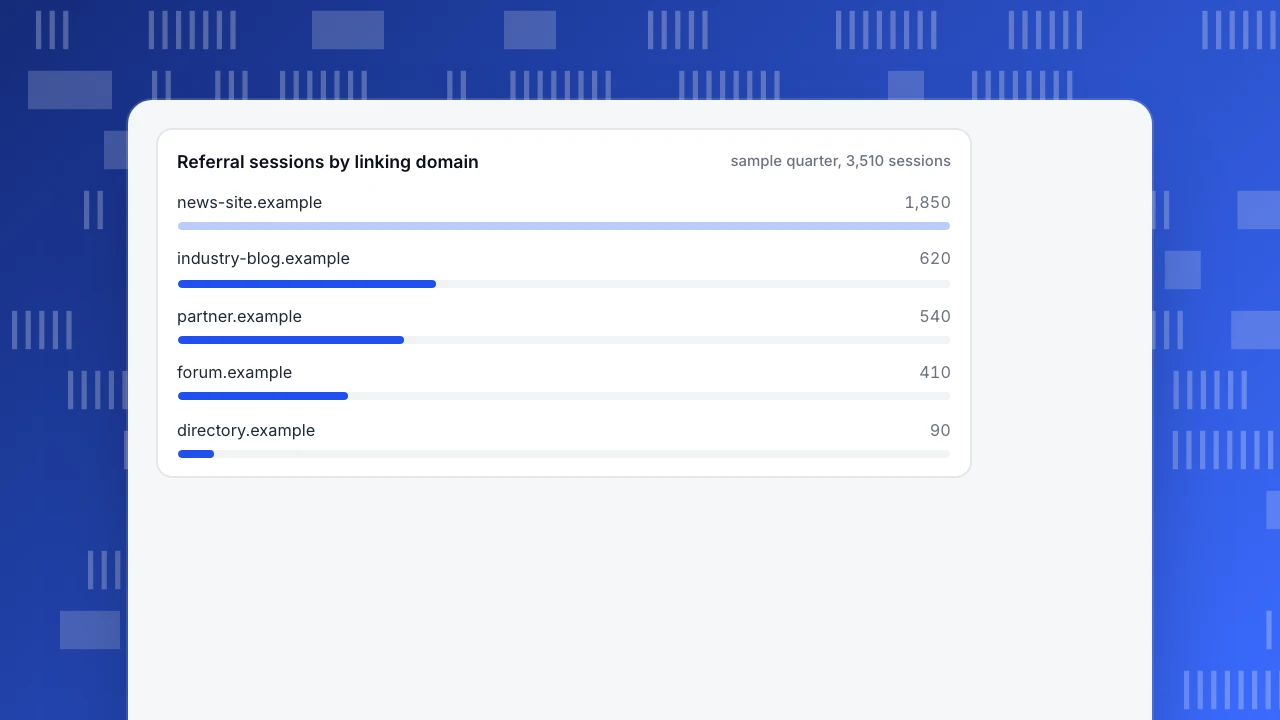
- Volume and value are different rankings. The news site sends the most visits (1,850) but converts at 2.00%, giving 37 conversions. The partner sends 540 sessions yet 38 conversions at 7.04%. Rank links by conversions per link and by rate, not by sessions.
- One link can carry a domain. The news site's single link has 1,850 sessions, 53% of all referral visits (1,850 ÷ 3,510 = 52.7%). If that page is updated or the link removed, over half of the referral traffic disappears; a table of totals hides that concentration.
- A directory listing can be nearly worthless for visits. 90 sessions and one conversion do not tell you whether the link helps rankings, only that it sends almost nobody.
- Forum links convert better than they look. Four comment links bring 410 sessions at 4.88%, a rate well above the news site, probably because readers arrive with a question your page answers.
Two cautions. Sample sizes are small: the directory's 1.11% is one conversion and could easily be 0 or 3. And the rates describe visitors who clicked, a self-selected group, so they say nothing about what would happen if you sent more traffic to the same page.
Referral sessions by linking domain
sample quarter, 3,510 sessionsDoes a nofollow link send fewer visits?
No. The rel attribute tells Google how you want a link treated; it does not stop people from clicking it. Google's documentation lists three values for outbound links: sponsored for advertisements and paid placements, ugc for user-generated content such as comments and forum posts, and nofollow as the catch-all when the others do not apply. Links marked with these values are generally not followed by Google, though the linked page may still be crawled if Google finds it another way.
That makes rel a ranking-side question, not a click-side question:
- In the sample above, the forum's four comment links are the kind most sites mark
ugcornofollow. They still sent 410 sessions and 20 conversions. - Referral sessions therefore tell you whether the link is worth having as a source of visitors, regardless of its attribute.
- Whether a link helps rankings is a different question, and referral data cannot answer it.
If you are deciding whether to keep a link, read the two numbers separately: visits and conversions from referral data, and ranking effect from the test in the next section.
How do you measure the ranking effect of a backlink?
A new backlink may raise rankings for the page it points to, but organic visits do not say "this came from that link". The practical method is a before-and-after comparison with a control group of similar pages that got no new link.
Sample data: a guide page gets a link from a relevant site on a known date. Compare four weeks before with four weeks after.
| Group | Organic sessions, 4 weeks before | Organic sessions, 4 weeks after | Change |
|---|---|---|---|
| Linked page | 800 | 1,100 | +37.5% |
| Five similar pages, no new link | 3,000 | 3,150 | +5.0% |
| Linked page vs control | +31.0% (1.375 ÷ 1.05 − 1) |
How to read it: the control pages grew 5.0% over the same weeks (seasonality, other site changes), so only the growth beyond that, 1.375 ÷ 1.05 = 1.310, is plausibly linked to the new backlink. That is a plausible effect, not a proven one. Anything else that changed on the linked page in those weeks (an update, a title change, a new internal link) is mixed in.
Rules that keep this honest:
- Pick the control before you look. Choose similar pages by topic and traffic level in advance.
- Do not change the linked page during the window.
- Use clicks from search, not just sessions, if you have Search Console connected: it shows clicks, impressions and average position per page, usually one to three days late.
- Repeat on several links before concluding anything; one link is an anecdote.
How do you decide which backlinks are worth your effort?
Use rules, not feelings. The thresholds below are rules of thumb to adjust to your own traffic, not standards:
- If a link sends fewer than about 30 sessions a quarter and the page never moved in search, it is not paying its way in either currency; leave it, do not chase more like it.
- If a link sends under 100 sessions but the control test shows a lift, keep building that type of link: the value is in ranking, not clicks.
- If one domain accounts for more than half of your referral sessions, treat it as a dependency. Ask the owner to keep the page stable and avoid redirects.
- If a link has a high conversion rate on few sessions, find the sentence around the link; copy that framing in outreach to similar sites.
What mistakes make backlink traffic look better or worse than it is?
- Counting direct as "no link". Clicks without a referrer land in Direct, so referral figures are a floor.
- Crediting a spike to a link. A news mention lasts days, and the spike ends with it; weekly averages hide that.
- Ignoring bots. Crawlers that follow links inflate referral counts unless they are filtered out. Clean the sessions before ranking linking domains.
- Mixing paid and earned. Sponsored placements belong in a campaign tracker with spend, not in a backlink table.
- Comparing links across different goals. Use the same named goal for every row.
Measuring backlink traffic in TapCub
Take the five-domain table and rebuild it.
- Open Web analytics › Sources and look at the referral channel and its sources. Click a row to narrow the other reports to it; channel rules can be adjusted if a partner's UTM tags misclassify the visit.
- In Web analytics › Goals, define one goal (trial start) and read conversions for each domain with the same definition.
- Open Web analytics › Pages to see which landing pages the referral visits enter on, and whether the page the link points to is the page you intended.
- For the ranking test, connect Google Search Console or Bing Webmaster and open Monitoring › Search performance: clicks, impressions, click-through rate and average position per page, usually one to three days late. Use the date annotations (Configuration › Annotations) to mark the day the link appeared.
- TapCub separates real visitors from bots and AI crawlers, so link-following crawlers do not inflate the referral counts in your table.
TapCub does not find or build backlinks and does not check link quality; it measures what the visits do once they arrive.
FAQ
How much traffic does a backlink bring?
It varies by orders of magnitude: in the sample above, one link sent 1,850 sessions in a quarter and another sent 90. Judge each link by its own referral sessions and conversions, not by an average.
Do backlinks increase organic traffic?
They can, by helping the linked page rank, but the effect does not show up as referral visits. Estimate it with a before-and-after test against similar pages without a new link, and treat the result as plausible rather than proven.
Does a nofollow backlink still send traffic?
Yes. The rel value tells Google how you want the link treated, not whether people can click. A nofollow, ugc or sponsored link still sends visitors if it is visible and clickable.
How do I see which sites send me traffic?
Open your referral or source report and group by source domain. In GA4, referral visits are those whose medium is referral, app or link; clicks without a referrer land in Direct, so the report shows a minimum.
What is a good conversion rate for backlink traffic?
There is no universal figure. Compare each linking domain against your own site-wide rate (3.62% in the sample) and against other referral rows with the same goal.
Sources
Was this article helpful?
We use your answers to fix and expand this page.
Couldn’t send. Please try again in a minute.
Thanks for the feedback. We’ll use it to improve this page.You’ve already sent feedback on this page. Thanks.

Data Analyst
Explores traffic sources, conversion funnels, and retention, using clear metric definitions and concrete examples to explain what the numbers mean.