Try it on your own data
Every report in this article is in the free plan. One snippet for web and apps, up to 10 sites.
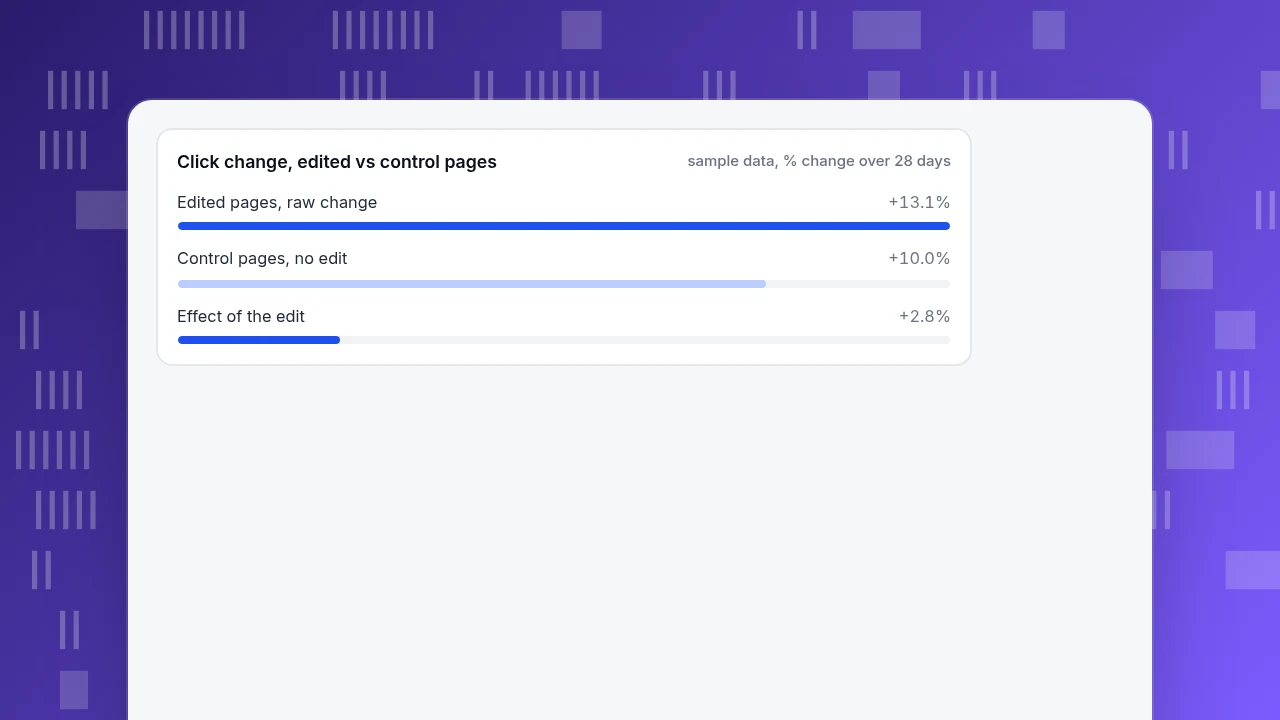
Start freeAI for content optimization is a drafting and editing aid for pages that already exist: it can sharpen titles, structure and readability, but it cannot supply original facts or tell you whether a change worked. Measure with a before-and-after comparison against unchanged control pages. In the sample below, edited pages gained 13.1% in clicks, yet control pages gained 10.0% without any edit, so the edit was worth 38 clicks.
What you will learn
- Use AI for titles, structure and readability; add original facts and check every number yourself
- Judge an edit by the change on edited pages minus the change on unchanged control pages, not by the raw rise
- Compare equal windows with a gap for late search data, and check engagement and conversions, not only clicks
What does AI content optimization actually mean?
AI content optimization is using a language model to improve pages that already exist: tightening titles and descriptions, spotting gaps against a topic, restructuring headings, simplifying hard passages and drafting a refresh. It is an editing and drafting aid. It does not decide whether a change helped. Only your own traffic and engagement data can say that, and the way to find out is a before-and-after comparison with a control group.
That distinction is the point of this guide. Teams often judge an AI rewrite by how good the new text reads, or by a rise in traffic that would have happened anyway. The sections below separate what AI can fix from what it cannot, give rules for using it safely, and show how to measure the result without fooling yourself. If you are deciding which pages to touch first, start with a content audit and check for content decay.
What can AI fix, and what can't it?
| Problem | Can AI help? | How | Needs a human to |
|---|---|---|---|
| Weak title or meta description | Yes | Draft several options in different styles | Pick one that is accurate and matches the page |
| Hard-to-read passages | Yes | Flag long sentences, suggest simpler wording | Keep terms and numbers correct |
| Missing subtopics | Partly | Compare your headings to the topic and list gaps | Decide which gaps readers actually need |
| Outline and structure | Yes | Propose a clearer heading order | Check it still answers the main question |
| Out-of-date facts | No | It may restate old facts confidently | Look up current figures and cite them |
| No original information | No | It predicts likely text, so it adds nothing new | Add data, examples, screenshots, first-hand detail |
| Page does not match search intent | Partly | Summarise what top results cover | Choose the intent and rewrite the page around it |
| Slow page, weak internal links, low authority | No | These are not wording problems | Fix with engineering, linking and promotion |
A short rule: AI is good at re-expressing what is already on the page and bad at supplying what is missing from it. If the page is thin because nobody on your team has anything new to say, a model cannot repair that.
| Group | Clicks before | Clicks after | Change |
|---|---|---|---|
| 8 updated pages | 1,240 | 1,402 | +13.1% |
| 8 control pages | 1,010 | 1,111 | +10.0% |
| Updated pages expected without the edit | 1,240 | 1,364 | +10.0% |
| Effect of the edit | — | +38 clicks | +2.8% |
Sample data: 28 days before and 28 days after, from a search performance report.
What should you check before publishing AI-assisted changes?
Google's guidance on generative AI content says three things worth building a process around. Generative models "predict a likely sequence of words" rather than retrieve facts, so you should manually fact-check and review all AI-generated content for accuracy before publishing, including titles, meta descriptions, structured data and image alt text. Using generative AI to create many pages without adding value for users may violate its spam policy on scaled content abuse. And AI is useful for researching a topic and structuring original content.
Turn that into a checklist for each edited page:
- Facts. Every number, date and name was checked against a source, not accepted from the model.
- Added value. The page now contains something it did not before: a number, a worked example, a step, a comparison.
- Intent. The first paragraph answers the question the page's main query asks.
- Voice and accuracy of claims. Nothing promises more than the product or the data supports.
- Scale. You are improving selected pages with a reason, not regenerating hundreds of pages in one pass.
On speed, an experiment published in Science in 2023 (Noy and Zhang) gave 453 college-educated professionals occupation-specific writing tasks, and those who used ChatGPT finished about 40% faster, with output quality rated about 18% higher by blinded evaluators. The authors note that the tasks did not require precise factual accuracy. So the evidence supports "faster drafting of ordinary writing"; it does not show that rewritten pages rank or convert better. That is a question about your pages, and the next sections answer it.
How do you test whether the change worked?
Run it like a small experiment.
- Choose the pages and a control group. Pick 8 to 10 pages you will change and a similar group you will leave alone (same topic area, similar traffic). The control group tells you what happened to everyone because of season, news or algorithm changes.
- Record a baseline. For a fixed window such as 28 days before the change, record clicks, impressions, click-through rate (clicks ÷ impressions) and average position for each page. In Google's Search Console performance report, average position is the topmost position your link occupied for each query, averaged across queries, so read it alongside impressions.
- Change only what you decided to change. Log the date and exactly what was changed (title, meta, intro, sections).
- Wait for a comparable window. Use the same length after the change, with the same day-of-week mix. Search data usually arrives a day or more late, so do not compare partial days.
- Compare against the control. The effect is the change on edited pages minus the change on control pages.
- Add engagement and outcomes. Search clicks are not the goal. Check time on page, bounce, engaged sessions and conversions for the same pages, from your own analytics.
Worked example: eight updated pages and eight control pages
Sample data: 28 days before and 28 days after, in Search Console.
| Group | Clicks before | Clicks after | Change | Impressions before | Impressions after | CTR before | CTR after |
|---|---|---|---|---|---|---|---|
| 8 updated pages | 1,240 | 1,402 | +13.1% | 61,000 | 63,500 | 2.03% | 2.21% |
| 8 control pages | 1,010 | 1,111 | +10.0% | 52,000 | 53,000 | 1.94% | 2.10% |
- Updated pages: 1,402 ÷ 1,240 = 1.131, so clicks rose 13.1%. A team looking only at this row would report a big win.
- Control pages (unchanged): 1,111 ÷ 1,010 = 1.100, so clicks rose 10.0% with no edits. Something outside the edit, such as season or demand, lifted all pages.
- What the updated pages would have had without the edit: 1,240 × 1.100 = 1,364 clicks.
- Effect of the edit: 1,402 − 1,364 = 38 clicks, or 38 ÷ 1,364 = +2.8%.
- CTR gained 0.18 points on updated pages (2.03% to 2.21%) and 0.15 on controls (1.94% to 2.10%), so most of the CTR improvement was not caused by the edit either.
The honest reading: the edit may have helped a little, but 38 extra clicks across eight pages in 28 days is small enough that normal variation could explain it. Run another window, add pages, or look at page-level differences before concluding anything. Without the control group the conclusion would have been "+13.1%, the rewrite works", about three-quarters of which was season or demand.
Click change, edited vs control pages
sample data, % change over 28 daysHow do you read the result?
| What you see | Likely meaning | What to do next |
|---|---|---|
| Edited pages up, controls flat | The edit probably helped | Roll out to similar pages, keep measuring |
| Edited and control pages up by about the same | Season or demand, not the edit | Do not credit the edit |
| Impressions up, CTR down | Pages appear for more queries but the title promises the wrong thing | Review titles against the new queries |
| CTR up, engagement down | Title attracts clicks the page does not satisfy | Fix the page, not the title |
| Edited pages worse than controls | The edit hurt, or an error went in | Compare with the old version and revert if needed |
Judge the page by outcomes, not only by search clicks: a page that gets 5% more clicks and 20% fewer sign-ups got worse.
What mistakes spoil AI content optimization?
- Judging by how the text reads. Fluent text is not evidence of better results; measure.
- No control group. Everything that moved the whole site is credited to the edit.
- Changing many things at once. Title, intro, structure and links all changed means you cannot say which mattered.
- Publishing unchecked facts. A confident wrong number is worse than a vague right one; check every figure.
- Regenerating at scale. Mass-produced pages without added value invite the spam problem Google describes.
- Looking too soon. A few days of data on a low-traffic page is noise.
How to measure an AI content update in TapCub
TapCub does not write or rewrite content. It measures what happened after you did. Use the example above as the walkthrough.
- Connect Search Console. In Monitoring › Search performance, connect Google Search Console (or Bing Webmaster) to see clicks, impressions, click-through rate and average position by page, query and country. Data usually arrives one to three days late, so leave a gap at the end of each window.
- Find the candidates. Pages ranked in the top 10 but with a click-through rate below the median are flagged on that page; changing the title and description is the cheapest first fix. The scatter plot has one dot per page.
- Mark the change. Add a date annotation in Configuration › Annotations on the day each batch of pages is edited, so the before and after windows are easy to align on every chart.
- Check the pages themselves. In Web analytics › Pages, compare time on page and bounce for the edited and control URLs before and after.
- Tie it to outcomes. Set a goal in Web analytics › Goals for the action that matters (sign-up, demo request) and read goal conversions for the edited pages next to the control pages, using the page filters.
- Keep the audience clean. Bots and AI crawlers are counted separately by default, so they do not inflate the visitor numbers you compare.
TapCub shows what changed, not why; the control group still has to be your design.
FAQ
Can AI optimise content for SEO?
It can help with drafts: titles, descriptions, outlines and readability. It cannot supply original information, current facts or the intent decision. Treat its output as a draft and measure results with a before-and-after test against a control group.
Does Google penalise AI-generated content?
Google's guidance says using generative AI to create many pages without adding value for users may violate its spam policy on scaled content abuse, and that content should be fact-checked and reviewed. Using AI as an aid is not the issue; low-value mass production is.
How do I measure whether an AI rewrite helped?
Record clicks, impressions, click-through rate and average position for a baseline window, change the pages, then compare an equal window after, against unchanged control pages. The effect is the edited pages' change minus the control pages' change.
How long should I wait before judging a content update?
Use equal windows before and after, often 28 days, with the same days of the week and a gap for late-arriving search data. Low-traffic pages need longer or more pages to say anything.
What should a human always check on AI content?
Facts, numbers and dates, claims about your product, whether the first paragraph answers the page's main question, and whether the page now contains something new.
Sources
- Google Search Central. Google Search's guidance about AI-generated content — fact-checking, scaled content abuse and added value. Checked 2026-11-22.
- Google Search Console Help. Performance report (Search) — definitions of clicks, impressions, CTR and average position. Checked 2026-11-22.
- Noy, S. and Zhang, W. (2023). Experimental evidence on the productivity effects of generative artificial intelligence. Science 381, 187–192 — about 40% less time and 18% higher rated quality on professional writing tasks. Checked 2026-11-22.
Was this article helpful?
We use your answers to fix and expand this page.
Couldn’t send. Please try again in a minute.
Thanks for the feedback. We’ll use it to improve this page.You’ve already sent feedback on this page. Thanks.

Product Experience Specialist
Explores usability, user journeys, and feature adoption through practical examples of onboarding and everyday product use.