Try it on your own data
Every report in this article is in the free plan. One snippet for web and apps, up to 10 sites.
Start freeAffiliate marketing with AI means using AI for research, drafting, updating and reporting while the model stays the same: a reader trusts the page, clicks your tracked link and buys. AI cuts the drafting hours, but verification and disclosure remain. In the sample, AI shortens payback from 13.3 to 8.5 months, and halving the click rate stretches it to 17. Below: a stage-by-stage workflow, the rules and the numbers.
What you will learn
- Pair every AI task with a named human check; Google says AI content must be manually fact-checked before publishing
- Disclose affiliate links next to the link in plain words such as ad or sponsored; an About page is not enough
- AI cuts drafting time, not click rate: payback was 8.5 months at a 4% click rate and 17 months at 2%, so test the first batch before scaling
What does affiliate marketing with AI actually change?
Affiliate marketing with AI means using AI tools for parts of the work, such as research, drafting and reporting, while the business model stays the same: you recommend a product, a visitor clicks your tracked link, and you earn a commission if they buy. AI changes how fast you produce and update pages. It does not change what earns the commission: a reader who trusts the page, a click on the link and a purchase at the merchant.
That distinction decides how to use it. AI lowers the cost of producing a page, but two costs stay: the time to check what it wrote, and the rules on disclosure and quality. The article covers where AI helps at each stage, the rules from Google and the US Federal Trade Commission, a worked example of the economics, and how to track results. For the wider topic of AI in measurement, see AI marketing analytics.
Where does AI help in an affiliate workflow, and what must a person check?
Match each stage with one AI task and one human check. If you cannot name the check, do not automate the task.
| Stage | Useful AI task | Human check | What goes wrong if skipped |
|---|---|---|---|
| Research | Cluster keywords, list questions readers ask | Confirm the questions in real search results | Pages for questions nobody asks |
| Product facts | Summarise specifications from the merchant's own page into a table | Compare each figure with the source | Wrong price, size or feature on your page |
| Drafting | Produce a first draft or an outline | Rewrite with what you actually tested or know; fact-check every claim | Generic text with errors that readers notice |
| Updating | Flag pages where a product or price may have changed | Open the merchant page and confirm | Stale offers that no longer exist |
| Reporting | Summarise clicks and orders per page | Check totals against the network report | Confident summaries of wrong numbers |
| Partner vetting (if you run a programme) | Screen applicants for obvious problems | Review the final shortlist yourself | Approving partners who mislead readers |
The common thread is that AI is good at producing structure and speed, and weak at facts and at first-hand experience. Google's guidance on generative AI content states that generative models do not retrieve facts, and that it is critical to manually fact-check and review all AI-generated content for accuracy and trustworthiness before publishing. Treat that as the quality bar for every stage in the table.
| Stage | AI task | Human check |
|---|---|---|
| Research | Cluster keywords, list reader questions | Confirm in real search results |
| Product facts | Summarise merchant specifications | Compare each figure with the source |
| Drafting | Outline or first draft | Rewrite with what you tested; fact-check |
| Updating | Flag pages that may be stale | Open the merchant page and confirm |
| Reporting | Summarise clicks and orders | Check totals against the network report |
If you cannot name the check, do not automate the task.
Which rules apply to AI-written affiliate pages?
Two sets of rules matter, and neither is optional.
Search quality. Google says using AI tools to generate many pages without adding value for users may violate its spam policy on scaled content abuse. It also recommends being transparent about how content was created. An affiliate page that restates a merchant's specifications in AI-polished prose adds nothing a reader cannot get from the merchant, so what you add has to be something the merchant page lacks: your own measurements, photos, comparisons, or a clear recommendation for a specific kind of reader.
Disclosure. The FTC's guidance for influencers applies to affiliate links wherever you publish them:
- Disclose any financial, employment, personal or family relationship with a brand, including free or discounted products.
- Place the disclosure with the endorsement itself; the FTC warns that a disclosure is likely to be missed if it appears only on an About Me or profile page.
- Use simple, clear wording such as "advertisement", "ad" or "sponsored", and avoid vague terms like "collab".
- Make the disclosure in the same language as the endorsement.
- Disclose even if you think your evaluations are unbiased.
A practical pre-publish checklist for any AI-assisted page:
- Every number was compared with its source.
- At least one section contains something only you could write: a test result, a measurement, a screenshot you took.
- The affiliate disclosure sits next to the first affiliate link, in plain words.
- The page answers one specific question; it is not one of fifty near-identical pages.
- The date of the last check is on the page.
Does AI make affiliate content pay? A worked example
Sample data: you publish 20 articles a month and each earns affiliate revenue as follows.
- Each article gets 300 visits a month from search.
- 4% of visitors click a merchant link: 300 × 0.04 = 12 clicks.
- 3% of merchant clicks end in a purchase: 12 × 0.03 = 0.36 orders.
- The commission is $25 an order: 0.36 × $25 = $9.00 a month per article. Revenue per click is 0.03 × $25 = $0.75.
Production cost, with your time valued at $30 an hour:
| Without AI | With AI | |
|---|---|---|
| Research and drafting | 4.0 hours | 1.5 hours |
| Fact-checking and rewriting | included above | 1.0 hour |
| Time total | 4.0 hours | 2.5 hours |
| Time cost | $120.00 | $75.00 |
| AI tool ($30 a month ÷ 20 articles) | $1.50 | |
| Cost per article | $120.00 | $76.50 |
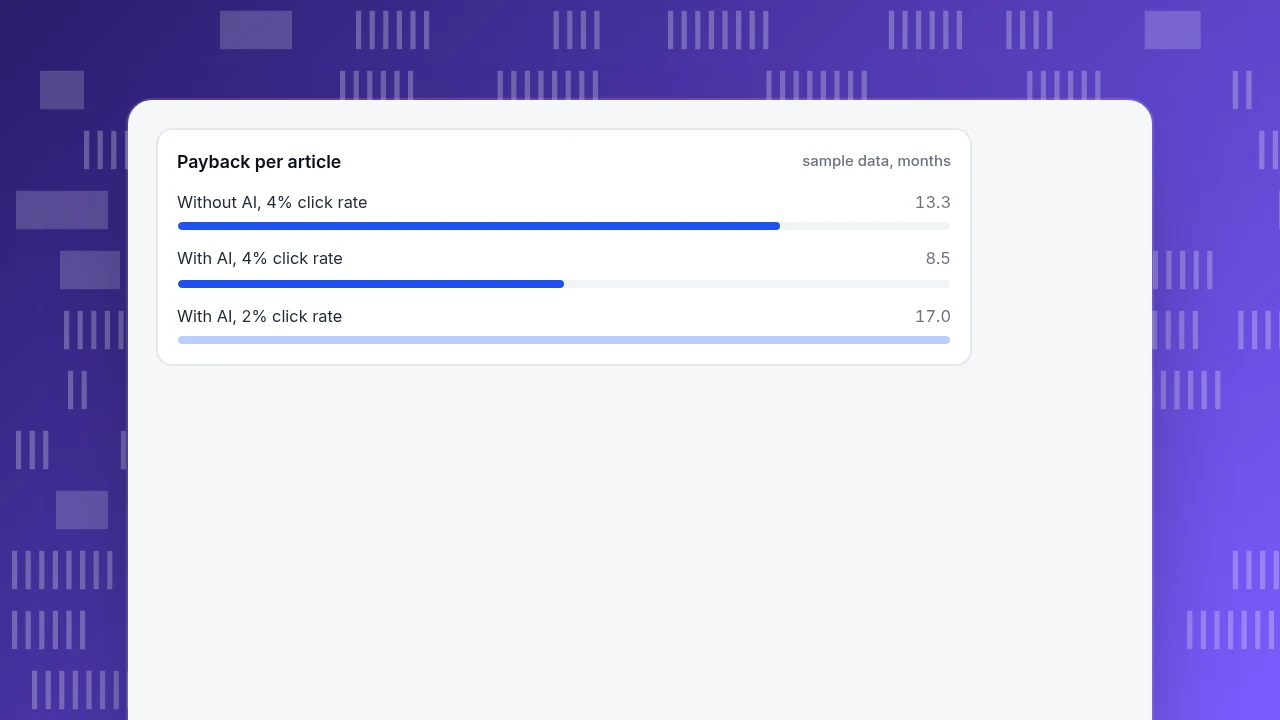
| Payback at $9.00 a month | 13.3 months | 8.5 months |
The recomputation: payback is cost ÷ monthly revenue, so $120 ÷ $9 = 13.3 and $76.50 ÷ $9 = 8.5 months. After 12 months an article earns 12 × $9 = $108, which is a $12 loss without AI and a $31.50 gain with AI. Twenty articles together earn $180 a month.
Two lessons follow. First, AI shortens payback by cutting the drafting hours, but the one hour of verification is the part you cannot remove; if you skip it, you save time and break the fact-checking rule above. Second, revenue is driven by traffic and click rate, which AI does not change. If the click rate is 2% instead of 4%, revenue falls to $4.50 a month and payback with AI stretches to 17 months. Before scaling production, check the click rate on the first batch.
Payback per article
sample data, monthsHow do I track whether it works?
Use three numbers per page and reconcile them with the network once a month.
- Visits to the page, by source.
- Outbound clicks to the merchant from that page.
- Orders and commission from the network report, mapped back to the page through a sub-ID or a campaign tag in your link.
A concrete way to do this is to add a page label to every affiliate link, for example a sub-ID parameter such as subid=review-standing-desks appended to the link the merchant gives you, using the same name for the same page everywhere. Each row of orders in the network report can then be traced back to one page, and the monthly reconciliation is a single table with page name, your click count and the network's click count. Without that label you only know how much you earned in total, not which article to update.
Then compare your outbound clicks with the clicks the network reports. Sample data: you count 1,200 outbound clicks in a month and the network shows 1,000: 1,000 ÷ 1,200 = 83.3%. Some gap is normal (blocked scripts, double clicks, bots); if the ratio falls below about 70% (a rule of thumb, not a standard), check that your links and redirects work. From the network's side the page's conversion rate is orders ÷ network clicks, 30 ÷ 1,000 = 3.0% in this sample.
Track how each page was made as well. Tag pages as "AI-assisted" or "written by hand" in your content sheet and compare revenue per page after 90 days. If AI-assisted pages earn much less, the draft is not adding value and you should spend the hours on first-hand material instead.
How can TapCub help with this?
TapCub does not write content, track commissions or run AI for you. It measures what happens on your pages, in the first two numbers of the list above.
- See where visits come from. In Web analytics › Sources, the Channels and UTM tabs show visitors and sessions by channel and campaign. A separate AI sources tab counts human sessions that arrived from an AI product, which is useful now that readers find pages through AI answers.
- Count outbound clicks. The website script records clicks on links whose domain differs from yours automatically, as an outbound-click event, so no extra code is needed for affiliate links. Look at them in Web analytics › Events, and compare against the click counts in the network report.
- Make affiliate clicks a goal. Define the outbound-click event as a goal in Web analytics › Goals to see which pages and sources produce clicks, which is the 4% rate in the example.
- If you run the programme, tag partner links. Give partners links with
utm_medium=affiliateand their own source name. Conversions per source then appear in the Sources report; add the commissions you pay as cost rows by source in All-platform analytics › Business › Channel ROI to get cost per acquisition and return on ad spend per partner. - Know the boundary. TapCub cannot see a purchase on the merchant's site unless the merchant sends it back, and it does not manage payouts. The order and commission figures come from the network; TapCub tells you which page and source sent the click.
FAQ
How can AI be used in affiliate marketing?
For research, drafting, updating and reporting: clustering keywords, turning merchant specifications into tables, drafting outlines, flagging stale pages and summarising clicks. Each use needs a human check. AI does not change how commissions are earned or what readers trust.
Is AI-generated affiliate content allowed by Google?
Google says AI can be useful, but that it is critical to manually fact-check and review AI-generated content before publishing, and that generating many pages without adding value may violate its spam policy on scaled content abuse. The test is whether the page adds something for readers.
Do I have to disclose affiliate links?
Yes. The FTC says to disclose any financial relationship with a brand, place the disclosure with the endorsement itself, use simple wording such as "ad" or "sponsored", and disclose even when you believe your evaluation is unbiased. A line on an About page is not enough.
How much does an affiliate article earn?
It depends on traffic, click rate, conversion rate and commission. In the sample here, 300 visits × 4% clicks × 3% orders × $25 gives $9.00 a month per article. Use your own numbers; the formula is the useful part.
How do I track affiliate clicks without a plugin?
Record outbound clicks with your analytics tool, tag partner links with campaign or sub-ID values, and compare your click count with the network's report each month. A ratio above about 70% is a reasonable rule of thumb; a lower one means check your links.
Sources
- Google Search Central, Google Search's guidance on using generative AI content: fact-checking AI-generated content and the scaled content abuse policy (checked 2026-11-22).
- Federal Trade Commission, Disclosures 101 for Social Media Influencers: when and how to disclose material connections (checked 2026-11-22).
Was this article helpful?
We use your answers to fix and expand this page.
Couldn’t send. Please try again in a minute.
Thanks for the feedback. We’ll use it to improve this page.You’ve already sent feedback on this page. Thanks.

Product Adoption Consultant
Explores customer onboarding, live conversations, and self-service, turning common usage questions into practical guidance and improvements.