Try it on your own data
Every report in this article is in the free plan. One snippet for web and apps, up to 10 sites.
Start freeTo add live chat to WordPress, either install the vendor's plugin or paste the vendor's one-line script into the theme header. The script route has fewer parts to break; the plugin route helps editors who cannot reach the header. The real cost is page speed and upkeep, so measure with five runs on and off and compare medians against the 2.5-second good line for Largest Contentful Paint.
What you will learn
- If you can edit the header, a script has the least that can break; use a plugin when you cannot, after checking its update history
- Measure five runs with and without chat and compare medians; accept a method that adds 0.3 seconds or less and stays under 2.5 seconds
- Re-test monthly and after any theme change, because a theme switch or cache can silently remove the widget
What are the ways to add live chat to WordPress?
There are three ways, and every chat product uses one of them.
| Method | What you do | Who keeps it working |
|---|---|---|
| Chat plugin | Install and activate a plugin from the WordPress directory or a vendor, connect your chat account, set options | You update the plugin; the vendor updates its code |
| Script in the theme header | Paste one <script> tag into the global header, either in the theme or through a header-injection field | You keep the tag when the theme changes |
| Tag manager | Load the same script through a tag manager container that is itself installed once | Whoever owns the container |
WordPress powers 38.5% of all websites and 57.4% of those with a known content management system, according to W3Techs on 22 November 2026, so most chat vendors publish a plugin and a script. The two work the same way in the end: the visitor's browser loads a chat file from the vendor's server. The difference is what lives on your side of the fence, and that decides maintenance and speed. If you want the general procedure for any site, add live chat to a website covers it, and the step-by-step page for this platform is install on WordPress. This article is about choosing between the methods.
Plugin or script: what do you give up with each?
The trade is convenience against control. The table counts the steps of a typical install and lists the failure you are most likely to meet.
| Plugin | Script in header | Tag manager | |
|---|---|---|---|
| Typical steps | 6: install, activate, sign in, connect site, set options, test | 4: copy tag, paste in header, save and clear cache, test | 6: container installed, new tag, trigger, publish, clear cache, test |
| Extra code on your server | The plugin's PHP runs on every page request | None; the tag is plain HTML | Container snippet only |
| Settings screens inside WordPress | Yes | No; settings live in the chat product | No |
| Most likely failure | Plugin conflict or update breaks the widget | Theme change or page cache hides the tag | Container not published, consent rule blocks the tag |
| Uninstall | Deactivate and delete; check leftover options | Remove one line | Remove or pause one tag |
| Best when | Several non-technical editors and no header access | One person who can edit the theme or header field | Many third-party tags already managed centrally |
Three judgement rules follow from the table:
- If you can edit the header, the script route has the least that can break, because there is nothing to update on your server.
- If you cannot touch the header and a vendor plugin exists, the plugin is the practical choice; check when it was last updated and whether it works with your WordPress version before installing.
- If a tag manager already carries your analytics and consent logic, put chat there so one consent rule governs everything; otherwise adding one just for chat is more machinery than it is worth.
| Plugin | Script in header | |
|---|---|---|
| Typical steps | 6 | 4 |
| Extra code on your server | PHP runs on every request | None |
| Settings screen in WordPress | Yes | No |
| Most likely failure | Plugin conflict or update | Theme change or page cache |
| Uninstall | Deactivate, delete, check leftovers | Remove one line |
A tag manager adds a third route if one already carries your analytics and consent rules.
How much does it slow the page down?
Every method loads a file from the chat vendor, so the question is how much and when, not whether. Google's Core Web Vitals give you the yardstick: a page is rated good when its Largest Contentful Paint is 2.5 seconds or less, its Interaction to Next Paint is 200 milliseconds or less and its Cumulative Layout Shift is 0.1 or less, assessed at the 75th percentile of page loads (web.dev).
Measure it yourself, because the answer depends on your theme, host and cache. A protocol that takes about twenty minutes:
- Pick one representative page, such as the home page or a product page.
- Run five tests with chat off, using the same tool, device profile and network setting each time. Note the Largest Contentful Paint of each and take the median.
- Turn chat on with method A. Clear the page cache. Run five tests again and take the median.
- Remove method A, repeat for method B.
- Compare medians, not single runs; single runs vary too much.
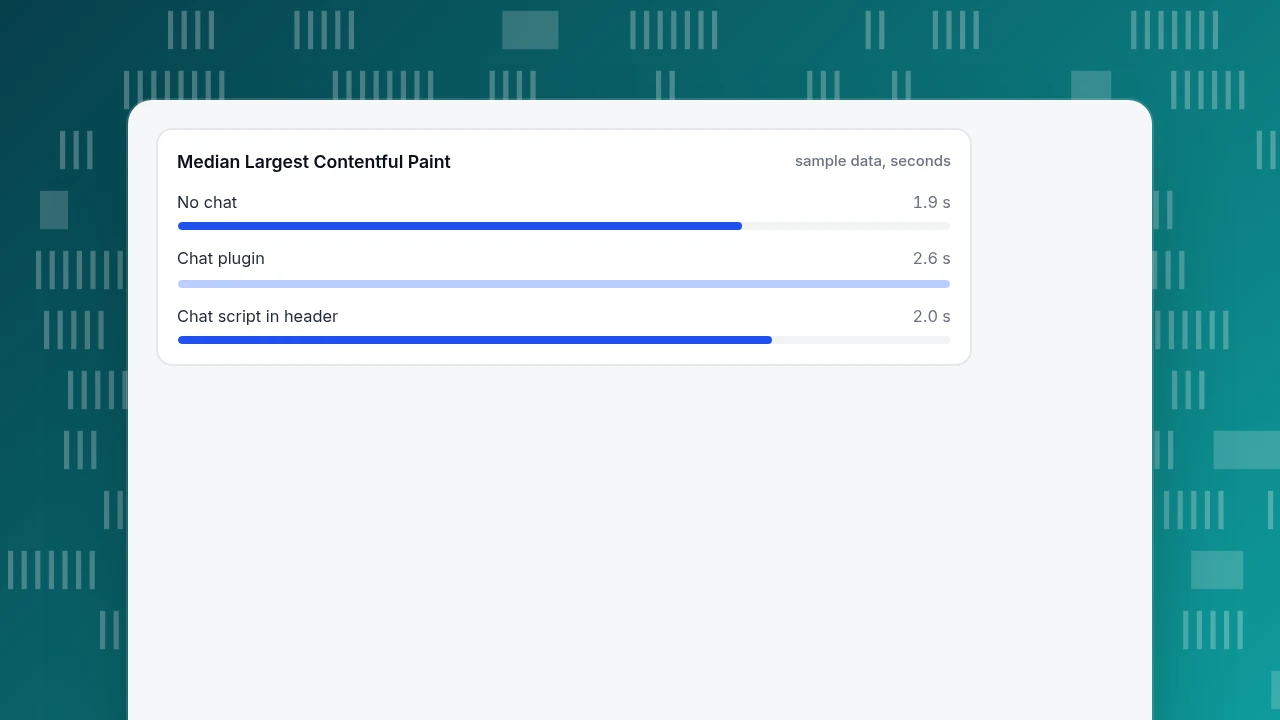
Sample data, five runs each, Largest Contentful Paint in seconds:
| Setup | Runs | Median |
|---|---|---|
| No chat | 1.9, 2.0, 1.8, 2.1, 1.9 | 1.9 |
| Chat plugin | 2.5, 2.7, 2.4, 2.6, 2.8 | 2.6 |
| Chat script in header | 2.0, 2.1, 1.9, 2.1, 2.0 | 2.0 |
The recomputation: the medians are the third value of each sorted list: 1.9, 2.6 and 2.0. The plugin adds 2.6 − 1.9 = 0.7 seconds and pushes the page past the 2.5-second line; the script adds 2.0 − 1.9 = 0.1 seconds. These numbers are illustrative: your own measurement is the one to trust, and a well-built plugin can perform like a script.
A decision rule you can apply to your own numbers: accept a method if the median Largest Contentful Paint rises by 0.3 seconds or less and stays under 2.5 seconds; if it crosses 2.5, load the chat later or switch method. WordPress itself helps here: since version 6.3 a script registered with wp_enqueue_script can pass 'strategy' => 'defer' or 'async' in its arguments, and a tag you paste in the header can carry defer the same way.
Median Largest Contentful Paint
sample data, secondsHow do I add a chat script to WordPress without a plugin?
The script route has the same few steps whichever chat product you use.
- Copy the tag from your chat product. It is one line that loads a file from the vendor and identifies your site.
- Find the right place. Use the theme's header settings if it has a custom code field. If not, use a child theme's header template or a small header-injection tool. Do not edit a parent theme directly, because an update will overwrite your change.
- Paste it once, in the global header. One copy, on every page. Two copies cause double loading, and some products load only the first.
- Save and clear every cache. Clear the WordPress page cache, any caching plugin, the host's cache and the CDN. Caches that serve saved HTML will keep serving the old header.
- Test in a private window. The widget should appear within a few seconds; send a message from the visitor side and answer it as an agent.
- Re-test after theme or builder changes. A theme switch or a page-builder template can drop a header tag, so add the check to your release routine.
If the widget does not appear, work through the usual suspects in this order: cache, a security plugin that blocks third-party scripts, a consent rule that is holding the tag back, and a content security policy that does not list the vendor's domain.
What breaks later, and who notices?
Install time is a small part of the cost. The failures that matter happen months later.
| Event | Plugin route | Script route |
|---|---|---|
| WordPress core update | Plugin may need a compatibility update | Not affected |
| Theme change | Not affected | Tag must be re-pasted |
| Caching plugin added or changed | Can serve stale pages | Can hide the new tag |
| Security hardening | May be blocked by firewall rules | Blocked only if third-party scripts are blocked |
| Vendor changes | Plugin update needed | Usually none; the file is loaded from the vendor |
Put a monthly check in the calendar: open the site in a private window, confirm the widget loads and run the speed measurement on the same page. The chat is a customer-facing feature, and nobody on your team will notice it has vanished until a customer says so.
How does this work in TapCub?
TapCub's documentation is explicit that there is no WordPress plugin for it and no plugin named TapCub to look for, so the script route is the only route, and it is short. The same single script carries web analytics and chat.
- Install the analytics script once. Paste the one-line tag into the theme header or a header custom-HTML field, as described in install on WordPress, then clear the page cache. Open Web analytics › Realtime and confirm your own visit appears.
- Turn chat on with a switch. In Live chat › Chat settings, enable live chat and save. The site's script loads the chat file only when the collect response says chat is enabled; tabs that are already open need one reload before the bubble appears. You do not paste a second script, and the documentation says not to add one.
- Set the look. Brand name, colour, bubble side and hiding the bubble on mobile are in Live chat › Chat settings › Appearance; the greeting is under Greeting & translation.
- Run your speed test. Use the protocol above on one page with the script and chat on, then off, and record the medians. Because the chat file loads only when enabled, switching chat off in settings removes it without touching the header.
- Check conversations carry context. Send a message from a private window; in Live chat › Inbox the agent sees the visitor's source and recent page views, because chat and analytics share one visitor ID.
If the theme caches HTML per page, clear that cache after any header change. TapCub does not offer a WordPress settings screen; configuration is in the console, not in wp-admin.
FAQ
How do I add live chat to WordPress?
Either install the chat vendor's plugin, or paste the vendor's one-line script into the theme header and clear every cache. The script route has fewer moving parts if you can edit the header; the plugin route suits editors who cannot. Test in a private window afterwards.
Does a live chat plugin slow down WordPress?
It can, because it loads the vendor's file and may add PHP work on every request. Measure with five runs with and without chat, compare medians and judge against Google's good threshold of 2.5 seconds for Largest Contentful Paint. Your own medians beat any general claim.
Do I need a plugin for live chat on WordPress?
No. Any chat product that gives you a script tag works without a plugin: paste the tag once in the global header. Plugins add a settings screen inside WordPress and convenience for non-technical editors, at the cost of one more thing to update.
Where do I paste the chat script in WordPress?
In the global header, once, so it loads on every page. Use the theme's custom code field, a child theme's header template or a header-injection tool. Avoid editing a parent theme directly, because an update overwrites it.
Why is my chat widget not showing on WordPress?
Check in this order: a page cache serving old HTML, a security plugin blocking third-party scripts, a consent rule holding the tag, and a content security policy that omits the vendor's domain. Reload in a private window after clearing the caches.
Sources
- web.dev, Web Vitals: good thresholds for Largest Contentful Paint (2.5 s), Interaction to Next Paint (200 ms) and Cumulative Layout Shift (0.1) at the 75th percentile (checked 2026-11-22).
- WordPress Core Make blog, Registering scripts with async and defer attributes in WordPress 6.3: the
strategyargument forwp_enqueue_script(checked 2026-11-22). - W3Techs, Usage statistics of WordPress: 38.5% of all websites and 57.4% of known content management systems (page dated 22 November 2026).
Was this article helpful?
We use your answers to fix and expand this page.
Couldn’t send. Please try again in a minute.
Thanks for the feedback. We’ll use it to improve this page.You’ve already sent feedback on this page. Thanks.

Product Analyst
Focuses on event analysis, conversion funnels, and retention, using clear metric definitions and structured analysis to explain product performance.