Try it on your own data
Every report in this article is in the free plan. One snippet for web and apps, up to 10 sites.
Start freestrict-origin-when-cross-origin is the default Referrer-Policy in major browsers: it sends the full URL within your site, only the origin (no path or query) to other sites, and nothing when going from HTTPS to HTTP. For analytics, that means external visits show a host without a page, and some arrive as direct.
What you will learn
- Under the default, a cross-site click sends only the origin: you see blog.example, never the article, and the query string is dropped
- In the 1,000-session sample, 63% of external visits have a known host, 7% a known page and 27% no referrer at all, so they look direct
- UTM parameters live in your landing URL, so tagged links keep their attribution whatever the sender's policy says
What does strict-origin-when-cross-origin send?
strict-origin-when-cross-origin is a Referrer-Policy value with three rules. For a request to the same site, the browser sends the full URL, path and query included. For a request to a different site over a connection of the same or better security, it sends only the origin (scheme, host and port, shown with a trailing slash). For a downgrade from HTTPS to HTTP, it sends nothing.
Take a link on https://blog.example/guides/seo?draft=7 that points to your site:
| Where the click lands | What your server sees in Referer |
|---|---|
Another page on https://blog.example | https://blog.example/guides/seo?draft=7 |
Your site on https://shop.example | https://blog.example/ |
A page on http://shop.example (plain HTTP) | nothing |
The middle row is the one that matters for analytics. You learn which site sent the visitor, but not which article, and the query string is gone. Chrome's own announcement describes it the same way: only the origin is sent for cross-origin requests, so the path and query string are dropped.
Is it the default in browsers?
Yes, when a page sets no policy, or sets an invalid one, the default is strict-origin-when-cross-origin. MDN notes it replaced no-referrer-when-downgrade after the November 2020 revision of the specification. Chrome announced the switch for version 85, with the rollout starting in July 2020 for beta and August 2020 for stable.
The consequence for anyone reading referrer reports: since 2020, the sender's choice, not yours, decides how much of the referrer URL you get, and the default for most senders is "host only". If you remember reports that showed the exact blog post that linked to you, that detail has been disappearing for years, even though nothing changed on your site. Chrome's post warns that server-side logging and analytics relying on the full referrer URL would likely lose granularity.
What does each Referrer-Policy value send?
MDN lists eight values. This table is the whole matrix: the three columns are a request to the same origin, a request to a different origin over HTTPS, and a downgrade from HTTPS to HTTP.
| Policy value | Same-origin | Cross-origin (HTTPS to HTTPS) | HTTPS to HTTP |
|---|---|---|---|
no-referrer | nothing | nothing | nothing |
no-referrer-when-downgrade | full URL | full URL | nothing |
origin | origin | origin | origin |
origin-when-cross-origin | full URL | origin | origin |
same-origin | full URL | nothing | nothing |
strict-origin | origin | origin | nothing |
strict-origin-when-cross-origin (default) | full URL | origin | nothing |
unsafe-url | full URL | full URL | full URL |
How to read it: "strict" in a name means "send nothing on a downgrade". "When-cross-origin" means "full URL only inside the same site". unsafe-url is called that because, as MDN warns, it can leak private information from HTTPS URLs to insecure origins.
A policy can also be set per link. rel="noreferrer" suppresses the header for one link, whatever the page policy says, and the W3C Referrer Policy spec describes it as a link type for a, area and link elements.
| Policy value | Same-origin | Cross-origin (HTTPS) | HTTPS to HTTP |
|---|---|---|---|
| no-referrer | nothing | nothing | nothing |
| no-referrer-when-downgrade | full URL | full URL | nothing |
| origin | origin | origin | origin |
| origin-when-cross-origin | full URL | origin | origin |
| same-origin | full URL | nothing | nothing |
| strict-origin | origin | origin | nothing |
| strict-origin-when-cross-origin (default) | full URL | origin | nothing |
| unsafe-url | full URL | full URL | full URL |
Source: MDN Referrer-Policy, read 2026-11-23.
How does the policy show up in analytics reports?
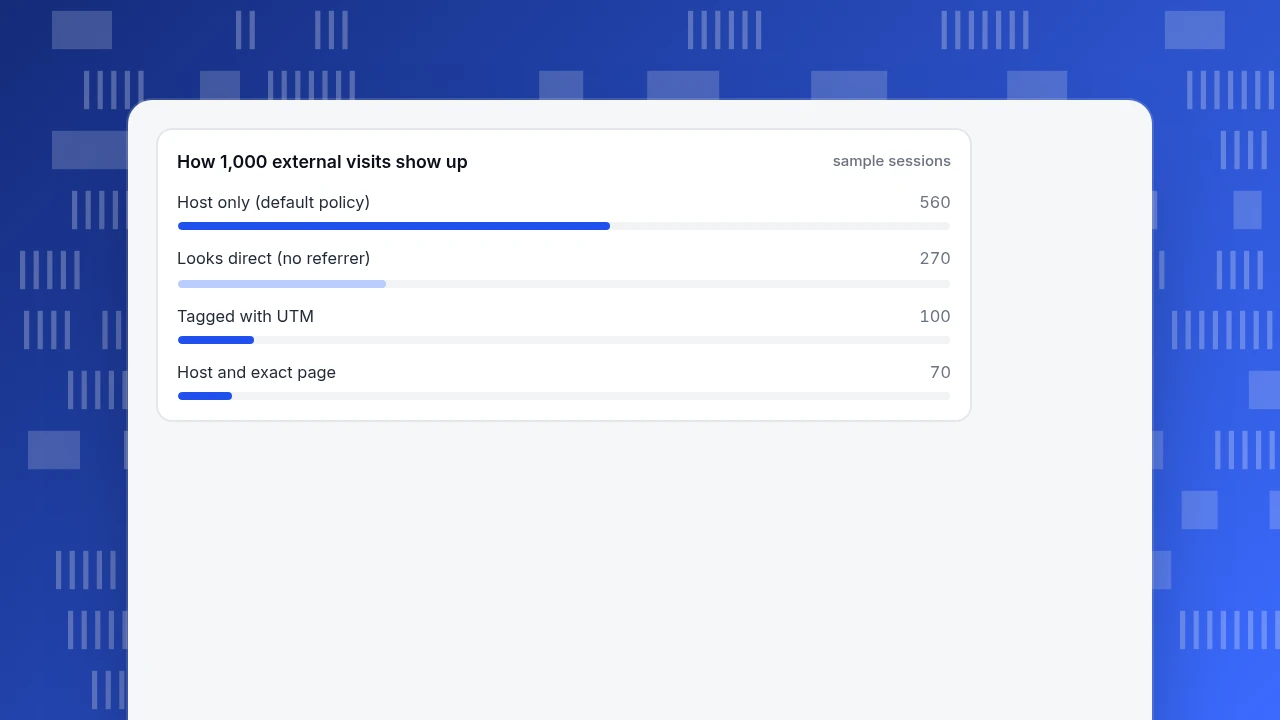
A referrer report has two jobs: tell you which site sent a visit, and, if you are lucky, which page. The policy of the sending page controls both. Sample data: 1,000 sessions that arrived by following a link from an external site.
| How the session arrived | Sessions | What the report can say |
|---|---|---|
| Sender used the default policy (origin only) | 560 | The host, e.g. blog.example; no path |
Sender sent the full URL (unsafe-url or no-referrer-when-downgrade) | 70 | The host and the exact page |
Sender used no-referrer, or the link had rel="noreferrer" | 90 | Nothing: looks direct |
| Email apps, chat apps and in-app browsers that pass no referrer | 180 | Nothing: looks direct |
| Link tagged with UTM parameters | 100 | Source, medium and campaign from the URL |
| Total | 1,000 |
The shares: host known for 560 + 70 = 630 sessions (63%); exact page known for 70 (7%); campaign known for 100 (10%); no information for 90 + 180 = 270 (27%). If you assumed everyone used the default, you would expect 0% unknown.
Three consequences follow.
- Direct is partly a referrer-policy artifact. In the sample, 27% of external arrivals have no referrer even though a person clicked a link. They land in direct, and the direct number grows without a single new bookmark. The blog post direct traffic lists the other causes.
- Partial referrers are normal. A row that says
blog.examplewith no page is not a bug; it is what the default policy sends. - Tags survive where referrers do not. UTM parameters sit in your landing URL, so a policy on the sending page cannot remove them. For any link you control, such as newsletters, partner posts and social bios, use a tagged link (see create a UTM link).
If your own site still serves HTTP in places, a click from an HTTPS page to that HTTP page sends no referrer at all under the default. Moving the destination to HTTPS removes that loss.
How 1,000 external visits show up
sample sessionsWhich policy should your own site set?
Your policy controls what you reveal when your pages link out or load third-party resources. It does not change what other sites reveal to you. Pick by what your URLs contain.
| Your situation | Suggested value | Why |
|---|---|---|
| URLs carry no private data, you want the default behavior stated explicitly | strict-origin-when-cross-origin | Full URLs inside your site, host only outward, nothing on downgrade |
| URLs contain tokens, reset links, internal IDs | same-origin or no-referrer | Nothing leaves your site |
| You want partners to see you sent them traffic, but nothing else | strict-origin | Origin only, nothing on downgrade |
| You need full URLs sent to your own other domains | Avoid unsafe-url; log it server-side instead | It leaks to every destination |
Set it as a response header:
Referrer-Policy: strict-origin-when-cross-originMDN also documents a fallback syntax: a comma-separated list with the preferred policy last, such as no-referrer, strict-origin-when-cross-origin, where an old browser uses the earlier value if it does not know the later one. Multiple values work only in the header, not in the referrerpolicy attribute. You can also set a policy for one element with referrerpolicy="no-referrer".
One trade-off to know before choosing no-referrer site-wide: it also hides your site from the people you link to. Partners who track their incoming traffic will see it as direct, which makes your links look less valuable to them.
How do you test what your site sends?
You can verify a policy in two minutes.
- Open a page of your site in Chrome DevTools and go to the Network panel with "Preserve log" on.
- Click a link to an external site you control, such as a test page on another domain.
- Select the document request and read the
Refererrequest header. Under the default policy it should be your origin with a trailing slash. Underno-referrerit is missing. - Repeat with an HTTP destination to confirm that nothing is sent on a downgrade.
- In your own server log, check the
$http_refererfield. nginx's defaultcombinedformat writes the value of theRefererrequest header into every log line, so you can count how many requests carry a full URL, an origin or-.
Note the spelling: the HTTP header is Referer (a historical typo), the policy and the JavaScript property document.referrer use the correct spelling.
How to read referrer data in TapCub
Suppose the sample above is your month: you see a large direct number and a list of partner hosts with no pages. TapCub cannot recover a referrer the browser never sent; what it can do is show you which part of the traffic is explained and tag the rest.
- Open Web analytics › Sources. Rules look at UTM parameters, the referring host and ad click IDs; a visit with no source at all is counted as direct. Start on the Channels tab and note the direct share.
- Switch to the Referrers tab to see which hosts send visits. Hosts that appear without pages are the default policy at work; click a row to filter other reports to that host.
- Open the UTM tab to see tagged campaigns. These stay attributed even when the sending page withholds a referrer.
- For links you control, switch from plain links to UTM-tagged ones, then watch direct fall and the campaign rows grow over the next two weeks.
- Remember internal navigation: TapCub treats a hop from your own site as internal, not as acquisition, so your own site's policy does not turn an in-site click into a referral.
TapCub only reports what the browser sends and what the link carries. It does not guess the missing referrer for a direct visit.
FAQ
What is strict-origin-when-cross-origin?
It is a Referrer-Policy value. Same-origin requests carry the full URL; cross-origin requests carry only the origin; and a downgrade from HTTPS to HTTP carries nothing. It has been the default in Chrome since version 85, which started rolling out in August 2020, and MDN lists it as the default when no policy is set.
Is strict-origin-when-cross-origin secure?
It is a balanced choice: it never sends a path or query string to another site, and it sends nothing when the destination is less secure. It still reveals your origin to every site you link to, so if even the host name is sensitive, use same-origin or no-referrer. MDN warns that unsafe-url can leak private data and advises against it.
Why does my analytics show a host but no page?
Because the sending site's browser followed the default policy, which sends the origin only. The path and query string are dropped before the request leaves, so no analytics tool can show the article that sent the click. Ask the partner for the link location, or give them a tagged link.
Why is some referral traffic showing up as direct?
A visit is direct when the browser sent no referrer and the URL carried no tags. Causes include no-referrer policies, rel="noreferrer" links, a downgrade from HTTPS to HTTP, and apps that open links without a referrer. See the sample: 270 of 1,000 external arrivals looked direct.
Does the policy affect my own site's internal links?
Under the default, same-origin navigation sends the full URL, so internal page paths are available. The policy does not tell you anything about visitors from other sites. A stricter value such as no-referrer removes the previous page even for internal links in the server log.
Sources
- MDN Web Docs. Referrer-Policy header — the eight values and what each sends, the default, fallback syntax and the
unsafe-urlwarning. Read 2026-11-23. - Chrome for Developers. A new default Referrer-Policy for Chrome: strict-origin-when-cross-origin — Chrome 85 rollout (beta July 2020, stable August 2020), origin-only for cross-origin, nothing on downgrade, analytics impact. Read 2026-11-23.
- W3C. Referrer Policy — the origin policy and trailing slash, and the
noreferrerlink type. Read 2026-11-23. - nginx. ngx_http_log_module — the
combinedlog format and the$http_refererfield. Read 2026-11-23.
Was this article helpful?
We use your answers to fix and expand this page.
Couldn’t send. Please try again in a minute.
Thanks for the feedback. We’ll use it to improve this page.You’ve already sent feedback on this page. Thanks.

Data Analyst
Explores traffic sources, conversion funnels, and retention, using clear metric definitions and concrete examples to explain what the numbers mean.