Try it on your own data
Every report in this article is in the free plan. One snippet for web and apps, up to 10 sites.
Start freeTo create a UTM link, add utm_source, utm_medium and utm_campaign to the destination URL after a question mark. The hard part is not the builder but the names: values are case sensitive, so five spellings of one source become five report rows. Pick medium and source from a fixed list, write everything in lowercase, and keep a registry. Below: the steps, a naming table and a worked example.
What you will learn
- Use utm_source, utm_medium and utm_campaign every time; values are case sensitive, so lowercase everything
- Choose medium names that match your analytics tool's channel rules, from a fixed list nobody types freely
- Keep one registry of live links; a 520-session sample split across five spellings hid 58% of the channel in its top row
What is inside a UTM link?
A UTM link is an ordinary URL with extra parameters added after a question mark. The page that opens is the same; the parameters ride along so your analytics tool can record where the visit came from. Google's documentation says to always use utm_source, utm_medium and utm_campaign, and treats utm_term and utm_content as optional.
| Parameter | Question it answers | Example value | Required? |
|---|---|---|---|
utm_source | Which specific site, list or platform sent the click? | newsletter, linkedin | Yes |
utm_medium | Which kind of channel was it? | email, paid-social | Yes |
utm_campaign | Which initiative does this click belong to? | 2026-11_signup_webinar | Yes |
utm_term | Which paid keyword triggered the ad? | ab-testing-sample-size | Optional |
utm_content | Which link or creative inside the campaign? | header-button, video-a | Optional |
A finished link looks like this:
https://example.com/webinar?utm_source=newsletter&utm_medium=email&utm_campaign=2026-11_signup_webinar&utm_content=header-button
Two properties of this format cause almost every problem later. First, Google's documentation states that values are case sensitive: utm_source=google and utm_source=Google are different values, so they land in different report rows. Second, the parameters are just text you type. Nothing checks that the spelling is the same as last month, which is why the rest of this guide is about naming rules rather than about the builder tool. The wider definition of the term is in the UTM glossary entry.
How do I create a UTM link, step by step?
You can build a link in a spreadsheet, a free builder form or by hand. The steps are the same in all three.
- Start from the final URL. Open the page in a browser, copy the address after any redirect, and strip old tracking parameters. If a short link or a redirect sits in front of the page, test later that the parameters survive it.
- Pick the medium from a fixed list. The medium is the channel type, and you should only be able to choose it, never type it freely. A starting list is in the next section.
- Name the source after the specific sender.
newsletter,linkedin,partner-acme,podcast-spring. The source answers "which one", the medium answers "which kind". - Name the campaign with a pattern. A pattern such as
yyyy-mm_goal_offersorts chronologically and says what the campaign was for:2026-11_signup_webinar. - Add content only when you compare links. Use
utm_contentwhen two links in the same campaign need separate numbers (header button vs footer link, video A vs video B). Leave it out otherwise. - Write everything in lowercase with hyphens. No spaces, no capitals, no accents. A space has to be percent-encoded as
%20under the URL standard (RFC 3986), which makes links hard to read and easy to mangle in some email editors. - Click the finished link once before publishing. Open it in a private window and confirm the right page loads and the visit shows up in your analytics within a few minutes.
If you use a spreadsheet, a formula keeps the lowercase rule automatic. With the base URL in A2, source in B2, medium in C2, campaign in D2 and content in E2:
=A2&"?utm_source="&LOWER(B2)&"&utm_medium="&LOWER(C2)&"&utm_campaign="&LOWER(D2)&IF(E2="","","&utm_content="&LOWER(E2))
Wrap SUBSTITUTE(x," ","-") around each cell if people type spaces. Whatever the builder, the discipline is the same: choices come from lists, not from memory.
Which names should I use? A convention that sorts into channels
Your analytics tool sorts visits into channels using rules on source and medium. Google's Analytics 4 documentation shows the idea: Affiliates needs the medium affiliate exactly, Referral accepts referral, app or link, Paid Search needs a search-site source and a medium that contains "cp" or equals "ppc" or starts with "paid"; the same medium pattern with a social-site source is Paid Social; and a medium or source of "email" is Email. Those definitions are not case sensitive and cannot be edited. A medium you invent, such as newsletter-blast, does not match anything and falls into an "unassigned" or "other" bucket.
So choose medium names that match the common rules, and keep the list short:
| Medium | Use for | Typical source values | Would match Google's channel rule? |
|---|---|---|---|
email | Newsletters, lifecycle emails | newsletter, onboarding | Yes, Email |
cpc | Paid search clicks | google, bing | Yes, Paid Search (contains "cp") |
paid-social | Paid social ads | linkedin, facebook | Yes, starts with "paid" |
social | Organic social posts you link yourself | linkedin, x | Yes, Organic Social (medium social) |
affiliate | Partner and affiliate links | partner-acme | Yes, Affiliates (medium equals affiliate) |
referral | Links on other sites that are not ads | docs-site | Yes, Referral (medium referral) |
Three naming rules cover most teams:
- One spelling per thing. Write the list down in a shared sheet; if
facebookis in it,fbandFacebookare mistakes, not variants. - Campaign names describe the initiative, not the channel. The channel is already in medium.
2026-11_signup_webinarcan run on email, paid social and organic social at once, and the report then compares those channels for the same initiative. - Never put personal data in a link. Parameters appear in browser history, server logs and shared screenshots. Use a campaign name, not an email address or a customer ID.
| Medium | Use for | Channel it maps to in GA4 rules |
|---|---|---|
| Newsletters, lifecycle emails | ||
| cpc | Paid search clicks | Paid Search |
| paid-social | Paid social ads | Paid Social |
| social | Organic social posts | Organic Social |
| affiliate | Partner and affiliate links | Affiliates |
| referral | Non-ad links on other sites | Referral |
Channel rules are not case sensitive, but report rows still split by spelling, so keep everything lowercase.
What do inconsistent UTM links do to a report?
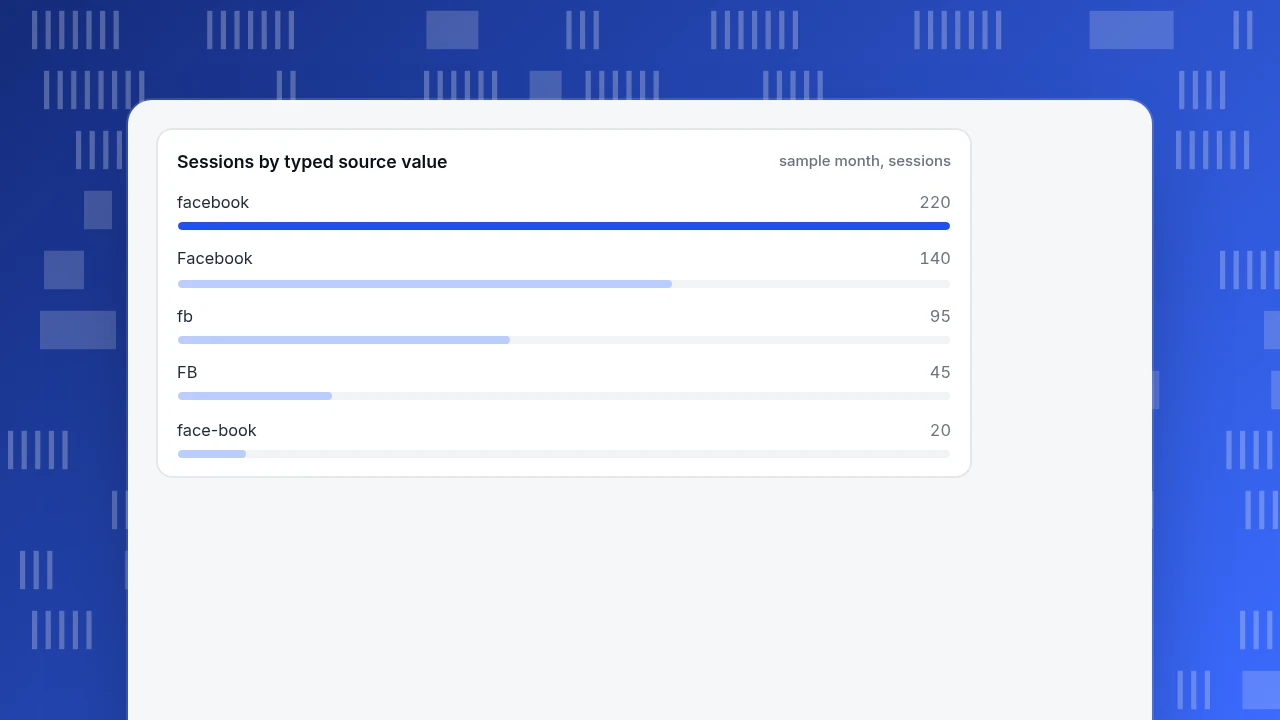
Sample data: in one month 520 sessions came from one social platform, tagged by five people with five spellings. The same sessions produced 21 conversions.
| Source value as typed | Sessions | Conversions | Conversion rate |
|---|---|---|---|
facebook | 220 | 9 | 4.1% |
Facebook | 140 | 7 | 5.0% |
fb | 95 | 3 | 3.2% |
FB | 45 | 2 | 4.4% |
face-book | 20 | 0 | 0.0% |
After cleaning: facebook | 520 | 21 | 4.0% |
The recomputation is 220 + 140 + 95 + 45 + 20 = 520 sessions and 9 + 7 + 3 + 2 + 0 = 21 conversions, so 21 ÷ 520 = 4.04%. Before cleaning, the largest row shows only 220 sessions, 42% of the real total (220 ÷ 520), so someone reading the top row would under-report the channel by more than half. The row-level rates also look like real differences (5.0% against 0.0%) when they are just a few conversions spread across labels: the Facebook row has 7 conversions, the face-book row has none from 20 sessions, and neither number means anything on its own.
Five mistakes cause most of these splits:
- Free typing. Fix: pick medium and source from a list.
- Capital letters. Fix: lowercase everything, because values are case sensitive.
- Reused campaign names. Fix: include the month or quarter so last year's name cannot collide with this year's.
- Parameters lost in redirects. Short links, link-tracking in email tools or a login wall can drop everything after the question mark. Fix: click the link in a private window and watch the landing URL.
- Tagging internal links. UTM tags describe how someone arrived from outside. Putting them on a link between your own pages overwrites the original source in many tools. Fix: use an event for internal promotions, not UTM tags.
Sessions by typed source value
sample month, sessionsHow do I keep a registry so the names stay clean?
A registry is a shared sheet where every live link is written once. It takes ten minutes to set up and prevents the table above.
Use these columns: date created, owner, destination URL, source, medium, campaign, content, full URL, where it is published, end date. Add two small lists on another tab: allowed media (the table in the previous section) and allowed sources. Use data validation so those two cells are drop-downs, and generate the full URL with the formula shown earlier.
A monthly review takes five minutes: sort the source column, look for near-duplicates, and fix the next link rather than editing history. If the analytics tool lets you merge or rename values after the fact, do it once and then lock the list. For naming of the parameters themselves, TapCub's help page naming UTM parameters gives a compact version of the same rules.
How do I check the tagged traffic in TapCub?
Take the sample link above and follow it through the product.
- Publish the tagged link and click it once. Open Web analytics › Realtime and confirm the visit appears with the right page. TapCub's script is a single line in the page head, so nothing extra is needed on the landing page for UTM values to be read.
- Read the values. In Web analytics › Sources, the UTM tab splits source, medium, campaign, term and content, with visitors, sessions, pageviews, bounce and duration per row. If a typo has crept in, you see it as a second row immediately.
- Check the channel. The Channels tab groups sessions by rules that look at UTM, the referring host and ad click IDs. Rules you add for the site take priority over the defaults, and you can recompute history after changing them in Web analytics › Configuration › Web settings. If one of your media lands in the wrong channel, add a rule. How the decision is made is explained in how channels are decided.
- Compare conversions. The channel table includes conversions for goals you have defined, so
2026-11_signup_webinarcan be judged by sign-ups, not only by visits. - Add the money. In All-platform analytics › Business › Channel ROI you can import spend by day, channel, source and campaign (CSV columns
day,channel,source,campaign,cost,currency,clicks,impressions). Clean campaign names make this join work: if the campaign in the CSV does not match the campaign in the link, the cost and the sessions end up on different rows.
TapCub does not create the links for you or fix the spelling afterwards; the discipline is in the registry. What it does is show the raw values side by side so inconsistencies are visible the first day, not the end of the quarter.
FAQ
How do I create a UTM link?
Add utm_source, utm_medium and utm_campaign to the destination URL after a question mark, joined with ampersands. Take medium and source from a fixed list, name the campaign with a pattern, write everything in lowercase with hyphens, and click the link once to test it.
Are UTM parameters case sensitive?
Yes. Google's documentation states that utm_source=google and utm_source=Google are different values, so they appear as separate rows. Channel grouping rules in Google Analytics 4 are the exception: those definitions are not case sensitive, but your own reports still split by spelling.
What is the difference between UTM source and medium?
Source is the specific sender, such as newsletter or linkedin. Medium is the kind of channel, such as email or paid-social. Source answers "which one", medium answers "which type", and channel grouping rules mostly read the medium.
Can I use UTM parameters on links inside my own site?
Avoid it. UTM tags describe how a visitor arrived from outside, and tagging links between your own pages can overwrite the original source in many tools. Track internal promotions with an event or a click-tracking approach instead.
Do I need a UTM builder tool?
No. A spreadsheet with drop-down lists and one formula is enough. A builder helps only when it enforces the same lists; one that lets everyone type anything reproduces the problem faster.
Sources
- Google Analytics Help, Collect campaign data with custom URLs: required and optional UTM parameters, case sensitivity (checked 2026-11-22; the page covers the legacy Universal Analytics builder).
- Google Analytics Help, Default channel group: medium and source rules for Paid Search, Paid Social and Email (checked 2026-11-22).
- IETF, RFC 3986, section 2.1 Percent-Encoding: characters that must be percent-encoded in URLs.
Was this article helpful?
We use your answers to fix and expand this page.
Couldn’t send. Please try again in a minute.
Thanks for the feedback. We’ll use it to improve this page.You’ve already sent feedback on this page. Thanks.

Data Analyst
Explores traffic sources, conversion funnels, and retention, using clear metric definitions and concrete examples to explain what the numbers mean.