Try it on your own data
Every report in this article is in the free plan. One snippet for web and apps, up to 10 sites.
Start freeA product update announcement tells existing users what changed, who it affects and what to do next, in the channel that matches the update's impact. Success is feature use, not opens: in the sample, 910 of 10,000 users (9.1%) used the new feature, and 90.3% of them arrived through tagged announcement links. Below: formats per channel, a writing template and the numbers to track.
What you will learn
- Choose the channel by impact: in-app for visible changes, changelog for every release, email for changes that need action
- Track a chain, not opens: reached, clicked, tried the feature, used it within 14 days
- Tag every link; if many users adopt without a tagged click, you cannot see which channel works
What is a product update announcement?
A product update announcement tells existing users that something changed, why it matters to them and what to do next. It is not the same as a launch for new buyers; the audience already uses the product, so the job is adoption, not persuasion. A good announcement has four parts: what changed, who it affects, what the reader should do, and where to learn more. The channel changes the length and the tone, not those four parts.
Treat each announcement as a small experiment with a result you can read: how many people saw it, how many acted, and how many used the feature afterwards. The rest of this article gives formats per channel, then the numbers to track, using one sample update.
Which channel fits which kind of update?
Match the channel to how much the update affects the reader and how much explanation it needs.
| Channel | Best for | Length | Track | Watch out for |
|---|---|---|---|---|
| In-app message | Changes users will see on their next visit | 1 headline, 1 sentence, 1 button | Views, clicks, feature use | Interrupting a task; showing it to people the change does not touch |
| Changelog page | Every release, as a permanent record | Title, date, 2–5 lines, link | Page visits, clicks to the feature | Becoming a list nobody reads |
| Changes that need action or affect billing | Subject, 3 short paragraphs, 1 link | Delivered, clicks, unsubscribes | Counting opens as proof | |
| Blog post | Major releases that deserve context | 400–800 words | Visits, time on page, clicks | Writing a launch story for a small fix |
| Social post | Visible, shareable launches | 1–3 sentences and an image | Clicks with UTM tags | Reach numbers with no click-through |
| App store notes | Mobile app updates | Short, plain language | Updates installed, ratings after | Fixed length limits |
| Chat message | Visitors with a question the update answers | 1–2 sentences | Replies | Only reaches people who visit while chat is on |
Two practical limits. Apple's App Store Connect accepts up to 4,000 characters in "What's New in This Version" for each version after the first, and promotional text up to 170 characters. Write the first two lines for the person who reads only the start. For email, the U.S. CAN-SPAM Act requires a postal address, honest subject lines and a working opt-out honored within 10 business days, with penalties of up to $53,088 per email for violations (FTC compliance guide, checked 2026-11-22). A pure service announcement to existing customers is often a transactional message, but promotional content turns it into marketing.
| Channel | Best for | Track |
|---|---|---|
| In-app message | Changes users see on next visit | Views, clicks, feature use |
| Changelog page | Every release, as a record | Visits, clicks to the feature |
| Changes needing action or affecting billing | Delivered, clicks, unsubscribes | |
| Blog post | Major releases | Visits, time on page, clicks |
| Chat message | Visitors with a question the update answers | Replies |
Treat email opens with caution; clicks and feature use are the numbers to trust.
How do you write the announcement itself?
Use a fixed template so each update takes ten minutes, not an hour:
- Headline: the outcome for the reader. "Save any report and reopen it in one click", not "Introducing Saved Reports v2".
- One sentence on who it is for and when it is live. "Available to all plans from today."
- What to do. One button or link, labeled with the action: "Save your first report".
- One line of detail. What is different from before, including anything that will break.
- Where to learn more. Link to the help article or changelog entry.
Rules that raise the response: one announcement, one action; no more than one link beyond the main one; say plainly if something is being removed and give the date. Do not announce fixes users never noticed.
What does the same update look like in each format?
Sample copy for the Saved Reports update, so you can see how the template shrinks and grows:
- In-app banner. Headline: "Save any report and reopen it in one click." Line: "Saved Reports is on for all plans today." Button: "Save your first report".
- Changelog entry. "12 Nov: Saved Reports. Save a report with its filters and date range, then reopen it from the Reports menu. Reports saved before today keep their filters. Learn more." Date first, because people scan for it.
- Email. Subject: "Reopen any report in one click". Body: one sentence on the outcome, one on who gets it, one button, one line about the change in behavior (saved filters now persist), and the help link.
- Chat message. To a visitor on the reports page for 40 seconds: "Looking for a way to reuse this report? You can now save it with its filters. Want a quick walkthrough?"
Each version has the same four facts. What differs is how much of the why you include: none in the banner, one line in the changelog, a short paragraph in the email.
When does an update deserve a blog post?
Write a post only if you can answer yes to two of these three: does the change alter how customers do their main job, will it surprise people if they do not read about it, and is there a story behind it worth 400 words? Everything else goes in the changelog. A blog post for a small improvement trains readers to ignore your posts, and the cost is a day of writing for a result you could have had in ten minutes.
Which numbers show whether it worked?
Track a chain, not a single number. Every step has a different owner: delivery, interest and adoption.
Sample data: Saved Reports launches to 10,000 active users. The announcement goes out by email, an in-app banner and a changelog entry, each link tagged with its own campaign and medium.
| Channel | Reached | Clicks | Click rate | Tried the feature | Click to try |
|---|---|---|---|---|---|
| 9,800 delivered of 10,000 (98.0%) | 392 | 4.0% of delivered | 330 | 84.2% | |
| In-app banner | 6,000 shown | 540 | 9.0% of shown | 396 | 73.3% |
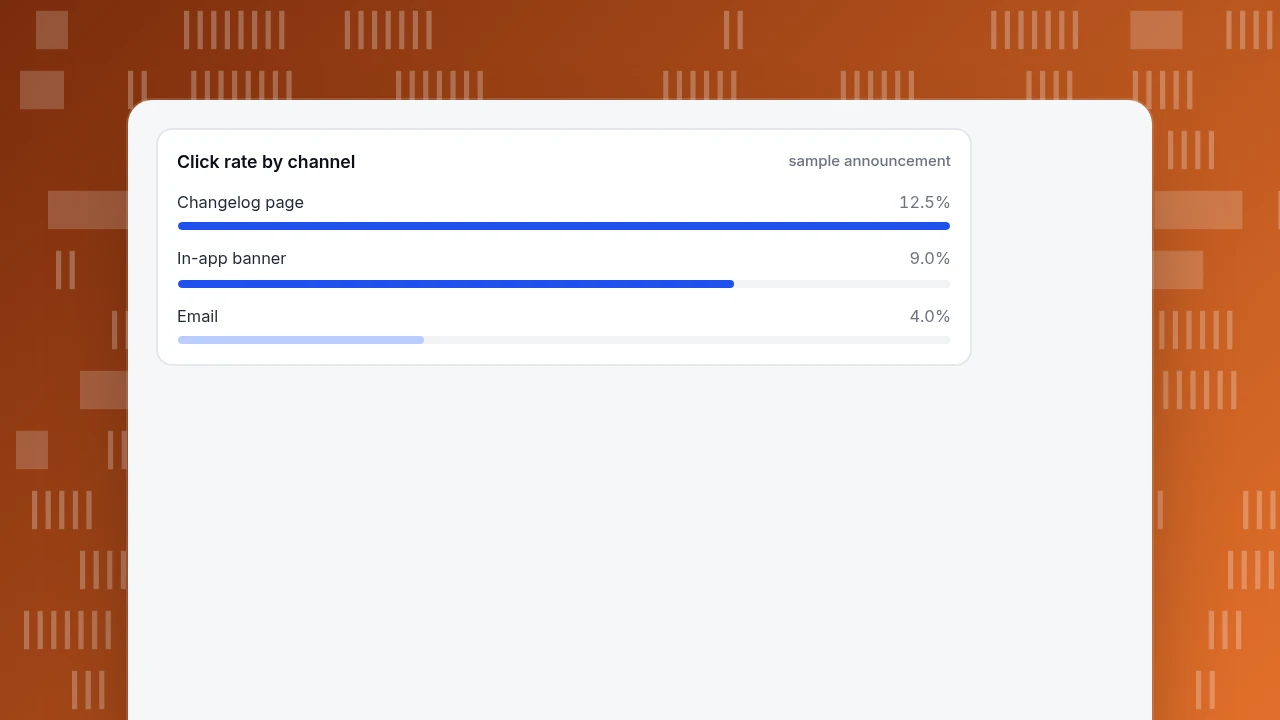
| Changelog page | 1,200 visits | 150 | 12.5% of visits | 96 | 64.0% |
| Total | 822 |
Adoption in 14 days: 910 of 10,000 active users used the feature, 9.1%. Of those, 822 (90.3%) came from a tagged announcement click and 88 (9.7%) found it without one. That second number is a check on the tagging: if it is large, your links are missing tags or people are finding the feature in the product anyway.
Two guardrails sit next to the adoption number. Unsubscribes: 29 on 9,800 delivered is 0.30%; if it rises after a run of announcements, you are announcing too often. And support contacts about the feature: if they jump, the announcement did not explain it. Treat open rate with caution; some mail apps load images automatically, so an open can be recorded when nobody read the message. Clicks and feature use are the numbers to trust.
Click rate by channel
sample announcementHow often should you announce, and to whom?
Announce by impact, not by release:
- Everyone, every channel: changes that alter pricing, remove a feature or need action by a date.
- Affected users only: a new option inside a feature they already use. Send to the users who used that feature in the last 30 days.
- Changelog only: fixes and small improvements.
A cadence that works for many small teams is one email a month that summarizes the month, plus in-app and changelog entries as updates ship. Review it with one test: if the unsubscribe rate or the click rate moves for two sends in a row, change the cadence before changing the copy.
What do announcement mistakes look like in the numbers?
| Mistake | What you see | Fix |
|---|---|---|
| Untagged links | Adoption with 0 attributed clicks; a big "found it without" number | Add campaign and medium tags to every link |
| Announcing to everyone | Low click rate overall, normal in the affected group | Target the users who used the related feature |
| Vague headline | Clicks high on the changelog, low from email | Rewrite the headline as the outcome |
| Link to a long page | Clicks fine, trying the feature low (under 50% click to try) | Link straight to the feature, not to a tour |
| Too frequent | Unsubscribes rising, clicks falling | Move small items to the changelog |
How do you track an announcement in TapCub?
TapCub does not send emails or in-app messages and does not host a changelog; it measures what happens after people click, and it can talk to visitors who are already on your site. Following the sample:
- Tag the links. Add campaign and medium tags to each announcement link, for example
utm_medium=email&utm_campaign=saved-reports. Web analytics › Sources shows visitors by UTM, so each channel is a row. - Count the feature use. Send an event when someone uses the feature. Your product teams can plan it in All-platform analytics › Data › Tracking plan and watch arrivals in real time.
- Build the chain. In All-platform analytics › Behavior › Behavior analysis, make a funnel from the announcement landing page to the feature event. The click-to-try column above is that funnel's second step.
- Mark the date. Add the release as an annotation in Configuration › Annotations, so a change on any chart has a note.
- Reach visitors on site. In Live chat › Chat settings › Proactive invites, set a rule for the page where the feature lives, after a dwell time you choose, with text up to 300 characters. The rule list shows impressions, open rate and reply rate, so you can retire lines nobody answers.
For how to read adoption after the announcement, see measure product adoption.
FAQ
What should a product update announcement include?
What changed, who it affects, what to do next and where to learn more. Lead with the outcome for the reader, give one action and link to detail. Add the date for anything being removed.
How do you announce product updates to customers?
Pick the channel by impact: in-app message for changes users will see, changelog for every release, email for changes that need action, blog for major releases. Tag every link so you can see which channel produced feature use.
How long should a release note be?
As short as the change allows: a headline, one sentence and a link in-app; three short paragraphs in email. Apple allows up to 4,000 characters for What's New, but the first two lines are what most people read.
How do you measure whether an update announcement worked?
Follow the chain: reached, clicked, tried the feature, used it within 14 days. In the sample, 910 of 10,000 users (9.1%) used the feature and 90.3% of them came from tagged clicks. Watch unsubscribes alongside.
How often should you send product update emails?
Monthly is a common starting point for a summary, with in-app and changelog entries for individual releases. Reduce frequency if unsubscribes rise or clicks fall for two sends in a row.
Sources
- Apple. Platform version information, App Store Connect Help — What's New up to 4000 characters; promotional text up to 170 characters. Checked 2026-11-22.
- U.S. Federal Trade Commission. CAN-SPAM Act: A Compliance Guide for Business — requirements, 10 business days for opt-outs, penalties up to $53,088 per email. Checked 2026-11-22.
Was this article helpful?
We use your answers to fix and expand this page.
Couldn’t send. Please try again in a minute.
Thanks for the feedback. We’ll use it to improve this page.You’ve already sent feedback on this page. Thanks.

Product Experience Specialist
Writes about product experience, practical workflows, and growth, turning complex processes into clear steps for everyday decisions.