Try it on your own data
Every report in this article is in the free plan. One snippet for web and apps, up to 10 sites.
Start freeOutsourcing 24/7 live chat is cheaper than staffing it yourself only when the quote per chat stays below your break-even price, which is (in-house 24/7 cost − business-hours cost) ÷ chats outside business hours. In the sample here that is $24.47 per chat, because an always-on seat is busy only a third of the time.
What you will learn
- One always-on seat is paid for 8,736 hours a year but handles chats for about 2,880 of them: 33% utilisation
- Break-even price per chat = (24/7 in-house cost − business-hours cost) ÷ after-hours chats; $24.47 in the sample
- AI after-hours cuts cost only for questions a tested knowledge base can answer; the rest wait until morning
Coverage hours are not handling hours
The expensive part of 24/7 live chat is not the chats. It is the empty hours between them. Staffing one seat around the clock means paying for 168 hours a week, even if the chats themselves only fill a third of that time.
Here is a sample site. Sample data: 1,800 chats a month (21,600 a year), an average handling time of 8 minutes per chat, and one chat at a time per agent.
- Handling time: 21,600 × 8 min ÷ 60 = 2,880 agent-hours a year.
- Coverage for one always-on seat: 168 h × 52 weeks = 8,736 seat-hours a year.
- Utilisation of that seat: 2,880 ÷ 8,736 = 33%.
Two thirds of the paid time is spent waiting. That is the number an outsourcer sells against: they pool many clients' quiet hours so no one seat sits idle. It is also the number an in-house team should check before it hires a night shift.
The hours are not equally quiet. In the sample, chats arrive like this:
| Time block | Hours a week | Share of chats | Chats per hour | Agent-hours of work per hour |
|---|---|---|---|---|
| Weekday 08:00–18:00 | 50 | 58% | 4.82 | 0.64 |
| Weekday 18:00–24:00 | 30 | 16% | 2.22 | 0.30 |
| Weekday 00:00–08:00 | 40 | 6% | 0.62 | 0.08 |
| Weekend, all day | 48 | 20% | 1.73 | 0.23 |
Each row is the weekly chats (21,600 ÷ 52 = 415.4, times the share) divided by the hours in the block. The last column multiplies chats per hour by 8 minutes. In the night block an agent would have work for under five minutes in every hour. Pull the same table from your own chat timestamps before you compare any quote; the shape of your week decides which option wins.
What an in-house 24/7 seat really costs
Start from public wage data so the numbers are not invented. The US Bureau of Labor Statistics reports a median pay of $21.53 an hour for customer service representatives (May 2025). Its Employer Costs for Employee Compensation release for private industry (June 2026) shows wages and salaries at 70.0% of total compensation and benefits at 30.0%.
If wages are 70% of the total, the loaded hourly cost is $21.53 ÷ 0.70 = $30.76. One full-time person paid for 2,080 hours costs $30.76 × 2,080 = $63,975 a year.
That person is not available for all 2,080 hours. Holidays, sick days, training and breaks are real. Assume 85% of paid hours are productive seat time: 2,080 × 0.85 = 1,768 hours.
| Option | Seat-hours a year | People needed | Annual cost | Cost per chat answered |
|---|---|---|---|---|
| In-house, 24/7, one seat | 8,736 | 8,736 ÷ 1,768 = 4.94 | $316,111 | $14.63 (all 21,600 chats) |
| In-house, 50 business hours | 2,600 | 2,600 ÷ 1,768 = 1.47 | $94,081 | $7.51 (the 12,528 chats in those hours) |
Three things make the 24/7 figure a floor, not a quote. It uses the median wage, so a night-shift differential would raise it. It ignores recruiting, supervision and software seats. And one seat means one chat at a time at any hour, which is thin if two visitors arrive together. Use it to see the shape of the decision, not as a budget.
Business-hours staffing answers 58% of chats live (0.58 × 21,600 = 12,528). The other 9,072 chats, 42%, arrive when nobody is there. Those 9,072 chats are the whole outsourcing question.
When does outsourcing pay off?
Outsourcing the uncovered hours beats the in-house 24/7 seat when its price per chat stays below one number:
Break-even price per chat = (cost of 24/7 in-house − cost of business-hours team) ÷ chats outside business hours
Sample data: ($316,111 − $94,081) ÷ 9,072 = $24.47 per chat.
Any quote below $24.47 per outsourced chat is cheaper than hiring the night and weekend shifts yourself. The table shows what that looks like for a few example quotes. These prices are assumptions to show the arithmetic, not market rates; replace them with real quotes.
| Quote per outsourced chat | Outsourced cost (9,072 chats) | Plus business-hours team | Total a year | Per chat, all 21,600 |
|---|---|---|---|---|
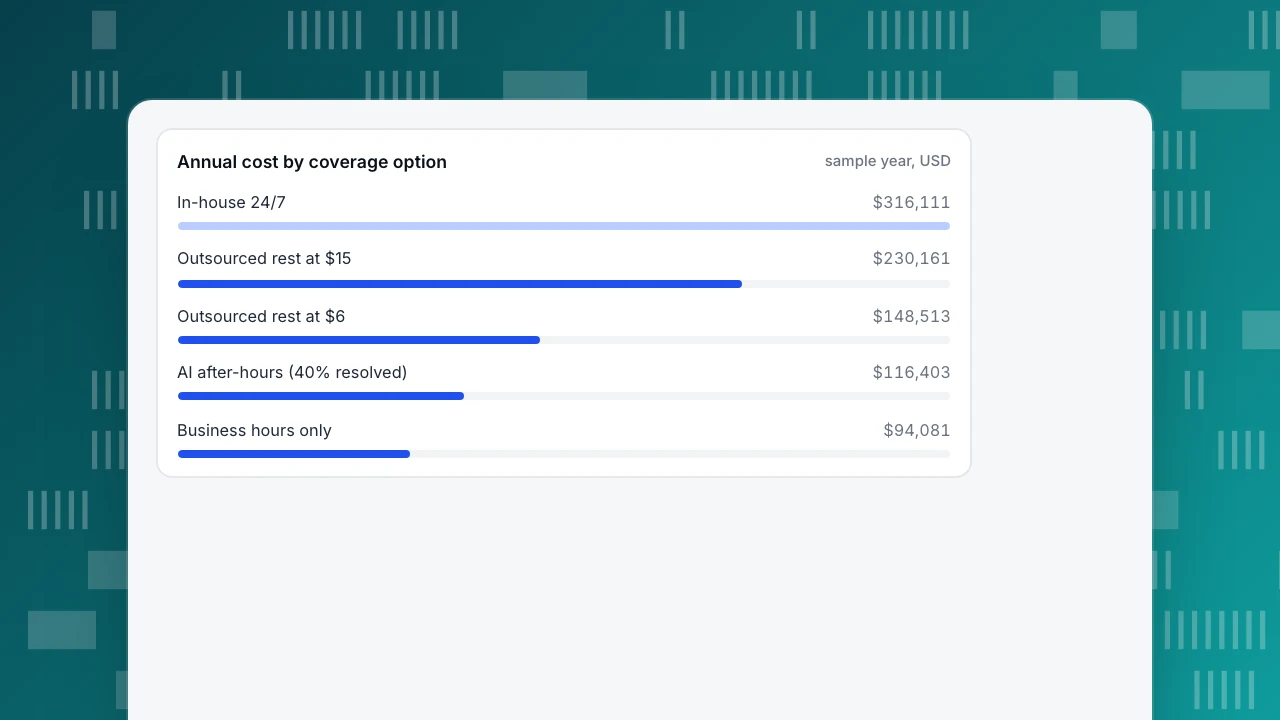
| $6 | $54,432 | $94,081 | $148,513 | $6.88 |
| $10 | $90,720 | $94,081 | $184,801 | $8.56 |
| $15 | $136,080 | $94,081 | $230,161 | $10.66 |
| $24.47 | $221,992 | $94,081 | $316,073 | $14.63 |
Two cautions before you read this as "outsourcing always wins." First, per-chat pricing is only one model; providers may also charge by agent-hour or by seat with a minimum, and a minimum turns your quiet night hours back into a fixed cost. Ask for the model, then run the same break-even with that unit. Second, the comparison assumes the outsourced chats are resolved as well as yours. If the vendor can only collect an email and promise a callback, you bought an answering service, and the right comparison is against offline messages, not against a trained agent.
Annual cost by coverage option
sample year, USDWhere AI after-hours fits
The third option is to let a knowledge base answer the repeatable questions overnight and leave the rest for the morning. The arithmetic differs: the chats an AI cannot answer are not lost, they wait, and your business-hours team answers them the next day at their normal handling cost.
Staff cost per chat at the loaded rate: 8 min ÷ 60 × $30.76 = $4.10.
Sample data: if the knowledge base resolves 40% of the 9,072 after-hours chats, 60% remain: 9,072 × 0.60 = 5,443 chats. Next-morning handling costs about $22,322 (5,443 chats × $4.10, using unrounded inputs), so the business-hours team plus after-hours AI costs about $94,081 + $22,322 = $116,403, before the AI usage fee. At 30% resolved it is $120,123; at 50%, $112,683.
What this model leaves out matters. Waiting until morning is a worse experience than an immediate human reply, and some visitors will not wait. An AI answer that is wrong costs more than a delayed right one, so the resolution rate you plug in should come from a tested knowledge base, not from a hope. And an AI reply is only a reply: it does not change orders, issue refunds or call other systems. If the typical night chat is "where is my parcel" and the answer sits in an order system the AI cannot read, the resolved share will be near zero.
Comparing the four ways side by side
| In-house 24/7 | Business hours + outsourced rest | Business hours + AI after-hours | Business hours + offline messages | |
|---|---|---|---|---|
| Annual cost (sample) | $316,111 | $148,513 at $6 per chat | $116,403 plus AI fee | $94,081 |
| Live answer at 2 a.m. | Yes, one at a time | Yes, by vendor staff | For questions the knowledge base covers | No |
| Product knowledge | Highest | Depends on training you pay for | Only what you wrote down | Highest, but delayed |
| Main risk | Idle hours, hard to hire nights | Quality and brand voice | Wrong or empty answers | Visitors leave before morning |
| Control of data and tone | Full | Shared with vendor | Full | Full |
The fourth column is the baseline everyone forgets. Before paying for any overnight coverage, ask what the 9,072 uncovered chats are worth. If an after-hours chat is a visitor asking about opening times, the offline form may be enough. If it is a buyer with a basket of $400, coverage is cheap at $24 a chat.
| Option | Annual cost (sample) | Live answer at 2 a.m. | Main risk |
|---|---|---|---|
| In-house 24/7, one seat | $316,111 | Yes, one chat at a time | Idle hours, hard to hire nights |
| Business hours + outsourced rest | $148,513 at $6 per chat | Yes, by vendor staff | Quality and brand voice |
| Business hours + AI after-hours | $116,403 plus AI fee | Only for questions the knowledge base covers | Wrong or empty answers |
| Business hours + offline messages | $94,081 | No | Visitors leave before morning |
Sample data: 21,600 chats a year, 8 minutes per chat, BLS median wage with 30% benefits share. Outsourcing prices are assumptions.
What to check before you sign with a chat outsourcer
Outsourcing chat means other people speak in your name. These checks turn "quality" into something you can test in the first month.
- Pilot a defined slice. Start with nights and weekends only, not the whole queue, so your own team's results give you a control to compare against.
- Agree the measures. First response time, resolution rate and satisfaction score, defined the same way you measure your own team. Ask what counts as "resolved" and whether an email collected for later follow-up is counted.
- Share the knowledge, not just a script. Give the provider your help centre and the canned replies your own team uses. Ask how they will be updated when you change a policy.
- Define the handoff. Which situations must be escalated to you the next morning: refunds, complaints, legal questions? Write the list and review ten transcripts in week one.
- Check data terms. Chats contain personal data. Ask who the subprocessors are, where transcripts are stored and how long, and get data-processing terms in writing.
- Plan the exit. Make sure you keep transcripts and that your knowledge base stays yours if you leave.
A decision rule you can run on your own numbers
Run these in order and stop at the first one that fits.
- Count the share of chats outside business hours. Under 15%: use offline messages and a fast morning reply. Coverage costs more than the chats are worth.
- Work out your break-even price per chat with the formula above. If every quote is above it: staff the extra hours yourself, or use the AI-plus-morning model.
- Check your answer rate for the repeatable questions. If a tested knowledge base would answer 40% or more overnight: start with AI after-hours and add outsourcing only for the rest.
- If chats outside business hours are high-value, pilot outsourcing for one block (for example weekends), measure it for a month against the same block with offline messages, and extend only if it wins.
In TapCub: measure the uncovered hours before paying for them
Using the sample above, here is how you would work out the three inputs in TapCub. TapCub does not provide outsourced agents, so it is the place to size the problem and check the result, not to buy the coverage.
- Open Live chat › Reports and read the number of conversations and the first response time. First response counts only a human's first reply, so AI answers do not flatter it. The heatmap on the same page counts conversation starts by weekday and hour, which is the raw material for your own version of the time-block table.
- Set your business hours in Live chat › Chat settings › Office hours. Outside them, visitors see the offline greeting and can leave an email and a question, which land in Live chat › Chat settings › Offline messages with the status New, Replied or Closed. The count of unanswered offline messages is your measured number of lost after-hours chats.
- To test the AI model, open Live chat › Chat settings › AI assistant and choose "only when all agents are offline", so people answer during the day and the knowledge base answers at night. Build entries in Live chat › Knowledge base: question-and-answer entries are sent as written and do not use an AI call. The knowledge base hit rate in the reports is your resolution rate. If the assistant lacks material, it hands over to a human.
- If you add outsourced people, invite them to the project in Configuration › Settings › Members with the Agent only role, which opens only the inbox and not your analytics reports. Check the per-agent workload in the reports against the vendor's invoice.
- To see whether after-hours chats matter commercially, use Live chat › Reports › Conversion attribution, which compares visitors who chatted with those who did not. It shows a relationship, not proof that chat caused the conversion.
FAQ
How much does 24/7 live chat cost?
For one always-on in-house seat, the sample here comes to about $316,000 a year at the median customer service wage plus a 30% benefits share, before night differentials and software. Outsourcing replaces that fixed cost with a per-chat, per-hour or per-seat price, so the answer depends on your chat volume and the quote.
Is it cheaper to outsource live chat?
It is when the quote per chat is below your break-even: (24/7 in-house cost − business-hours cost) ÷ after-hours chats. In the sample that is $24.47. It is not cheaper when a minimum fee turns quiet hours into a fixed cost, or when the vendor cannot resolve chats.
Can AI replace night-shift live chat agents?
Only for questions your knowledge base covers. An AI reply cannot change an order or issue a refund, so chats that need an action wait for a person. The sample saves about $22,000 a year when 40% of after-hours chats are resolved, and loses value if answers are wrong.
How do I know when 24/7 coverage is worth it?
Count the share of chats outside business hours and the value of each. Under 15% of chats, offline messages are usually enough. When after-hours visitors are high-value buyers, pilot one block, such as weekends, and compare it with the same block handled by offline messages.
What should I ask a live chat outsourcing provider?
Ask how they define resolved, how they will learn your policies, which cases they escalate, who their subprocessors are, where transcripts are stored and how you leave. Pilot nights and weekends first, and review ten transcripts in week one.
Sources
- US Bureau of Labor Statistics, Occupational Outlook Handbook: Customer Service Representatives: median pay $44,770 a year and $21.53 an hour (May 2025); employment projected to decline 5% from 2025 to 2035. Checked 2026-11-21.
- US Bureau of Labor Statistics, Employer Costs for Employee Compensation: private industry, June 2026, $46.89 an hour total, wages 70.0% and benefits 30.0%. Checked 2026-11-21.
Was this article helpful?
We use your answers to fix and expand this page.
Couldn’t send. Please try again in a minute.
Thanks for the feedback. We’ll use it to improve this page.You’ve already sent feedback on this page. Thanks.

Product Experience Specialist
Writes about product experience, practical workflows, and growth, turning complex processes into clear steps for everyday decisions.