Try it on your own data
Every report in this article is in the free plan. One snippet for web and apps, up to 10 sites.
Start freeAn out of office reply should answer four questions in under 60 words: are you away, when are you back, who can help now and what will happen to the email. Below are eight templates by situation, including a support-team handoff that names the new ticket owner, a table comparing their length and tone, and how Gmail and Outlook actually send the reply.
What you will learn
- Answer four questions: away, return date, one named contact, what happens to the email
- Leave out where you are and why; the reply goes to strangers and automated senders too
- Gmail replies once per sender and again after four days; test the setup before you leave
What should an out-of-office reply say?
A good out-of-office reply answers four questions in under 60 words: are you away, when are you back, who can help now, and what will happen to the email. Everything else is optional. Leaving any of the four out is how people end up with a second email asking "did you get my message?"
- That you are away, in the first sentence. Do not make people read a greeting and a thank-you before the news.
- A return date, not "soon" or "next week". If dates may change, say "until at least [DATE]".
- One named alternative with an email address or phone number, for urgent matters. One is better than five: a reader will pick one.
- What happens to the message. "I'll reply when I'm back" is enough; "this email is not forwarded" is needed if you have left the company.
Two things to leave out. Do not say where you are or that your home is empty; an auto-reply goes to everyone who writes, including strangers and automated senders. And do not name a colleague without asking them first; if a whole team covers, give a shared team address.
The templates below are written for the situations people search for. Replace the square brackets and trim anything you do not need. If your out-of-office note is also an apology for a delay, the tone guidance in apology email applies.
| Element | What to write | Why |
|---|---|---|
| Away | First sentence | Readers should not hunt for the news |
| Return date | A real date or 'until at least' | Lets readers plan |
| Contact | One named person with email | One is more likely to be used than five |
| What happens | 'I'll reply when I'm back' or 'not forwarded' | Sets the expectation |
Keep it under 60 words and leave out location and reason.
Templates by situation
Short absence (a day or a few days)
Thank you for your email. I'm out of the office until [RETURN DATE] and will reply when I'm back. For anything urgent, please contact [NAME] at [EMAIL].
Length: 27 words. Use when you will see email at least once a day, or not at all, for a short period.
Holiday or annual leave
Hello, and thank you for your message. I'm on annual leave from [START DATE] to [END DATE] with limited access to email. I'll reply after I return on [RETURN DATE]. If your request can't wait, [NAME] ([EMAIL]) can help. Best regards, [YOUR NAME]
Length: 43 words. The start date matters because people may have written before you left; the return date tells them when to expect an answer.
Unplanned absence
Thank you for writing. I'm out unexpectedly and can't reply to email right now. For anything urgent, please contact [NAME] at [EMAIL]. I'll respond when I'm back.
Length: 27 words. There is no date because you may not know it. Do not give a reason; it is not needed and it is private.
Conference or business travel
Thanks for your message. I'm travelling for [EVENT] until [RETURN DATE] and will have limited access to email. I'll answer within two working days of my return. If it's urgent, [NAME] at [EMAIL] can help.
Length: 35 words. A response window ("within two working days") is a promise, so only write one you can keep. Two working days here is an example; choose your own.
Extended leave (parental, sabbatical, long absence)
Hello, I'm on extended leave from [START DATE] and am not checking email. For [TOPIC A], please contact [NAME A] at [EMAIL A]; for [TOPIC B], contact [NAME B] at [EMAIL B]. For anything else, [TEAM EMAIL] will route your message. I'll update this note when I'm back.
Length: 48 words. Split cover by topic so people reach the right person, and use a team address as the catch-all. Update the note when you return so it does not keep describing a leave that has ended.
Company holiday closure for a team
Thank you for contacting [COMPANY] support. Our team is closed from [START DATE] to [END DATE] for [HOLIDAY]. Your message is in the queue and will be answered in the order received from [RETURN DATE]. For an outage, check [STATUS PAGE].
Length: 41 words. A team-level message beats naming individuals. For urgent issues give a status page or a monitored mailbox, not a personal number.
Left the company
Thank you for your email. I no longer work at [COMPANY]. For [TOPIC], please contact [NAME] at [EMAIL]. This message has not been forwarded.
Length: 24 words. Say clearly that the message is not forwarded; people assume otherwise and may share sensitive information.
Out-of-office replies for a support team handoff
A support agent going on leave has a special problem: customers write about tickets, not about the agent. A generic "I'm away" leaves them waiting. The fix is a handoff reply that names the new owner and says the history has been passed on:
Hi [CUSTOMER NAME], thanks for the update on ticket [NUMBER]. I'm away from [START DATE] to [END DATE]. [NAME] now owns this ticket and has the full history, so you don't need to repeat anything. Just reply to this email and it will reach them.
Length: 45 words. Three rules make this work:
- Reassign the ticket before you leave. The message is only true if the new owner can see the thread.
- Name who now owns it, not a general inbox, so the customer knows someone is accountable.
- Tell the customer they do not need to repeat themselves. That sentence does more for the relationship than any apology.
If the whole team is away, use the closure template and give a status page for outages. If the delay will make customers wait longer than usual, the guidance in apology email covers how to say so.
Length and tone: the templates compared
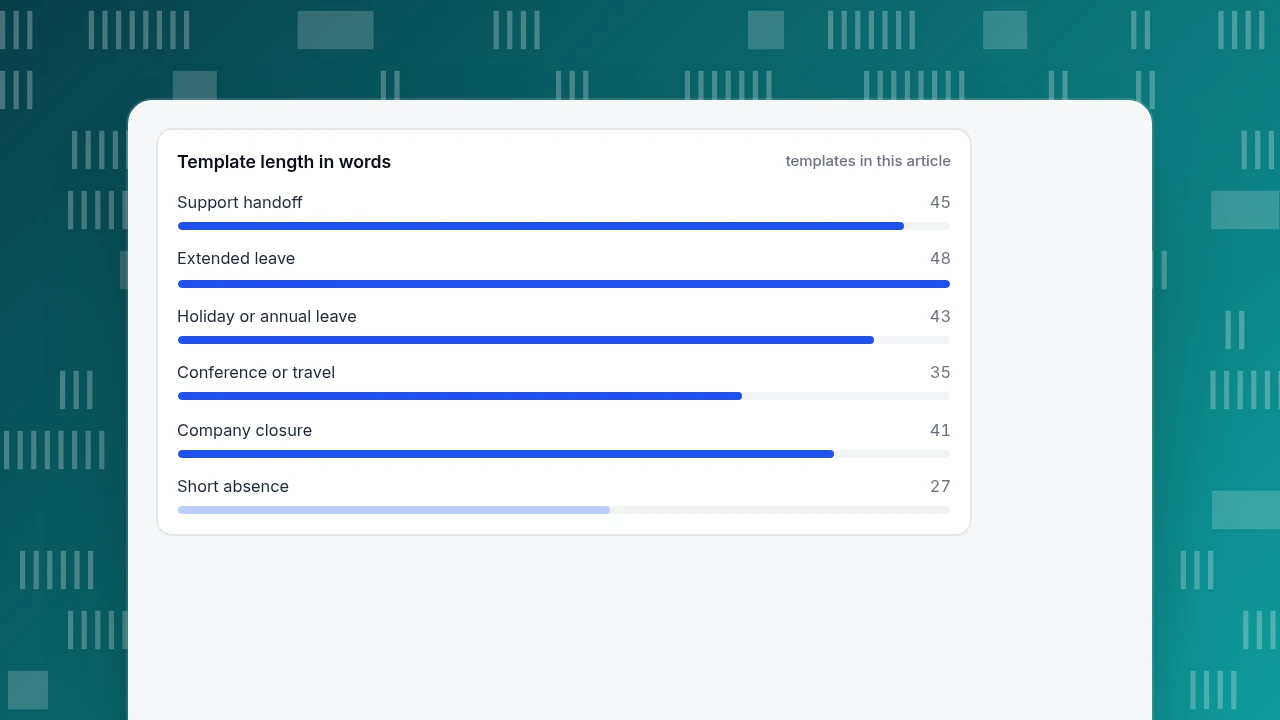
All word counts below are of the templates in this article, counted by splitting on spaces, so they can be rechecked.
| Template | Words | Tone | Return date | Named contact |
|---|---|---|---|---|
| Short absence | 27 | Neutral, brisk | Yes | Yes |
| Holiday or annual leave | 43 | Warm, formal | Yes | Yes |
| Unplanned absence | 27 | Neutral | No | Yes |
| Conference or travel | 35 | Friendly, practical | Yes | Yes |
| Extended leave | 48 | Formal | No | Yes (by topic) |
| Company closure | 41 | Formal, collective | Yes | No (status page) |
| Support handoff | 45 | Personal, reassuring | No (end date) | Yes (new owner) |
| Left the company | 24 | Neutral, final | Not applicable | Yes |
The average is 36.2 words, and the shortest and longest differ by 24 words. Longer is not better. The longest ones are long because they carry extra information (topics, ticket history), not because they are more polite. If a template does not need a sentence to answer one of the four questions, cut the sentence.
Template length in words
templates in this articleSetting it up so it behaves
The wording only helps if the tool sends it correctly.
Gmail. Open Settings, then See all settings, then the General tab and turn on the Vacation responder. You can set a date range, a subject and a message; the reply starts at 12:00 AM on the start date and ends at 11:59 PM on the end date. Senders usually get the reply once, and again if they write after four days while the responder is still on. Adding a subject line keeps the reply from being sent inside an existing conversation thread, and mail in spam or sent to mailing lists you subscribe to does not get a reply. An optional checkbox limits replies to your contacts (Google Gmail Help, vacation responder).
Outlook. Automatic replies send a customised message once to each person who emails you while you are away. You can set a time period, limit replies to your contacts (recommended, because replies to everyone outside the organisation can reach newsletters and junk mail), and in classic Outlook with a work or school account write separate messages for people inside and outside your organisation. The built-in feature does not work with Gmail, Yahoo or other POP or IMAP accounts, and the rule-based workaround needs Outlook to stay running (Microsoft Support, automatic replies).
Practical consequences: if someone writes twice in your absence they will see one reply, so put the return date where they will see it the first time; if your absence is longer than four days, a Gmail sender who writes again after that will get the reply again; and test by sending a message from a personal address before you leave.
Common mistakes
- No date, so readers cannot plan.
- Five alternative contacts, so nobody is accountable.
- Overshare: travel plans, medical detail, an empty house.
- A promise you cannot keep: "I will reply within 24 hours" when you will be on a plane.
- Left on after you return, so people think you are still away.
- Never tested, so the reply goes to the wrong people or not at all.
- Humour in a customer-facing message when the customer is waiting on a problem; keep jokes for internal messages if you use them at all.
When the inbox is a chat window: the same idea in TapCub
The four questions apply to live chat too: are you away, when are you back, who can help now, what happens to the message. Suppose your team is closed for a week. TapCub does not send emails for you, but it handles the chat side:
- In Live chat › Chat settings › Office hours, set the time zone and the hours when agents are available.
- Outside those hours, or when no agent is online, visitors can leave an email address and a question through the offline message form (Live chat › Chat settings › Offline messages). Each message has a status of new, replied or closed, so you can see the backlog when you return.
- If you use the AI assistant (Live chat › Chat settings › AI assistant), you can set it to answer only when all agents are offline. It answers from your knowledge base and hands over when the knowledge base is not enough; it only drafts replies and does not act on orders.
- Put your closure dates and the reply window in the knowledge base (Live chat › Knowledge base) so the assistant can state them; agents can also reply from the Live chat › Canned replies list by typing a slash.
- In Live chat › Reports, offline messages are counted separately and not as resolved conversations, so a quiet week does not inflate your resolution rate.
FAQ
What should I write in an out-of-office message?
Say that you are away in the first sentence, give your return date, name one person to contact for urgent matters and say what will happen to the email. Keep it under 60 words. Leave out where you are and why.
How long should an out-of-office message be?
Between 20 and 60 words is enough. The templates here range from 24 to 48 words; the longer ones carry extra information such as topics or ticket history, not extra politeness.
Should I include my return date?
Yes, when you know it. If you do not, say "until at least" a date or give a reason-free "I'll reply when I'm back" and a contact. A date lets readers decide whether to wait or contact someone else.
Does Gmail send the out-of-office reply every time?
No. Gmail usually sends the vacation responder reply once per sender, and again if they write after four days while it is still on. Mail in spam or sent to mailing lists does not get a reply.
Can an out-of-office reply be a security risk?
It can. It goes to everyone who writes, including strangers, so do not share travel details or that a home is empty. For external senders, a short message is safer.
Sources
Was this article helpful?
We use your answers to fix and expand this page.
Couldn’t send. Please try again in a minute.
Thanks for the feedback. We’ll use it to improve this page.You’ve already sent feedback on this page. Thanks.

Product Analyst
Focuses on event analysis, conversion funnels, and retention, using clear metric definitions and structured analysis to explain product performance.