Try it on your own data
Every report in this article is in the free plan. One snippet for web and apps, up to 10 sites.
Start freeFirst-party data is what you collect yourself from people who deal with you directly, second-party data is another organization's first-party data shared with you by agreement, and third-party data is gathered by a company with no relationship to the person and sold to many buyers. The difference decides how accurate the data is and how hard it is to show consent.
What you will learn
- The labels describe who collected the data and their relationship with the person, not the format
- A bought list can win on trials in absolute terms (60 vs 20) and still lose 60% of records before anyone is contacted
- Accuracy and consent are the two columns that separate the types; a small site can only collect first-party data itself
What do first-party, second-party and third-party data mean?
The three labels describe one thing: who collected the data and what relationship they had with the person it describes. They say nothing about the format (a spreadsheet, an event stream or a list of emails can be any of the three).
- First-party data is what you collect yourself from people who deal with you directly: pageviews and clicks on your site, sign-ups, orders, support chats, survey answers they give you. You hold the relationship, so you can tell them what you collect and why.
- Second-party data is someone else's first-party data that they hand to you under an agreement. A partner shares a list of customers who opted in to partner offers, or a clean-room match of overlapping audiences. The person has a relationship with the partner, not with you.
- Third-party data is collected by a party that has no direct relationship with the person and then packaged and sold or licensed to many buyers: data brokers, audience marketplaces, cookie-based interest segments.
A short test: ask "Did this person give it to the party that handed it to me, and does that party have a relationship with them?" If you collected it, first-party. If your partner collected it and gave it to you, second-party. If a broker assembled it from many sources, third-party. There is also zero-party data, which a person volunteers on purpose (a preference form, a quiz); it is first-party by origin and is covered in zero-party data.
What is the difference at a glance?
The table below is the one to keep. It compares the three on the points that decide whether a small site can use them.
| First-party | Second-party | Third-party | |
|---|---|---|---|
| Where it comes from | Your own site, app, checkout, chat, forms | A partner's first-party data, shared by agreement | Brokers, marketplaces and aggregated sources |
| Who has the relationship with the person | You | Your partner | Nobody you can name |
| Consent and notice | You collect it, so you can show the notice and record the choice | Needs a lawful basis for the sharing and a notice that names you | Hardest to evidence; you rely on the seller's claims |
| Accuracy | High for what you observe; limited to people who visit | Good for the partner's own customers; depends on how matching works | Modelled and often stale; categories are inferred |
| Scale | Smallest; grows with your traffic | Medium; limited to one partner's audience | Largest; the same segments are sold to your competitors |
| Cost | Cost of running the site and tracking | Negotiated; often a deal, not a price list | Priced per record or per thousand |
| Can a small site collect it itself? | Yes, from day one | Only with a partner who wants the swap | You can buy it, not collect it |
Two columns matter more than the rest. Accuracy differs because first-party data records what a person actually did on your pages, while a third-party segment such as "interested in running shoes" is a guess built from other places. Consent differs because the closer the collector is to the person, the easier it is to show what they were told.
| First-party | Second-party | Third-party | |
|---|---|---|---|
| Source | Your own site, app, checkout, chat | A partner's first-party data, shared by agreement | Brokers and marketplaces |
| Relationship with the person | You | Your partner | Nobody you can name |
| Consent evidence | You can show the notice and the choice | Needs a sharing basis and a notice that names you | Hardest to evidence |
| Accuracy | High for what you observe | Good for the partner's customers | Modelled and often stale |
| Scale | Smallest | Medium | Largest, shared with competitors |
| Small site can collect it? | Yes | Only with a willing partner | No, only buy |
Summary of how the three types differ; consent wording follows GDPR Articles 4(11) and 14.
Why is consent harder with second-party and third-party data?
Under the EU's General Data Protection Regulation, consent has to be "freely given, specific, informed and unambiguous" (Article 4(11)). When you receive personal data that did not come from the person, Article 14 requires you to tell them who you are, why you hold the data and where it came from, within a set time. That is workable when you collected the data: the notice sits next to the form. It is much harder when you bought it, because the person has never heard of you and you cannot easily show what they agreed to or whether the agreement covers your use.
Practical consequences:
- First-party data can carry the choice with it. Record the consent state next to each profile or event so you can stop using the data when someone withdraws.
- Second-party data needs a data-sharing agreement that says what the partner told people, which uses are allowed and who deletes what on request. Ask for the wording the partner showed.
- Third-party data needs the same checks, plus a seller you can question about sources. If the seller cannot say where a segment came from, treat it as unusable for personal targeting.
This is a summary of the regulation, not legal advice; the rules differ by country, and your lawyer decides what applies to you.
Are third-party cookies going away, and does it change the picture?
On April 22, 2025, Google said it would keep its current approach to third-party cookie choice in Chrome and would not roll out a separate prompt for them. Users can still choose their cookie settings, and Google said it would keep strengthening tracking protections in Incognito. So third-party cookies did not disappear on schedule.
That does not rescue third-party data. Reach is uneven: some browsers and many users block third-party cookies, and anyone who opts out disappears from cookie-based segments. For a small site the lesson is practical rather than predictive: do not build measurement on something you do not control. A segment that depends on a cookie set by a third party can vanish with a setting, while an event you record on your own domain stays under your control.
What does a visitor event look like under each type?
One concrete visit shows the difference. A visitor, "V", reads two pages on your site, then clicks "Start trial" and signs up with an email.
First-party — you record this yourself, with your own identifiers:
page_view      path=/pricing        referrer=google   utm_campaign=spring   device=mobile  country=DE
page_view      path=/features/chat
click          element=start_trial
signup         plan=free            consent=analytics:granted
Second-party — a partner who runs a review site tells you (under the agreement) that 4,000 of its newsletter subscribers who opted in to partner offers read comparison guides. You receive an audience file, not behavior on your own site. You learn who they are as a group, not what they did on your pages.
Third-party — a broker's segment says "software buyers, mid-size companies". You receive a label attached to a hashed identifier. You cannot see which sources it came from, and you cannot check whether V ever agreed to that label.
Only the first block is something your own analytics can produce, which is why the next question matters: how much of each type is actually usable?
How do you compare usable data and cost?
Sample data: a small software site wants to reach 1,000 relevant people this quarter, and takes three routes. A record is usable if it is valid, matches the audience you want, and you can show a lawful basis for using it. The assumptions are stated so you can swap in your own.
| Route | Records | Cost | Usable share | Usable records | Trial rate | Trials | Data cost per trial |
|---|---|---|---|---|---|---|---|
| First-party (your own sign-ups) | 250 | $0 data cost | 100% | 250 | 8.0% | 20 | $0 |
| Second-party (partner audience) | 4,000 | $400 | 55% | 2,200 | 1.5% | 33 | $12.12 |
| Third-party (bought list) | 50,000 | $1,000 | 40% | 20,000 | 0.3% | 60 | $16.67 |
Check the arithmetic: 250 × 8.0% = 20 trials; 4,000 × 55% = 2,200 and 2,200 × 1.5% = 33 trials, so $400 ÷ 33 = $12.12; 50,000 × 40% = 20,000 and 20,000 × 0.3% = 60 trials, so $1,000 ÷ 60 = $16.67.
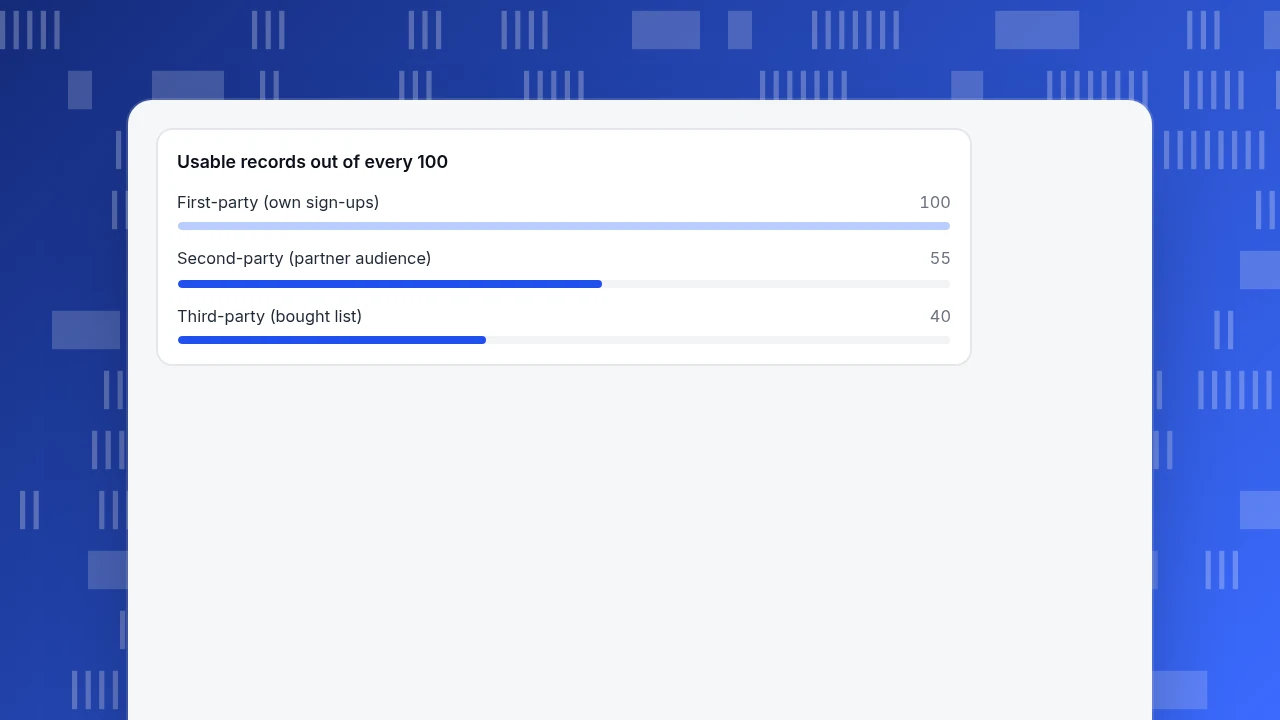
Read it correctly. The third-party list produces the most trials in absolute terms (60 against 20 and 33) because it is large, and it is the cheapest per record ($0.02). But it loses 60% of the records before anyone is contacted, and the $0 beside first-party hides the cost of running the site and tracking. The honest conclusion is narrower: first-party data is the only one you can grow without paying per record, and the paid routes are a supplement that you should compare per trial, not per record.
Usable records out of every 100
What can a small site collect itself?
A small site cannot buy its way to a big first-party dataset, but it can collect a surprising amount of useful data without any partner:
- Traffic source and campaign from the referrer and UTM parameters on every visit.
- Pages and events: which pages, which clicks, which forms were submitted (not what was typed).
- Goal outcomes: sign-ups, orders, demo requests.
- Identity after login: once someone signs in, link their visits to one profile so you can follow them across devices.
- Declared preferences: a plan choice, a preferences page, a chat answer.
- Conversations: questions people ask in chat, which tell you what the site did not answer.
What you should not expect to collect is anything about people who never visit you. That is where second-party and third-party data come in, and also where their risks begin.
How do you decide which type to use?
Use these rules in order:
- If the question is about your own visitors or customers, first-party data answers it. Do not buy data to learn what your analytics already knows.
- If you want to reach people outside your audience, ask whether a partner whose audience overlaps yours would swap an opt-in list. That is second-party. Insist on seeing the consent wording.
- If the only way to reach a segment is a bought list, treat it as a one-time test, measure cost per trial rather than per record, and stop if the cost per trial ends up above what a trial is worth to you.
- If you cannot name the source or the consent wording, do not use the data to contact individuals.
- If you need to measure the result, add UTM parameters to anything driven by second-party or third-party data, so the visits land in your first-party analytics. That makes the outside data testable. To build the first-party base, see first-party data strategy; for the partner route, see second-party data, and for the broker route, third-party data.
How to build and check your first-party data in TapCub
The example above ends with one question: how many of your visits and sign-ups are really first-party? Here is how to answer it with TapCub.
- Install one script. Add the tracking code from Web analytics › Configuration › SDK code. It records pageviews, referrers and UTM parameters on your own domain, which is the raw material for first-party data.
- Define the outcome. In Web analytics › Goals, mark sign-up or purchase as a goal so each source gets a conversion rate. This is how you test second-party or third-party traffic: tag the partner link with UTM parameters and read it under Web analytics › Sources.
- Identify logged-in users. Call
tapcub.loginafter sign-in; the person then appears in All-platform analytics › Users › People, with a timeline of their behavior. Anonymous visitors have no profile. - Set the consent rules. In Configuration › Privacy center, choose a collection tier. In the European Economic Area and the UK, the default needs consent and drops to the anonymous tier without it, while pageviews and custom events are still recorded.
- Know the limits. TapCub measures what happens on your own properties. It does not sell or enrich data, and it does not supply second-party or third-party segments.
FAQ
What is the difference between first-party, second-party and third-party data?
The difference is who collected it. First-party data is collected by you from people who deal with you directly. Second-party data is another organization's first-party data, shared with you by agreement. Third-party data is collected by a company with no direct relationship to the person and sold to many buyers.
What is an example of second-party data?
A travel site agrees to share the email addresses of customers who opted in to partner offers with a hotel brand. The customers have a relationship with the travel site, not with the hotel. The hotel receives data that is first-party for the travel site and second-party for itself.
Is third-party data legal to use?
It can be, but the burden of proof sits with you. Under GDPR you must have a lawful basis for the personal data you use and must notify people when data did not come from them. If you cannot show where it came from or what people were told, do not use it to contact individuals. Ask a lawyer for your case.
Which type of data is the most accurate?
First-party data is usually the most accurate for what it covers, because you observe real behavior on your own pages. Its limit is coverage: you only learn about people who reach you. Third-party segments cover more people but are often modelled and out of date.
Can a small business use first-party data without a CRM?
Yes. Web analytics events, goals and a login identifier already give you traffic source, behavior and outcomes. A CRM adds contact history, but you can start with the data your own site produces.
Sources
- European Union, Regulation (EU) 2016/679 (GDPR), Article 4(11) (definition of consent) and Article 14 (information to be provided where data was not obtained from the person). Checked 2026-11-23.
- Anthony Chavez, Privacy Sandbox: next steps, Google, April 22, 2025. Checked 2026-11-23.
- Google Analytics Help, Campaign URL parameters (UTM). Checked 2026-11-23.
Was this article helpful?
We use your answers to fix and expand this page.
Couldn’t send. Please try again in a minute.
Thanks for the feedback. We’ll use it to improve this page.You’ve already sent feedback on this page. Thanks.

Data Engineer
Writes about event design, data quality, and collection workflows, with verifiable implementation methods for reliable analytics.