Try it on your own data
Every report in this article is in the free plan. One snippet for web and apps, up to 10 sites.
Start freeETL with SQL means extracting rows with a SELECT, transforming them with expressions, joins and window functions, and loading them with INSERT ... SELECT, using an upsert so a rerun is safe. Below is one complete example you can run in SQLite: a 12-row events table cleaned, deduplicated, loaded into three tables and reconciled to the last row and cent.
What you will learn
- Put every cleaning rule in one view so you can inspect the result before anything is loaded
- Make the load idempotent with a primary key and ON CONFLICT, then prove it by running it twice
- Reconcile counts and money: 12 extracted = 1 duplicate + 2 rejected + 9 loaded, and purchases 466.00 − 45.00 rejected = 421.00
What ETL means when you do it in SQL
ETL stands for extract, transform, load. Amazon's description is the plainest: pull the relevant records from the source database, reshape them into a form that is more useful for analysis, and write the prepared data into the target database. SQL fits each step: extract is a SELECT (or an export), transform is expressions, joins and window functions inside a SELECT, and load is INSERT ... SELECT into a target table.
Doing ETL in SQL alone is realistic when the source and target are tables you can reach from one database session and the volume is in the thousands to low millions of rows. It stops being enough when you need scheduling, many sources or file formats, or alerts; the last section gives rules for that.
If the load comes before the transform, the order is called ELT. ETL vs ELT compares them, and the ETL glossary page has the short definition. This article is one concrete, runnable example of the SQL itself. Everything below runs unchanged in the SQLite command line, DB Browser for SQLite or Python's sqlite3 module (SQLite 3.25 or newer, because it uses window functions and upserts). The counts shown are the actual output of a run on SQLite 3.51.0.
The source table and what is wrong with it
Sample data: twelve rows exported from a shop's event log. They contain the problems real exports have.
CREATE TABLE raw_events (
  event_id TEXT, occurred_at TEXT, user_email TEXT,
  event_name TEXT, amount_cents INTEGER, page TEXT
);
INSERT INTO raw_events VALUES
 ('E001','2026-11-01 09:15:00','Ann@Example.com ','Purchase', 4500,'/checkout/done'),
 ('E002','2026-11-01T10:02:30','bob@example.com','purchase',12900,'/checkout/done'),
 ('E003','2026-11-01 11:40:00','ann@example.com','page_view',NULL,'/pricing'),
 ('E003','2026-11-01 11:40:00','ann@example.com','page_view',NULL,'/pricing'),
 ('E004','2026-11-01 23:59:59','cy@example.com','PURCHASE ', 2500,'/checkout/done'),
 ('E005','2026-11-02 08:00:00','bob@example.com','page_view',NULL,'/blog'),
 ('E006','2026-11-02 08:05:00','dee@example.com','purchase', 7800,'/checkout/done'),
 ('E007','2026-13-02 09:00:00','eve@example.com','purchase', 3000,'/checkout/done'),
 ('E008','2026-11-02 14:30:00',NULL,'purchase', 1500,'/checkout/done'),
 ('E009','2026-11-03 10:00:00','ann@example.com','purchase', 4500,'/checkout/done'),
 ('E010','2026-11-03 12:12:00','bob@example.com','page_view',NULL,'/pricing'),
('E011','2026-11-03 18:45:00','cy@example.com','purchase', 9900,'/checkout/done');| Problem | Rows | Rule to fix it |
|---|---|---|
Same event_id twice | E003 (2 copies) | Keep one row per event_id |
Mixed timestamp separators (space and T) | E002 | Normalise to YYYY-MM-DD HH:MM:SS |
| Impossible date (month 13) | E007 | Reject with a reason, do not load |
| Missing user | E008 | Reject with a reason, do not load |
| Mixed case, trailing spaces | E001, E004 | lower(trim(...)) |
| Money as integer cents | all purchases | Divide by 100 |
The targets are three tables: events_clean for good rows, events_rejected for rows that failed a rule, and daily_summary for one row per day.
CREATE TABLE events_clean (
  event_id TEXT PRIMARY KEY, occurred_at TEXT NOT NULL, user_id TEXT NOT NULL,
  event_name TEXT NOT NULL, amount REAL, page TEXT);
CREATE TABLE events_rejected (event_id TEXT, reason TEXT);
CREATE TABLE daily_summary (
  day TEXT PRIMARY KEY, events INTEGER, buyers INTEGER, revenue REAL);
Extract: pull only what you need
In a real pipeline the extract step is a query against another system or a file export. Two habits keep it cheap. Select only the columns the target needs, and extract incrementally: store a watermark, the largest timestamp you have already loaded, and fetch only newer rows.
SELECT event_id, occurred_at, user_email, event_name, amount_cents, page
FROM raw_events
WHERE occurred_at > :last_loaded_at;
On the first run the watermark is an empty string and everything comes through. Two cautions. Compare on a column the source sets reliably, such as an insert timestamp, and rerun the last few minutes again to catch late rows: that is safe only because the load step below is idempotent. And do not use SELECT * into a table you do not control; a column added at the source will silently change your target.
In this example the raw rows are already in raw_events, so extract is the view's FROM clause, and the watermark is left as a comment for your own pipeline.
Transform: clean, deduplicate and normalise in one view
Put every rule in one view so that you can inspect the result before anything is loaded.
CREATE VIEW v_stage AS
WITH norm AS (
  SELECT event_id,
         datetime(replace(occurred_at,'T',' '))          AS occurred_at,
         lower(trim(user_email))                         AS user_id,
         lower(trim(event_name))                         AS event_name,
         amount_cents / 100.0                            AS amount,
         page,
         row_number() OVER (PARTITION BY event_id ORDER BY rowid) AS rn
  FROM raw_events)
SELECT * FROM norm WHERE rn = 1;
replace(occurred_at,'T',' ')turns2026-11-01T10:02:30into the space-separated form. SQLite'sdatetime()accepts both, and per its documentation returnsNULLfor input it cannot parse. That is what makes E007 detectable:datetime('2026-13-02 09:00:00')isNULL, so you can test for it instead of crashing the load.lower(trim(...))makesAnn@Example.comandann@example.comthe same user. Without it, one buyer becomes two in every count.row_number() OVER (PARTITION BY event_id ORDER BY rowid)numbers the copies of each event; keepingrn = 1removes the duplicate E003. Window functions arrived in SQLite 3.25.0 (2018-09-15).- Dividing by
100.0, not100, avoids integer division.
Query the view and check it before loading: SELECT count(*) FROM v_stage returns 11 (12 raw rows minus the one duplicate), and the two bad rows show NULL in the timestamp or user column.
Load: rejects, clean rows and an idempotent summary
Three statements, in this order.
-- 1. rejects, with a reason you can read later
INSERT INTO events_rejected
SELECT event_id,
       CASE WHEN occurred_at IS NULL THEN 'bad timestamp' ELSE 'missing user' END
FROM v_stage
WHERE occurred_at IS NULL OR user_id IS NULL;

-- 2. clean rows
INSERT INTO events_clean
SELECT event_id, occurred_at, user_id, event_name, amount, page
FROM v_stage
WHERE occurred_at IS NOT NULL AND user_id IS NOT NULL
ON CONFLICT(event_id) DO NOTHING;

-- 3. daily summary, safe to run again
INSERT INTO daily_summary (day, events, buyers, revenue)
SELECT date(occurred_at), count(*),
       count(DISTINCT CASE WHEN event_name='purchase' THEN user_id END),
       coalesce(sum(CASE WHEN event_name='purchase' THEN amount END),0)
FROM events_clean
WHERE true
GROUP BY date(occurred_at)
ON CONFLICT(day) DO UPDATE SET
  events=excluded.events, buyers=excluded.buyers, revenue=excluded.revenue;
Two details matter. ON CONFLICT ... DO NOTHING on the primary key means a rerun cannot insert an event_id twice. In step 3, DO UPDATE with the excluded. prefix overwrites a day's row with the newly computed values, so running the job twice leaves one row per day with the same numbers. The upsert syntax arrived in SQLite 3.24.0 (2018-06-04); PostgreSQL documents the same ON CONFLICT form. When an upsert takes its values from a SELECT, SQLite's documentation says the SELECT should always have a WHERE clause, even WHERE true, so that the parser does not confuse ON with a join; that is the reason for WHERE true in step 3.
Result of the real run:
| day | events | buyers | revenue |
|---|---|---|---|
| 2026-11-01 | 4 | 3 | 199.00 |
| 2026-11-02 | 2 | 1 | 78.00 |
| 2026-11-03 | 3 | 2 | 144.00 |
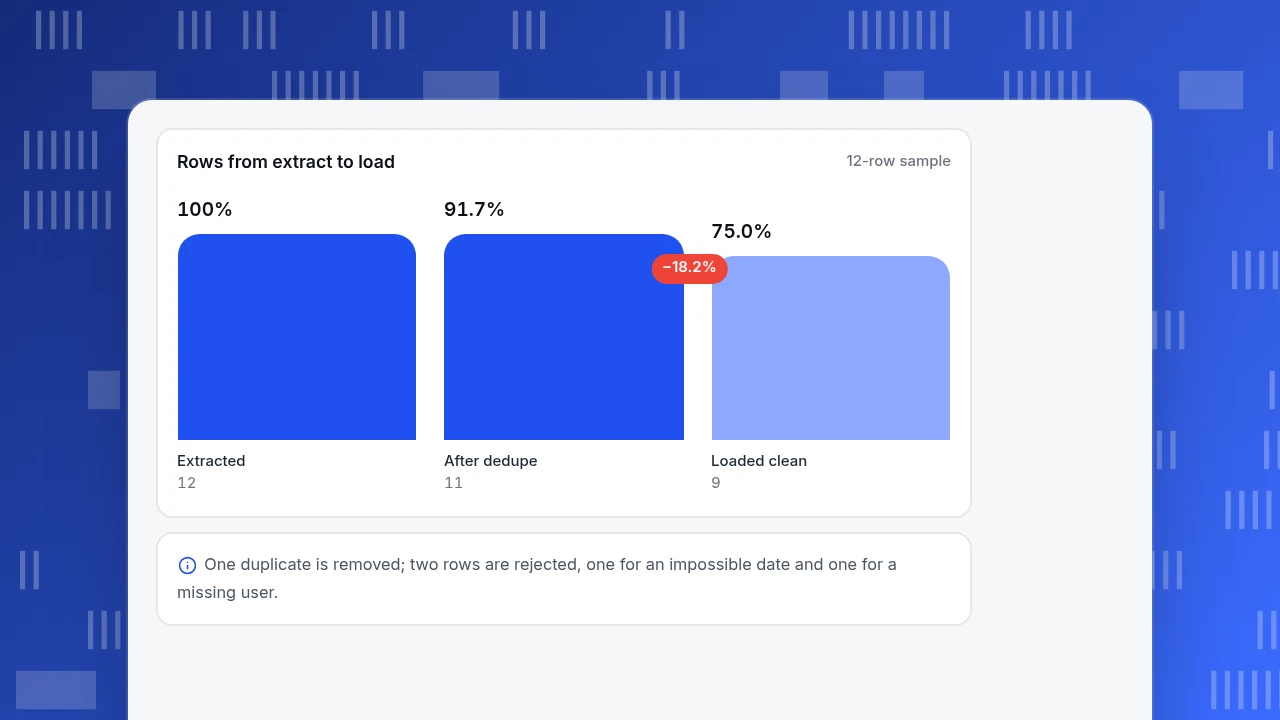
Rows from extract to load
12-row sampleExtracted
12
After dedupe
11
Loaded clean
9
Reconcile the counts and prove it can be rerun
A pipeline that cannot show where every row went is not finished. Check two identities.
Row count: extracted 12 = duplicates removed 1 + rejected 2 + loaded 9. The query:
SELECT (SELECT count(*) FROM raw_events) AS extracted,
       (SELECT count(*) FROM raw_events) - (SELECT count(*) FROM v_stage) AS dup,
       (SELECT count(*) FROM events_rejected) AS rej,
       (SELECT count(*) FROM events_clean) AS loaded;
It returns 12, 1, 2, 9, and 1 + 2 + 9 = 12.
Money: purchases in the raw table sum to 466.00 once amounts are divided by 100 (45 + 129 + 25 + 78 + 30 + 15 + 45 + 99). The rejected purchases are E007 (30.00) and E008 (15.00), a total of 45.00. So the clean purchases should sum to 466.00 − 45.00 = 421.00, and SELECT sum(amount) FROM events_clean WHERE event_name='purchase' returns exactly 421.0.
Rerun test: clear events_rejected, then run the three load statements a second time. Still 9 rows in events_clean and the same three daily_summary rows, with 2 rejects, because the rejects table was emptied first. If a rerun changes a count, the load is not idempotent and a failed run would corrupt the target.
| Check | Expected | Result |
|---|---|---|
| Rows: extracted = duplicates + rejected + loaded | 12 = 1 + 2 + 9 | 12, 1, 2, 9 |
| Purchase total after rejects | 466.00 − 45.00 = 421.00 | 421.0 |
| Rerun: rows in events_clean | 9 | 9 |
| Rerun: rows in daily_summary | 3 | 3 |
| Rerun: unexplained differences | 0 | 0 |
Sample data. Every check passed on a real run; if a rerun changes any count, the load is not idempotent.
When SQL alone stops being enough
SQL is the transform language of most data pipelines, but the glue around it is not SQL. Match the signal to the response:
| Signal | What it means | What to add |
|---|---|---|
| The job must run every night at 02:00 | You need a scheduler | cron, a workflow tool or your database's own job feature |
| Source and target are different systems | A single session cannot read both | An export file or a connector for extract and load |
| The raw table has hundreds of millions of rows | A full rescan each run is too slow | Incremental loads on the watermark, partitions, a warehouse |
| Rules change often | Hand-edited view definitions drift | Keep the SQL in version control and review changes |
| Someone must be told when it breaks | Nothing is watching the job | Row-count checks like the one above, wired to an alert |
If you run the transform inside the warehouse after loading raw data, you are doing ELT, which is covered in ETL vs ELT. The SQL in this article moves to that setup unchanged; only the order of the steps differs.
How to send the result to TapCub
Take events_clean from above and bring it into TapCub as events.
- Export the load-ready shape. Select the columns TapCub's CSV wizard maps, with the time as ISO text:
SELECT occurred_at AS time, event_name AS event, user_id, page FROM events_clean. Use an internal user ID, not an email, asuser_id; the demo uses emails only to show lower-casing. Keep personal data out explains what to leave out. - Import the file once. In All-platform analytics › Data › Data import, choose Import file. The wizard detects the type, shows the first 20 rows and guesses the mapping from column names such as
time,event_nameanduser_id. A file holds at most 100,000 rows, so split larger exports. Imported events carry the platformimport, which you can filter on. - Keep the loading ongoing with the server events API. The import page is for migrations, not continuous collection; for a scheduled job, send events from your pipeline through the server events API; see send server-side events.
- Query it back. The SQL tab in All-platform analytics › Behavior › Behavior analysis accepts one
SELECTorWITHover the project'sv_events,v_sessions,v_personsandv_autocaptureviews, returns at most 50,000 rows and times out after 30 seconds. Writes are rejected, so TapCub's SQL is for reading what you loaded, not for the load itself. See query data with SQL.
TapCub is not an ETL tool: it does not schedule or run your transformations. It receives the cleaned events and lets you analyse them with the same reports as events from the script.
FAQ
What is ETL in SQL?
It is extract, transform and load done with SQL statements. Extract is a SELECT or an export, transform is the cleaning and reshaping inside the SELECT, and load is INSERT ... SELECT into the target table. It works well for modest volumes where source and target are in reach of one database session, and needs a scheduler for repeated runs.
Can you do ETL with SQL only?
For one-off or modest jobs, yes: the example above extracts, cleans, deduplicates, loads and reconciles with SQL alone. You still need something outside SQL to run it on a schedule, to move data between separate systems and to alert you when a check fails. Those parts are small compared with the transformations.
How do you make a SQL load safe to rerun?
Give the target a primary key and use an upsert: ON CONFLICT ... DO NOTHING for facts that never change and DO UPDATE SET col = excluded.col for summaries. Then a rerun produces the same rows. Test it by running the load twice and comparing row counts, as in the reconciliation section.
What is the difference between ETL and ELT in SQL?
ETL transforms the data before loading it; ELT loads raw data first and transforms it with SQL inside the target. The SQL is the same. ELT keeps the raw table, so you can fix a rule and rebuild, which is easier when the target is a warehouse with plenty of compute.
Which SQL features matter most for ETL?
Cleaning functions such as trim, lower and date parsing; CASE for rules; GROUP BY for summaries; window functions such as row_number() for deduplication; and upserts for safe reloads. These cover most transformations; the rest of the work is checking counts.
Sources
- Amazon Web Services, What is ETL?: definition of extract, transform and load, and how ELT reverses the order. Checked 2026-11-20.
- SQLite, UPSERT:
ON CONFLICTsyntax, theexcluded.qualifier, the 3.24.0 version and theWHEREclause note forINSERT ... SELECT. Checked 2026-11-20. - SQLite, Date and time functions: accepted time formats and
NULLfor unparseable input. Checked 2026-11-20. - PostgreSQL, INSERT: the
ON CONFLICT DO NOTHINGandDO UPDATEclauses. Checked 2026-11-20. - SQLite, Window functions: added in version 3.25.0 (2018-09-15), including
row_number(). Checked 2026-11-20.
Was this article helpful?
We use your answers to fix and expand this page.
Couldn’t send. Please try again in a minute.
Thanks for the feedback. We’ll use it to improve this page.You’ve already sent feedback on this page. Thanks.

Customer Experience Consultant
Writes about live chat, visitor conversations, and self-service, sharing practical ways to make customer communication clearer and more effective.