Try it on your own data
Every report in this article is in the free plan. One snippet for web and apps, up to 10 sites.
Start freeA connected customer journey is one ordered record of what a person did across web, chat, app and email, tied together by an identifier. It is a data property first: journeys break because each device and channel identifies people differently, and a login is the strongest join key. In the sample, 340 visitor IDs were really 200 customers, and 36% of chat involvement was invisible.
What you will learn
- Journeys break because identifiers live in one browser or system: devices differ, Safari deletes script-created cookies after 7 days without interaction, and each tool has its own ID
- Prefer deterministic stitching through a login or hashed email; probabilistic matching on IP or behavior is a last resort that can merge two people
- In the sample, 1.70 IDs per customer inflated visitors, and 18 of 50 chats sat on a different ID from the purchase, so only 64% were linkable before stitching
What is a connected customer journey?
A connected customer journey is a single, ordered record of what one person did across every channel they used, such as your website, live chat, app and email, tied together by an identifier so you can read it as one story instead of several unrelated fragments. It is a data property before it is an experience goal: the customer can only get a consistent experience if your systems can recognise that the person who asked a question in chat on Tuesday is the person who bought on Friday.
The test is simple. Pick any customer who bought. Can you list, in order, every visit, chat and purchase they made, whichever device they used? If the answer is "only the ones on the device that bought", the journey is not connected yet. This guide covers why journeys break, how identity stitching reconnects them, a worked example with numbers, and what to set up in order. The broader context of mapping stages and touchpoints is in customer journey map and omnichannel engagement; this article is about the data plumbing that makes those maps trustworthy.
Why do customer journeys break into pieces?
Journeys break because each channel and device identifies people differently. Four causes cover most of the damage:
| Cause | What happens | Typical symptom |
|---|---|---|
| Multiple devices | Phone, laptop and work computer each get their own anonymous ID | One person counted as three visitors |
| Browser storage limits | Safari's tracking prevention deletes cookies created in JavaScript and other script-writable storage after 7 days of no interaction with the site | A returning visitor looks new after a week away |
| Link decoration | When a landing page URL carries tracking parameters, Safari caps JavaScript-created cookies on that page to 24 hours | Campaign visitors lose their history after a day |
| Separate systems | Web analytics, chat, email and billing each keep their own customer ID | Chat transcripts cannot be joined to purchases |
The Safari numbers come straight from WebKit's tracking-prevention documentation, which also notes that home-screen web apps are exempt from the 7-day cap. The point is not that one browser is the villain; it is that any identifier stored in the browser alone is temporary, so a journey that depends on it will fall apart on a weekly cycle or sooner.
What is identity stitching, and which methods are there?
Identity stitching is the process of linking separate identifiers (browser IDs, device IDs, chat sessions, emails) to the same person. The US Federal Trade Commission's 2017 staff report on cross-device tracking describes the two families, and the distinction still organises the field.
| Method | How it links | Example signal | Strength | Weakness |
|---|---|---|---|---|
| Deterministic | Through an identifier the person supplies, such as a login | The same account ID or hashed email on a phone and a laptop | Exact: either the identifier matches or it does not | Only works for people who identify themselves |
| Probabilistic | By inferring from patterns | A shared public IP address, or two devices visiting the same unusual mix of sites | Works without a login | Produces guesses; can merge two people; less visible to the person |
The FTC report notes that people usually have a relationship with the platforms that use deterministic data and can read their policies, while probabilistic tracking often happens out of the person's view, and that companies often combine both. For a customer journey you control, the practical rule is to prefer deterministic links and treat probabilistic ones as a last resort that needs a clear privacy basis. A login or an email the customer typed is a far safer join key than a guess from an IP address.
Google's own description of its user-ID feature reflects the same idea: you associate your identifiers with individual users so their behavior can be connected across sessions, devices and platforms.
What does a connected journey look like for one customer?
Here is one customer's path, with the identifier used at each step. Sample data, one person across two devices:
| Step | When | Where | Device ID | Known as |
|---|---|---|---|---|
| 1 | Day 1 | Ad click, reads pricing page | V1 (phone) | Anonymous |
| 2 | Day 3 | Returns from a search, reads a comparison page | V2 (laptop) | Anonymous |
| 3 | Day 3 | Asks a question in live chat | V2 (laptop) | Anonymous |
| 4 | Day 5 | Opens the app and signs in | V1 (phone) | Account u_123 |
| 5 | Day 5 | Signs in on the website | V2 (laptop) | Account u_123 |
| 6 | Day 6 | Purchases | V2 (laptop) | Account u_123 |
Before signing in on day 5, steps 1 to 3 are two unrelated anonymous visitors. The sign-in is the moment of stitching: once V1 and V2 are both bound to account u_123, the record reads as one journey (ad, pricing, comparison, chat, sign-in, purchase), and the chat in step 3 is visible as part of the path to the purchase. Without the stitch, the purchase has V2 behind it but no ad, and the day-1 ad click looks like a visitor who never converted.
| Measure | Before stitching | After stitching |
|---|---|---|
| People counted | 340 visitor IDs | 200 customers |
| Chats linkable to the purchase | 32 of 50 (64%) | 50 of 50 |
| Chatters filed under did not chat | 18 | 0 |
Sample data for one month; stitching here means binding every device to the customer's login ID.
How big is the damage when journeys are not connected?
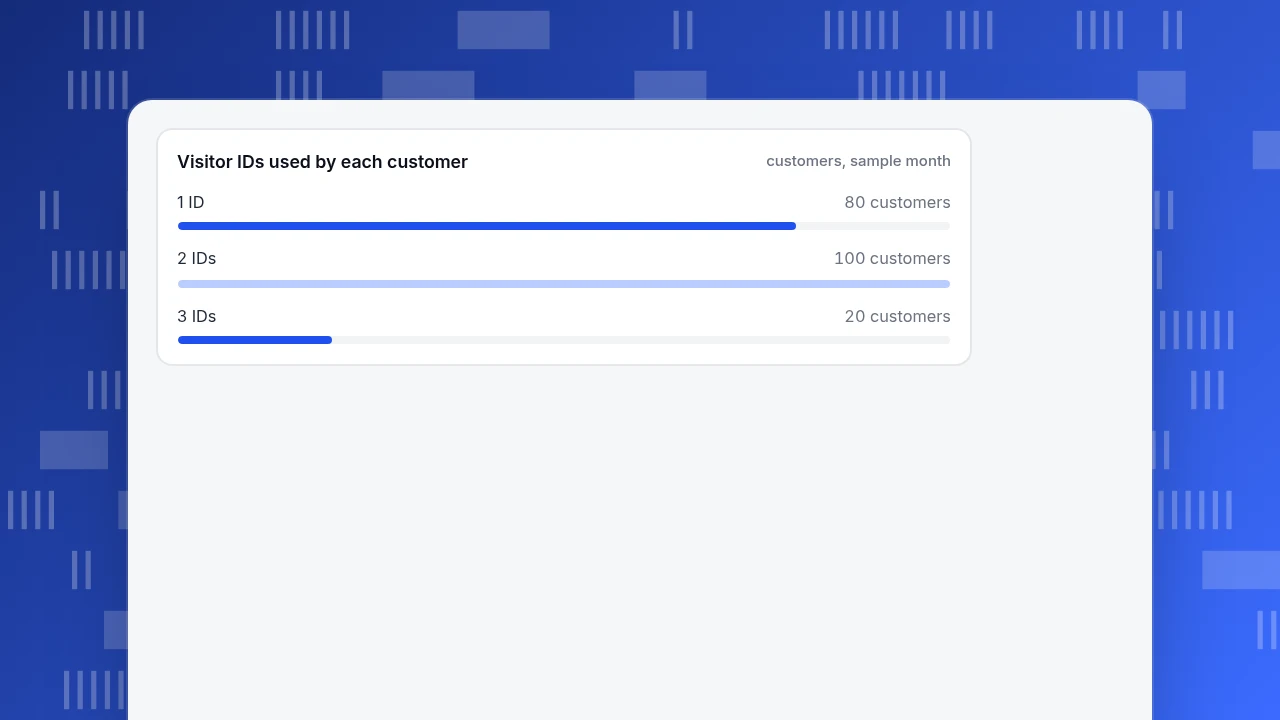
Sample data for one month on a site: 200 customers purchased. The records show 340 anonymous visitor IDs belonging to those customers before any stitching. Of the 200 customers, 80 used one ID, 100 used two IDs and 20 used three IDs.
| IDs used by the customer | Customers | IDs | Share of customers |
|---|---|---|---|
| 1 | 80 | 80 | 40% |
| 2 | 100 | 200 | 50% |
| 3 | 20 | 60 | 10% |
| Total | 200 | 340 | All customers |
The arithmetic: 80 + 100 + 20 = 200 customers; 80 × 1 + 100 × 2 + 20 × 3 = 340 IDs; 340 ÷ 200 = 1.70 IDs per customer. Sixty percent of customers (120 of 200) appear as more than one visitor, so visitor counts overstate the number of people by 1.70 times among customers, and 140 of the 340 IDs are not additional people at all (340 − 200).
Now add chat. Suppose 50 of those 200 customers chatted before buying. For 18 of them, the chat happened on a different ID from the one that purchased. Matching by the purchasing ID alone, only 32 of 50 chats (64%) can be connected to the purchase; after stitching, all 50 can. A report that says "32 chatters bought" understates chat's presence in the purchase paths by 36%, and a conversion comparison between "chatted" and "did not chat" visitors is contaminated, because 18 chatters are sitting in the "did not chat" group.
Two lessons. First, unconnected data errs in one direction: it makes channels that happen on a different device from the purchase look less involved. Second, the fix is not a tool but an identifier, so the order of work matters.
Visitor IDs used by each customer
customers, sample monthHow do you build a connected journey in the right order?
- Choose the identifier of record. A login ID is the strongest: customer-supplied, stable and shared across devices. Decide what counts as the same person and write it down.
- Decide where people identify themselves. Account creation, sign-in and checkout are natural points. The earlier the sign-in, the more history can be attached.
- Attach the identifier everywhere it is known. Send it to web analytics, the app and chat, using the same value in each. Hash emails before sending.
- Decide what happens on conflicts. Shared devices will log in as different people; the rule should keep earlier history with the person it was recorded under and treat the new login as a new journey.
- Test with 20 known customers. Ask a few internal people to complete a test journey on two devices, then check that the record reads as one story. Check a shared-device case too.
- Review consent and retention. Stitching increases what you know about a person, so confirm the legal basis in each region and keep the retention rules visible.
What mistakes weaken a connected journey?
- Relying on browser storage alone. It resets weekly in some browsers, as the table in the second section shows.
- Merging on weak signals. Merging two devices because they share a public IP address will sometimes merge two people.
- Late identification. If sign-in happens only after purchase, the pre-purchase history is attached late or not at all.
- Different values per channel. An ID that is "u_123" on the web and "123" in chat will never join.
- Counting people and devices as the same thing. Report visitors, devices and people separately.
- Forgetting anonymous visitors. Visitors who never identify themselves stay as aggregates; do not invent profiles for them.
How does TapCub connect web visits and chat conversations?
Take the six-step journey above. Here is how its web and chat halves connect in TapCub, and where the limits are.
- Use one script for both. The chat widget is loaded by the same analytics script, so a visitor's chat and browsing share one visitor ID. Turn chat on under Live chat › Chat settings › Install when analytics is already on the page, and do not add a second tag.
- See the context inside the conversation. In Live chat › Inbox, the agent sees the visitor's source, their last two days of browsing and earlier conversations, and can open the visitor's analytics profile in one click.
- Identify people when they sign in. Call
tapcub.loginwith your user ID (email and phone values are hashed). The first login on a device writes the user onto that session and fills in the device's earlier anonymous events. - Read the stitched record. In All-platform analytics › Users › People, the person has a profile with a day-by-day timeline. In Web analytics › Sessions, sessions are grouped under the user across devices, with a device count. In All-platform analytics › Users › Identity map, a difference card compares visitor, device and person counts, which is the 340 versus 200 comparison from the worked example.
- Know the limits. Identification (identified mode) needs a Pro plan or above and is switched on by contacting support. Anonymous visitors have no profile, and under strict privacy the visitor ID changes daily, so the same person cannot be tied across days without a login. The chat widget does not send pageviews or logins; the analytics script does. The chat has no pre-chat form, so if you need an email, ask in the conversation or use the offline message form.
TapCub joins the records you identify; it does not guess that two anonymous devices belong to the same person. Anyone who never signs in remains in the aggregate numbers.
FAQ
What is a connected customer journey?
A single ordered record of what one person did across all channels, such as web, chat, app and email, tied together by an identifier. It is a data property first: the experience only feels consistent if your systems can recognise the same person across touchpoints.
What is identity stitching?
Linking separate identifiers, such as browser IDs, device IDs and chat sessions, to the same person. Deterministic stitching uses something the person supplies, like a login; probabilistic stitching infers from patterns such as a shared IP address, which can be wrong.
Why do customer journeys break across devices?
Each device and browser has its own anonymous ID, and browser storage can be short-lived: Safari deletes script-created cookies and other script-writable storage after 7 days without interaction. In the sample, 120 of 200 customers used more than one ID.
How do you connect web and chat data?
Use the same visitor identifier in both, and attach your login ID once the person signs in. In TapCub the chat widget and analytics script share one visitor ID, and login binds the user to the device's earlier anonymous history.
Is probabilistic matching safe to use?
Treat it as a last resort. It produces guesses, can merge different people, and is less visible to the person being tracked, as the FTC's 2017 report notes. Prefer deterministic links and confirm the legal basis before using inferred ones.
Sources
- WebKit. Tracking Prevention in WebKit: deletion of script-created cookies and script-writable storage after 7 days of no interaction, 24-hour cap with link decoration. Checked 2026-11-22.
- US Federal Trade Commission. Cross-Device Tracking: A Federal Trade Commission Staff Report (January 2017): deterministic and probabilistic techniques, hashed email sharing, combining both. Checked 2026-11-22.
- Google Analytics Help. User-ID overview: associating your own identifiers with users across sessions, devices and platforms. Checked 2026-11-22.
Was this article helpful?
We use your answers to fix and expand this page.
Couldn’t send. Please try again in a minute.
Thanks for the feedback. We’ll use it to improve this page.You’ve already sent feedback on this page. Thanks.

Product Experience Specialist
Writes about product experience, practical workflows, and growth, turning complex processes into clear steps for everyday decisions.