Try it on your own data
Every report in this article is in the free plan. One snippet for web and apps, up to 10 sites.
Start freeThe Cache-Control header tells browsers and CDNs whether they may keep a copy of a response, for how long it stays fresh, and what to do when it is stale. Set no-cache on HTML, max-age=31536000, immutable on files with a hash in the name, private or no-store on personal pages, and never leave the choice to a guess.
What you will learn
- Fresh copies are reused with no request; stale ones are revalidated. Without Cache-Control, caches guess (RFC 9111 suggests 10% of the time since Last-Modified)
- Match the value to the URL: hashed files get max-age=31536000, immutable; HTML gets no-cache; personal pages get private or no-store
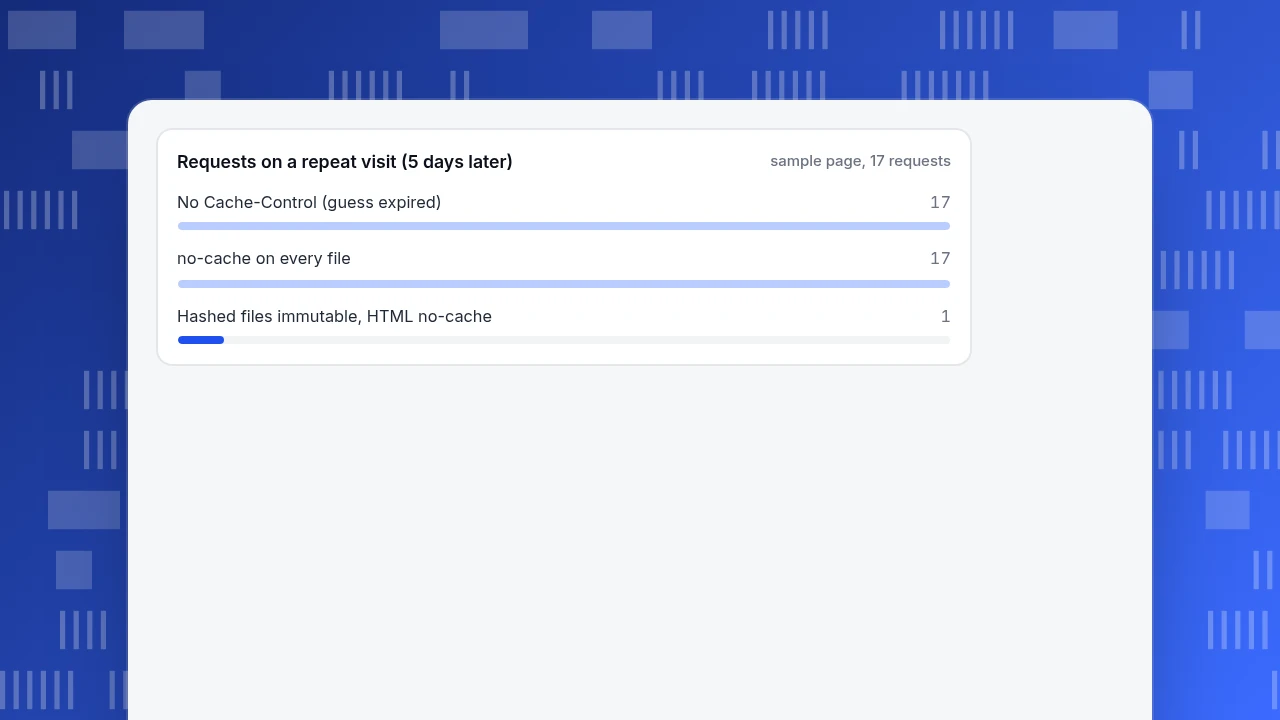
- no-cache does not mean do not store. In the sample, no-cache on every file means 17 requests per visit; the recommended setup needs 1, which is 94% fewer
What the Cache-Control header decides
Every response a server sends can carry a Cache-Control header. It tells browsers and shared caches such as a CDN three things: whether they may keep a copy, how long that copy counts as fresh, and what they must do once it is stale. A copy that is still fresh is reused with no network request at all. A stale copy is either re-checked with the server (a conditional request that usually returns a short 304 Not Modified) or thrown away.
If you send no Cache-Control at all, caches are allowed to guess. RFC 9111 (June 2022, section 4.2.2) says a cache that sees a Last-Modified date may set a heuristic lifetime as a fraction of the time since that date, and gives 10% as a typical fraction. MDN's advice for that case is blunt: if you have caching requirements, state them explicitly in the header. That is the whole job of this header: replace the guess with a decision for each kind of file.
The directives you will actually use
There are more than a dozen directives. Eight cover almost every site. The definitions below follow MDN's Cache-Control reference.
| Directive | What it means | Typical use |
|---|---|---|
max-age=N | The response stays fresh until N seconds after it was generated | Any file you are happy to serve without asking again |
s-maxage=N | Same, but only for shared caches such as a CDN; it overrides max-age there and private caches ignore it | Let a CDN keep a page longer than browsers do |
no-cache | The response may be stored, but must be validated with the origin before every reuse | HTML and other files that change without changing URL |
no-store | No cache of any kind, private or shared, should store the response | Account pages, receipts, anything sensitive |
must-revalidate | Once stale, the response must be validated before reuse | Pair with max-age when a stale copy would be wrong |
immutable | The response will not change while it is fresh | Files whose URL contains a version or content hash |
public / private | Shared caches may store it / only the browser's own cache may | private for anything tied to one user |
stale-while-revalidate=N | A stale response may be reused for N more seconds while a fresh one is fetched in the background | Content where a slightly old copy is fine |
Two details save a lot of debugging. First, max-age is measured from when the response was generated, not from when the browser received it, so a response that spent 40 seconds in a CDN has 40 fewer seconds left. The Age header reports that time. Second, there is no defined upper limit for max-age in MDN's reference, but web.dev's HTTP cache guide calls 31,536,000 seconds (one year) the maximum supported value, so use that and stop.
What to set for each file type
The right value depends on one question: can the URL change its content? If the URL names the version, the content can be cached for a year. If the URL stays the same while the content changes, the browser has to ask. The table gives a starting point; it is a judgment, not a standard, so change it where your release process differs.
| File type | Does the URL change with the content? | Recommended Cache-Control | Why |
|---|---|---|---|
| HTML pages | No (/pricing is always /pricing) | no-cache with an ETag | Always checked, so a new release shows at once; a 304 costs a few hundred bytes |
CSS and JS with a content hash (app.3f9a1c.js) | Yes | public, max-age=31536000, immutable | A new build creates a new URL, so the old one never needs to expire |
| Fonts (hashed or versioned) | Yes | public, max-age=31536000, immutable | Fonts almost never change, and they are expensive to fetch |
| Images with a hash in the name | Yes | public, max-age=31536000, immutable | Same reasoning as scripts |
| Images, CSS or JS without a version in the URL | No | max-age=86400 (one day) or no-cache | A short lifetime limits how long a stale copy can survive |
| API responses shared by every user | No | public, max-age=60 or s-maxage=60, stale-while-revalidate=30 | Cheap to repeat, fine to be a minute old |
| API responses or pages for one logged-in user | No | private, no-cache (or no-store if sensitive) | Keeps one person's data out of shared caches |
| Payment, account or health pages | No | no-store | Nothing should be written to any cache |
Web.dev's guide gives the same two poles: max-age=31536000 for URLs with a fingerprint or version, and no-cache for resources that should be revalidated before every use, with ETag making the revalidation cheap. Everything else on the table sits between those two.
| File type | Recommended Cache-Control | Why |
|---|---|---|
| HTML pages | no-cache, with an ETag | Always checked, so a new release shows at once |
| Hashed CSS, JS, fonts, images | public, max-age=31536000, immutable | New build, new URL: the old one never needs to expire |
| Unversioned images, CSS, JS | max-age=86400, or no-cache | Short life limits how long a stale copy survives |
| Shared API responses | public, max-age=60 | Cheap to repeat, fine to be a minute old |
| One user's pages or API | private, no-cache | Keeps personal data out of shared caches |
| Payment, account, health | no-store | Nothing is written to any cache |
A starting point based on MDN and web.dev guidance, not a standard. Adjust it to your release process.
A worked example: what a repeat visit costs
Sample data: a page made of one HTML document (30 KB), one stylesheet (80 KB), one script (250 KB), two fonts (60 KB in total) and twelve images (600 KB), which is 17 requests and 1,020 KB on a first visit. Assume a 304 response costs about 0.4 KB of headers, the HTML changed since the last visit, and the static files were last modified 30 days ago. Three configurations are compared on a return visit:
- A. No
Cache-Control. Heuristic freshness is 10% of 30 days, which is 72 hours. - B.
no-cacheon everything. Every file is re-checked on every visit. - C. Hashed static files with
max-age=31536000, immutable; HTML withno-cache.
| Return visit after | A: no header | B: no-cache everywhere | C: recommended |
|---|---|---|---|
| 1 day | 1 request, 30 KB | 17 requests, 36.4 KB | 1 request, 30 KB |
| 5 days | 17 requests, 36.4 KB | 17 requests, 36.4 KB | 1 request, 30 KB |
| 8 days | 17 requests, 36.4 KB | 17 requests, 36.4 KB | 1 request, 30 KB |
The arithmetic: configuration B sends one full HTML (30 KB) plus 16 conditional requests (16 × 0.4 KB = 6.4 KB), so 17 requests and 36.4 KB. Configuration A behaves like C for the first 72 hours, then falls off a cliff on day 5 because the guess expired; if the files had been modified two days ago the guess would have lasted only 4.8 hours. Configuration C needs one request on every revisit, a saving of 16 requests (94%) against B and A after day 3. The bytes saved look small because 304 replies are small; the real cost of B is 16 extra round trips, each one a chance for a slow connection to stall rendering. A first visit is 1,020 KB in every configuration, so caching never helps the first load; it helps every load after.
Requests on a repeat visit (5 days later)
sample page, 17 requestsWhy no-cache does not mean "do not cache"
The most common mistake is reading no-cache as "do not store". MDN says it plainly: no-cache does not mean "don't cache". The response can be stored, but it must be validated with the origin before each reuse. RFC 9111 (section 5.2.2.4) describes the same behaviour: a stored response must not be used without forwarding the request for validation. The directive that forbids storage is no-store (section 5.2.2.5).
This matters in two directions. If you put no-cache on a hashed JavaScript file you pay for 16 validation round trips on every visit, as in configuration B above. If you put no-cache on a page with personal data and expect it to be unstored, you are relying on a directive that allows storage. For those pages use no-store, and add private if a CDN sits in front.
Long lifetimes are safe only when the URL changes
The year-long max-age in the table comes with a condition: a new release must produce a new URL. Build tools do this by putting a content hash in the file name, so app.3f9a1c.js becomes app.b72e04.js when the code changes. The HTML, which is always revalidated, points at the new name, and the old file simply stops being requested.
Without that, a long lifetime is a trap. Setting max-age=31536000 on /styles.css means returning visitors can keep the old stylesheet for up to a year, and you cannot recall it. Fix the URL first, then lengthen the lifetime.
immutable adds one more benefit. RFC 8246 (September 2017) explains that on a normal reload browsers send conditional requests for sub-resources, even when the site updates by changing URLs, and those requests just come back as 304. With immutable, clients should skip them while the response is fresh; only an explicit force reload overrides it.
Shared caches and personal data
A CDN is a shared cache, so it follows s-maxage, public and private. Three rules keep you out of trouble.
- Use
privatefor anything tied to one user. A response markedprivatemay be stored only in the browser's own cache. - Use
s-maxageto give the CDN a different lifetime than browsers. For a blog index that changes hourly,max-age=0, s-maxage=3600lets the CDN absorb the traffic while browsers always re-check. - Use
stale-while-revalidatewhen a slightly old copy is acceptable. MDN's example ismax-age=604800, stale-while-revalidate=86400: fresh for 7 days, then reusable for one more day while a new copy is fetched in the background.
Also watch for headers that quietly switch caching off. Cloudflare's default cache behavior page lists private, no-store, no-cache, max-age=0 and a Set-Cookie header as reasons a response is not cached at its edge. Other CDNs have their own rules, so test yours with the commands in the next section.
How to check what your server sends
You do not need a tool beyond the browser.
- Command line. Run
curl -sI https://example.com/assets/app.3f9a1c.jsand read thecache-controlline. Do the same for the HTML page. Repeat with-H "If-None-Match: <etag>"to confirm that revalidation returns304. - Browser developer tools. Open the Network panel, reload twice, and read the Size column.
(memory cache)or(disk cache)means no request was made; a size of a few hundred bytes with status304means a revalidation happened. - Look for missing headers. Any file without
Cache-Controlis being cached by guesswork. List them by file type and assign one rule per row of the table above. - Check the response after a deploy. Confirm that the HTML shows the new file names and that the old hashed files are still served for visitors holding a cached page.
How to see the effect in TapCub
Take the example above. After you ship configuration C, you want proof that real visitors load pages faster, not just that the headers look right. TapCub does not set or read your headers; it measures what visitors experience.
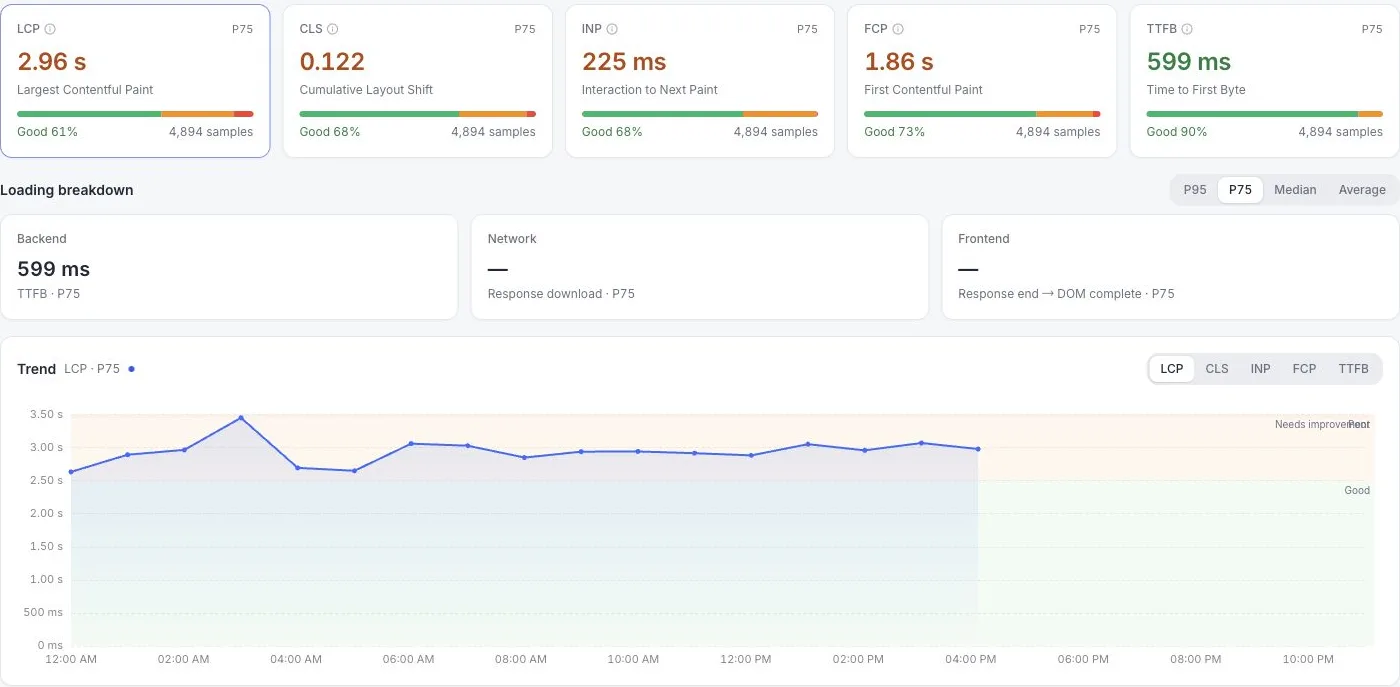
- Mark the change. Add a note on the release date in Configuration › Annotations, so the date shows on your charts.
- Open the real-user numbers. In Monitoring › Performance, read the cards for largest contentful paint and time to first byte. TapCub rates LCP good at 2.5 seconds or less and poor above 4 seconds, and TTFB good at 800 milliseconds or less and poor above 1.8 seconds. Switch the cards to P75, because the slow visitors are the ones a cache helps.
- Compare equal periods. The performance page has no previous-period comparison, so set the date range to the two weeks before the change, note the P75 values, then repeat for the two weeks after.
- Find the pages that did not improve. The Slowest pages list is sorted by P75 LCP; a page that stays on it is probably HTML served without a cache, or an image without a long lifetime.
The numbers come from visitors' browsers, so they include returning visitors, who are the ones the cache changes most. TapCub reports the result; the headers themselves are set in your web server or CDN.
FAQ
What is the best Cache-Control value for static files?
For files whose names contain a version or content hash, use public, max-age=31536000, immutable. One year is the maximum value web.dev lists, and immutable stops browsers re-checking on reload. For static files with a fixed name, use a short lifetime such as max-age=86400, or no-cache with an ETag.
What is the difference between no-cache and no-store?
no-cache lets a cache store the response but requires validation with the origin before each reuse. no-store tells every cache, private or shared, not to store the response at all. Use no-cache for HTML that changes often, and no-store for pages that must never be written to disk, such as account or payment pages.
What does max-age=0 do?
It makes the response stale immediately, so a cache must check with the origin before reusing it. Pair it with must-revalidate if a stale copy would be wrong. Some CDNs do not cache such a response at all: Cloudflare's documentation lists max-age=0 among the values that stop edge caching by default. Check how yours handles it before relying on it.
Is Cache-Control set by the server or the browser?
The server sets it in the response, and the browser follows it. The browser also sends its own Cache-Control in requests, for example max-age=0 on a reload, but the response header decides how long a copy stays fresh. Configure it in your web server, application framework or CDN.
Do I still need Expires or Last-Modified?
You do not need Expires when Cache-Control: max-age is present, because max-age takes precedence. Keep ETag or Last-Modified: they make revalidation cheap by letting the server answer 304 Not Modified instead of resending the file.
Sources
- MDN Web Docs, Cache-Control header reference. Directive definitions and examples. Checked 2026-11-20.
- web.dev, Prevent unnecessary network requests with the HTTP Cache. One-year maximum,
no-cachefor HTML. Checked 2026-11-20. - IETF, RFC 9111: HTTP Caching, June 2022. Heuristic freshness,
no-cache,no-store,Age. Checked 2026-11-20. - IETF, RFC 8246: HTTP Immutable Responses, September 2017. Checked 2026-11-20.
- Cloudflare, Default cache behavior. Origin headers that stop edge caching. Checked 2026-11-20.
Was this article helpful?
We use your answers to fix and expand this page.
Couldn’t send. Please try again in a minute.
Thanks for the feedback. We’ll use it to improve this page.You’ve already sent feedback on this page. Thanks.

Product Experience Specialist
Writes about product experience, practical workflows, and growth, turning complex processes into clear steps for everyday decisions.