Try it on your own data
Every report in this article is in the free plan. One snippet for web and apps, up to 10 sites.
Start freeNormal business hours are usually weekdays, around 8 or 9 a.m. to 5 p.m., but chat support hours should follow when your visitors ask, not the office calendar. Count chat starts by hour over at least four weeks, choose the smallest window that reaches a target like 80% of weekday chats, and handle the rest with an offline message. Below: a worked example, the rules and the offline setup.
What you will learn
- Normal hours differ by organization; cover the hours when chats start instead
- Count chat starts per hour for four weeks, then choose the smallest window that reaches a coverage target
- Outside the hours, show hours and time zone, collect an email and question, and promise a reply time
What are normal business hours?
There is no single legal or universal answer. In the United States "normal business hours" usually means weekday daytime, Monday to Friday around 8 or 9 a.m. to 5 p.m., but organizations define their own. A university health center's HR page gives standard administrative hours as 8 a.m. to 5 p.m. Monday through Friday. A liberal arts college's staff handbook gives 8:30 a.m. to 4:30 p.m. Monday through Friday, with a one-hour unpaid lunch and most employees working a 35-hour week. Two respectable definitions already differ by an hour on each end.
For a website that offers live chat the better question is different: when do your visitors actually ask for help? Office hours describe when staff are at work, not when customers have questions. This guide shows how to read your own hourly traffic and chat data, choose coverage hours that capture most chats for the fewest staffed hours, and handle the rest with an offline message. If you are deciding whether to offer chat at all, start with live chat customer service; the offline form itself is described in the help article on chat offline messages.
Why does 9-to-5 coverage often miss most chats?
Because visitor behavior follows visitors' schedules, not yours. People shop and ask questions in the evening, at lunch, on weekends and in other time zones. A support window copied from the office calendar is a guess about when demand happens, and the guess is easy to test.
Three patterns can pull demand outside the standard window, and each shows up clearly in hourly data:
- Evening peaks. Consumers browse after work; a store's busiest chat hours can be 19:00 to 21:00.
- Weekends. Retail and leisure sites often see steady weekend traffic.
- Time zones. A site with US and European visitors has two peaks in one day; the hours you read must all be in one time zone.
None of these is a rule; each is a hypothesis you check against the chat start counts by hour of your own site. The worked example below does the check with numbers.
What data do you need before choosing hours?
Four numbers per hour of the week, collected over at least four weeks so one unusual day does not decide the schedule:
- Visitors per hour, to see when people are on the site.
- Chat starts per hour, which is what you are actually covering.
- Weekday and weekend counts separately, since schedules differ.
- One time zone for all of it, the one your office hours will be set in.
Chat starts matter more than visitors: a lunchtime of heavy traffic and few questions needs less coverage than an evening of light traffic and many questions. Visitors give you the shape; chat starts give you the workload.
Small sites need one adjustment. With fewer than about 100 chat starts a month, single hours are noisy (one chat moves an hour from 1 to 2), so group the data into three-hour blocks and choose blocks rather than hours. The sample below has 390 weekday chats, enough to read single hours; a site with a tenth of that should not.
Worked example: covering the chat hours
Sample data: a store receives 480 chat starts in four weeks, of which 390 come on Monday to Friday and 90 on the weekend (40 Saturday, 50 Sunday). The chat starts across the four weekdays by hour, in local time, hour 00 to hour 23, are:
2, 1, 1, 1, 1, 2, 4, 8, 14, 22, 26, 28, 24, 26, 27, 25, 22, 20, 24, 30, 34, 28, 14, 6
These sum to 390. There are two peaks: a daytime plateau from 09:00 to 17:00 and an evening peak that tops out at 34 chats in the 20:00 hour.
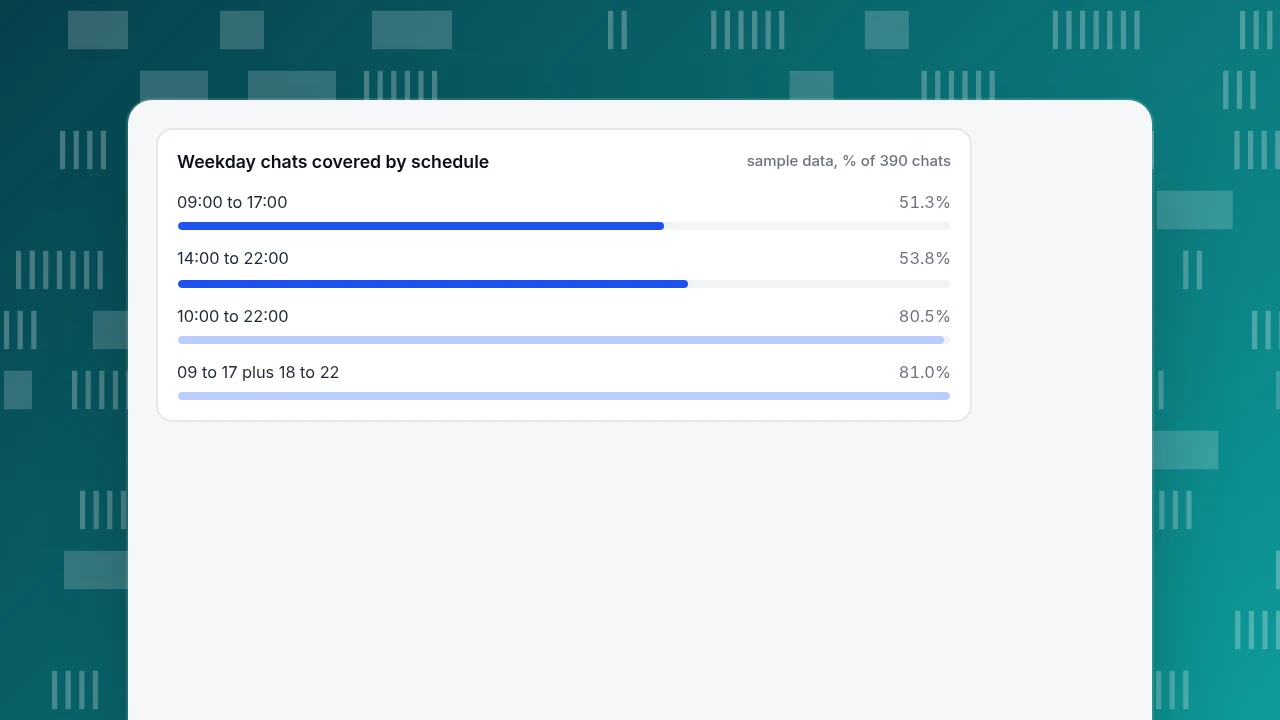
The default window. Staffing 09:00 to 17:00 on weekdays covers hours 9 to 16, which sum to 200 chats. That is 200 ÷ 390 = 51.3% of weekday chats, and 200 ÷ 480 = 41.7% of all chats, because the weekend is not staffed. Forty hours a week of cover reaches fewer than half of the questions.
The same eight hours, moved. The best eight-hour window is 14:00 to 22:00, which sums to 210 chats (53.8% of weekday chats), ten more than the default for the same staffing cost. Moving does not solve the problem, though; it still misses almost half.
More hours. A 12-hour window from 10:00 to 22:00 covers 314 chats, or 80.5% of weekday chats and 65.4% of all chats. A split schedule of 09:00 to 17:00 plus 18:00 to 22:00 (12 staffed hours with an hour's break) covers 316 chats (81.0%). Either costs 60 staffed hours a week, 20 more than the default, and brings 114 more chats a month into coverage (314 − 200), or about 1.4 chats per added staffed hour (114 ÷ 80 hours over four weeks).
| Schedule (Mon to Fri) | Staffed hours per week | Weekday chats covered | Share of weekday chats | Share of all chats |
|---|---|---|---|---|
| 09:00 to 17:00 | 40 | 200 | 51.3% | 41.7% |
| 14:00 to 22:00 | 40 | 210 | 53.8% | 43.8% |
| 10:00 to 22:00 | 60 | 314 | 80.5% | 65.4% |
| 09:00 to 17:00 and 18:00 to 22:00 | 60 | 316 | 81.0% | 65.8% |
The decision is not which schedule is "right"; it is how much extra cover is worth the cost. In this sample the first 20 added staffed hours a week roughly bring weekday cover from half to four-fifths of chats.
Weekday chats covered by schedule
sample data, % of 390 chatsHow do you pick the hours?
Use a rule you can write down, then check it against the data:
- Choose a coverage target. For example, cover 80% of weekday chat starts. Start from the busiest hour and add hours until you reach it; this gives a contiguous or split window.
- Add the weekend only if it pays. In the sample the weekend is 90 of 480 chats (18.8%). A weekend shift for under a fifth of chats is a business decision; an offline message may be enough.
- Prefer one extra evening shift over a longer day when the evening peak is clear, because it adds the peak and avoids hours of slack in the morning.
- Revisit quarterly. Seasonal sites move their peaks; a new campaign can add a new one.
- Keep the rule in terms of chats per staffed hour. In the default schedule it is 200 chats over 160 staffed hours (40 hours × 4 weeks), or 1.25 chats per hour; the 10:00 to 22:00 window has 314 over 240 hours, or 1.31. If a candidate hour has fewer chats than half of your average, it is the first to drop.
| Schedule (Mon to Fri) | Staffed hours per week | Share of weekday chats covered |
|---|---|---|
| 09:00 to 17:00 | 40 | 51.3% |
| 14:00 to 22:00 | 40 | 53.8% |
| 10:00 to 22:00 | 60 | 80.5% |
| 09:00 to 17:00 and 18:00 to 22:00 | 60 | 81.0% |
Sample data: 390 weekday chat starts in four weeks.
What happens outside the hours?
The offline experience decides whether a visitor who arrives at 23:00 becomes a lost chat or a next-morning conversation. Four rules cover most of it:
- Say the hours and the time zone in the offline greeting, so the visitor knows when a person will reply.
- Collect an email and the question, not just a "leave a message" box, so the first reply can answer instead of ask.
- Promise a reply time you can keep, such as the next working morning, and review new messages first thing.
- Let the knowledge base answer common questions first. Self-service answers for hours, shipping and returns clear many offline questions before they become messages.
What goes wrong when you set support hours?
- Copying the office calendar. Opening hours are staff hours, not visitor hours.
- Judging by visitors, not by chats. A busy hour with few questions needs less cover.
- Mixing time zones. One report in UTC and another in local time makes peaks look misplaced.
- Using one week of data. One unusual week, such as a promotion, moves the peak. Use at least four.
- Forgetting holidays. A normal Monday and a bank holiday Monday are different data.
- An offline message with no promise. Visitors who get no reply time assume none is coming.
How do you set this up in TapCub?
Following the store example:
- Find the busy hours. In Live chat › Reports, the heatmap counts chat starts by weekday and hour; the hot pages list shows where chats begin. In Web analytics › Reports, the hourly bucket shows visitors and conversions by hour (hourly view is limited to 7 days at a time, so read one week at a time across a month).
- Set office hours. In Live chat › Chat settings › Office hours, turn on Enable office hours, then pick the time zone, working days, start and end. A start later than the end means the span crosses midnight and runs to the end time the next day. Office hours do not stop an agent from marking themselves online in the inbox; outside the span the bubble uses the offline greeting.
- Write the offline greeting. In the greeting settings, fill Greeting (agents offline) with your hours and time zone. Outside the span, or inside it when nobody is online, visitors can leave an email and a question. If the AI assistant is on, the knowledge base answers first and the form appears only when it cannot.
- Process the messages. In Live chat › Chat settings › Offline messages, messages have the statuses New, Replied and Closed. Review New first each morning.
- Check the effect. After a month, compare chat starts by hour again, and look at whether first responses and the share of resolved conversations improved. TapCub does not schedule your staff; it shows where the chats are.
FAQ
What are normal business hours?
There is no universal standard. In the US it usually means weekdays, around 8 or 9 a.m. to 5 p.m. Published examples include 8 a.m. to 5 p.m. at one university health center and 8:30 a.m. to 4:30 p.m. at a college, so check the specific organization or contract.
What hours should live chat support be available?
Cover the hours when chats actually start. Count chat starts per hour over at least four weeks, then choose the smallest window that reaches a target such as 80% of weekday chats, and handle the rest with an offline message.
Should live chat be available on weekends?
Only if weekend chat volume justifies the staffing. In the sample, the weekend was 18.8% of chats; a weekend offline message with a next-day reply may be enough at that level.
How do you handle chats outside business hours?
Show the hours and time zone in an offline greeting, collect an email and the question, promise a reply time you can keep, and let the knowledge base answer common questions first.
Can TapCub schedule my agents?
No. TapCub sets when the chat bubble shows as online or offline, and reports chat starts by weekday and hour. Staff scheduling stays in your own tools.
Sources
- University of Connecticut Health, Human Resources: standard administrative hours, 8 a.m. to 5 p.m., Monday through Friday.
- Kenyon College, Business Hours: 8:30 a.m. to 4:30 p.m., Monday through Friday, one-hour unpaid lunch, 35-hour week.
Was this article helpful?
We use your answers to fix and expand this page.
Couldn’t send. Please try again in a minute.
Thanks for the feedback. We’ll use it to improve this page.You’ve already sent feedback on this page. Thanks.

Product Experience Specialist
Writes about product experience, practical workflows, and growth, turning complex processes into clear steps for everyday decisions.