Try it on your own data
Every report in this article is in the free plan. One snippet for web and apps, up to 10 sites.
Start freeGood SaaS knowledge bases share three traits: a structure that follows how customers describe problems, search that finds answers when the wording differs, and a handoff to a person that carries context. Judge them by self-service resolution rate, the share of article visitors who do not contact support within a fixed window. Below are the patterns, an article template and the arithmetic with sample data.
What you will learn
- Organise by how customers describe the problem, with five to eight top-level categories and one question per article
- Review failed searches weekly: five fixes covered 64.4% of zero-result queries in the sample
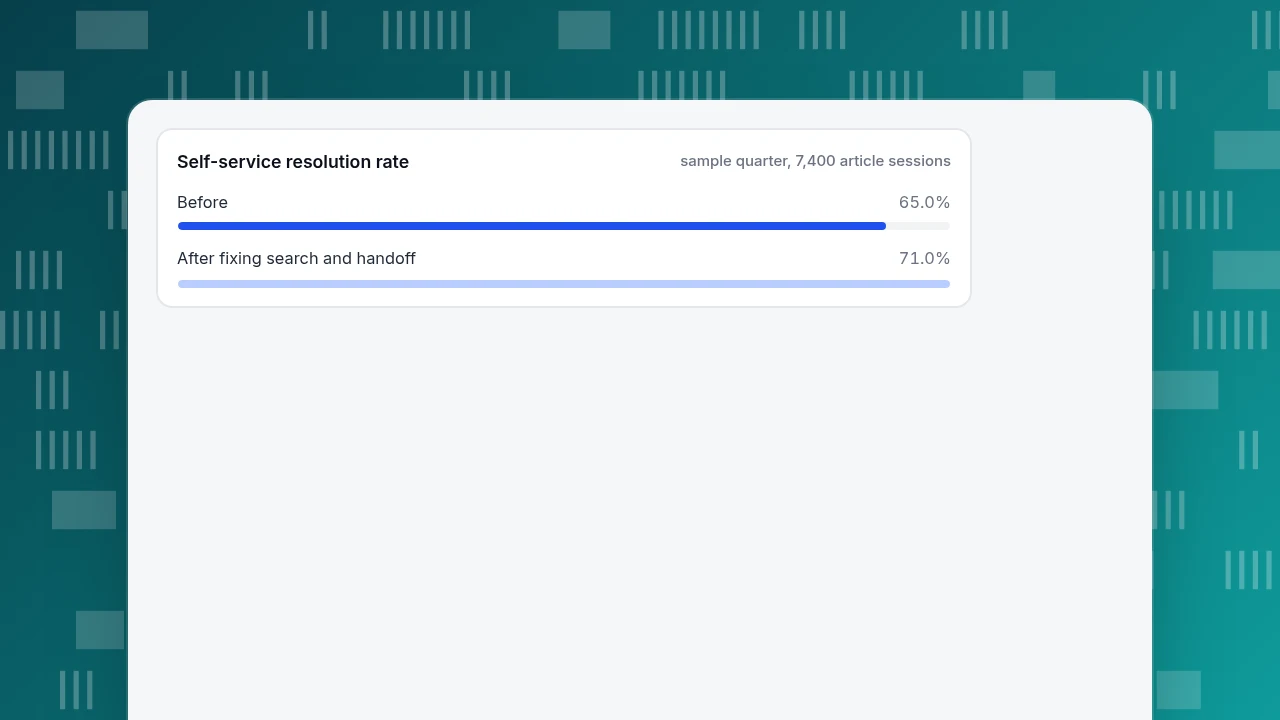
- Measure self-service resolution rate, not page views; the sample moved from 65.0% to 71.0%
What do good SaaS knowledge bases have in common?
Strong SaaS knowledge bases look different on the surface, but they pass the same three tests: the structure matches how customers describe their problem, the search finds an answer when the wording differs, and the page hands off to a person with context when the answer is not enough. Everything else (design, tone, illustrations) is secondary. The honest way to judge any knowledge base, yours included, is a number: the share of article visitors who solved the problem without contacting support.
This guide does not rank products or copy anyone's pages. It breaks down the patterns that good knowledge bases share, shows an article template you can reuse and works through the self-service resolution arithmetic with sample data. For how a knowledge base powers automated answers, see knowledge base chatbot; for the metric that sits behind the business case, see ticket deflection.
Why the bar matters: a 2024 Gartner survey of 5,728 customers found that only 14% of customer service issues were fully resolved in self-service, and only 36% even for issues customers called very simple. More than 43% of failed self-service attempts failed because the customer could not find relevant content.
How should a knowledge base be structured?
Pick the top-level layout by how your customers think, not how your company is organised. Three layouts cover most SaaS products:
| Layout | Top-level categories (example) | Works when | Weak when |
|---|---|---|---|
| By task | Get started, Set up, Fix a problem, Billing and plans | Customers arrive with a goal or an error | Product has many unrelated modules |
| By product area | Dashboard, Integrations, Reports, Admin | Power users who know the feature name | New users who do not know the vocabulary |
| By role or plan | Admins, Members, Developers, Enterprise | Access and permissions differ sharply | Most questions are shared across roles |
Three rules hold for any layout:
- Five to eight top-level categories. More than that and people stop reading the list; fewer and each category becomes a dumping ground.
- One question per article. "Connect your calendar" and "Disconnect your calendar" are two articles, not one long page with two sections.
- Title it the way customers type it. "Reset your password" beats "Credential management"; "Invoice shows the wrong company name" beats "Billing profile fields".
A hybrid is common: a task-based front door ("Get started", "Fix a problem") with a product-area index underneath for returning users.
| Layout | Works when | Weak when |
|---|---|---|
| By task (Get started, Fix a problem) | Customers arrive with a goal or an error | Product has many unrelated modules |
| By product area (Dashboard, Reports) | Power users who know feature names | New users who lack the vocabulary |
| By role or plan (Admins, Developers) | Access and permissions differ sharply | Most questions are shared across roles |
A task-based front door with a product-area index underneath suits many SaaS products.
What does a good help article contain?
Good articles are boring in the same way. A reusable template, shown with a generic example:
Title: Change the email address on your account Answer (first sentence): You can change your account email in Settings › Profile; the new address must be confirmed before it takes effect. Steps (seven at most): 1. Open Settings › Profile. 2. Select Change email. 3. Enter the new address and your password. 4. Open the confirmation message sent to the new address and select Confirm. What you should see: A banner saying the address was updated; sign-in emails go to the new address. If this did not work: The confirmation link expires after a set time; request a new one. Still stuck? Contact us (opens a chat with this article attached). Last reviewed: a date.
The elements that matter most are the first-sentence answer (many readers stop there), the expected result (so people can tell whether it worked) and the last line, which turns a dead end into a handoff. A review date makes stale articles visible to both readers and the team.
What must search do?
Most readers search before they browse, and search fails in a predictable way: customers use words your articles do not. Track one number, the zero-result rate (searches with no results ÷ all searches), and review the failed queries every week.
Sample data: 3,000 searches in a month, 540 with no result (18.0%). The five most common failed queries:
| Failed query | Searches | What to do |
|---|---|---|
| cancel plan | 96 | Add the phrase "cancel" to the title of the downgrade article |
| invoice | 81 | Create a short "Find and download invoices" article |
| delete account | 72 | Publish the article and link it from the privacy page |
| sso | 54 | Add "single sign-on" and "SSO" as synonyms |
| change owner | 45 | Merge into the transfer-ownership article |
Together these five account for 348 of the 540 failed searches (64.4%). Fixing five articles or synonyms cuts the zero-result rate from 18.0% toward 6.4% (192 of 3,000) with no new writing beyond three short articles. Search also needs to tolerate typos and plural forms, and should show the article title and the answer's first line in results so people do not open the wrong page.
What happens when the article is not enough?
A knowledge base that pretends it can solve everything produces angry contacts. Gartner's survey found that 45% of customers who started in self-service said the company did not understand what they were trying to do, so the handoff has to carry that understanding with it:
- Put "Still need help?" on every article, not only on the home page.
- Carry context. The message should arrive with the article title, so the agent does not ask "what are you trying to do?" again.
- Offer a person early for urgent topics such as billing disputes and outages; do not make people read three articles first.
- Count the handoff as information. Every contact that starts from an article is a note that the article is incomplete or hard to find.
If answers are generated by an AI model instead of written by hand, the same rule applies, with an extra one: the company is responsible for what its site says. In Moffatt v. Air Canada (2024 BCCRT 149), a British Columbia tribunal rejected an airline's argument that its chatbot was a separate entity responsible for its own statements. Answers should come from reviewed material and hand off when the material runs out.
How do you measure whether the knowledge base works?
Page views measure traffic, not help. Use self-service resolution rate = article sessions with no contact within 7 days ÷ article sessions. Pick the window (3 or 7 days) and keep it fixed.
Sample data: a quarter with 10,000 help-center sessions, of which 7,400 viewed at least one article. Of those, 2,590 contacted support within seven days, so 4,810 did not.
| Measure | Before | After fixing search and handoff |
|---|---|---|
| Article sessions | 7,400 | 7,400 |
| Contacted within 7 days | 2,590 | 2,146 |
| Self-service resolution rate | 65.0% | 71.0% |
| Zero-result searches (of 3,000) | 540 (18.0%) | 192 (6.4%) |
Before: 4,810 ÷ 7,400 = 65.0%. After: (7,400 − 2,146) ÷ 7,400 = 71.0%, which is 444 fewer contacts (2,590 − 2,146) from the same traffic. Two cautions: the metric counts people who gave up as resolved if they never contact you, so read it next to satisfaction ratings and repeat-contact counts; and compare like with like, because a spike in outage traffic will lower it for reasons unrelated to content quality.
Self-service resolution rate
sample quarter, 7,400 article sessionsWhich knowledge base mistakes recur?
- Organising by internal team. Customers do not know which team owns a feature.
- Counting views as resolution. A page with many views and many follow-up contacts is a problem page, not a popular one.
- Never retiring articles. An article describing a removed screen is worse than no article. Review the 20 most-viewed pages quarterly.
- Hiding contact options. It raises frustration, not deflection, and the contact arrives angry.
- Writing for search engines first. Titles stuffed with keywords read badly; write for the customer's words and let the query log tell you what is missing.
How to build this in TapCub
TapCub's knowledge base serves the chat widget, so apply the same ideas there:
- Start from real questions. In Live chat › Knowledge base, use Generate from conversations on the draft inbox. It merges visitor questions and agent replies from conversations resolved in the last 30 days into Q&A drafts; approve the good ones. A site can generate once every 24 hours.
- Choose the entry type. Q&A entries are sent as written when the question matches and do not use an AI call; document entries are split into passages of about 600 characters and the model drafts from the best-matching ones. Use Q&A for the high-volume questions, as in the failed-search table above.
- Pin the top questions. Pinned Q&A entries appear in the visitor-facing FAQ; opening an answer does not create a conversation or use quota, and Not solved or a request for a person opens a conversation for an agent.
- Test before publishing. The Playground runs the same path as a visitor, spends no quota and creates no conversation.
- Read the gaps. In Live chat › Reports, the knowledge base hit rate is the share of questions answered by a direct Q&A match or a retrieved answer. Handoffs in the inbox are labelled (no knowledge match, model could not answer, visitor asked, turn limit, agent took over); the "no knowledge match" ones are your next articles. Use Fix & save on a wrong AI answer to store the corrected answer as a Q&A entry.
The AI only writes a reply from your material; it cannot change an order or call another system.
FAQ
What makes a good SaaS knowledge base?
A good one has a structure that follows how customers describe problems, search that finds answers when the wording differs, and a handoff to a person with context. Measure it with the share of article visitors who do not contact support within a fixed window, such as seven days.
How do you organise a knowledge base?
Choose five to eight top-level categories by task, product area or role, write one question per article and title each the way customers type it. A task-based front door with a product-area index underneath suits many SaaS products.
How do you measure knowledge base effectiveness?
Use self-service resolution rate (article sessions with no contact within a set window ÷ article sessions) alongside the zero-result search rate and satisfaction ratings. In the sample, fixing search and handoff moved resolution from 65.0% to 71.0%.
How often should you update knowledge base articles?
Review the most-viewed articles at least quarterly and any article whenever the screen or policy it describes changes. Show a last-reviewed date and retire pages that describe removed features.
Sources
- Gartner Survey Finds Only 14% of Customer Service Issues Are Fully Resolved in Self-Service, Gartner press release, 19 August 2024, survey of 5,728 customers.
- Moffatt v. Air Canada, 2024 BCCRT 149, Civil Resolution Tribunal of British Columbia, responsibility for chatbot statements.
Was this article helpful?
We use your answers to fix and expand this page.
Couldn’t send. Please try again in a minute.
Thanks for the feedback. We’ll use it to improve this page.You’ve already sent feedback on this page. Thanks.

Product Analyst
Focuses on event analysis, conversion funnels, and retention, using clear metric definitions and structured analysis to explain product performance.