Try it on your own data
Every report in this article is in the free plan. One snippet for web and apps, up to 10 sites.
Start freeHelp desk portal examples fall into five patterns: a search-first knowledge base, guided triage, a ticket form with status, an in-widget FAQ with chat, and a status page. Judge each by what it resolves without a person and what it hands over. Gartner found 70% of customers try self-service but only 9% fully resolve there, so measure zero-result searches and contacts, not visits.
What you will learn
- Five patterns: search-first knowledge base, guided triage, ticket status, in-widget FAQ and status page
- Only a ticket-status portal needs a ticketing system behind it; the others work with a knowledge base alone
- Measure zero-result searches, helpful votes and contacts per 1,000 customers; silence after a visit is not resolution
What a help desk portal is, and what to look for in an example
A help desk portal is the customer-facing front of a support operation: a page where people find answers, ask for help and sometimes follow a request. A portal can be a knowledge base with a search box, a ticket form with a status page, a guided questionnaire, or a chat window with a short list of common questions. Most "examples" lists show screenshots. This article does the opposite: it describes five archetypes without naming any product, annotates what each does well, and tells you which numbers show whether it works. For the support-desk software side, see AI help desk.
Why portal quality matters is easy to state. In a 2019 Gartner survey analysis of more than 8,000 customer journeys, 70% of customers used self-service at some point in resolving an issue, but only 9% fully resolved it there. A later Gartner survey of 5,728 customers (December 2023, published 2024) put full self-service resolution at 14%. Most people try the portal first, and most still end up contacting someone, so the portal's job is to resolve what it can and to hand over the rest without making people repeat themselves.
Five help desk portal examples, annotated
The layouts below are text sketches of common patterns. The notes mark what to copy and what to watch.
Example 1: the search-first knowledge base
[ Logo ]                              [ Contact us ]
        How can we help?
[ Search box ........................ ]
 Popular:  Reset password · Invoices · Cancel plan
[Getting started] [Billing] [Account] [Troubleshooting]- Does well: one dominant search box, a "Popular" row that answers the top questions in one click, a small number of categories.
- Watch: zero-result searches (a missing article), and "Contact us" hidden so deep that people give up.
- Measure: searches with no result as a share of all searches; articles opened per search.
Example 2: the guided triage
What are you trying to do?
 ( ) Fix a problem   ( ) Change my plan   ( ) Something else
-> Which part? -> Try these 3 steps -> Did that fix it? [Yes] [No -> talk to us]- Does well: asks one question at a time and shows steps before offering a person; the "No" button passes the path taken along.
- Watch: long trees. Keep the depth shallow and look at where people drop out of each branch.
- Measure: completion rate per branch; share ending in "No".
Example 3: the ticket form with a status page
Submit a request:  [Topic ▾] [Describe ........] [Attach file]
My requests: #2041 Open #2038 Waiting for you #2030 Solved- Does well: gives a visible record, so customers stop asking "any update?".
- Watch: needs a ticketing system behind it; a form that goes to a shared mailbox with no status is a form, not a portal.
- Measure: time to first reply; tickets reopened.
Example 4: the in-widget FAQ with chat
[ Chat bubble ] Common questions: Where is my order? · Refund policy · Talk to a person- Does well: shows answers where the customer already is, so no separate site visit; keeps the person option one tap away.
- Watch: the common-questions list goes stale; review it on a schedule.
- Measure: answer opens without a conversation, and "not solved" clicks.
Example 5: the status and notices page
All systems normal Notices: Planned maintenance Sat 02:00–03:00 UTC- Does well: answers "is it just me?" before anyone writes in, and cuts repeat contacts during incidents.
- Watch: it must be updated by a person during an incident; a stale status page is worse than none.
- Measure: contacts per hour during incidents with and without a notice.
Feature comparison of the five portal types
| Type | Resolves without a person | Needs a ticketing system | Setup effort | Best when |
|---|---|---|---|---|
| Search-first knowledge base | High, if articles exist | No | Medium (writing) | Many repeat questions |
| Guided triage | Medium to high | No | Medium | Few, well-defined problems |
| Ticket form and status | Low (it routes) | Yes | Medium to high | Complex, multi-step requests |
| In-widget FAQ with chat | Medium | No | Low | Questions asked mid-purchase |
| Status and notices | Narrow but strong | No | Low | Outages and planned changes |
Most mature portals combine two or three of these: a searchable knowledge base, an in-page way to reach a person and, for complex cases, a ticket.
| Portal type | Needs a ticketing system | Best when |
|---|---|---|
| Search-first knowledge base | No | Many repeat questions |
| Guided triage | No | Few, well-defined problems |
| Ticket form and status | Yes | Complex, multi-step requests |
| In-widget FAQ with chat | No | Questions asked mid-purchase |
| Status and notices | No | Outages and planned changes |
Most mature portals combine two or three patterns.
What a good portal contains: an annotated checklist
| Element | What good looks like | Why it matters |
|---|---|---|
| Search | One box, tolerant of typos, results ranked by usefulness | The queries show what people actually look for |
| Top questions | 5–8, chosen from real contact data | Covers the largest share of demand |
| Article format | One answer per article, steps numbered, last-updated date | Quick to scan; trust in freshness |
| Feedback | "Did this help?" Yes/No on every article | Shows which pages fail |
| Escape hatch | "Talk to a person" visible on every page | Keeps people who fail from leaving angry |
| Context handover | The path or question travels to the agent | Customers do not repeat themselves |
| Languages | Same structure per language | Avoids a thin second-language portal |
An element earns its place when you can name the number it moves.
Measure a portal with real arithmetic
Sample data: one month of a portal serving 50,000 active customers.
| Measure | Count | Rate |
|---|---|---|
| Portal sessions | 10,000 | 100.0% |
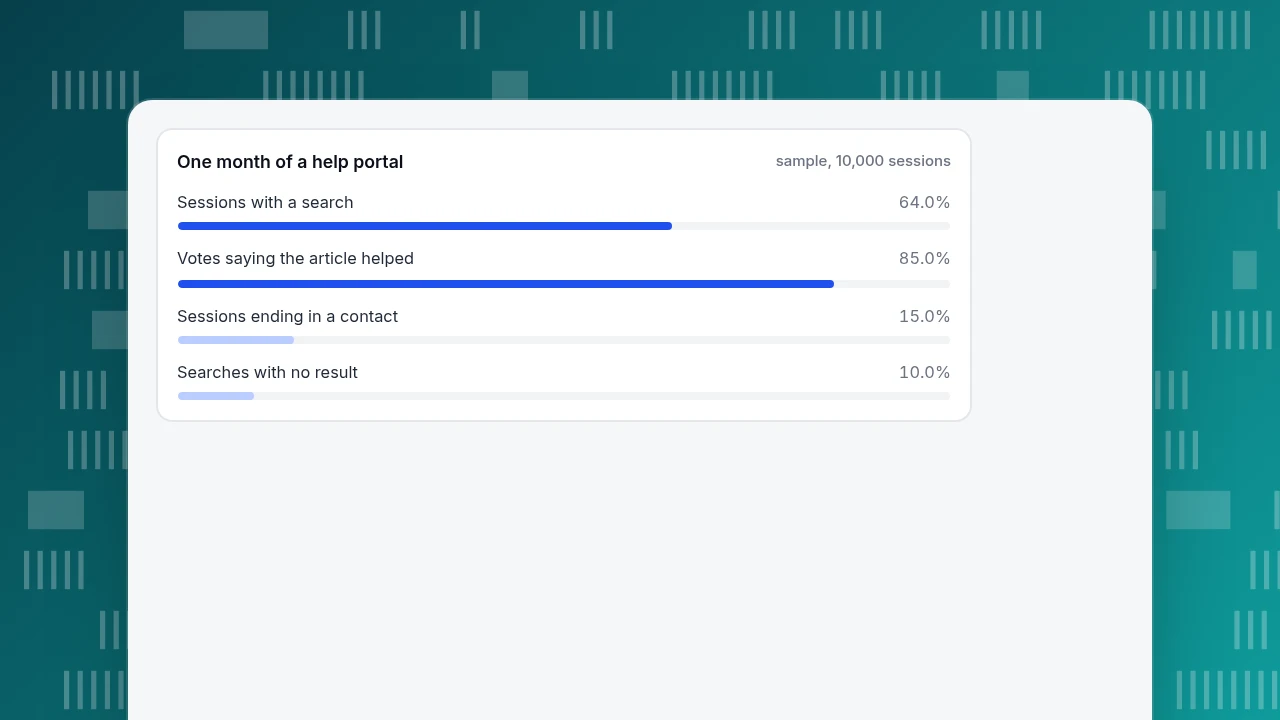
| Sessions with a search | 6,400 | 64.0% |
| Searches with no result | 640 | 10.0% of searches |
| "Did this help?" votes | 5,000 | 50.0% of sessions |
| Votes saying yes | 4,250 | 85.0% of votes |
| Sessions ending in a contact request | 1,500 | 15.0% |
Check: 6,400 ÷ 10,000 = 64.0%; 640 ÷ 6,400 = 10.0%; 4,250 ÷ 5,000 = 85.0%; 1,500 ÷ 10,000 = 15.0%.
Two cautions. First, "no contact afterwards" is not the same as "resolved": some visitors give up in silence, which is part of why independent survey figures for full self-service resolution are far lower than portal dashboards suggest. Pair the "helped" vote with a contact check. Second, a 10% zero-result rate is a to-do list: the 640 failed searches show exactly which articles to write.
To estimate savings, compare contact volume before and after a change, per 1,000 customers, and use unit costs. Gartner's 2019 poll put an average live-channel contact at $8.01 and a self-service contact at about $0.10. Suppose contacts fall from 120 to 96 per 1,000 customers after you add ten articles: 24 fewer per 1,000. For 50,000 customers that is 24 × 50 = 1,200 contacts, and 1,200 × ($8.01 − $0.10) = $9,492 a month. Treat it as an order of magnitude: your own cost per contact is the number to use.
One month of a help portal
sample, 10,000 sessionsCommon portal mistakes
- Hiding the contact option. It lowers contacts and raises frustration; make it findable and make the handover smart.
- Writing for the company. Name articles by the customer's words ("My order has not arrived"), not internal terms.
- No ownership. A portal with no editor goes stale within months; assign an owner and a review date.
- Measuring only visits. Visits go up when people cannot find answers; track zero-result searches, helpful votes and contacts after visits.
- Treating chat as a separate world. The question the customer typed in chat should become tomorrow's article.
- Duplicating the same answer in many places. Updates drift apart; keep one source and link to it.
Build the in-widget portal in TapCub
TapCub is not a ticketing system and does not provide a customer-facing ticket tracker. It covers the in-widget pattern (example 4) and a standalone page. Here is how to set up the sample.
- Write answers once in the knowledge base. In Live chat › Knowledge base, add Q&A entries for your top questions. When a visitor's question matches a Q&A entry, the answer is sent as written, with no AI call. Add documents for longer material; those are split into passages of about 600 characters and a model drafts the reply.
- Pin the top questions. Pinned Q&A entries appear in the visitor-facing FAQ. Opening an answer does not create a conversation and does not use quota. The pinned-question limit depends on the plan: 3 on Free, 5 on Pro, 8 on Max and 10 on Ultra.
- Keep the person option open. Not solved, or a request for a person, opens a conversation and brings the question to an agent. Outside office hours, visitors can leave an offline message; with AI on, the knowledge base answers first and the message form appears only when it cannot.
- Offer a standalone page. Each site has a full-screen chat page at
https://chat.askcub.com/SITE_KEY, useful for an email signature, a QR code or a social profile, with no snippet on any site. - Read the numbers. Live chat › Reports shows conversations, resolution rate, first response, satisfaction and knowledge base hit rate, which is the share of questions answered by a direct Q&A match or a retrieved answer. Unanswered questions point to the next article to write.
FAQ
What is a help desk portal?
A customer-facing page where people find answers, contact support and sometimes track a request. It can be a searchable knowledge base, a ticket form with a status page, a guided questionnaire, an in-page FAQ with chat, or a mix of them.
What should a help desk portal include?
A search box, five to eight top questions taken from real contact data, one-answer articles with a last-updated date, a "Did this help?" vote, a visible way to reach a person and a handover that passes the question along. Add a ticket form only if you have a system behind it.
How do I measure whether a help desk portal works?
Track zero-result search rate, helpful votes, sessions ending in a contact request and contact volume per 1,000 customers before and after changes. In the sample, 10.0% of searches had no result and 85.0% of votes were positive. Do not treat silence as resolution.
How much can a portal save?
Multiply the contacts avoided by the difference in cost per contact. Using Gartner's 2019 averages of $8.01 for a live contact and about $0.10 for self-service, 1,200 fewer contacts a month saves about $9,492. Replace both unit costs with your own.
Do I need a ticketing system for a portal?
Not for a knowledge base, a guided triage, an in-widget FAQ or a status page. You need one when requests have several steps and customers expect to follow progress. A form that sends mail to a shared inbox, with no status, is not the same thing.
Sources
- Gartner. Gartner Says Only 9% of Customers Report Solving Their Issues Completely via Self-Service (25 September 2019) — 70% use self-service at some point; 9% fully resolve; $8.01 live contact vs about $0.10 self-service.
- Gartner. Gartner Survey Finds Only 14% of Customer Service Issues Are Fully Resolved in Self-Service (19 August 2024) — survey of 5,728 customers, December 2023.
- TapCub documentation: Knowledge base, Install and enable, Chat reports, Data and billing. Checked 2026-11-22.
Was this article helpful?
We use your answers to fix and expand this page.
Couldn’t send. Please try again in a minute.
Thanks for the feedback. We’ll use it to improve this page.You’ve already sent feedback on this page. Thanks.

Product Analyst
Focuses on event analysis, conversion funnels, and retention, using clear metric definitions and structured analysis to explain product performance.