Try it on your own data
Every report in this article is in the free plan. One snippet for web and apps, up to 10 sites.
Start freeA data security strategy for analytics answers four questions about the data your tracking collects: what do we hold, who can see it, how long do we keep it, and what do we do when something goes wrong. Turn each answer into a setting you can check. In the sample below, cutting retention from 365 to 90 days removes 75% of stored event rows, and trimming admin roles cuts the people who can change settings by 40%.
What you will learn
- Start with an inventory, then collect less: data you never collect cannot leak
- Give each person the smallest role that works and count the people who can change settings or export raw data
- Set retention in days per data type, scope API keys, and review roles, keys, exports and the audit log every quarter
What is a data security strategy for an analytics team?
A data security strategy for analytics is a written plan that answers four questions about the data your tracking collects: what do we hold, who can see it, how long do we keep it, and what do we do when something goes wrong. It is smaller than a company-wide security programme and more specific than "follow best practice": each answer is a setting someone can check.
Analytics data is a good place to start because it is collected continuously, read by many people and exported often. A tracking script can gather identifiers (visitor IDs, logged-in user IDs, device details) and, if nobody is looking, free-text values that include email addresses. Reports, exports, API keys and shared links then spread it further.
The law gives the same four questions a legal form. Under the GDPR (Regulation (EU) 2016/679), personal data must be "adequate, relevant and limited to what is necessary" (Article 5(1)(c)), kept in an identifiable form for no longer than necessary (Article 5(1)(e)), and protected by "appropriate technical and organisational measures" that match the risk, including pseudonymisation and encryption where suitable (Article 32). Breaches of the security obligations can draw fines of up to €10 million or 2% of worldwide annual turnover, and breaches of the basic principles of Article 5 up to €20 million or 4%, whichever is higher (Article 83). The plan below is how to turn those sentences into settings. If you also work with AI tools, see AI data governance for the model-side rules.
What data do you actually hold?
You cannot protect what you have not listed. Before touching any setting, write a one-page inventory for each tracking project.
| Data type | Example | Risk if it leaks | Keep? |
|---|---|---|---|
| Visitor identifiers | Anonymous visitor ID, device details | Low alone; high if joined to a person | Yes, within retention |
| Logged-in user identity | User ID, email, name | High: directly identifies a person | Only what a report needs |
| Free-text values | Form entries, search terms, URL query strings | High: may contain emails, phone numbers, tokens | Strip or do not collect |
| Network data | IP address | Medium: location and identification | Truncate or discard |
| Behaviour records | Events, sessions, page paths | Medium: sensitive in combination | Within retention |
| Exports and reports | CSV exports, shared links | Medium to high: copies leave the system | Delete when used |
| Credentials | API keys, session cookies | High: grant access to all of the above | Rotate, scope, never paste |
The columns do the work. "Keep?" should be filled in by a person who knows what a report is used for. If nobody can say why a field is collected, it is a candidate for removal.
How do you collect less?
Data you never collect cannot leak, be subpoenaed or be misused. Minimisation is the cheapest control and the one most often skipped.
- Remove what no report uses. Review the event and property list once a quarter; delete or stop sending the unused ones.
- Never send direct identifiers as properties. Use an internal user ID, not an email address or a name.
- Strip text that looks like personal data. Free-text fields and URL query strings are where emails and phone numbers sneak in.
- Truncate addresses. Keep only what the analysis needs, such as country or city.
- Choose a collection level that matches consent. Where consent is required and not given, collect less rather than nothing at all.
Sample data: a site sends 20 properties on each event. A review finds 6 that no report, segment or goal uses and 2 (email and full name) that identify a person. Removing the 8 leaves 12, a 40% reduction in stored fields and no direct identifiers in event rows.
Who should see what?
Access control is the second answer. The principle is least privilege: each person gets the smallest set of permissions that lets them do their job, no more.
Sample data: a team of 12 people has access to one analytics project. Before the review, the owner plus 4 admins can change settings, invite people and run compliance actions (5 people), 4 are analysts and 3 are viewers. Two of those four admins only ever build and read reports.
| Role | Before | After | Reason for the change |
|---|---|---|---|
| Owner | 1 | 1 | Cannot be removed; keep one named owner |
| Admin | 4 | 2 | Only the two who manage settings and members keep it |
| Analyst | 4 | 6 | The two admins who only build reports are now analysts |
| Viewer | 3 | 3 | Read-only, unchanged |
| People who can change settings | 5 | 3 | A 40% smaller set of people who can change anything |
The number to watch is the people who can change settings or export raw data, because that is the group a stolen login would give an attacker. Narrow the rest too: restrict a member to the channels, platforms or hostnames they need, and hide sensitive properties from people who do not need them.
Protect the logins themselves. CISA's guidance for passwords is to use at least 16 characters, store them in a password manager rather than writing them down, and turn on multifactor authentication, especially for email and financial accounts. Apply the same to everyone with access to analytics: a strong unique password and a second factor.
How long should you keep it?
Retention is the third answer. Under the storage limitation principle, personal data should not be kept in identifiable form for longer than the purposes need. In practice that means choosing a number of days per data type and having a scheduled job delete what has expired.
Match the period to a purpose you can state. A rule of thumb that holds up: the retention for a record is the longest period for which a named report still needs that record at event level. Aggregated daily totals do not identify a person and can stay.
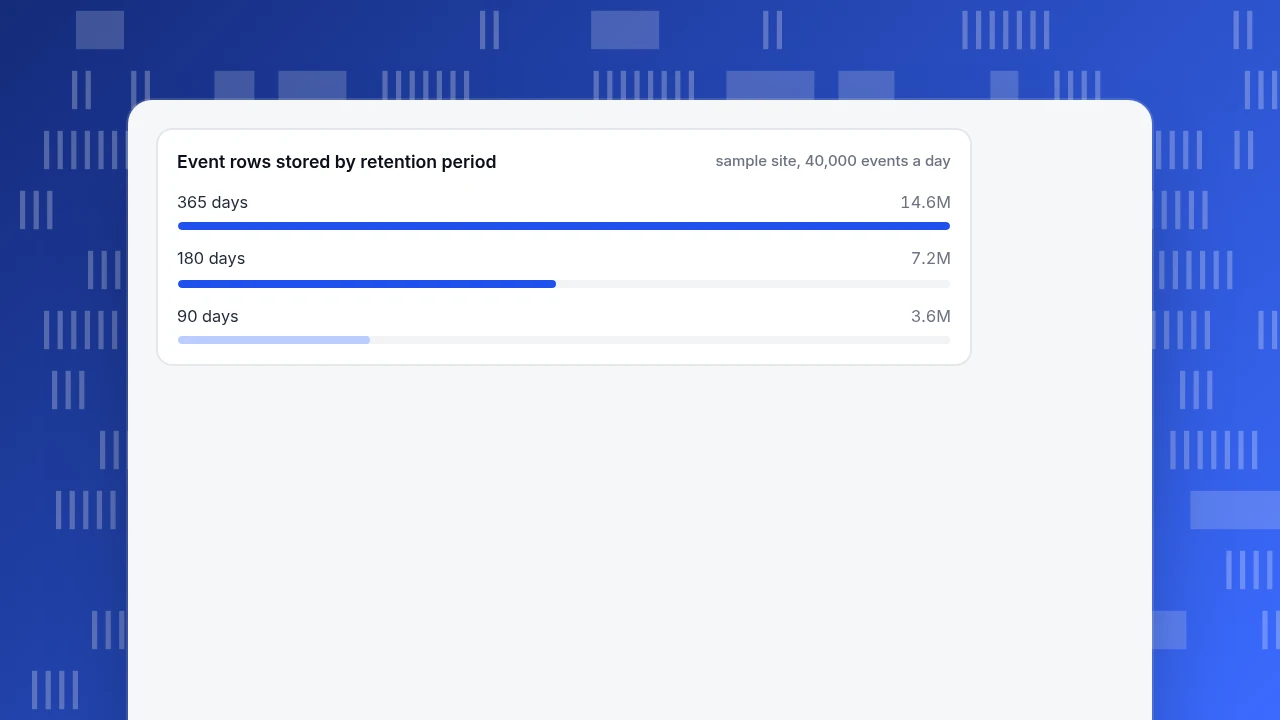
Sample arithmetic: a site records 40,000 events a day.
| Retention | Rows stored at steady state | Compared with 365 days |
|---|---|---|
| 365 days | 14,600,000 | baseline |
| 180 days | 7,200,000 | 50.7% fewer |
| 90 days | 3,600,000 | 75.3% fewer |
Cutting retention from 365 to 90 days removes about three-quarters of the event rows that could ever be exposed, while the reports that need year-on-year comparison can still use the daily totals. Set different periods for different data: event detail and automatic click capture can be shorter than user profiles, and records of consent are usually kept longer so you can prove what a person agreed to.
Event rows stored by retention period
sample site, 40,000 events a dayWhat about API keys, exports and shared links?
The fourth set of controls covers the copies and doors that live outside the console.
- API keys. Give each key the narrowest scope it needs (read reports or write events, not everything) and bind it to one project where possible. Show it once, store it in a secret manager and revoke it the moment you suspect a leak. Never paste a key into a support ticket.
- Exports. An export is a copy that leaves the system and ignores your retention rules. Keep a list of who exports what and delete files after use.
- Shared links. Use a password, limit the modules shown and cap the number of days of data a viewer can see.
- Sessions and recovery. Know how long a login stays valid, and turn on two-step verification for everyone with admin rights.
Sample data: a review of 8 API keys finds 3 with full-access scope. Two were created for a one-off migration and are no longer used (revoke), and one drives a dashboard that only reads reports (re-issue with a read scope). After the review, 0 of 6 remaining keys have full access.
How do you log, review and respond?
Controls drift. Two habits keep them honest.
- Keep an audit trail. Record who added or removed members, changed security settings, switched two-step verification and changed privacy configuration. Review it on a schedule, not only after an incident.
- Run a quarterly review. Walk through the checklist below, fix what has drifted and note the date.
- Have a response path for data subject requests. People may ask for access, erasure, restriction or portability of their data. Decide who handles each request type and how long it takes before the first request arrives.
- Write the incident steps in one page. Who decides, who is told, how a key or account is revoked, and who records what happened.
The data security checklist
| Control | What to check | Evidence | Owner | How often |
|---|---|---|---|---|
| Inventory | Every project has a data-type list | One-page inventory | Analytics lead | Twice a year |
| Minimisation | Unused events and properties removed; no direct identifiers | Event and property list | Analytics lead | Quarterly |
| Roles | Admins are the minimum set; viewers are read-only | Member list | Owner | Quarterly |
| Login security | Strong unique passwords; two-step verification for admins | Account settings | Owner | Quarterly |
| Retention | Days set per data type; scheduled deletion on | Retention settings | Privacy owner | Twice a year |
| API keys | Scoped, bound to a project, revoked when unused | Key list | Engineering | Quarterly |
| Exports and links | Passwords, day limits, deleted after use | Export and sharing list | Analytics lead | Quarterly |
| Audit log | Member and privacy changes reviewed | Log review note | Owner | Quarterly |
| Requests | Named handler for access, erasure, restrict, portability | Procedure page | Privacy owner | Yearly |
| Control | Setting to choose | Where in TapCub |
|---|---|---|
| Roles | Smallest set of admins; others analyst or viewer | Configuration › Settings › Members |
| Retention | Days per data type, within the plan cap | Configuration › Privacy center |
| API keys | Narrow scope, bound to one project, revoked when unused | Configuration › Settings › API keys |
| Shared links | Password, chosen modules, day limit | Configuration › Settings › Public sharing |
| Audit trail | Review member and privacy changes | Configuration › Settings › Audit log |
TapCub provides the controls; retention periods and who needs access are your decisions.
How to apply this in TapCub
Take the 12-person team and the 40,000-events-a-day site from above. Here is where each setting lives.
- Review members and roles. Open Configuration › Settings › Members. Roles are Owner, Admin, Analyst and Viewer: admins change settings, invite people and run compliance actions; analysts read reports and create goals; viewers are read-only. An admin can narrow other members to channels, platforms or hostnames, hide properties and set a mask level (none, partial or full).
- Turn on two-step verification and know how long a login lasts. With two-step verification on, a correct password alone does not log a person in. The login cookie is valid for 14 days.
- Set retention. Open Configuration › Privacy center and the Data minimisation & retention section. Default retention is 365 days for events, 90 for automatic click capture, 730 for profiles and 730 for consent receipts, and a project cannot exceed the cap of its plan (180 days by default on the free tier). A scheduled job deletes expired detail rows; daily summaries do not hold personal data and are not deleted by the retention period.
- Check what is collected. IP addresses are not written on events: they are truncated for geography and used for the visitor hash, then discarded. Strings that look like an email or phone number are rewritten to a placeholder when stripping is on, which is the default, and automatic capture does not record visible element text by default.
- Scope API keys. Create them at Configuration › Settings › API keys. They start with
wck_and the full value is shown once. Choose scopes (for exampletrack:writeorstats:read) rather than all, and bind a key to one project when you can. - Review sharing, exports and the audit log. Configuration › Settings › Public sharing creates read-only links with an optional password, chosen modules and a limit on the days visible. Configuration › Settings › Audit log lists member and permission changes, privacy changes, exports and logins, and exports up to 50,000 rows to CSV, NDJSON or JSON. Data subject requests (access, erasure, restrict, portability) are handled in the privacy center.
TapCub gives you the controls and the log; it does not decide your retention periods or who should have access. Those choices, and the legal basis for collecting the data, remain yours.
FAQ
What are the main elements of a data security strategy?
Four are enough to start: an inventory of the data you hold, minimisation of what you collect, access control with least privilege, and retention with deletion. Add logging and a response plan for requests and incidents, and review everything on a schedule.
How do you secure analytics data?
Collect only what a report uses, give each person the smallest role that works, protect logins with strong passwords and two-step verification, scope and rotate API keys, expire old data and review who exported or shared what.
How long should you keep analytics data?
Only as long as a named report needs it at event level. The GDPR's storage limitation principle says identifiable data should not be kept longer than necessary, so pick a number of days per data type and delete on a schedule rather than keeping everything.
Who should have admin access to analytics?
The smallest group that manages settings and members, ideally two or three named people. Everyone else who builds reports needs analyst access, and people who only read need viewer access.
Does anonymous analytics remove the need for a security strategy?
No. Anonymous or truncated data lowers the risk, but you still hold keys, exports, shared links and sometimes logged-in user data. Access, retention and key controls apply either way.
Sources
- European Union. Regulation (EU) 2016/679 (GDPR), Articles 5, 32 and 83 — data minimisation, storage limitation, security of processing and administrative fines. Checked 2026-11-22.
- CISA. Use Strong Passwords — at least 16 characters, password managers and multifactor authentication. Checked 2026-11-22.
Was this article helpful?
We use your answers to fix and expand this page.
Couldn’t send. Please try again in a minute.
Thanks for the feedback. We’ll use it to improve this page.You’ve already sent feedback on this page. Thanks.

Customer Experience Consultant
Writes about live chat, visitor conversations, and self-service, sharing practical ways to make customer communication clearer and more effective.