Try it on your own data
Every report in this article is in the free plan. One snippet for web and apps, up to 10 sites.
Start freeA bot prevention solution stops unwanted automated traffic while letting people and useful bots through, so the right comparison is false positives, not only what it blocks. Pick the threat first, put strict methods on narrow targets, and keep bots out of your analytics reports.
What you will learn
- OWASP names 21 automated threats; match the method to the threat instead of buying one product for all
- In the sample, a stricter setting stops 3,330 more bad requests but blocks 1,225 more people; it pays only above 0.44 dollars per extra bad request stopped
- robots.txt is advisory (RFC 9309), and a script-based analytics tool sees only bots that run JavaScript
What a bot prevention solution has to do
A bot prevention solution stops unwanted automated traffic from reaching or abusing your site while letting people and useful bots through. That second half is what separates a solution from a firewall rule. Imperva's 2025 Bad Bot Report puts automated traffic at 51% of all web traffic, the first time in a decade it has passed human activity, with bad bots at 37%. The gap between those two figures, 14 points (51% minus 37%), is automated traffic outside the bad-bot count, which can include crawlers you want, so blocking all bots would cut off things you need.
Three jobs are often bundled under one name, and it helps to separate them:
- Prevent: stop or slow a request before it does harm (rate limits, challenges, blocks).
- Detect: classify traffic as human, good bot or bad bot, so you know what you are dealing with.
- Measure: keep bot traffic out of your analytics so decisions rest on human behavior.
Most buying guides cover only the first. This article compares the methods on false positives, which is where the cost of prevention hides, and then looks at what each method does to your analytics. For the definition of the wider field see bot mitigation.
Pick the threat before the method
OWASP's Automated Threats to Web Applications project names 21 distinct automated threats, from OAT-001 Carding to OAT-021 Denial of Inventory. Each needs a different defense, which is why one product rarely covers everything. Five of them matter most for a typical site:
- Credential stuffing (OAT-008): mass login attempts to test stolen username and password pairs. The defense lives at the login and password reset endpoints.
- Scraping (OAT-011): collecting application content or other data for use elsewhere. The defense is rate and behavior based, since scrapers can use accounts or need none.
- Account creation (OAT-019): bulk fake sign-ups. The defense is at the sign-up form.
- Scalping and denial of inventory (OAT-005, OAT-021): buying or holding stock faster than people can. The defense is at add-to-cart and checkout.
- Skewing (OAT-016): bots that click links, request pages or submit forms to distort your metrics. This one targets your analytics, not your servers, so it is the threat that a server-side block does not fully fix.
Write down which of these you have evidence of. A site losing money to fake sign-ups needs a different tool from one that is only worried about its page-view counts.
Methods compared
The false-positive ratings below are our judgment on how likely each method is to block a real person if left at default strictness. They are not measured rates.
| Method | What it stops | False-positive risk | Friction for people | Weakness |
|---|---|---|---|---|
| Rate limiting | Fast, repetitive requests | Medium: shared office or mobile networks look like one source | None until the limit | Slow, distributed bots stay under the limit |
| robots.txt | Polite crawlers only | None | None | Advisory: RFC 9309 says its rules are not a form of access authorization |
| CAPTCHA or interactive challenge | Simple scripts | Low to medium | High: every person is asked | Solving services, accessibility cost |
| JavaScript or browser check | Clients that do not run a browser | Medium: privacy tools and older browsers can fail | Low, usually invisible | Headless browsers pass |
| IP reputation and blocklists | Known bad sources | Medium: reused or shared addresses | None | Fresh addresses are not on the list |
| Behavior and device analysis | Bots that mimic browsers | Medium, depends on model | None until flagged | Needs tuning and monitoring |
| Honeypot form fields | Naive form-filling bots | Low | None | Skilled bots skip hidden fields |
| Login protections (multi-factor, lockouts) | Credential stuffing | Low | Medium | Does not touch scraping or fake traffic |
The robots.txt row is worth a note: it works only on bots that choose to obey it, and the RFC says explicitly that it is not a substitute for content security measures. Use it to guide good crawlers, not to stop bad ones.
| Method | What it stops | False-positive risk | Weakness |
|---|---|---|---|
| Rate limiting | Fast repeated requests | Medium | Slow distributed bots |
| CAPTCHA or challenge | Simple scripts | Low to medium | Friction; solving services |
| JavaScript check | Clients without a browser | Medium | Headless browsers pass |
| IP reputation | Known bad sources | Medium | New addresses |
| Behavior analysis | Browser-mimicking bots | Medium | Needs tuning |
| Honeypot field | Naive form bots | Low | Skilled bots skip it |
| Login protections | Credential stuffing | Low | Nothing else |
False-positive ratings are our judgment at default strictness, not measured rates.
The false-positive arithmetic
Sample data: 100,000 requests a day with the composition Imperva reports, applied as an example only: 37,000 from bad bots (37%), 14,000 from other automated traffic (14%) and 49,000 from people (49%).
Compare two settings of the same tool:
| Setting | Bad bots blocked | Bad bots let through | Human requests blocked | Precision of blocking |
|---|---|---|---|---|
| Moderate: catches 90%, wrongly blocks 0.5% of humans | 33,300 | 3,700 | 245 | 99.3% |
| Strict: catches 99%, wrongly blocks 3% of humans | 36,630 | 370 | 1,470 | 96.1% |
The calculations: moderate blocks 37,000 × 90% = 33,300 bad requests and 49,000 × 0.5% = 245 human ones; precision is 33,300 ÷ (33,300 + 245) = 99.3%. Strict blocks 37,000 × 99% = 36,630 and 49,000 × 3% = 1,470; precision is 36,630 ÷ (36,630 + 1,470) = 96.1%.
Going strict stops 3,330 more bad requests and blocks 1,225 more human ones. If a blocked human request would have converted at 2% on an order worth 60 dollars, each is worth 1.20 dollars, so the stricter setting costs about 1,470 dollars a day against about 294. The stricter setting pays for itself only if each additional bad request stopped is worth more than 1,470 ÷ 3,330 = 0.44 dollars to you. For a login endpoint under credential-stuffing attack, that is easy to clear. For a scraper that costs you almost nothing, it is not.
Replace every number with your own. The method is the point: measure what blocking people costs, not only what blocking bots saves.
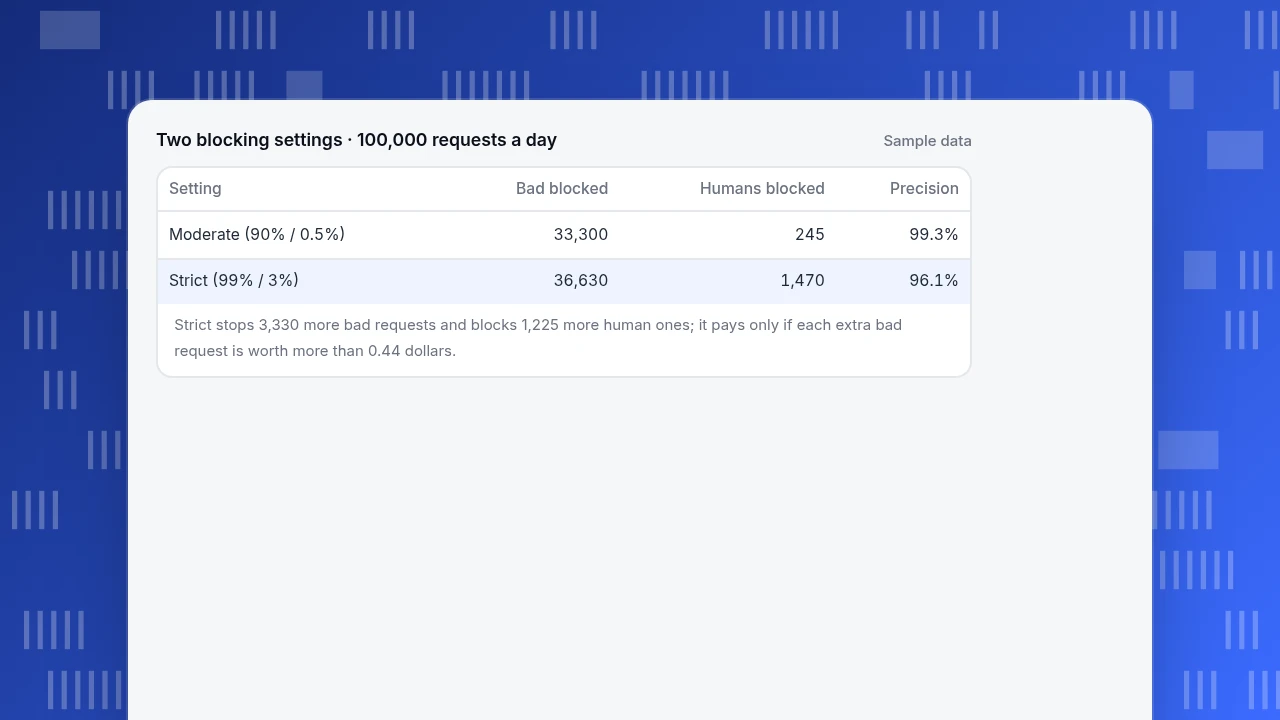
Two blocking settings · 100,000 requests a day
Sample data| Setting | Bad blocked | Humans blocked | Precision |
|---|---|---|---|
| Moderate (90% / 0.5%) | 33,300 | 245 | 99.3% |
| Strict (99% / 3%) | 36,630 | 1,470 | 96.1% |
Strict stops 3,330 more bad requests and blocks 1,225 more human ones; it pays only if each extra bad request is worth more than 0.44 dollars.
Which method for which problem
Use these rules in order:
- If the problem is login abuse, add multi-factor authentication and lockouts first, then rate limits on the login endpoint. These have low false positives because they target one endpoint.
- If the problem is fake sign-ups, add a honeypot field and email verification before a visible challenge. Keep the challenge for traffic already flagged as suspicious.
- If the problem is scraping, rate limit by behavior rather than address, and use behavior analysis for the pages that matter. A challenge on every page costs every reader.
- If the problem is distorted metrics, you may not need to block anything. Separating bots in analytics solves the measurement problem without risking real visitors.
- If you only want good crawlers to behave, publish robots.txt and verify the crawlers you care about instead of trusting the name in the request header.
The pattern: put strict methods on narrow targets, such as login and checkout, and light methods site-wide. A strict method on every page maximizes false positives.
What each method does to your analytics
Prevention and measurement interact in four ways:
- A block before your script loads removes the bot from analytics. That is useful, but you never see how much was blocked unless the block layer reports it.
- A challenge that people sometimes fail removes real visitors too. Visits drop, and the drop looks like a marketing problem.
- A JavaScript-only analytics script sees only bots that run JavaScript. Simple scripts never appear, so a clean analytics report does not prove you have no bots.
- Bots that are not blocked inflate sessions and distort funnels and conversion rates. This is what OWASP's skewing threat describes: bots that click and request pages to distort metrics.
Two checks follow. First, compare the visitor count before and after any change to your prevention settings; an unexplained drop of more than a few percent suggests false positives. Second, keep human and bot traffic in separate reports, so a decision about conversion rate rests on people.
Bot traffic in TapCub
TapCub identifies and separates bot traffic in your analytics. It does not block bots; use your edge or server layer for that.
- Keep the default mode. New projects use Detect and report separately. Recognized bots go only to the bot report and do not inflate human visitors, sessions or pageviews. Only the Do not detect setting mixes them in, and it is not recommended.
- Read the bot report. Open Web analytics › Bots. The All bots tab lists each bot with name, operator, purpose, requests, pages visited, most common status code, last seen, trust level and the detection layers that matched. The AI & agents tab shows AI crawler reads against human visitors sent back.
- Check the false-positive row. If a row looks like a real visitor, report a false positive from the bot report so a platform admin can review it. Trust is verified, suspected or unknown; unknown does not by itself mean a crawler is spoofed.
- Know the limit. With only the page script, TapCub sees only bots that execute JavaScript, and the report says so at the top. For status codes, response time and crawlers that do not run JavaScript, add server events or a log import.
- Compare before and after. After changing a block rule at your edge, compare human visitors in Web analytics › Overview and the bot totals in Web analytics › Bots to see whether bots fell without human visits falling with them.
FAQ
What is the best way to prevent bots on a website?
There is no single best way; match the method to the threat. Use login protections for credential stuffing, a honeypot and email verification for fake sign-ups, and behavior-based rate limits for scraping. Keep strict methods on narrow targets such as login and checkout to limit false positives.
Does a CAPTCHA stop bots?
It stops simple scripts but asks every person to do work, and solving services exist. Use it as a second step for traffic already flagged as suspicious rather than on every page. It also needs an accessible alternative for people who cannot solve it.
Does robots.txt block bad bots?
No. It only guides crawlers that choose to follow it. RFC 9309 says its rules are not a form of access authorization and that the protocol is not a substitute for valid content security measures. Use it for good crawlers and other controls for bad ones.
How do bots affect analytics?
Unblocked bots inflate sessions and page views and distort funnel and conversion rates; OWASP names this threat skewing. Separating recognized bots into their own report keeps human metrics clean, but a script-based tool sees only bots that run JavaScript.
How do you reduce false positives in bot blocking?
Put strict methods on narrow targets, start in monitor-only mode, measure human visitors before and after a change, and review blocked samples. Calculate what blocked people cost, such as lost conversions, against what stopped bots save.
Sources
- Imperva, 2025 Bad Bot Report (automated traffic 51% of web traffic; bad bots 37%). Checked 2026-11-22.
- OWASP, Automated Threats to Web Applications and the OAT-008 Credential Stuffing, OAT-011 Scraping and OAT-016 Skewing pages (21 named threats). Checked 2026-11-22.
- IETF, RFC 9309: Robots Exclusion Protocol, September 2022. Checked 2026-11-22.
Was this article helpful?
We use your answers to fix and expand this page.
Couldn’t send. Please try again in a minute.
Thanks for the feedback. We’ll use it to improve this page.You’ve already sent feedback on this page. Thanks.

Product Experience Specialist
Writes about product experience, practical workflows, and growth, turning complex processes into clear steps for everyday decisions.