Try it on your own data
Every report in this article is in the free plan. One snippet for web and apps, up to 10 sites.
Start freeNo, IP addresses are not unique to each device. A public address is unique on the internet at one moment, but home routers, offices, mobile carriers and VPNs put many devices behind one address, and one phone gets a different address on each network it joins. For visitor counting that makes IP a clue about a network, not an identifier. In the sample below, counting distinct IPs missed 51.5% of 1,000 real visitors.
What you will learn
- One public IP is often shared by many devices (NAT, carrier-grade NAT, offices, VPNs) and one device uses many IPs
- Counting by IP undercounts shared addresses and overcounts people who switch networks; the error size varies by audience mix
- Count sessions or hashed visitor IDs, label the metric honestly, and keep the raw IP out of reports
Are IP addresses unique to each device?
No. Public IP addresses are unique at one moment on the internet, but a single public address is usually shared by many devices, and one device uses many addresses over time. Two separate effects break the idea of "one IP, one device":
- One IP, many devices. A home router, an office, a school, a mobile carrier or a VPN presents many devices to the internet through one address, using network address translation (NAT).
- One device, many IPs. The same phone has a different public address on home Wi-Fi, on mobile data and on a coffee-shop network, and addresses can change on a schedule even in one place.
For anyone counting visitors, that means an IP address is a clue about a network, not an identifier of a person or device. The rest of this guide gives the numbers, a table of the common cases, a worked counting error, and what to use instead. Whether your own phone has an address is covered in do phones have IP addresses; how to reduce the address you store is in IP anonymization.
Why are there not enough addresses for one per device?
IPv4 addresses are 32 bits long, so there are 2^32 = 4,294,967,296 of them in total, and large blocks are reserved. RFC 1918 sets aside three private blocks that are not routed on the public internet: 10.0.0.0/8, 172.16.0.0/12 and 192.168.0.0/16 (RFC 1918, February 1996). Together those blocks hold 16,777,216 + 1,048,576 + 65,536 = 17,891,328 addresses, and every home or office network reuses them. Your laptop's 192.168.1.23 and a stranger's 192.168.1.23 are different devices with the same address, which is why only the router's public address means anything to a website.
Internet service providers ran short of public IPv4 addresses, so many now put several customers behind one address using carrier-grade NAT. RFC 6888 defines a CGN as a NAT function "used to share the same IPv4 address among several subscribers" (RFC 6888, April 2013), and RFC 6598 reserved 100.64.0.0/10 for ISPs to number the links to such devices (RFC 6598, April 2012). That block alone is 2^22 = 4,194,304 addresses.
IPv6 has 2^128 addresses, so there is no shortage, but the other half of the problem stays: devices rotate their addresses. RFC 4941 describes temporary IPv6 addresses that hide the stable part of the address; its defaults give a temporary address a preferred lifetime of 1 day and a valid lifetime of 1 week (RFC 4941, September 2007).
Which situations break the "one IP, one device" assumption?
| Scenario | Devices behind one public IP | Does the IP change? | IP as a visitor ID |
|---|---|---|---|
| Home network behind a router (NAT) | Several: phones, laptops, TV | Sometimes, on the ISP's schedule | Identifies a household at best |
| Office, school or campus | Tens to thousands | Rarely | Many people look like one visitor |
| Mobile data with carrier-grade NAT | Many unrelated subscribers | Changes as you move or reconnect | Many strangers look like one visitor |
| Public Wi-Fi (café, airport, hotel) | Everyone on the network | Not for the venue; the person leaves | Strangers share one value |
| VPN or proxy | All of the provider's users on that exit | By server chosen | Hides the person's real network |
| One phone moving between Wi-Fi and mobile | One | Yes, several times a day | One person counted as several |
| IPv6 with temporary addresses | One | Yes, within a day by default | A new "visitor" every day |
Read the table both ways. Rows 2, 3, 4 and 5 make many people look like one and push counts down. Rows 6 and 7 make one person look like many and push counts up. Some of these errors cancel each other, but not reliably, and not by the same amount in each report.
| Scenario | Devices behind one public IP | IP as a visitor ID |
|---|---|---|
| Home network (NAT) | Several | Identifies a household at best |
| Office, school or campus | Tens to thousands | Many people look like one visitor |
| Mobile carrier-grade NAT | Many unrelated subscribers | Many strangers look like one visitor |
| VPN or proxy | All users on that exit | Hides the real network |
| Phone moving between Wi-Fi and mobile | One | One person counted as several |
Sample reading; sizes vary by network.
Worked example: how far off is counting by IP?
Sample data: one day, 1,000 real visitors to a site. Where they come from:
| Source of the visits | Visitors | Public IPs they use | Visitors per IP |
|---|---|---|---|
| Home connections (households) | 600 | 450 | 1.33 |
| Offices and schools | 250 | 25 | 10 |
| Mobile carrier addresses | 150 | 10 | 15 |
| Total | 1,000 | 485 |
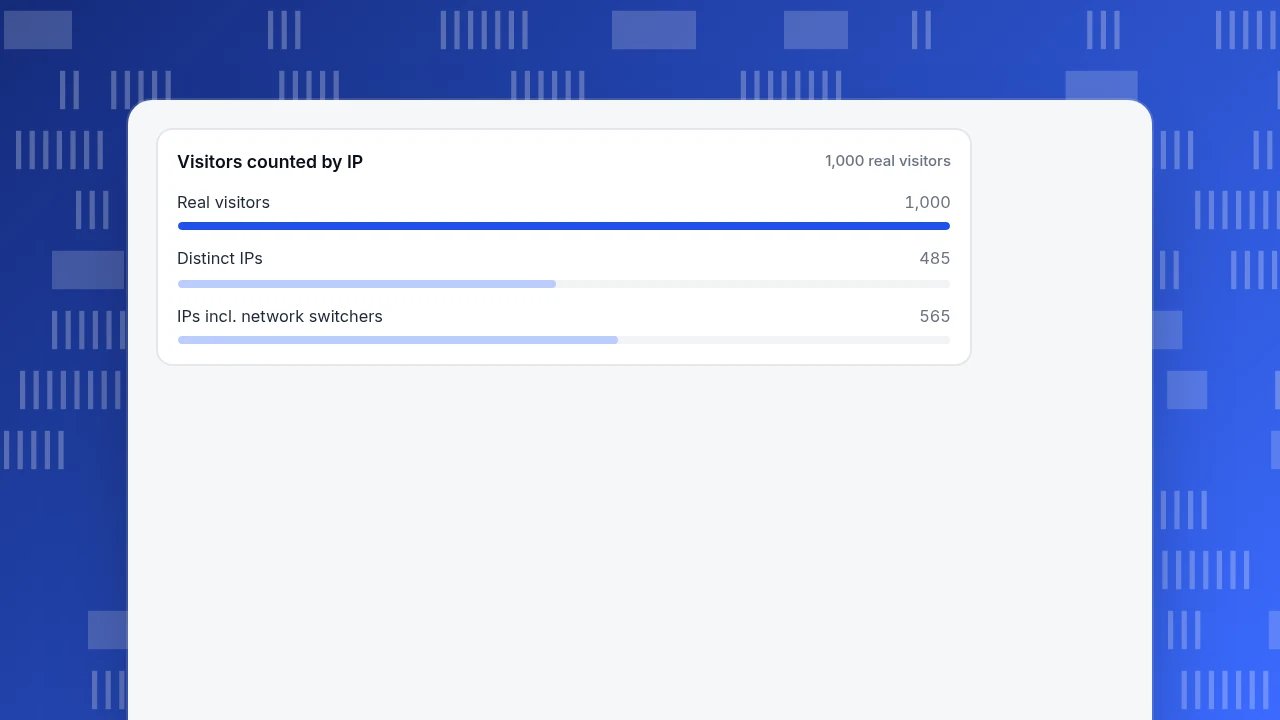
A report that counts distinct IP addresses as "unique visitors" says 485, which is 515 too few, an undercount of 515 ÷ 1,000 = 51.5%.
Now add the opposite error. Of the home visitors, 80 browse at lunchtime on mobile data and again in the evening on home Wi-Fi. They are each counted under a second address, adding up to 80 extra IPs: 485 + 80 = 565. The report still undercounts, now by (1,000 − 565) ÷ 1,000 = 43.5%, and it would give a different wrong number tomorrow if some of the 450 household IPs rotate. An error that varies in size is worse for decisions than a constant one: a campaign aimed at offices (many people per IP) would look weak, while one aimed at home users on the move (several IPs each) would look strong, for reasons that have nothing to do with the campaign.
Visitors counted by IP
1,000 real visitorsWhat happens to reports that use IP as an identifier?
- Unique visitor counts are wrong in a direction that depends on your audience mix, as above.
- Conversion rates use the wrong denominator. If 40 purchases come from 485 "visitors" instead of 1,000, the rate is 8.2% instead of 4.0%, a factor of 2.06 too high.
- Returning-visitor reports mislabel: an office worker who leaves and a colleague who arrives look like one returning visitor.
- Personalisation and fraud rules based on IP block or greet the wrong people on shared networks. A rate limit of 100 requests an hour per IP is harmless to a household and can lock out a whole office.
- Privacy: an IP address can still be personal data even when it does not identify a device. The Court of Justice held in Breyer (Case C-582/14, October 2016) that a dynamic IP address can be personal data for a website operator that has legal means to link it to a person. Using it as an ID therefore adds privacy duties without adding accuracy.
What should you use instead of an IP address?
| Option | What it gets right | What it costs |
|---|---|---|
| A first-party cookie or stored ID | Follows one browser across days | Needs consent in some places; breaks when cleared |
| A hash of address and browser data with a salt | No stored ID; separates people sharing one IP better than the IP alone | Rotating the salt resets who is "returning" |
| A login ID | Follows one person across devices | Only for people who log in |
| Session counts instead of visitors | Honest about what is measured | Does not tell you how many people |
None of these is exact. Choose the one whose error you can describe, label the metric accordingly ("visitors" versus "sessions"), and keep the IP out of the report. If the address is used at all, truncate or discard it as early as possible.
How does TapCub count visitors without relying on the IP address?
TapCub builds a visitor ID from a site salt combined with the address and browser data, not from the IP alone, and the IP address is not stored. Applied to the example above:
- Understand the counting model. The collector hashes a site salt with address and browser data into a visitor ID. The website script does not write a cookie by default. Two people behind one office IP who use different browsers get different IDs.
- Pick the privacy setting knowing the trade-off. With the strict privacy preset the salt rotates each project day, so the same browser is not the same visitor tomorrow; with the balanced preset the salt is kept longer, which is what allows new versus returning visitors.
- Identify logged-in people. If people sign in, calling
tapcub.loginon login binds the person to the device, so All-platform analytics › Users › People shows one profile across devices. Visitors who never log in stay in aggregates. - Read the countries without the IP. Web analytics › Realtime shows page, source, country and device for each row; it does not show IP addresses or anything that identifies a person.
TapCub's counts are still an estimate for anonymous visitors: they cannot tell two people with the same browser setup on one shared address apart, and they cannot link one person across two browsers without a login.
FAQ
Is an IP address unique to a device?
No. A public IP address is unique on the internet at a given moment, but many devices can share it through NAT, and a single device gets different public addresses on different networks and over time.
Can two devices have the same IP address?
Yes, in two ways. Devices on different home networks reuse the same private addresses, such as 192.168.1.23, and devices on the same network share one public address when they go out through a router or a carrier-grade NAT.
Does every device have its own IP address?
Each device on a local network has a private address, but websites see only the public address of the router, carrier or VPN. Private blocks reserved by RFC 1918 hold 17,891,328 addresses and are reused everywhere.
Why does my IP address change?
Providers assign addresses dynamically and may change them, you move between networks, and IPv6 devices generate temporary addresses that by default stay preferred for 1 day under RFC 4941.
Should I use IP addresses to count unique visitors?
No. It undercounts people behind shared addresses and overcounts people who switch networks. In the sample above it was off by 43.5% in total.
Does IPv6 make IP addresses unique to each device?
It removes the shortage, so a device can have its own public address without NAT, but it does not make the address a stable device ID. Operating systems rotate temporary addresses (by default after 1 day), and a phone moving between networks still gets a different network prefix. IPv6 shifts the problem; it does not remove it.
Sources
- IETF, RFC 1918: Address Allocation for Private Internets, February 1996: the three private blocks (checked 2026-11-23).
- IETF, RFC 6888: Common Requirements for Carrier-Grade NATs, April 2013, and RFC 6598: IANA-Reserved IPv4 Prefix for Shared Address Space, April 2012 (checked 2026-11-23).
- IETF, RFC 4941: Privacy Extensions for Stateless Address Autoconfiguration in IPv6, September 2007: temporary address lifetimes (checked 2026-11-23).
- Court of Justice of the EU, Breyer, Case C-582/14, 19 October 2016.
Was this article helpful?
We use your answers to fix and expand this page.
Couldn’t send. Please try again in a minute.
Thanks for the feedback. We’ll use it to improve this page.You’ve already sent feedback on this page. Thanks.

Customer Experience Consultant
Writes about live chat, visitor conversations, and self-service, sharing practical ways to make customer communication clearer and more effective.