Try it on your own data
Every report in this article is in the free plan. One snippet for web and apps, up to 10 sites.
Start freeYes, a phone has an IP address, in fact one per network it uses: a private address on Wi-Fi, a carrier-assigned one on mobile data and another inside a VPN. The address a website sees is the public one the network presents, often shared with many other people. That is why counting unique IP addresses misstates audiences, and why an analytics tool should count visitors or logins instead.
What you will learn
- A phone holds a separate IP address for each network it uses; websites only see the public address that network presents
- Carrier-grade NAT lets many phones share one public address, so one address is not one person
- Count visitors or logged-in users instead of IP addresses, and use IP only for a coarse country lookup
What kinds of IP address does a phone have?
A phone does not have one IP address; it has one per active network connection, and most of them are not the address a website sees. When the phone is on Wi-Fi, the router hands it a private address. When it is on mobile data, the carrier assigns one, often from a pool shared by many customers. Turn on a VPN and it gets a third. Only one of these is the address your analytics tool receives.
| Connection | Address the phone holds | Address a website sees | Who assigns it |
|---|---|---|---|
| Wi-Fi at home | Private, such as 192.168.1.23 | The router's public address, shared by everything on that network | Router (DHCP) for the private one; the internet provider for the public one |
| Wi-Fi at an office or cafe | Private, often 10.x.x.x | The venue's public address, shared by every guest | Venue router and provider |
| Mobile data behind carrier-grade NAT | Private or "shared address space" (100.64.0.0/10) | A public address from a carrier pool, shared by many phones | Carrier |
| Mobile data over IPv6 | A public IPv6 address | That same address, usually not shared | Carrier |
| VPN | An address inside the VPN tunnel | The VPN server's public address | VPN operator |
The private ranges are fixed by RFC 1918 (February 1996): 10.0.0.0/8, 172.16.0.0/12 and 192.168.0.0/16. Addresses in these ranges are not routable on the public internet, which is why a website can never see your phone's Wi-Fi address.
How does a phone get its IP address?
On Wi-Fi the phone asks the router for an address using DHCP, and the router lends it one for a set period called a lease. A lease that expires or a network you leave gives the address back. This is why your phone's home Wi-Fi address can change from one week to the next even though you never touched a setting.
On mobile data the carrier sets up a data session when the phone attaches to the network and assigns the address then. Two things are common:
- IPv4 behind carrier-grade NAT (CGNAT). IPv4 addresses ran short, so carriers put many subscribers behind a small set of public addresses. RFC 6598 (April 2012) reserved 100.64.0.0/10 as "shared address space" for exactly this, distinct from the RFC 1918 ranges and meant for service-provider networks. Your phone holds a carrier-internal address; the translation device swaps it for a shared public one on the way out.
- IPv6. With IPv6 the phone can hold a public address of its own, so there is nothing to translate. Many carriers run both: IPv6 where the destination supports it, translated IPv4 where it does not.
The practical consequence is the same in both cases: the address a website logs is chosen by the network, not by the phone, and it can change whenever the network does.
How do you check the IP address on your phone?
Menu names vary by phone model and software version, so treat these as the usual route.
- Private (Wi-Fi) address, iPhone: Settings, then Wi-Fi, then the information icon next to the connected network; the IP Address line is the private address.
- Private (Wi-Fi) address, Android: Settings, then the connected Wi-Fi network's details (on some phones under About phone, then Status information).
- Public address, either phone: open a "what is my IP" page in the browser. Run it once on Wi-Fi and once with Wi-Fi off. If the two public addresses differ, you have just seen two networks at work.
- Is it shared? If the private address starts with 100.64 through 100.127, the carrier is using shared address space, and many other phones leave through the same public address.
Compare the results with the table above. A phone that reports 192.168.1.23 in settings and a completely different address on the web page is behaving normally; the first is the Wi-Fi private address, the second is the public address the router presents.
Why does a phone's IP address keep changing?
Four routine events change the address a website sees:
- Moving between Wi-Fi and mobile data. Leaving home Wi-Fi for the street switches the public address from your household's to a carrier pool address.
- Moving between Wi-Fi networks. Home, office and cafe are three different public addresses.
- Lease and session turnover. DHCP leases expire, and mobile data sessions are re-established when a phone reconnects, wakes from airplane mode or hands over between towers or network types.
- A VPN or relay turning on. Traffic then appears to come from the VPN server's address, which thousands of other people may share.
For a person who checks your site in the morning at home, again on the commute and again at the office, that is three public addresses in one day with no change in who they are.
| What happens | Effect on the address a website sees |
|---|---|
| Wi-Fi to mobile data | Household address replaced by a carrier pool address |
| Home Wi-Fi to office Wi-Fi | A second public address for the same person |
| DHCP lease or mobile session renewed | Address can change with no move at all |
| VPN switched on | Everyone using that VPN server shares one address |
The same person can appear at three or more addresses in a day.
What does carrier NAT do to analytics?
Carrier NAT breaks the idea that one IP address means one person, in both directions. RFC 6269 (June 2011) lists the consequences for services that rely on addresses: an IPv4 address "no longer uniquely identifies a subscriber," counting unique addresses no longer counts unique users, and an address behind a carrier NAT geolocates to wherever the NAT sits rather than where the subscriber is. RFC 7021 (September 2013) adds that anti-abuse systems may treat many users behind one address as a single abusive source.
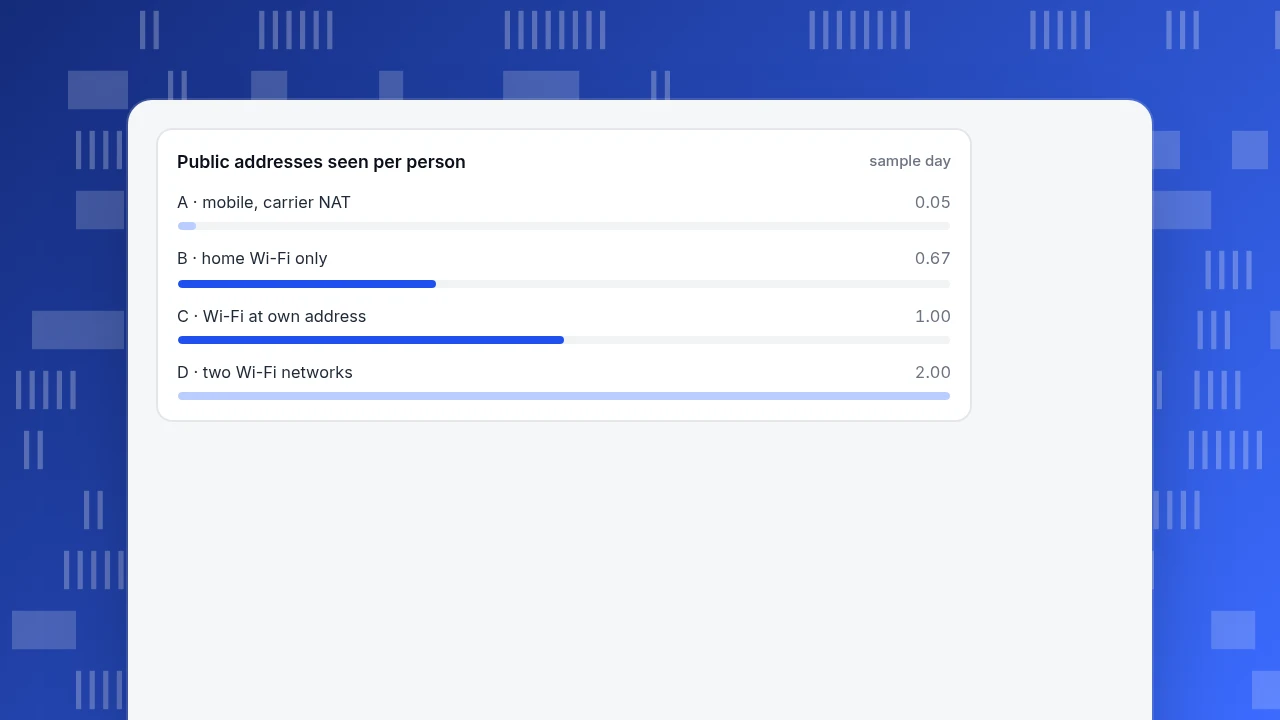
Here is a worked example showing the size of the error. Sample data: 280 real people visit a site in one day, in four groups.
| Group | People | How they connect | Public addresses seen | Addresses ÷ people |
|---|---|---|---|---|
| A | 120 | Mobile data only, behind carrier NAT sharing 6 public addresses | 6 | 0.05 |
| B | 90 | Home Wi-Fi only, 60 households | 60 | 0.67 |
| C | 40 | Home Wi-Fi at their own address (plus mobile data, already in A's pool) | 40 | 1.00 |
| D | 30 | Two Wi-Fi networks each (home and office) | 60 | 2.00 |
| Total | 280 | 166 | 0.59 |
Counting unique IP addresses gives 166 "visitors" for 280 real people, an undercount of 40.7% (166 ÷ 280 − 1). The total hides two opposite errors: group A is 95% undercounted because a pool of six addresses stands for 120 people, while group D is 100% overcounted because each person shows up at two addresses. A report built on IP counts therefore cannot tell you the size of your mobile audience, and it will exaggerate the audience of anyone who moves between networks.
Three other things go wrong on mobile data:
- Location is coarse and sometimes wrong. A carrier pool address geolocates to where the carrier's translation gear is, which can be a different city from the user. Country is usually right; city often is not.
- Blocking an address blocks bystanders. Rate-limiting or blocking one address that is sending too many requests also blocks every other phone behind it, which is how a bad actor on a shared address can lock out strangers.
- Repeat visits fail to link. A returning mobile user whose address changed between visits looks new if IP is the only signal.
Public addresses seen per person
sample dayWhat can analytics use instead of the IP address?
Use the IP address for the one thing it still does reasonably well, a coarse country or region lookup, and use something else to tell people apart. Match the question to the signal:
| Question | Is IP a good signal? | Better signal |
|---|---|---|
| Which country did the visit come from? | Yes, usually | IP lookup, truncated before the lookup if privacy rules require |
| Which city? | Weak on mobile data | Treat as approximate; do not target on it |
| How many different people? | No | A first-party visitor identifier, or the login ID for signed-in users |
| Is this a returning visitor? | No, addresses change | The same identifier across visits; an app SDK's device ID inside an app |
| Is this traffic a bot? | Partly (known data-centre ranges) | User agent, behaviour and known crawler lists, not the address alone |
| Block abusive traffic | Risky on shared addresses | Rate-limit per session or account, not per address |
Google's own documentation illustrates the privacy direction: in Google Analytics 4 IP addresses are not logged or stored, and for the older Universal Analytics, when masking was enabled the last octet of an IPv4 address was zeroed before location was derived. The pattern is common across analytics tools: look up the coarse location, then discard or truncate the address.
How does TapCub handle a phone's IP address?
Take the example above and ask what TapCub does when a phone moves from home Wi-Fi to mobile data.
- The address is used briefly and not kept. Per the compliance documentation, the collector uses the address for geography and for building the visitor ID, then discards it; it is not written on the event. In Configuration › Privacy center the default truncation is two bytes (the last two IPv4 octets) before a city lookup, and geography can be set to city, country or none per region rule.
- Reports show place, not address. Web analytics › Realtime shows country, device and source per row and does not show IP addresses; the globe point is the country resolved from the address.
- The visitor ID is built from the address and browser data. The collector hashes a site salt with the address and browser data. That makes a cookie-free count possible, and it also means a phone that changes network is not guaranteed to keep the same anonymous ID. Treat anonymous visitor counts on mobile as an estimate, in line with the carrier-NAT problems above.
- Signed-in people can be tied together. When identified mode is on,
tapcub.loginbinds a login ID to the device, so a person's Wi-Fi and mobile-data sessions in the same app or browser land on one profile in All-platform analytics › Users › People. Identified mode needs a plan that includes it and is switched on through support, per the identity documentation. - What TapCub does not do. It does not block or rate-limit traffic by address; it measures. Bots it recognises are reported separately in Web analytics › Bots rather than mixed into visitor counts.
FAQ
Do phones have IP addresses?
Yes. Every phone with an internet connection has an IP address for each network it uses: a private address on Wi-Fi, a carrier-assigned address on mobile data, and another inside a VPN. Websites only see the public address your connection presents, which is often shared with other users.
Is my phone's IP address the same on Wi-Fi and mobile data?
No. On Wi-Fi your phone holds a private address from the router and the site sees the router's public address. On mobile data the carrier assigns the address, and the site sees a carrier address. Switching between the two changes what websites see, which is why the same person can look like two visitors.
Can someone find my exact location from my phone's IP address?
Not precisely. An IP lookup usually gives a country and sometimes a city, and on mobile data the result tends to point at the carrier's network equipment. RFC 6269 notes that an address behind carrier-grade NAT locates to wherever the NAT sits, not to the subscriber.
Why do many phones share one IP address?
IPv4 addresses ran short, so carriers use carrier-grade NAT to let many subscribers share a few public addresses. The block 100.64.0.0/10 was reserved in 2012 for that purpose. IPv6 removes the need by giving each device its own public address.
Can I count unique visitors by IP address?
Not reliably. Carrier NAT and shared Wi-Fi make several people look like one address, while one person moving between networks looks like several. In the sample above, counting addresses undercounted 280 people by 40.7%, so use a visitor or login identifier instead.
Sources
- Rekhter, Y. et al. (1996). RFC 1918: Address Allocation for Private Internets. IETF.
- Weil, J. et al. (2012). RFC 6598: IANA-Reserved IPv4 Prefix for Shared Address Space. IETF.
- Ford, M. et al. (2011). RFC 6269: Issues with IP Address Sharing. IETF.
- Google Analytics Help, IP masking in Universal Analytics and IP addresses in GA4, checked 2026-11-22.
Was this article helpful?
We use your answers to fix and expand this page.
Couldn’t send. Please try again in a minute.
Thanks for the feedback. We’ll use it to improve this page.You’ve already sent feedback on this page. Thanks.

Data Engineer
Writes about event design, data quality, and collection workflows, with verifiable implementation methods for reliable analytics.